1. Въведение
This instruction manual provides comprehensive guidance for the safe and effective use of your Sony Alpha A390 Digital Single-Lens Reflex (DSLR) camera. The A390 features a 14.2 megapixel sensor, a 2.7-inch tilting LCD screen, Live View functionality, and an integrated SteadyShot INSIDE image stabilization system. Please read this manual thoroughly before operating the camera and retain it for future reference.
Ключови характеристики:
- 14.2 MP resolution for detailed images.
- На живо View with Quick Auto Focus for real-time composition.
- SteadyShot INSIDE in-camera image stabilization to reduce blur.
- Lightweight and ergonomic body design for improved handling.
- Integrated on-screen Help Guide for operational assistance.
- 2.7-inch tilting LCD screen for flexible viewъгли.
2. Продуктът свършиview
The Sony Alpha A390 is designed for both novice and experienced photographers, offering a balance of automatic convenience and manual control. Familiarize yourself with the camera's main components.
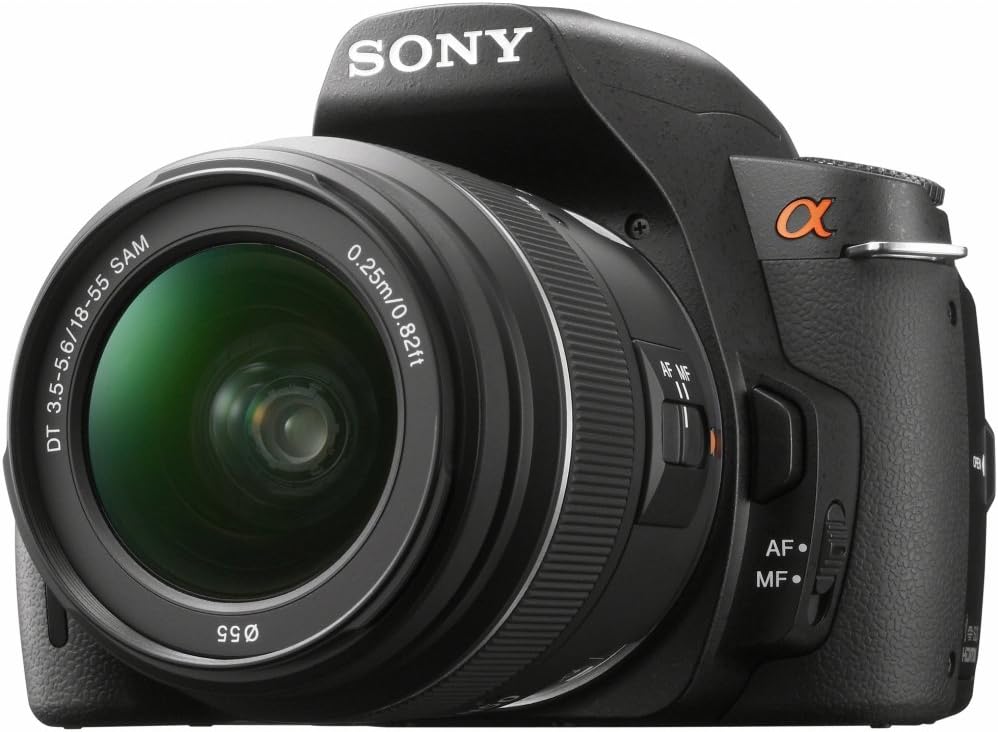
Фигура 2.1: Преден десен View of the Sony Alpha A390. This image displays the camera body with the standard 18-55mm lens mounted, showing the lens barrel, focus switch, and the Alpha logo.

Figure 2.2: Ergonomic Grip. A user's hand demonstrates the comfortable and secure grip of the Sony A390 camera body, highlighting its improved design.

Фигура 2.3: Задна част View with Tilting LCD. This image shows the back of the camera, emphasizing the tilting LCD screen and various control buttons accessible to the thumb, such as the menu and playback buttons.

Figure 2.4: LCD Display. Подробен view of the camera's 2.7-inch LCD screen, showing typical shooting information such as aperture, shutter speed, ISO, and battery status.
3. Настройка
3.1. Зареждане и инсталиране на батерията
- Insert the supplied NP-FH50 Lithium-Ion rechargeable battery into the battery charger.
- Включете зарядното устройство в контакта. Индикаторът за зареждане ще светне.
- Once charging is complete (indicator light changes or turns off), remove the battery.
- Отворете капака на отделението за батерии в долната част на камерата.
- Insert the charged battery firmly until it clicks into place. Close the cover.
3.2. Поставяне на обектива
- Свалете капачката на тялото от фотоапарата и задната капачка на обектива от обектива.
- Подравнете белия индексен знак на обектива с белия индексен знак на тялото на фотоапарата.
- Монтирайте обектива, като го завъртите по посока на часовниковата стрелка, докато се заключи на мястото си с щракване.
- Свалете предната капачка на обектива.
3.3. Поставяне на карта с памет
The A390 supports SD/SDHC and Memory Stick Pro Duo cards.
- Open the memory card cover on the side of the camera.
- Insert the memory card with the correct orientation until it clicks.
- Затворете капака на картата с памет.
4. Работа с камерата
4.1. Включване/изключване
To turn the camera on or off, slide the POWER switch located near the shutter button.
4.2. Режими на снимане
Завъртете диска за избор на режим, за да изберете желания режим на снимане:
- АВТОМАТИЧЕН: Camera automatically sets optimal settings.
- P (Програмна автоматична): Камерата задава блендата и скоростта на затвора, но можете да регулирате и други настройки.
- A (Приоритет на блендата): Вие задавате блендата, камерата задава скоростта на затвора.
- S (Приоритет на затвора): Вие задавате скоростта на затвора, камерата задава блендата.
- M (Ръчна експозиция): Вие контролирате както блендата, така и скоростта на затвора.
- СЦЕНА: Various scene modes (e.g., Portrait, Landscape, Macro) for specific situations.
4.3. Фокусиране
The A390 offers both autofocus (AF) and manual focus (MF). Use the AF/MF switch on the lens or camera body to select.
- Автофокус: Half-press the shutter button to focus. The camera uses a 9-point TTL phase detection system.
- На живо View Автофокус: When using Live View, the camera employs a quick AF system.
- Ръчен фокус: Завъртете пръстена за фокусиране на обектива, за да регулирате фокуса ръчно.
4.4. Контрол на експозицията
Adjust exposure using ISO sensitivity, shutter speed, and aperture.
- ISO: Range from 100 to 3200. Higher ISO increases sensitivity to light, useful in dim conditions, but may introduce noise.
- Измерване: Multi, Center-weighted, and Spot metering modes are available to measure light.
4.5. Баланс на бялото
The camera features an automatic white balance setting to ensure accurate color reproduction under various lighting conditions.
4.6. Светкавица
The A390 has a built-in flash. Flash modes include Auto, On, and Off. Use the flash in low-light situations or to fill in shadows.
5. Поддръжка
5.1. Почистване на камерата
- Тяло на камерата: Избършете с мека, суха кърпа. За упорити замърсявания използвайте кърпа, леко настърганаampзалят с вода.
- Обектив: Use a lens brush to remove dust, then a lens cleaning cloth with lens cleaning fluid. Avoid touching the lens surface with your fingers.
- Сензор за изображение: The camera has an anti-dust system. For persistent dust, consult a professional service center.
- LCD екран: Внимателно избършете с мека, суха кърпа.
5.2. Съхранение
When not in use, store the camera in a cool, dry, and well-ventilated place, away from direct sunlight and extreme temperatures. Remove the battery if storing for extended periods.
6. Отстраняване на проблеми
This section addresses common issues you might encounter. For more complex problems, refer to the Sony support webсайт или се свържете с отдела за обслужване на клиенти.
| проблем | Възможна причина/решение |
|---|---|
| Камерата не се включва. | Батерията не е заредена или не е поставена правилно. Уверете се, че батерията е заредена и правилно поставена. |
| Не мога да правя снимки. | Memory card is full, not inserted, or locked. Check card status, replace if full, or unlock. |
| Изображенията са замъглени. | Lens is not focused, camera shake, or shutter speed is too slow. Ensure proper focus, use SteadyShot INSIDE, or increase shutter speed. |
| Светкавицата не се задейства. | Flash mode is set to "Off" or battery is low. Check flash settings and battery level. |
| LCD екранът е празен. | Display settings may be off, or camera is in viewfinder mode. Press the DISPLAY button to cycle through display options. |
7. Спецификации
| Характеристика | детайл |
|---|---|
| Име на модела | ALPHA DSLR-A390 |
| Марка | Sony |
| Ефективна неподвижна резолюция | 14.2 MP |
| Технология на фотосензора | CCD |
| Размер на фото сензора | APS-C |
| Стабилизация на изображението | Сензорно изместване (SteadyShot INSIDE) |
| Съвместими монтажи | Sony/Minolta Alpha, Sony/Minolta Alpha DT |
| Тип обектив | Standard 18-55mm zoom lens (kit dependent) |
| Оптично увеличение | 3x (с обектив 18-55 мм) |
| Минимално фокусно разстояние | 18 милиметра |
| Максимално фокусно разстояние | 55 милиметра |
| Максимална бленда | F1.8 (lens dependent) |
| Разширен диапазон на ISO | 100-3200 |
| Скорост на затвора | 30 секунди до 1/4000 секунди |
| Непрекъснато снимане | 2.5 fps |
| Точки за автофокус | 9 |
| Технология за автоматично фокусиране | Continuous, Face Detection, Live View, Multi-area, Phase Detection, Selective single-point, Single |
| Описание на измерването | Мулти, централно претеглено, точково |
| Тип дисплей | LCD, Tilting |
| Размер на екрана | 2.7 инча |
| Тип флаш памет | SD/SDHC, Memory Stick Pro Duo |
| Технология за свързване | HDMI, USB |
| Тип батерия | Lithium-Ion NP-FH50 rechargeable battery |
| Среден живот на батерията | Приблизително 230 снимки |
| Тегло на артикула | 1.2 паунда (само тяло) |
| Размери (височина) | 3.82 инча |
| Поддържа се File формат | JPEG, RAW |
| Описание на процесора | Bionz |
| UPC | 027242798281 |
8. Гаранция и поддръжка
8.1. Гаранционна информация
The Sony Alpha A390 camera comes with a 1 ГОДИНИ ОГРАНИЧЕНА ГАРАНЦИЯ from the manufacturer. Please refer to the warranty card included with your product for full terms and conditions. This warranty covers manufacturing defects but typically excludes damage caused by misuse, accidents, or unauthorized repairs.
8.2. Правен отказ от отговорност
NO ADDITIONAL MANUALS, CHARGERS, OR ITEMS ARE INCLUDED BEYOND what is specified in the product packaging.
8.3. Поддръжка на клиенти
За допълнителна помощ, техническа поддръжка или запитвания относно услуги, моля, посетете официалния сайт за поддръжка на Sony. webсайта или се свържете с техния отдел за обслужване на клиенти. Дръжте доказателството за покупка и серийния номер на продукта лесно достъпни.