
1. Въведение
This manual provides essential information for the safe and efficient operation of your Philips 40PFL4609/F8 40-inch Full HD LED Smart TV. Please read these instructions carefully before using your television and retain them for future reference.
2. Информация за безопасност
Винаги спазвайте основните предпазни мерки, когато използвате този телевизор, за да намалите риска от пожар, токов удар и нараняване.
- Не излагайте телевизора на дъжд или влага.
- Не отваряйте шкафа; поверете цялото обслужване на квалифициран персонал.
- Осигурете добра вентилация около телевизора.
- Пазете захранващия кабел от настъпване или прищипване.
- Изключвайте телевизора от контакта по време на гръмотевични бури или когато не го използвате за продължителни периоди.
3. Съдържание на пакета
Проверете дали всички елементи са налични в кутията:
- Philips 40PFL4609/F8 40-inch Full HD LED Smart TV
- Дистанционно управление (изисква 2 батерии AAA, включени)
- Захранващ кабел
- Tabletop Stand and Screws
- Ръководство за бърз старт (не е включено в това дигитално ръководство)
- Ръководство на потребителя (този документ)
4. Настройка
4.1 Разопаковане и поставяне
Carefully remove the television from its packaging. Inspect the TV for any physical damage. Place the television on a stable, flat surface or mount it on a wall using a compatible VESA 200x200mm wall mount (sold separately).
4.2 Сглобяване на стойката
If using the tabletop stand:
- Поставете телевизора с екрана надолу върху мека, чиста повърхност, за да предотвратите повреда на екрана.
- Подравнете стойката с монтажните отвори в долната част на телевизора.
- Закрепете стойката с предоставените винтове.
4.3 Свързване на захранването
Connect the power cord to the TV's power input, then plug the other end into a 110 VAC, 60 Hz electrical outlet.
4.4 Свързване на външни устройства
Вашият телевизор Philips предлага различни опции за свързване на външни устройства.
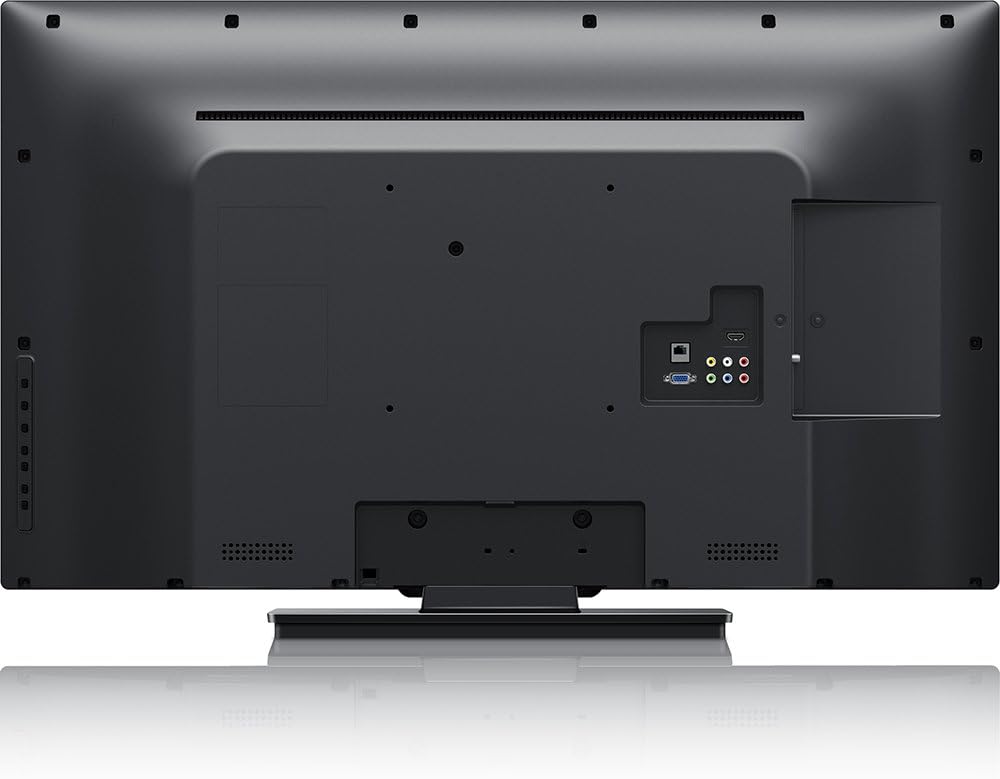
изображение: Задна view of the Philips 40PFL4609/F8 television, highlighting the input ports including HDMI, DVI, and other audio/video connections.
- HDMI: Connect Blu-Ray players, game consoles, or other HDMI-enabled devices. This model has 1 HDMI port.
- DVI: Connect computers or other DVI-enabled devices.
- USB: Connect USB storage devices for media playback. This model has 1 USB 2.0 port.
- Антена/кабел: Свържете антена или кабелна телевизия за излъчвани канали.
4.5 Съветник за първоначална настройка
При първото включване, телевизорът ще ви преведе през процеса на първоначална настройка:
- Избор на език: Изберете предпочитания от вас език.
- Мрежова връзка: Connect to your home Wi-Fi network. The TV supports Wi-Fi connectivity.
- Сканиране на канали: Scan for available broadcast channels (if an antenna or cable is connected).
5. Работа с телевизора
5.1 Дистанционно управлениеview
The included remote control allows you to navigate menus, adjust settings, and control playback. Insert two AAA batteries into the remote control, ensuring correct polarity.
5.2 основни функции
- мощност: Натиснете бутона за захранване, за да включите или изключите телевизора.
- Обем: Използвайте бутоните за сила на звука, за да регулирате нивото на звука.
- канал: Use the channel buttons to change TV channels.
- вход: Press the input button to select connected devices (HDMI, DVI, etc.).
5.3 Smart TV Features (Net TV)
Your Philips TV features Net TV, providing access to online content and applications.
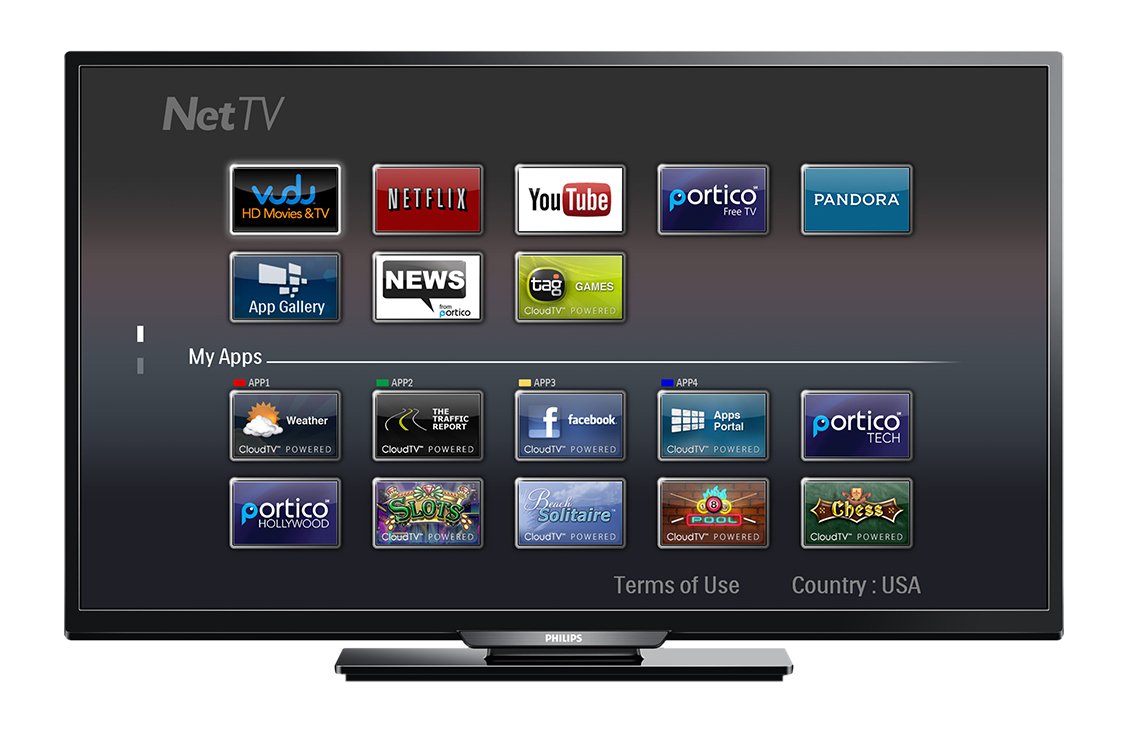
изображение: Отпред view of the Philips 40PFL4609/F8 television, showing the Net TV interface with various application icons such as Netflix, YouTube, and other streaming services.
- Достъп до приложения: Use the remote control to navigate to the Net TV menu and select applications like Netflix and YouTube.
- Wi-Fi свързаност: Ensure your TV is connected to a stable Wi-Fi network for optimal Smart TV performance.
5.4 Настройки на картината
Adjust picture settings to enhance your viewинг опит:
- Pixel Plus HD: This video engine enhances detail, depth, and clarity.
- 120Hz PMR (Perfect Motion Rate): Provides sharp images in fast-moving scenes.
- Access the picture menu to adjust brightness, contrast, color, and sharpness.
5.5 Настройки на звука
Оптимизиране на аудио изхода:
- SRS TruSurround: Enjoy immersive sound with this integrated surround sound format.
- Access the audio menu to adjust bass, treble, and sound modes.
5.6 Възпроизвеждане на медийни файлове през USB
Connect a USB storage device to the TV's USB 2.0 port to view снимки, възпроизвеждане на музика или гледане на видеоклипове.
6. Поддръжка
6.1 Почистване на екрана
Внимателно избършете екрана с мека кърпа без власинки. За упорити петна, dampНамокрете кърпата с малко количество вода или специализиран препарат за почистване на екрани. Не пръскайте течност директно върху екрана.
6.2 Почистване на Casing
Избършете телевизора casinс мека, суха кърпа. Избягвайте използването на абразивни почистващи препарати или разтворители.
6.3 Софтуерни актуализации
This model may not support automatic software updates via the internet. Check the Philips support website for information on manual firmware updates, if available, to ensure optimal performance and access to the latest features.
7. Отстраняване на проблеми
Ако срещнете проблеми с телевизора си, вижте следните често срещани решения:
- Без захранване: Ensure the power cord is securely plugged into both the TV and the electrical outlet. Check the power outlet with another device.
- Няма картина/звук: Verify the correct input source is selected. Check all cable connections (HDMI, DVI, antenna).
- Няма мрежова връзка: Ensure your Wi-Fi router is working correctly. Re-enter your Wi-Fi password if necessary.
- Net TV Limitations: Some users have reported that the Net TV functionality on this model can be basic or limited in terms of additional app installation or software updates. If you find the built-in Smart TV features insufficient, consider connecting an external streaming device.
- Физически щети: Upon unboxing, carefully inspect the screen and casing for any damage, especially along the edges, which could affect display quality. Contact your retailer immediately if damage is found.
- Дистанционното управление не работи: Сменете батериите тип AAA. Уверете се, че няма препятствия между дистанционното управление и инфрачервения сензор на телевизора.
8. Спецификации

изображение: отстрани view of the Philips 40PFL4609/F8 television, illustrating its slim profile and side-mounted connectivity options.
| Характеристика | Описание |
|---|---|
| Име на модела | PHILIPS 40PFL4609/F8 |
| Размер на екрана | 40 инча (100.3 сантиметра) |
| Технология на дисплея | LED, LCD |
| Резолюция | 1080p full HD |
| Честота на опресняване | 120 Hz (120Hz PMR) |
| Съотношение на страните | 16:9 |
| Технология за свързване | Wi-Fi |
| Съвместими интернет услуги | Netflix, YouTube |
| Специални функции | Blu-Ray compatible, DVI Input, HDMI Input, Full HD, HD Compatible, Internet, Surround Sound |
| HDMI портове | 1 |
| USB 2.0 портове | 1 |
| Режим на аудио изход | Стерео, съраунд звук |
| Integrated Surround Sound Format | SRS TruSurround |
| Описание на високоговорителя | SRS TruSurround |
| Консумирана мощност | 89 вата |
| Voltage | 110 VAC 60 Hz |
| Тегло на артикула | 8200 грама |
| Стандарт за монтаж VESA | 200 х 200 мм |
| Цвят | черен |
| Съвместими устройства | Laptop, Tablet, Game Console, Headphones |
| Моделна година | 2016 |
9. Гаранционна информация
This Philips television comes with a 12-месечна ограничена гаранция provided by the manufacturer. Please retain your proof of purchase for warranty claims. The warranty covers manufacturing defects under normal use conditions.
10. Поддръжка на клиенти
For further assistance, technical support, or warranty inquiries, please contact Philips customer service. Refer to the official Philips website or your product packaging for contact details specific to your region.