
Въведение
The ASTRO Gaming A40 TR Headset and MixAmp Pro TR are designed to provide a high-fidelity audio experience for gaming on PlayStation 4 and PC. The A40 TR headset offers user customization, allowing transformation from an open-back to a closed-back noise-canceling headset with optional Mod Kits. The MixAmp Pro TR features all-digital components for clear, interference-free audio and voice communication, with customizable settings via the ASTRO Command Center software.

Image: The ASTRO Gaming A40 TR Headset and MixAmp Pro TR, showcasing both components together. The headset is black with gold accents, and the MixAmp is a compact black unit with control dials.
Съдържание на пакета
Проверете дали всички изброени по-долу артикули са включени в опаковката на вашия продукт:
- ASTRO A40 TR Headset
- ASTRO MixAmp Pro TR
- A40 TR Inline Mute Cable (2.0m)
- TOSlink Optical Cable (3.0m)
- Micro-USB Cable (3.0m)
- Digital Daisy Chain Cable (0.5m)
- Swappable Microphone
Настройка
Свързване с PlayStation 4 (PS4)
- Свържете TOSlink Optical Cable from the MixAmp Pro TR's OPTICAL port to the PS4's Optical Out port.
- Свържете Микро-USB кабел from the MixAmp Pro TR's USB port to an available USB port on the PS4.
- Свържете A40 TR Inline Mute Cable from your A40 TR Headset to the headset port on the front of the MixAmp Pro TR.
- На вашия PS4 отидете до Settings > Sound and Screen > Audio Output Settings.
- Комплект Първичен изходен порт към Цифров изход (оптичен).
- Изберете Dolby Digital (Bitstream) for the audio format.
- Отидете на Настройки> Устройства> Аудио устройства.
- Комплект Входно устройство към USB Headset (ASTRO MixAmp Pro TR).
- Комплект Изходно устройство към USB Headset (ASTRO MixAmp Pro TR).
- Настройте Контрол на силата на звука (слушалки) до максимум.
- Комплект Изход към слушалки към Аудио за чат or Цялото аудио as preferred.
Свързване към компютър
- Свържете Микро-USB кабел from the MixAmp Pro TR's USB port to an available USB port on your PC.
- Свържете A40 TR Inline Mute Cable from your A40 TR Headset to the headset port on the front of the MixAmp Pro TR.
- On your PC, ensure the MixAmp Pro TR is selected as the default playback and recording device in your sound settings.
- Изтеглете и инсталирайте ASTRO Command Center software from the official ASTRO Gaming website to customize settings, update firmware, and manage EQ presets.
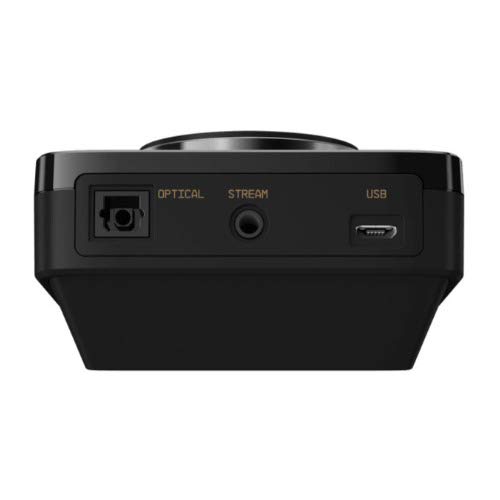
Изображение: Задна част view of the ASTRO MixAmp Pro TR, highlighting the Optical, USB, AUX, and Stream ports for various connections.
Operating the MixAmp Pro TR
МиксътAmp Pro TR provides intuitive controls for managing your audio experience:
- Главен регулатор за сила на звука: The large dial on the left controls the overall volume of your headset. Rotate clockwise to increase volume, counter-clockwise to decrease.
- Game/Voice Balance Dial: The smaller dial on the right allows you to adjust the balance between game audio and voice chat.
- Rotate towards "GAME" to prioritize game audio.
- Rotate towards "VOICE" to prioritize voice chat.
- EQ Presets Button: Located in the center, this button cycles through four customizable equalizer presets. The active preset is indicated by the illuminated icon (star, headphone, etc.). These presets can be configured using the ASTRO Command Center software.
- Dolby Button: Activates or deactivates Dolby Surround Sound. When active, the Dolby logo will illuminate.
- Бутон за изключване на микрофона: Located on the A40 TR Inline Mute Cable, this switch mutes or unmutes your microphone. When muted, the MixAmp's volume dials will typically glow red.
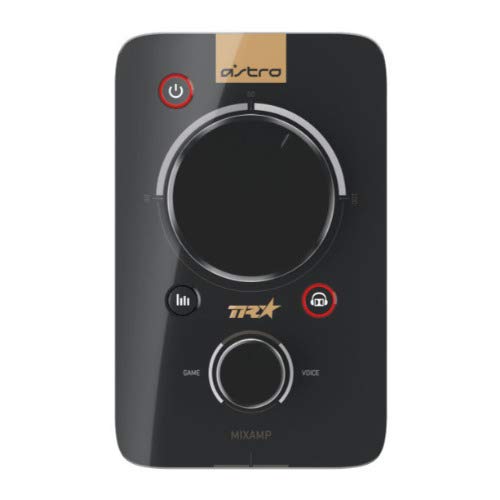
Изображение: Отгоре view of the ASTRO MixAmp Pro TR, showing the large master volume dial, the smaller game/voice balance dial, and the EQ preset buttons.
Поддръжка
- Почистване: Use a soft, dry cloth to clean the headset and MixAmpИзбягвайте абразивни почистващи препарати или разтворители.
- Съхранение: Store the headset and MixAmp на хладно и сухо място, далеч от пряка слънчева светлина и екстремни температури.
- Грижа за кабела: Работете внимателно с кабелите, за да предотвратите повреда. Избягвайте резки огъвания или прекомерно дърпане.
- Възглавнички за уши: Periodically check ear cushions for wear and tear. Replacement cushions are available from ASTRO Gaming.
Отстраняване на неизправности
If you encounter issues with your ASTRO Gaming A40 TR Headset or MixAmp Pro TR, try the following solutions:
| проблем | Решение |
|---|---|
| Няма звук от слушалките. |
|
| Микрофонът не работи. |
|
| Distorted or poor audio quality. |
|
For more detailed troubleshooting, please refer to the official ASTRO Gaming support resources.
Спецификации
- Номер на модела: 939-001511
- Честотна характеристика: 20 - 20,000 Hz
- Номинален импеданс: 48 ома
- Налягане на лентата за глава: 2.6N
- Размери на продукта: 9.06 x 13.87 x 4.33 инча
- Тегло на артикула: 1.06 паунда
- Свързване: Оптичен, USB
- Съвместимост: PlayStation 4, компютър
Гаранция и поддръжка
For detailed warranty information and product support, please visit the official ASTRO Gaming webсайта или вижте предоставената документация:
Ensure you register your product on the ASTRO Gaming website for the latest updates and support.