
Въведение
This manual provides essential information for setting up, operating, maintaining, and troubleshooting your Xiaomi Redmi Note 8 Pro smartphone. Please read this guide carefully to ensure optimal performance and longevity of your device.
Настройка
Съдържание на пакета
Проверете дали вашият пакет съдържа следните елементи:
- Смартфон Xiaomi Redmi Note 8 Pro
- Earphone Kit
- Блок за зареждане
- USB Type-C кабел
- Ръководство за потребителя
Поставяне на SIM карти
The Redmi Note 8 Pro supports dual Nano-SIM cards. Use the provided SIM ejector tool to open the SIM tray located on the side of the device. Carefully place your Nano-SIM cards into the designated slots, ensuring the gold contacts face downwards. Reinsert the tray firmly.
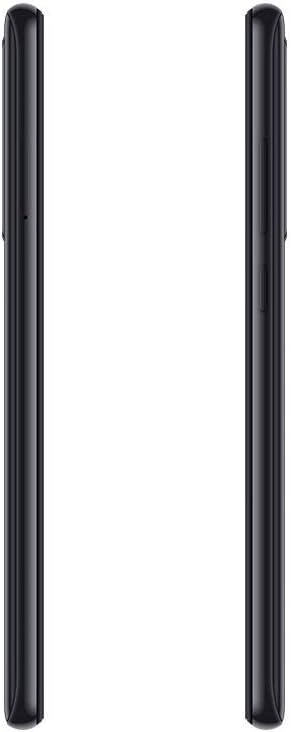
Изображение: Отстрани view of the Redmi Note 8 Pro, illustrating the location of the SIM card tray and physical buttons.
Initial Power On and Basic Configuration
Press and hold the Power button until the Xiaomi logo appears. Follow the on-screen instructions to select your language, connect to a Wi-Fi network, and set up your Google account. This process will guide you through essential settings to prepare your device for use.
Работа с вашето устройство
Дисплей и навигация
Your Redmi Note 8 Pro features a 6.53-inch FHD+ Dot Drop Display with a resolution of 2340 x 1080 pixels. Navigate the interface using touch gestures. The power button is located on the right side, along with the volume rocker. The device runs on Android with Xiaomi's MIUI interface, offering a customizable user experience.

Изображение: Отпред view of the Redmi Note 8 Pro, showcasing its 6.53-inch FHD+ Dot Drop Display.
Характеристики на камерата
The device is equipped with a 64MP AI Quad Camera system on the rear, allowing for versatile photography in various scenarios. The camera module includes multiple lenses for wide-angle, macro, and depth sensing. Open the Camera app to explore different modes and settings.

Изображение: Задна част view of the Redmi Note 8 Pro, highlighting the 64MP AI Quad Camera system.
Батерия и зареждане
The Redmi Note 8 Pro features a 4500mAh high-capacity battery. Use the provided USB Type-C cable and charging block to charge your device. For optimal battery life, avoid extreme temperatures and fully discharging the battery frequently.
Свързаност
The smartphone supports 4G cellular networks and NFC (Near Field Communication) for contactless payments and quick pairing with compatible devices. Bluetooth and Wi-Fi connectivity are also available for wireless communication and internet access.

Изображение: Горе и долу view of the Redmi Note 8 Pro, showing the USB-C port, 3.5mm headphone jack, and speaker grille.
Поддръжка
Почистване на вашето устройство
Use a soft, lint-free cloth to clean the screen and body of your smartphone. Avoid using harsh chemicals or abrasive materials, as these can damage the device's finish. For stubborn smudges, lightly dampИзплакнете кърпата с вода или препарат за почистване на екрани, специално предназначен за електроника.
Водоустойчивост
The Xiaomi Redmi Note 8 Pro is не е водоустойчив. Avoid exposing the device to water, rain, or excessive humidity. Liquid damage is not covered under warranty.
Софтуерни актуализации
Regularly check for and install software updates to ensure your device has the latest features, security patches, and performance improvements. You can usually find this option in the device's settings under "About phone" or "System updates."
Отстраняване на неизправности
Често срещани проблеми и решения
- Устройството не се включва: Ensure the battery is charged. Connect the device to its charger and wait a few minutes before attempting to power it on again. If it still doesn't turn on, try holding the power button for an extended period (10-15 seconds).
- Проблеми със зареждането: Check if the charging cable and adapter are securely connected. Try using a different cable or adapter to rule out faulty accessories. Ensure the charging port is clean and free of debris.
- Camera focus problems: Ensure the camera lens is clean and free from smudges. In some low-light conditions, autofocus may be slower. Try tapping on the screen to manually focus on your subject.
- Бавна производителност: Close unused applications running in the background. Clear cache data for apps that are frequently used. Consider restarting your device periodically. If performance issues persist, a factory reset might be necessary (back up your data first).
Фабрично нулиране
A factory reset will erase all data from your device and restore it to its original factory settings. This can resolve persistent software issues. Before performing a factory reset, ensure you have backed up all important data. The option is typically found in Settings > System > Reset options.
Спецификации
| Марка | XIAOMI |
| Име на модела | Redmi Note 8 Pro |
| Операционна система | Android |
| RAM | 6 GB |
| Капацитет за съхранение | 128 GB |
| Размер на екрана | 6.53 инча |
| Резолюция на дисплея | 2340 x 1080 (FHD+) |
| Клетъчна технология | 4G |
| Технология за свързване | NFC |
| Слотове за SIM карти | Две SIM карти |
| Размер на SIM картата | Нано |
| Ниво на водоустойчивост | Не е водоустойчив |
| Жак за слушалки | 3.5 мм |
| Резолюция на задната камера | 64 Megapixels (Quad Camera) |
| Капацитет на батерията | 4500 XNUMX mAh |
| Процесор | G90T liquidcool System |
Гаранционна информация
The Xiaomi Redmi Note 8 Pro comes with a 2-годишна гаранция от производителя from the date of purchase. This warranty covers defects in materials and workmanship under normal use. It does not cover damage caused by accidents, misuse, unauthorized modifications, or liquid exposure. Please retain your proof of purchase for warranty claims.
поддръжка
For further assistance, technical support, or to inquire about service and repairs, please visit the official Xiaomi website or contact their customer service. You can find detailed support resources, FAQs, and contact information on their official support pages.
Официален Xiaomi Webсайт: www.mi.com/global/support