
1. Въведение
This manual provides instructions for the FocalTop N2QAYB000953 replacement remote control. This remote is designed to function as a direct replacement for the original Panasonic Blu-ray Player remote control models N2QAYB000953, compatible with DMP-BDT360, DMP-BDT361, DMP-BDT460, and DMP-BDT460PS Blu-ray players.
No programming is required for this remote control. Simply insert batteries, and it is ready for use.
2. Настройка
2.1 Инсталиране на батерията
- Намерете отделението за батерии на гърба на дистанционното управление.
- Плъзнете капака на отделението за батерии надолу, за да го отворите.
- Insert two (2) AAA alkaline batteries (not included), ensuring the positive (+) and negative (-) terminals align correctly with the markings inside the compartment.
- Плъзнете капака на отделението за батерии обратно на мястото му, докато щракне здраво.

Figure 2.1: Battery compartment with cover removed, showing battery placement.
Забележка: Ensure batteries are inserted with correct polarity. Incorrect installation may prevent the remote from functioning.
3. Работа с дистанционното управление
The FocalTop N2QAYB000953 remote control is designed for intuitive operation of your compatible Panasonic Blu-ray Player. Point the remote directly at the Blu-ray player's infrared sensor for optimal performance.
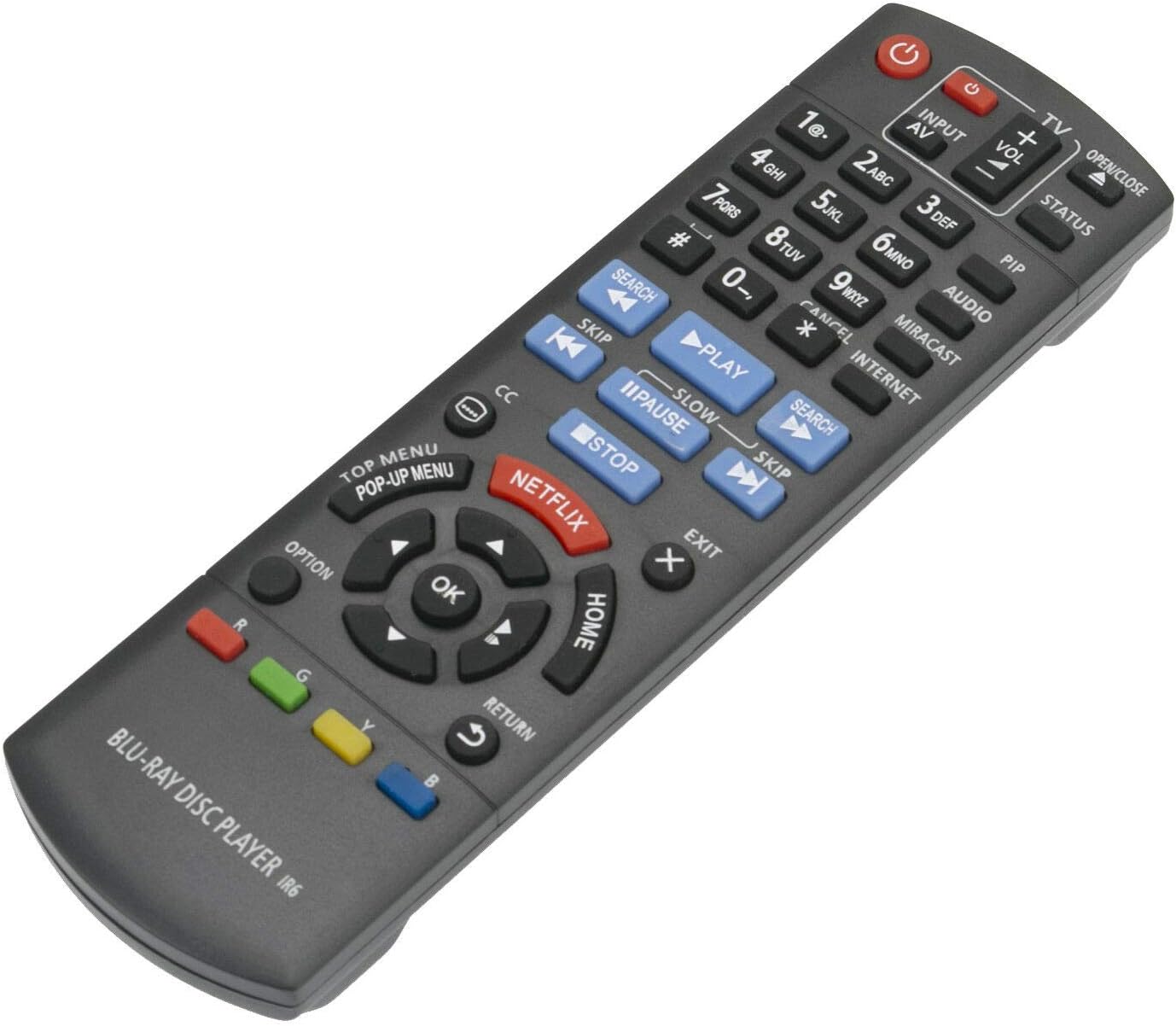
Фигура 3.1: Отпред view на дистанционното управление с разположение на бутоните.
3.1 ключови функции
- мощност (⏻): Turns the Blu-ray player on or off.
- Input/AV: Selects the input source on your television.
- Обем (+/-): Adjusts the volume of the connected audio system (if supported by the Blu-ray player's HDMI-CEC or similar function).
- Бутони с цифри (0-9): Used for direct track selection or entering numerical data.
- Играй (▶), пауза (⏸), Спри се (■): Стандартни контроли за възпроизвеждане на медийни файлове.
- Пропускане (⏭), Search (⏮): Navigate between tracks or fast-forward/rewind.
- Directional Pad (Up, Down, Left, Right) & OK: Навигира в менютата и потвърждава избора.
- У ДОМА: Returns to the main menu of the Blu-ray player.
- ГЛАВНО МЕНЮ/ИЗСКАЧАЩО МЕНЮ: Accesses the disc's top menu or pop-up menu.
- NETFLIX: Бутон за директен достъп до приложението Netflix.
- ВРЪЩАНЕ: Връща се към предишния екран или меню.
- ОПЦИЯ: Displays options relevant to the current screen or playback.
- Цветни бутони (червен, зелен, жълт, син): Used for specific functions within menus or applications, as indicated on-screen.
4. Поддръжка
- Почистване: Избършете дистанционното управление с мека, суха кърпа. Не използвайте течни почистващи препарати или абразивни материали.
- Смяна на батерията: Replace batteries when the remote's response becomes sluggish or stops working. Always replace both batteries at the same time with new ones of the same type (AAA alkaline).
- Съхранение: Ако дистанционното управление няма да се използва за продължителен период от време, извадете батериите, за да предотвратите протичане и евентуални повреди.
- Околна среда: Избягвайте излагането на дистанционното управление на екстремни температури, пряка слънчева светлина или висока влажност.
5. Отстраняване на проблеми
| проблем | Възможна причина | Решение |
|---|---|---|
| Дистанционното управление не работи. |
|
|
| Някои бутони не реагират. |
|
|
| Дистанционното работи периодично. |
|
|
6. Спецификации
- модел: N2QAYB000953
- марка: FocalTop
- Съвместимост: Panasonic Blu-ray Player models DMP-BDT360, DMP-BDT361, DMP-BDT460, DMP-BDT460PS
- Технология за свързване: Инфрачервен (IR)
- Тип контролер: Бутон за управление
- Източник на захранване: 2 x AAA алкални батерии (не са включени)
- Специална функция: Ергономичен дизайн
7. Гаранция и поддръжка
This product is a replacement remote control. For specific warranty information or technical support, please refer to the documentation provided by the original seller or contact FocalTop directly. No explicit warranty information is provided within this manual.