
Въведение
This manual provides detailed instructions for the installation, operation, maintenance, and troubleshooting of the HP ProDesk 400 G3 MS-7957 motherboard. Please read this manual thoroughly before proceeding with any installation or operation to ensure proper functionality and safety.
Информация за безопасност
Винаги спазвайте следните предпазни мерки, за да предотвратите повреда на дънната платка или нараняване:
- Изключете захранването от контакта, преди да инсталирате или демонтирате каквито и да е компоненти.
- Носете антистатична гривна за китка или често докосвайте заземен метален предмет, за да разредите статичното електричество, преди да докосвате дънната платка.
- Дръжте дънната платка за ръбовете ѝ, за да избегнете докосване на чувствителни компоненти.
- Осигурете добра вентилация в корпуса на компютъра, за да предотвратите прегряване.
- Пазете дънната платка от влага и екстремни температури.
Продуктът е свършилview
The HP ProDesk 400 G3 MS-7957 is a MicroATX motherboard designed for Intel processors with an LGA 1151 socket. It supports DDR4 RAM and features a B250 chipset, offering a reliable foundation for desktop computing.
Ключови характеристики
- Compatible CPU Brand: Intel
- Тип гнездо: LGA 1151/Socket H4
- Форм-фактор: MicroATX
- I/O конектори: Ethernet (RJ-45), USB 2.0, USB 3.0, VGA, DisplayPort, HD Audio Jack
Идентификация на компонента
Familiarize yourself with the layout of the motherboard to facilitate proper installation and connection of components.

Фигура 1: Ъглова view of the HP ProDesk 400 G3 MS-7957 motherboard. This image highlights the CPU socket (LGA 1151), four DDR4 RAM slots, PCIe slots, and various headers for front panel connections and storage devices.
Настройка и инсталиране
Преди да започнете
- Ensure your computer case is compatible with the MicroATX form factor.
- Gather all necessary components: CPU, RAM, CPU cooler, power supply, storage devices, and graphics card (if not using integrated graphics).
- Prepare your workspace by ensuring it is clean, well-lit, and static-free.
Монтаж на дънна платка
- Install the CPU into the LGA 1151 socket. Carefully align the CPU with the socket's notch and gently lower it into place. Close the retention arm.
- Нанесете термопаста върху процесора и монтирайте охладителя на процесора съгласно инструкциите на производителя.
- Install the DDR4 RAM modules into the designated slots. Ensure they are fully seated until the clips lock into place.
- Mount the motherboard into the computer case using the appropriate standoffs and screws.
- Свържете основния 24-пинов ATX захранващ конектор и 4-пиновия или 8-пиновия захранващ конектор на процесора от захранването към дънната платка.
- Install any expansion cards (e.g., graphics card) into the PCIe slots.

Фигура 2: Ъглов ъгъл отгоре надолу view of the HP ProDesk 400 G3 MS-7957 motherboard. This perspective provides a clear view of the processor socket, memory slots, and the layout of the various internal connectors and components.
Свързване на периферни устройства
- Connect SATA storage devices (HDDs/SSDs) to the SATA ports on the motherboard.
- Connect front panel headers (power button, reset button, USB ports, audio jacks) to their respective pins on the motherboard. Refer to your case manual for specific pin assignments.
- Connect external peripherals such as monitor, keyboard, mouse, and Ethernet cable to the rear I/O panel.
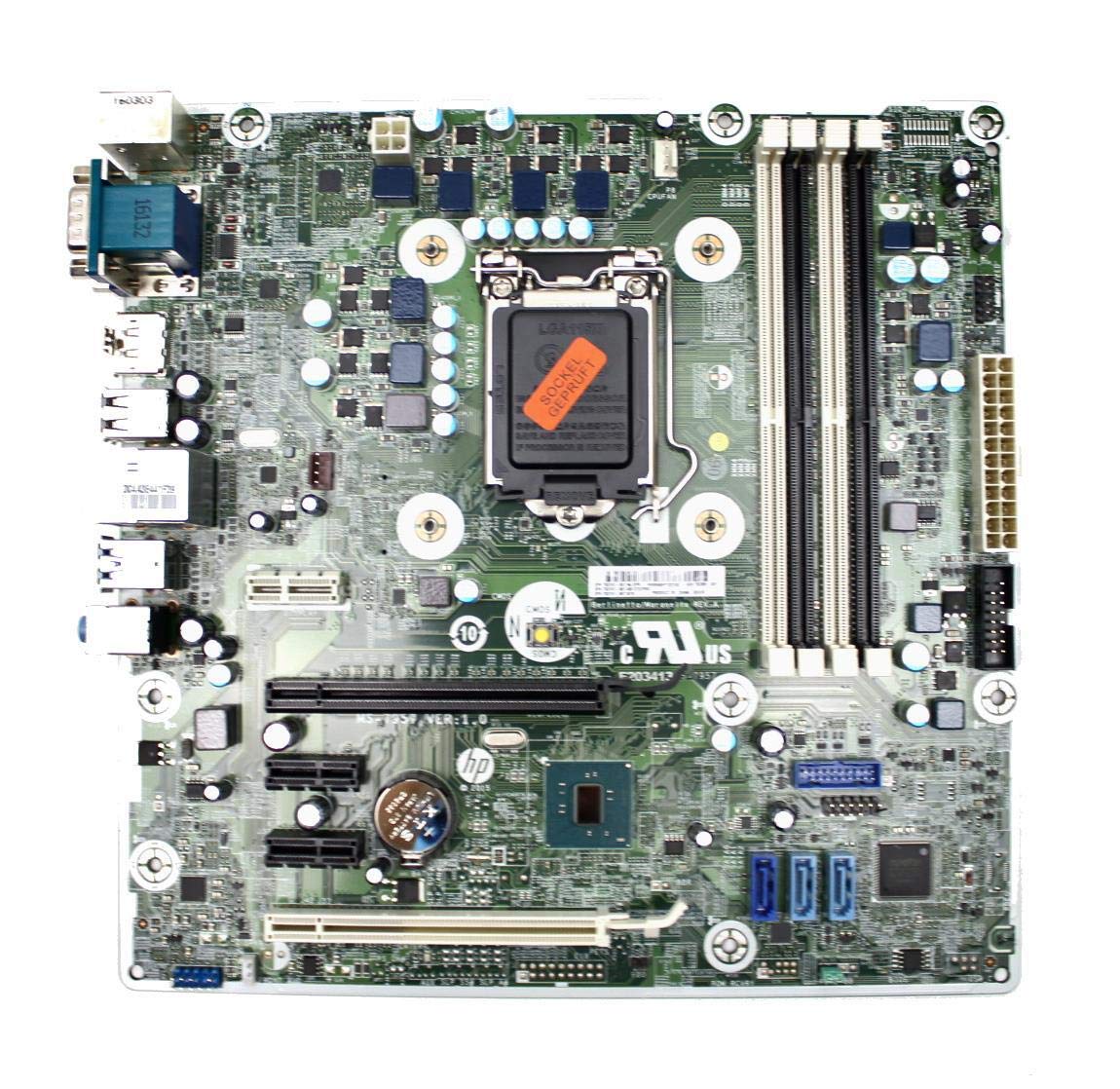
Figure 3: Rear I/O panel of the HP ProDesk 400 G3 MS-7957 motherboard. This image displays the available external connectivity options, including PS/2 ports, serial port, VGA, DisplayPort, USB 2.0, USB 3.0, Ethernet (RJ-45), and HD audio jacks.
Инструкция за работа
Първоначално включване
After all components are installed and connected, connect the power cable to the power supply and press the power button on your computer case. The system should initiate the boot process.
Конфигурация на BIOS/UEFI
За да получите достъп до помощната програма за настройка на BIOS/UEFI, натиснете определения клавиш (обикновено Дел, F2, F10, или F12) during the initial boot sequence. Here you can configure boot order, system time, and other hardware settings.
Инсталиране на драйвери
After installing your operating system, it is crucial to install the latest drivers for your motherboard's chipset, integrated graphics, audio, and network adapter. These drivers can typically be found on the HP support webсайта или на производителя на чипсета webсайт.
Поддръжка
- Почистване: Редовно почиствайте праха от дънната платка и компонентите, използвайки сгъстен въздух. Уверете се, че системата е изключена от захранването и е изключена от контакта преди почистване.
- Актуализации на BIOS/UEFI: Periodically check for BIOS/UEFI updates from HP's official support website. Updates can improve stability, compatibility, and performance. Follow update instructions carefully to avoid system damage.
- Актуализации на драйвери: Поддържайте всички системни драйвери актуализирани, за да осигурите оптимална производителност и съвместимост с новия софтуер и хардуер.
Отстраняване на неизправности
Този раздел предоставя решения на често срещани проблеми, с които може да се сблъскате:
- Без захранване: Check all power connections, including the 24-pin ATX and CPU power cables. Ensure the power supply is switched on and the wall outlet is functional.
- Без дисплей: Verify that your monitor is connected to the correct video output (VGA or DisplayPort) and is powered on. Reseat the graphics card (if applicable) and RAM modules.
- Нестабилност/Сривове на системата: This could be due to overheating, faulty RAM, or outdated drivers. Check CPU and GPU temperatures, run memory diagnostic tools, and update drivers.
- Периферното устройство не е открито: Ensure the peripheral is properly connected. Try a different port or update the relevant drivers.
- Проблеми с BIOS/UEFI: If you encounter issues after changing BIOS settings, try resetting the CMOS by removing the CMOS battery for a few minutes or using the clear CMOS jumper (refer to motherboard diagram for location).
Спецификации
| Характеристика | Спецификация |
|---|---|
| Марка | HP |
| CPU Socket | LGA 1151 |
| Съвместими устройства | Настолен компютър |
| RAM технология | DDR4 |
| Съвместими процесори | Intel Core i3-6xxx, Intel Core i5-6xxx, Intel Core i7-6xxx, Intel Core i3-7xxx, Intel Core i5-7xxx, Intel Core i7-7xxx, Intel Core i3-8xxx, Intel Core i5-8xxx, Intel Core i7-8xxx |
| Тип чипсет | Intel B250 |
| Платформа | Windows |
| Име на модела | MS-7957 |
| Модел на процесора | Core i3 (Note: Supports i3, i5, i7 as listed above) |
| Тип конектор за основно захранване | 24 щифта |
| Интерфейс на графична карта | PCI Express |
| Available Memory Slots | 4 |
| Total SATA Ports | 6 |
| Общо USB портове | 2 (Note: Refers to internal headers, rear I/O has more) |
| Общо Ethernet портове | 1 |
| Total PCIe Ports | 3 |
| производител | Computer Store Berlin (Reseller/Supplier) |
| Номер на част | 4061435962741 |
| ASIN | B08CS13PTQ |
Гаранция и поддръжка
Този продукт се предлага с a 1 години гаранция от датата на закупуване. Тази гаранция покрива дефекти в материалите и изработката при нормална употреба.
For technical support, warranty claims, or further assistance, please contact your point of purchase or refer to the official HP support resources for the ProDesk 400 G3 series.