
1. Въведение
Welcome to the user manual for your new Samsung Galaxy A21S smartphone. This guide provides essential information to help you set up, operate, maintain, and troubleshoot your device. Please read this manual carefully to ensure proper use and to maximize the performance of your phone.
2. Информация за безопасност
Before using your device, please read all safety warnings and precautions to prevent injury or damage. Keep the device away from water and extreme temperatures. Use only Samsung-approved chargers and accessories. Do not attempt to disassemble or repair the device yourself.
3. Съдържание на пакета
Проверете дали кутията на вашия продукт съдържа следните елементи:
- Samsung Galaxy A21S Smartphone
- Захранващ адаптер
- USB кабел
- Инструмент за изваждане на SIM карта
- Ръководство за бърз старт
The actual items supplied with the device may vary depending on the region and service provider.
4. Оформление на устройството
Familiarize yourself with the physical features and button locations of your Samsung Galaxy A21S.
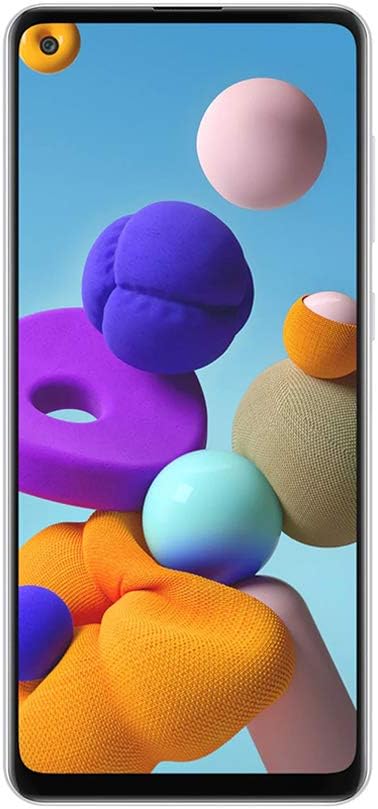
Фигура 4.1: Отпред view of the Samsung Galaxy A21S, highlighting the 6.5-inch display and the punch-hole front camera.

Фигура 4.2: Задна част view of the Samsung Galaxy A21S, featuring the quad camera array and the rear-mounted fingerprint sensor.

Фигура 4.3: Страна view of the Samsung Galaxy A21S, illustrating the placement of the volume rocker and power button.
5. Настройка
5.1. Installing the SIM and microSD Card
- Намерете тавата за SIM карта отстрани на устройството си.
- Поставете инструмента за изваждане на SIM картата в малкия отвор до тавата, за да я отворите.
- Place your Nano-SIM card(s) and/or microSD card (up to 64GB) into the tray with the gold contacts facing down. Ensure they are correctly seated.
- Внимателно натиснете тавата обратно в слота, докато щракне на мястото си.
5.2. Първоначално включване
Press and hold the Power button (located on the side of the device) until the Samsung logo appears. Follow the on-screen prompts to complete the initial setup, including language selection, Wi-Fi connection, Google account setup, and security settings (fingerprint recognition).
6. Работа с вашето устройство
6.1. Основна навигация
Your Galaxy A21S uses a touchscreen interface. Swipe to navigate between screens, tap to open apps, and pinch to zoom. Use the navigation bar at the bottom of the screen or gesture navigation for Home, Back, and Recent Apps functions.
6.2. Осъществяване на повиквания и изпращане на съобщения
За да осъществите повикване, отворете приложението Телефон, въведете номера и докоснете иконата за повикване. За да изпратите съобщение, отворете приложението Съобщения, докоснете иконата за ново съобщение, въведете получателя и вашето съобщение, след което докоснете изпращане.
6.3. Използване на камерата
The Galaxy A21S features a versatile quad-camera system. Open the Camera app to capture photos and videos. Tap the shutter button to take a picture. Swipe left or right to switch between modes like Photo, Video, and Macro. The front camera is 8 MP, and the main rear camera is 48 MP.
6.4. Свързаност
- Wi-Fi: Свържете се с безжични мрежи за достъп до интернет. Отидете в Настройки > Връзки > Wi-Fi.
- Bluetooth: Pair with other Bluetooth devices like headphones or speakers. Go to Settings > Connections > Bluetooth.
- Мобилни данни (LTE): Enable mobile data for internet access when Wi-Fi is unavailable. Go to Settings > Connections > Data usage.
6.5. Функционалност за две SIM карти
Your device supports two SIM cards, allowing you to manage two phone numbers or data plans simultaneously. You can set a preferred SIM for calls, messages, and mobile data in Settings > Connections > SIM card manager.
7. Поддръжка
7.1. Грижа за батерията
The device is equipped with a 5000 mAh Lithium-Ion battery. To prolong battery life, avoid fully discharging the battery frequently. Charge your device using the provided adapter and cable. Avoid exposing the device to extreme heat or cold during charging.
7.2. Софтуерни актуализации
Keep your device's software up to date to ensure optimal performance and security. Go to Settings > Software update to check for and install available updates. Ensure your device is connected to Wi-Fi and has sufficient battery before starting an update.
7.3. Почистване на устройството
Използвайте мека кърпа без власинки, за да почистите екрана и корпуса на телефона си. Избягвайте използването на агресивни химикали или абразивни материали, тъй като те могат да повредят покритието на устройството.
8. Отстраняване на проблеми
8.1. Често срещани проблеми
- Устройството не се включва: Ensure the battery is charged. If not, connect the charger and wait a few minutes before attempting to power on.
- Приложенията замръзват или се сриват: Затворете проблемното приложение и го отворете отново. Ако проблемът продължава, рестартирайте устройството си.
- Проблеми с мрежовата свързаност: Check if Airplane mode is off. Restart your device or reset network settings in Settings > General management > Reset > Reset network settings.
8.2. Възстановяване на фабричните настройки
If your device experiences persistent issues, a factory data reset can resolve many software-related problems. Предупреждение: Това ще изтрие всички данни на вашето устройство. Архивирайте важни данни, преди да продължите. Отидете в Настройки > Общи настройки > Нулиране > Фабрични настройки.
9. Спецификации
Below are the key technical specifications for the Samsung Galaxy A21S (A217M/DS):
| Характеристика | Спецификация |
|---|---|
| Име на модела | Galaxy A21s (A217M/DS) |
| Операционна система | Android 10.0 |
| Размер на екрана | 6.5 инча |
| Резолюция на дисплея | 720x1600 пиксела |
| RAM памет | 4 GB |
| Капацитет за съхранение | 64 GB |
| Разширяема памет | microSD up to 64 GB (Flash Memory Supported Size Maximum) |
| Задна камера | 48 MP (Main) + 8 MP + 2 MP + 2 MP (Quad Camera) |
| Предна камера | 8 MP |
| Капацитет на батерията | 5000 mAh (литиево-йонна) |
| Слот за SIM карта | Dual SIM (Nano) |
| Свързаност | Wi-Fi, LTE, GSM, UMTS, Bluetooth |
| Биометрична сигурност | Разпознаване на пръстови отпечатъци |
| Жак за слушалки | 3.5 мм |
| Размери на артикула | 6 x 4 x 2 инча |
10. Гаранция и поддръжка
Your Samsung Galaxy A21S is covered by a manufacturer's warranty. For detailed warranty information, please refer to the warranty card included in your product packaging or visit the official Samsung website. For technical support, software updates, or service inquiries, please contact Samsung customer service or visit an authorized service center. You can find more information and support resources on the Магазин на Samsung.