
1. Въведение
Thank you for choosing the W-KING Bluetooth Speaker. This powerful and versatile portable speaker is designed to deliver high-quality audio for various outdoor and indoor environments. With its robust construction, IPX6 waterproof rating, and extended battery life, it is an ideal companion for your adventures and gatherings. This manual provides essential information for setting up, operating, and maintaining your speaker to ensure optimal performance and longevity.
2. Важна информация за безопасност
Please read all safety warnings and instructions carefully before using this product. Keep these instructions for future reference.
- Do not expose the speaker to extreme temperatures (hot or cold) or high humidity.
- Do not disassemble, repair, or modify the speaker. This may void the warranty and pose a safety risk.
- Ensure the charging port cover is securely closed when not charging to maintain IPX6 waterproof integrity.
- Use only the specified charging cable and adapter. Incorrect charging may damage the battery or speaker.
- Дръжте високоговорителя далеч от медицински устройства, тъй като магнитното му поле може да повлияе на работата им.
- Избягвайте продължително слушане на високи нива на звука, за да предотвратите увреждане на слуха.
- Изхвърлете високоговорителя и батерията му отговорно, съгласно местните разпоредби.
3. Продуктът свършиview
Компоненти
The W-KING Bluetooth Speaker features a robust design with advanced audio components for superior sound quality.
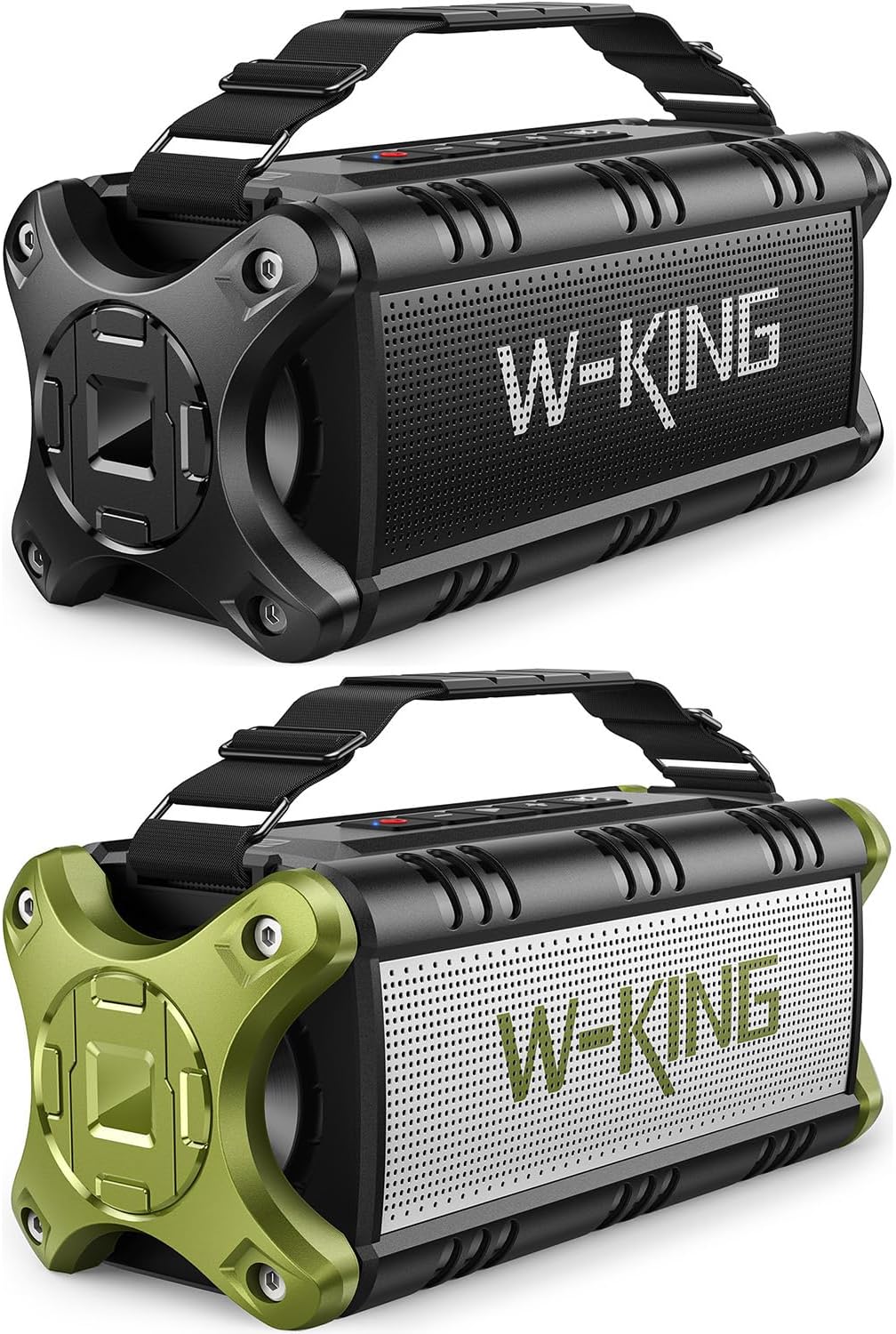
Фигура 3.1: Отпред view of the W-KING Bluetooth Speaker, showcasing its rugged design and W-KING branding.

Figure 3.2: Diagram illustrating the internal components, including 2x25W subwoofers, 2x5W tweeters, and passive bass radiators, contributing to 90W Peak 50W RMS sound output.
Оформление на контролния панел
The top panel of the speaker houses all essential controls for easy operation.
- Бутон за захранване: Натиснете и задръжте за включване/изключване. Натиснете кратко, за да проверите състоянието на батерията.
- Бутон за възпроизвеждане/пауза: Възпроизвеждане или пауза на аудио. Отговаряне/прекратяване на повиквания.
- Намаляване на звука (-): Намаляване на силата на звука. Натиснете и задръжте за предишна песен.
- Увеличаване на силата на звука (+): Увеличете силата на звука. Натиснете и задръжте за следващата песен.
- Бутон EQ: Cycle through different equalizer modes (Indoor/Outdoor).
- TWS бутон: Стартирайте сдвояване с истинско безжично стерео.
- Светлинен индикатор за батерията: Показва текущото ниво на батерията.
- Порт за зареждане (USB-C): За зареждане на високоговорителя.
- USB-A изходен порт: За функцията power bank.
- AUX-вход: За кабелна аудио връзка.
- Слот за TF карта: For playing music directly from a TF card.
4. Настройка
4.1 Зареждане на високоговорителя
Before first use, fully charge the speaker. The battery indicator lights will show charging progress.
- Open the protective cover on the side of the speaker to access the charging port.
- Свържете USB-C кабела за зареждане към порта за зареждане на високоговорителя.
- Connect the other end of the cable to a compatible USB power adapter (5V).
- The battery indicator lights will illuminate during charging and turn off when fully charged.
- Once charging is complete, securely close the protective cover to maintain waterproof integrity.
4.2 Първоначално Bluetooth сдвояване
Pair your W-KING speaker with your Bluetooth-enabled device.
- Press and hold the Power Button to turn on the speaker. The Bluetooth indicator light will flash, indicating it's in pairing mode.
- На вашето устройство (смартфон, таблет, лаптоп) активирайте Bluetooth и потърсете налични устройства.
- Select "W-KING" from the list of devices.
- Once connected, the Bluetooth indicator light will stop flashing and remain solid.
- Високоговорителят вече е готов да възпроизвежда аудио от вашето устройство.
4.3 NFC Connection (Android Only)
For quick pairing with NFC-enabled Android devices:

Figure 4.1: An Android smartphone being tapped against the W-KING speaker to establish an NFC connection, allowing for quick Bluetooth pairing without manual searching.
- Уверете се, че NFC е активиран на вашия Android смартфон.
- Turn on the W-KING speaker.
- Gently tap your smartphone against the NFC area on the speaker (usually indicated by an NFC logo).
- Потвърдете заявката за сдвояване на вашия смартфон.
5. Инструкции за работа
5.1 Основно възпроизвеждане
- Възпроизвеждане/пауза: Натиснете кратко бутона Възпроизвеждане/Пауза.
- Увеличаване/намаляване на звука: Short press the '+' or '-' buttons.
- Следваща песен: Натиснете и задръжте бутона „+“.
- Предишен запис: Натиснете и задръжте бутона „-“.
5.2 Режими на еквалайзера (EQ)
The speaker offers different EQ modes to optimize sound for various environments.

Figure 5.1: The W-KING speaker displaying its two distinct EQ modes, Indoor and Outdoor, allowing users to adjust sound profiles for different listening environments.
- Press the EQ button to cycle between available sound modes (e.g., Indoor, Outdoor).
- Each mode is designed to enhance specific aspects of the audio, such as bass or clarity, depending on the listening environment.
5.3 Сдвояване с истинско безжично стерео (TWS)
Connect two W-KING speakers for a powerful stereo sound experience.

Figure 5.2: Two W-KING speakers wirelessly connected to create a True Wireless Stereo setup, delivering 100W (180W MAX) super powerful stereo sound.
- Ensure both W-KING speakers are powered on and not connected to any other Bluetooth device.
- On one speaker (this will be the primary speaker), short press the TWS button. The TWS indicator light will flash.
- Основният говорител автоматично ще търси вторичния говорител.
- Once connected, both speakers will emit a confirmation tone, and the TWS indicator lights on both speakers will remain solid.
- Сега свържете устройството си към основния високоговорител чрез Bluetooth. Звукът ще се възпроизвежда стерео и през двата високоговорителя.
5.4 Разговори със свободни ръце
Вграденият микрофон позволява провеждане на разговори със свободни ръце, когато е свързан чрез Bluetooth.

Figure 5.3: Illustration of individuals using the W-KING speaker for hands-free calling, highlighting its built-in microphone for clear communication.
- Отговори на повикване: Натиснете кратко бутона Възпроизвеждане/Пауза.
- Край на разговора: Натиснете кратко бутона за възпроизвеждане/пауза по време на разговор.
- Отхвърляне на повикване: Натиснете и задръжте бутона Възпроизвеждане/Пауза.
5.5 Функция на преносимата батерия
Use the speaker's large battery to charge your mobile devices.

Figure 5.4: The W-KING speaker demonstrating its power bank capability by charging a smartphone, indicating its 40-hour playtime and external charging function.
- Отворете защитния капак отстрани на високоговорителя.
- Connect your device's charging cable to the USB-A output port on the speaker.
- Високоговорителят ще започне да зарежда устройството ви.
- Remember to close the protective cover when not in use to maintain waterproof integrity.
5.6 AUX and TF Card Playback
The speaker supports audio input via a 3.5mm AUX cable and direct playback from a TF (MicroSD) card.
- AUX вход: Insert a 3.5mm audio cable into the AUX-in port on the speaker and connect the other end to your audio source. The speaker will automatically switch to AUX mode.
- TF карта: Insert a TF card (with music files) into the TF card slot. The speaker will automatically detect the card and begin playing music.
6. Поддръжка
6.1 Почистване
To keep your speaker in optimal condition:

Figure 6.1: The W-KING speaker submerged in water, illustrating its IPX6 waterproof capability, making it suitable for use near water.
- Избършете високоговорителя с мек, damp плат. Не използвайте абразивни почистващи препарати или разтворители.
- If the speaker gets wet, ensure all port covers are securely closed. After exposure to water, wipe it dry thoroughly before opening any ports or charging.
6.2 Съхранение
- Съхранявайте високоговорителя на хладно и сухо място, далеч от пряка слънчева светлина и екстремни температури.
- Ако съхранявате батерията за продължителен период от време, зареждайте я до приблизително 50% на всеки няколко месеца, за да я запазите по-дълго.
7. Отстраняване на проблеми
If you encounter issues with your W-KING speaker, refer to the table below for common problems and solutions.
| проблем | Решение |
|---|---|
| Високоговорителят не се включва. | Уверете се, че батерията е заредена. Свържете високоговорителя към източник на захранване и опитайте отново. |
| Не може да се сдвои с Bluetooth устройство. | Make sure the speaker is in pairing mode (flashing Bluetooth light). Ensure Bluetooth is enabled on your device and it's within 100ft range. Forget previous pairings on your device and try again. |
| Няма звук или силата на звука е ниска. | Check volume levels on both the speaker and your connected device. Ensure the speaker is properly paired. If using AUX, check cable connection. |
| Сдвояването на TWS е неуспешно. | Ensure both speakers are W-KING models and not connected to any other Bluetooth device. Place them close to each other during pairing. |
| Speaker not charging external devices. | Ensure the speaker has sufficient battery charge. Check the USB cable connection. |
| Изкривяване на звука. | Reduce the volume on both the speaker and your device. Ensure the audio source is not distorted. |
8. Спецификации
Key technical specifications for the W-KING Bluetooth Speaker.
| Характеристика | Стойност |
|---|---|
| Марка | W-KING |
| Модел | B093LS3Q1H |
| Тип високоговорител | Външен преносим Bluetooth високоговорител |
| Пикова изходна мощност | 90 W (50 W RMS) |
| Ниво на водоустойчивост | IPX6 Водоустойчив |
| Технология за свързване | Bluetooth 5.0, NFC, AUX, TF Card |
| Безжичен обхват | До 100 фута (30 метра) |
| Живот на батерията | До 40 часа (варира в зависимост от обема и съдържанието) |
| Функция Power Bank | да |
| Включени компоненти | Rechargeable battery, Passive radiators, 3.5mm audio jack |
| Материал | Алуминий, Пластмаса |
9. Гаранция и поддръжка
The W-KING Bluetooth Speaker comes with a standard manufacturer's warranty. Please refer to the warranty card included in your product packaging for specific terms and conditions. For technical support, troubleshooting assistance, or warranty claims, please contact W-KING customer service through the official website or your purchase platform. Keep your proof of purchase for warranty validation.