
Saooer BLUE 20A
Saooer 20A Solar Charge Controller User Manual
Model: BLUE 20A
Въведение
This manual provides essential information for the safe and efficient operation of your Saooer 20A Solar Charge Controller. This intelligent regulator is designed to manage the working of solar panels and batteries in a solar system, featuring dual USB ports for mobile device charging. It is compatible with 12V and 24V systems and includes multiple protection functions to ensure system efficiency and prolong battery lifespan.

Фигура 1: Отпред view of the Saooer 20A Solar Charge Controller.
Инструкции за безопасност
- Ensure all connections are correct before powering on the controller. Incorrect wiring can damage the device or connected components.
- The controller is designed for indoor use or in a protected environment. Avoid exposure to direct sunlight, high temperatures, or moisture.
- Не се опитвайте сами да разглобявате или ремонтирате контролера. Обърнете се към квалифициран персонал за сервизно обслужване.
- Да се пази от деца.
- This controller is only suitable for lead-acid batteries: OPEN, AGM, GEL. Do not use with other battery types like Lithium-ion or LiFePO4, as this may cause damage or safety hazards.
- Always connect the battery first, then the solar panel, and finally the load. When disconnecting, reverse the order: disconnect the load, then the solar panel, and finally the battery.
Характеристики на продукта
- Автоматична система за обемtage Идентификация: Automatically detects 12V/24V system voltage.
- PWM Charging: Efficient Pulse Width Modulation charging mode.
- Двойни USB порта: Provides 5V/2A output for charging mobile devices.
- LCD дисплей: Clear display of status and data, allowing for convenient mode switching and parameter configuration.
- Множество функции за защита: Includes short-circuit protection, open-circuit protection, reverse protection, and over-load protection.
- Регулируеми параметри: User-adjustable charge and discharge parameters.
- Температурна компенсация: Automatic temperature compensation for optimal charging.
Настройка и инсталиране
Follow these steps carefully to install your solar charge controller. Incorrect installation can lead to damage or malfunction.
- Подготовка на окабеляването: Ensure all wires are properly stripped and have appropriate connectors if necessary. Use wires of sufficient gauge for your system's current.
- Свържете батерията: Connect the battery to the charge regulator first. Observe correct polarity (+ to + and - to -). The controller will automatically recognize the battery voltage (12V или 24V).
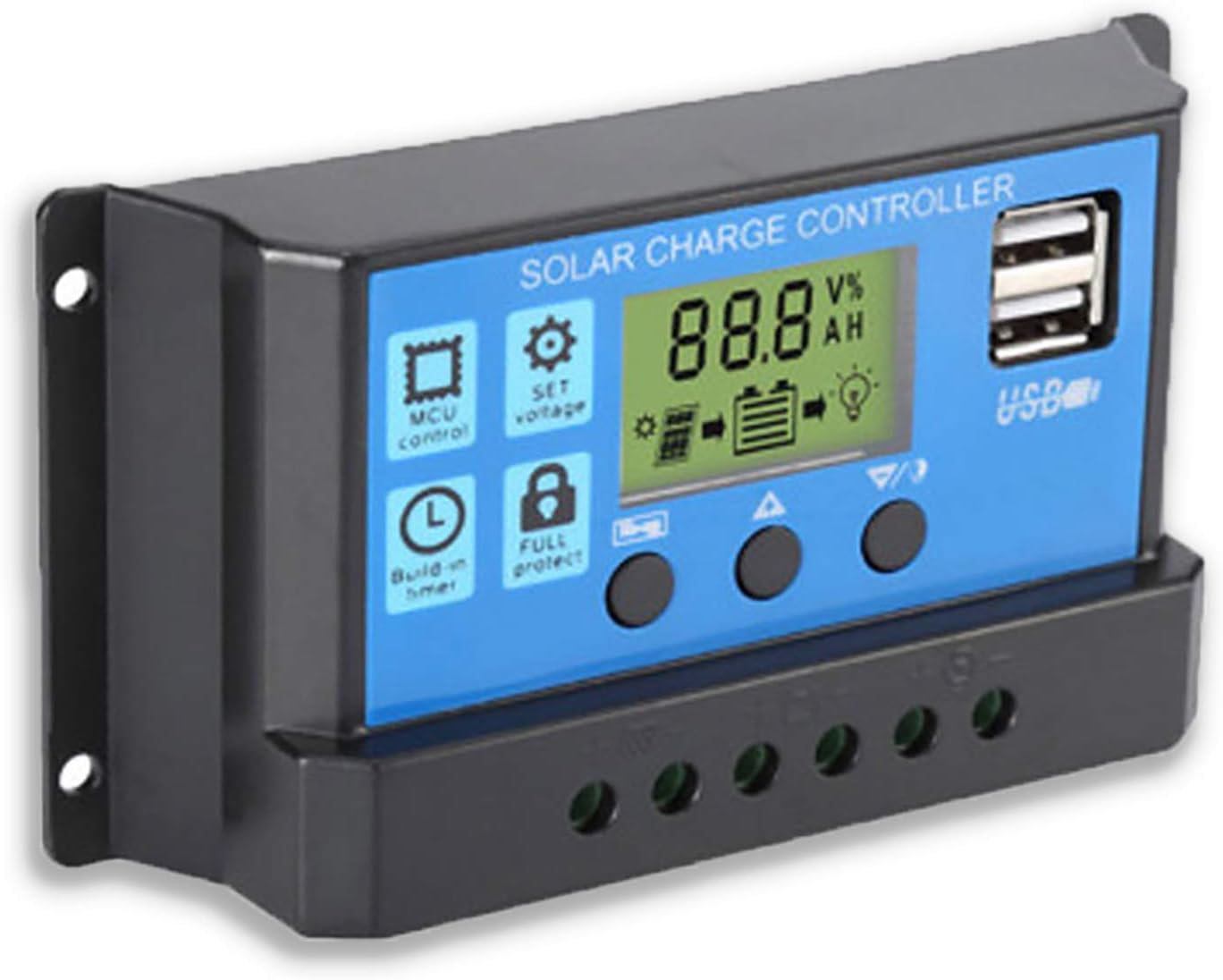
Фигура 2: Страна view showing the connection terminals for battery, solar panel, and load.
- Свържете слънчевия панел: Connect the solar panel to the solar charge controller. Ensure correct polarity.
- Свържете товара: Connect the consumer or load to the charge controller regulator. Ensure correct polarity.
Важна забележка: Always connect the battery first, then the solar panel, and finally the load. When disconnecting the controller, please remove the solar panel, then the load, and finally the battery. This sequence helps the controller recognize the battery voltage correctly and prevents damage.
Инструкция за работа
LCD дисплей и бутони

Фигура 3: Ъглова view показващ LCD дисплея и бутоните за управление.
The controller features an LCD display and three buttons for operation:
- Бутон за меню: Used to cycle through display modes and enter parameter setting mode.
- Бутон нагоре: Used to increase values or navigate upwards in menus.
- Бутон надолу: Used to decrease values or navigate downwards in menus.
Режими на показване
Press the Menu button to cycle through the following display modes:
- Батерия Voltagд (V)
- Слънчев панел Voltagд (V)
- Ток на натоварване (A)
- Battery Temperature (°C)
- Ток на зареждане (A)
- Ток на разреждане (A)
- Load Working Mode (24H, 0-23H, 0H)
Настройки на параметрите
To enter parameter setting mode, press and hold the Menu button for 5 seconds. Use the Up and Down buttons to adjust values, and the Menu button to confirm and move to the next parameter. Press and hold Menu again to exit setting mode.
| Параметър | Описание | Default (12V) | Range (12V) |
|---|---|---|---|
| B01/B02/B03 | Battery Type Selection (B01=Lead-acid, B02=Lithium Ion, B03=LiFePO4) | B01 | N/A |
| Charge Off Voltage | Voltage at which charging stops | 14.4V | 13.0V - 15.0V |
| Discharge Reconnect Voltage | Voltage at which load reconnects after low voltagд изключете | 12.6V | 11.0V - 13.5V |
| Discharge Stop Voltage | Voltage at which load disconnects to protect battery | 10.7V | 9.0V - 11.5V |
| Load Working Time | Timer for load output (24H, 0-23H, 0H) | 24ч | N/A |
Note: For 24V systems, multiply the 12V values by two.
Поддръжка
- Редовна проверка: Периодично проверявайте всички кабелни връзки за стегнатост и корозия.
- Чистота: Keep the controller clean and free from dust. Use a dry cloth for cleaning.
- Вентилация: Осигурете адекватна вентилация около контролера, за да предотвратите прегряване.
- Здраве на батерията: Следете обема на батериятаtage and health regularly. Replace batteries as needed.
Отстраняване на неизправности
| проблем | Възможна причина | Решение |
|---|---|---|
| Контролерът не се включва / LCD дисплеят е празен | Батерията не е свързана или има обратна полярност; ниво на батериятаtage твърде ниско. | Check battery connections and polarity. Ensure battery has sufficient charge. |
| Слънчевият панел не зарежда батерията | Solar panel not connected or reverse polarity; Insufficient sunlight; Damaged solar panel. | Check solar panel connections and polarity. Ensure panel is in direct sunlight. Test solar panel output. |
| Зареждането не работи | Load not connected or reverse polarity; Battery voltage too low (low voltage disconnect); Overload protection activated. | Check load connections and polarity. Charge battery. Reduce load or check for short circuit. |
| USB портовете не се зареждат | Батерия voltage too low; Device not compatible; Faulty USB cable. | Ensure battery is charged. Try a different device or cable. |
| Controller gets hot | Претоварване; Лоша вентилация. | Reduce load. Ensure controller has adequate airflow and is not in an enclosed space. |
Спецификации
| Характеристика | детайл |
|---|---|
| Модел | СИН 20А |
| System Voltage | 12V / 24V Auto |
| Максимален ток на зареждане/разреждане | 20A |
| USB изход | Dual USB, 5V/2A (Max) |
| Съвместимост на типа батерия | Lead-acid (OPEN, AGM, GEL) |
| Размери на продукта | 5.12 x 2.76 x 1.5 инча (приблизително 133 мм x 70 мм x 38 мм) |
| Тегло на артикула | 5 унции |
| Дисплей | LCD |
| Работна температура | -35°C до +60°C |

Figure 4: Product dimensions of the solar charge controller.
Гаранция и поддръжка
For warranty information or technical support, please contact the manufacturer, Saooer, through their official channels. Refer to your purchase documentation for specific warranty terms and contact details.
производител: Saooer
ASIN: B095764VB7
UPC: 605832982977
Можете да посетите Saooer Store on Amazon за повече информация или да се свържете с поддръжката.