1. Въведение
This manual provides detailed instructions for the setup, operation, and maintenance of your IDOLmain 2600W Karaoke System. Please read this manual thoroughly before using the product to ensure proper functionality and safety.
1.1 Съдържание на опаковката
The IDOLmain 2600W Karaoke System package includes the following components:
- 1 x IDOLmain IP-3900II Professional Mixing Ampлифир
- 2 x IDOLmain IPS-680 Professional Karaoke Speakers
- 2 x IDOLmain UHF-630 Wireless Microphones
- 2 x стойки за високоговорители
- 2 x Speaker Cables
- 1 x оптичен кабел
- 1 x HDMI кабел
- 2 x Microphone Windscreens
- 1 x Дистанционно управление

2. Информация за безопасност
Please observe the following safety precautions to prevent electric shock, fire, or damage to the equipment:
- Източник на захранване: Connect the system only to the specified power supply voltage. Ensure the power cord is securely plugged into an outlet.
- Вентилация: Не блокирайте вентилационните отвори. Осигурете достатъчен въздушен поток около amplifier за предотвратяване на прегряване.
- Вода и влага: Do not expose the system to rain, moisture, or excessive humidity. Keep liquids away from all components.
- Източници на топлина: Keep the system away from heat sources such as radiators, heat registers, stoves, or other heat-producing appliances.
- Почистване: Unplug the system from the power outlet before cleaning. Use a dry, soft cloth for cleaning. Do not use liquid cleaners or aerosol cleaners.
- Обслужване: Не се опитвайте сами да обслужвате този продукт. Обърнете цялото обслужване към квалифициран сервизен персонал.
- Разположение: Place the speakers and amplifier on stable, level surfaces. When using speaker stands, ensure they are properly assembled and stable to prevent tipping.
3. Ръководство за настройка
3.1 Amplifier Setup (IP-3900II)
Position the IP-3900II mixing amplifier on a stable, flat surface with adequate ventilation. Ensure all controls are set to their minimum positions before powering on.


3.2 Speaker Setup (IPS-680)
The IPS-680 speakers can be placed on the included speaker stands for optimal sound projection.
- Assemble the speaker stands according to their individual instructions. Ensure they are stable.
- Carefully place each IPS-680 speaker onto a stand. Ensure the speaker is securely seated.
- Position the speakers to the left and right of your listening area, facing towards the audience.


3.3 Wireless Microphone Setup (UHF-630)
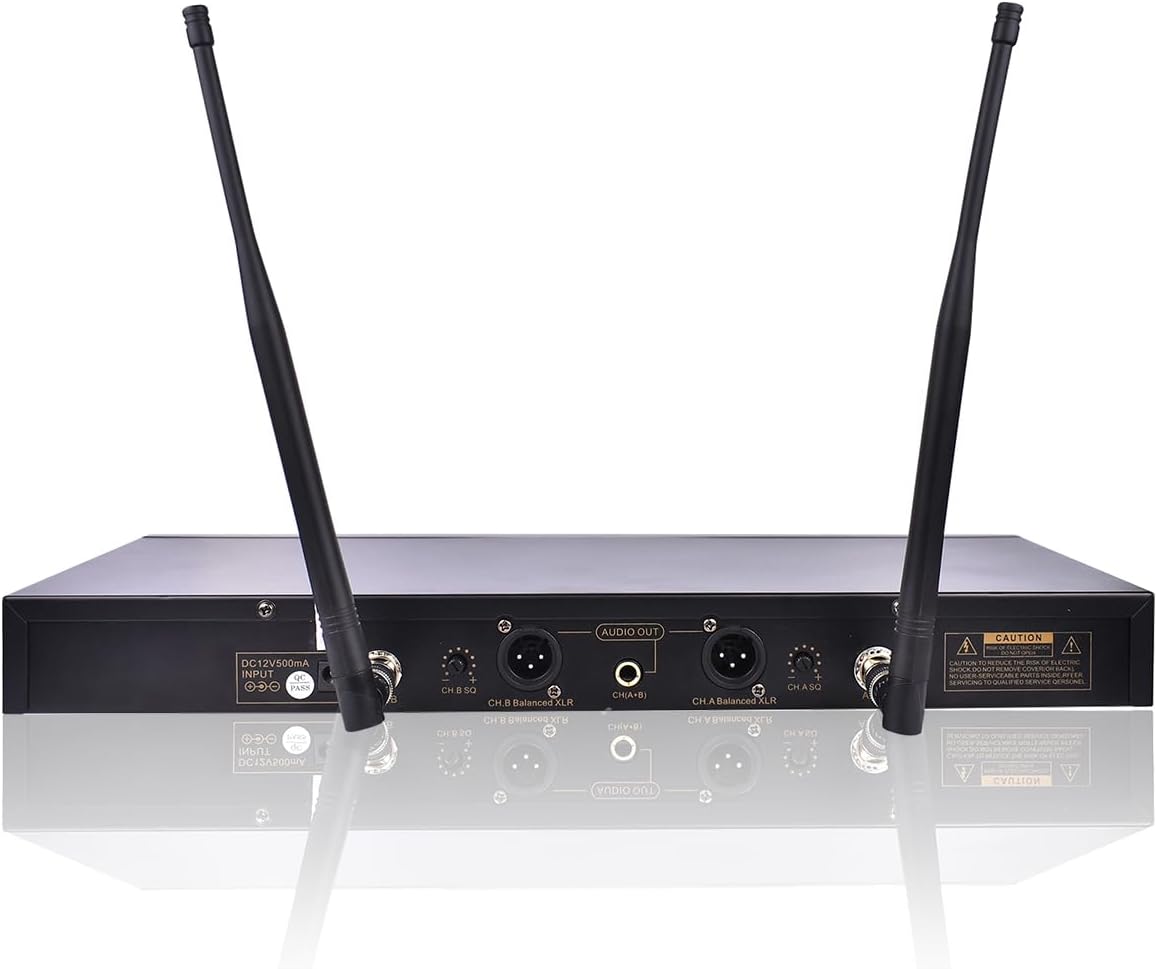
The UHF-630 wireless microphones require their receiver to be connected to the ampлифир.
- Connect the UHF-630 wireless microphone receiver to one of the microphone input ports on the IP-3900II amplifier using an appropriate cable (e.g., 1/4" or XLR).
- Ensure the receiver's antennas are extended for optimal signal reception.
- Insert fresh batteries into the UHF-630 wireless microphones.
- Power on the microphone receiver and the microphones. The system will automatically scan for available frequencies.

3.4 Свързване на компоненти
Следвайте тези стъпки, за да свържете amplifier, speakers, and audio/video sources:
- Speakers to Ampлифтинг: Use the provided speaker cables to connect the IPS-680 speakers to the speaker output terminals on the rear of the IP-3900II ampлибератор. The amplifier supports both Banana Plug and Speakon Plug speaker connectors. Ensure correct polarity (+ to + and - to -).
- Аудио/видео източници:
- HDMI: Connect your TV or media player to the HDMI input (HDMI 1 or HDMI 2) on the amplifier's rear panel using the provided HDMI cable. If your TV supports HDMI ARC, connect it to the HDMI ARC port for audio return.
- Оптичен: Connect your TV or other audio device to the OPTICAL input on the amplifier using the provided optical cable.
- Other Audio Inputs: The amplifier also features RCA (DVD, VOD, OPT) and Coaxial inputs for various audio sources.
- Захранване: Once all audio and speaker connections are made, connect the amplifier's power cord to a suitable electrical outlet.
Important: Ensure all connections are secure before powering on the system.
4. Инструкции за работа
4.1 Включване и основни контроли
- Press the Power button on the front panel of the IP-3900II amplifier, за да го включите.
- Adjust the main volume control (MUS VOL) to a low level.
- Select your desired audio input source (e.g., HDMI, Optical, Bluetooth) using the input selector buttons on the front panel or the remote control.
4.2 Bluetooth сдвояване
To stream audio wirelessly from your smartphone or tablet:
- Включете Bluetooth на вашето мобилно устройство.
- Press the "BT" button on the front panel of the ampлибератор. The ampLiferier ще влезе в режим на сдвояване.
- On your device, search for Bluetooth devices and select "BT-SPEAKER" to connect.
- Once connected, you can stream audio from your device to the amplifier. Note that only audio is transmitted via Bluetooth; video or graphics will not be transferred.
4.3 Работа с микрофона
To use the UHF-630 wireless microphones:
- Ensure the microphone receiver is powered on and connected to the ampлифир.
- Power on the wireless microphones. They should automatically connect to the receiver.
- Adjust the MIC VOL (Microphone Volume) control on the amplifier до желаното от вас ниво.
- Use the individual microphone volume, echo, low, mid, and high controls on the amplifier's front panel to fine-tune the microphone sound.
4.4 Karaoke Functionality
To enjoy karaoke with your system:
- Connect your TV or display to the amplifier via HDMI or Optical.
- On your TV remote, navigate to Sound Settings (or Audio Output/Sound Output) and ensure the Digital Audio Output (Audio Format) is set to "PCM". This is crucial for audio to be sent from the TV to the amplifier via Optical or HDMI ARC.
- Access karaoke content from platforms like YouTube on your smartphone, tablet, or smart TV.
- If using a smartphone/tablet, cast the content to your TV. Look for the casting icon on your device to connect to your TV.
- Adjust music volume (MUS VOL) and microphone volume (MIC VOL) on the amplifier to balance the sound.
5. Поддръжка
Regular maintenance ensures the longevity and optimal performance of your karaoke system.
- Почистване:
- Винаги изключвайте ampИзвадете замърсителя от контакта преди почистване.
- Use a soft, dry cloth to wipe down the surfaces of the amplifier, speakers, and microphones.
- Не използвайте абразивни почистващи препарати, разтворители или химически спрейове, тъй като те могат да повредят покритието.
- Вентилация: Осигурете amplifier's ventilation slots remain clear of dust and obstructions. Periodically use a soft brush or compressed air to clean these areas.
- Кабелни връзки: Periodically check all cable connections for tightness and wear. Loose connections can lead to poor sound quality or intermittent issues.
- Батерии за микрофон: Replace microphone batteries when the low battery indicator appears or when sound quality degrades. Remove batteries if the microphones will not be used for an extended period.
6. Отстраняване на проблеми
If you encounter issues with your IDOLmain Karaoke System, refer to the following table for common problems and solutions.
| проблем | Възможна причина | Решение |
|---|---|---|
| Няма сила за ampлифир | Захранващият кабел не е свързан; Контактът е повреден; Amplifier power switch off. | Проверете свързването на захранващия кабел; Опитайте друг контакт; Уверете се, че превключвателят за захранване е ВКЛЮЧЕН. |
| Няма звук от високоговорителите | Speaker cables loose/incorrectly connected; Amplifier input not selected; Volume too low; Source device not playing. | Verify speaker cable connections and polarity; Select correct input source; Increase MUS VOL; Check audio playback on source device. |
| Няма звук от микрофона | Microphones off; Low batteries; Receiver not connected/powered; MIC VOL too low; Microphone frequency interference. | Turn on microphones; Replace batteries; Ensure receiver is connected and powered; Increase MIC VOL; Allow receiver to auto-scan for clear frequencies. |
| Bluetooth не се свързва | Amplifier not in pairing mode; Device Bluetooth off; Incorrect device selected. | Press "BT" button on amplifier; Enable Bluetooth on device; Select "BT-SPEAKER" from device list. |
| No sound from TV via Optical/HDMI ARC | TV audio output setting incorrect; Cable loose/faulty; AmpВходът за изпарител не е избран. | Set TV Digital Audio Output to "PCM"; Check cable connections; Select correct input on amplifier (e.g., OPTICAL, HDMI ARC). |
7. Спецификации
7.1 IDOLmain IP-3900II Mixing Ampлифир
- Изходна мощност: 1500W + 1500W @ 8Ω
- Свързване: HDMI, Optical, Bluetooth, Wi-Fi (for streaming to amp)
- Микрофонни входове: 3 x XLR (Front), 2 x 1/4" (Front), 2 x XLR (Rear), 2 x 1/4" (Rear)
- Аудио входове: HDMI (2), Optical, Coaxial, RCA (DVD, VOD)
- Аудио изходи: Line Output, Sound Effect Input/Output, Pre-Processing Output
- Конектори за високоговорители: 2 x Banana Plug, 2 x Speakon Plug
- Характеристики: Recording function, Built-in wireless audio streaming
7.2 IDOLmain IPS-680 Professional Karaoke Speakers
- Максимална мощност: 1000 вата на високоговорител
- Размер на високоговорителя: 10 инча
- Размер на пищялка: 3 инча
- цвят: Black with Gold trim
7.3 IDOLmain UHF-630 Wireless Microphones
- Честотен диапазон: 900 MHz
- Честоти: 100 built-in frequencies per microphone
- Характеристики: Automatic frequency scanning, Infrared programming
7.4 General System Specifications
- марка: IDOLmain
- Източник на захранване: Електрически с кабел
- Брой канали: 5 (Ampлифтинг)
- Препоръчителна употреба: Home Karaoke
- Съвместими устройства: iPhone, iPad (for streaming)
- Тип монтаж: Tabletop (Amplifier), Stand (Speakers)
- UPC: 626245246302
- ASIN: B09VYC51MS