
1. Въведение
Thank you for choosing the YENKEE YMS 3030BK RGB Gaming Mouse Ultra Light Shotgun. This manual provides detailed instructions for setting up, operating, and maintaining your new gaming mouse. Please read this manual carefully before use to ensure optimal performance and longevity of your device.
The YENKEE YMS 3030BK RGB Gaming Mouse features an ergonomic design for comfortable use. Its unique ultra-light perforated construction promotes airflow, helping to keep your palm cool during extended use. Equipped with an accurate IC 6651 sensor, it offers precise tracking with a resolution of up to 6400 DPI, and includes customizable RGB backlighting.
2. Съдържание на пакета
Моля, проверете опаковката за следните артикули:
- 1 x YENKEE YMS 3030BK RGB Gaming Mouse Ultra Light Shotgun
- Ръководство на потребителя (този документ)
3. Продуктът свършиview
3.1 Основни характеристики
- Unique ultra-light perforated construction for improved airflow
- Ergonomic design for comfortable grip and to prevent palm sweat
- Customizable RGB backlight
- Accurate IC 6651 sensor with up to 6400 DPI resolution
- Wired USB connectivity
3.2 Компоненти на мишката
The YMS 3030BK mouse typically includes the following components:
- Бутон с ляв щракване
- Щракнете с десен бутон
- Scroll Wheel / Middle Click Button
- Бутон за регулиране на DPI (обикновено се намира зад колелцето за скролиране)
- Forward/Backward Side Buttons (typically on the left side)
- Optical Sensor (on the underside)
- USB кабел
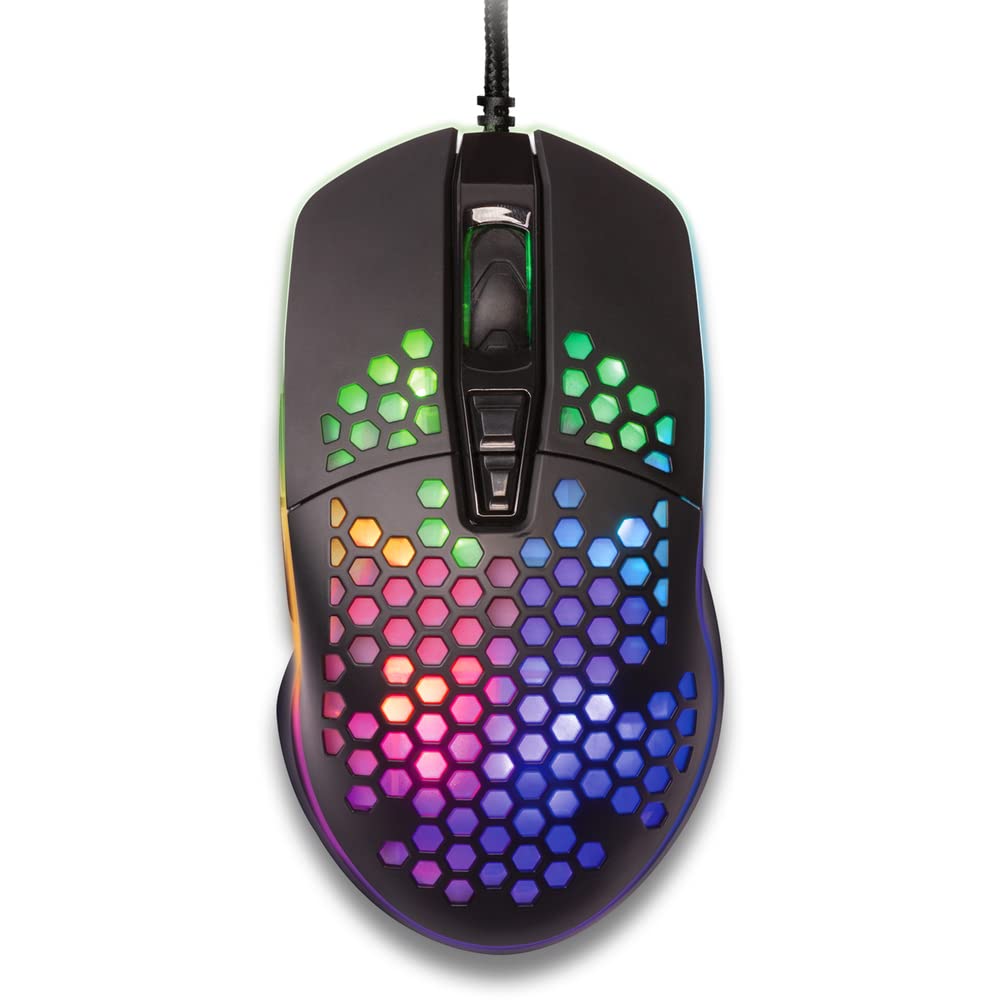
Фигура 1: Отгоре надолу view of the YENKEE YMS 3030BK RGB Gaming Mouse, highlighting its ultra-light perforated design and ergonomic contours.
4. Настройка
Follow these steps to set up your YENKEE YMS 3030BK gaming mouse:
- Свържете мишката: Включете USB конектора на мишката в наличен USB порт на вашия компютър.
- Инсталиране на драйвери: Your operating system (Windows 7, 8, Vista, XP) should automatically detect and install the necessary drivers. No additional software installation is typically required for basic functionality.
- Допълнителен софтуер: For advanced customization of RGB lighting and button assignments, please visit the official YENKEE website to check for any dedicated software for the YMS 3030BK model.
5. Инструкции за работа
5.1 Основна операция
- Ляв клик: Първоначално действие, селекция.
- Кликнете с десния бутон: Контекстно меню, вторично действие.
- Колело за превъртане: Scroll up/down, middle click for specific functions (e.g., opening links in new tabs).
- Странични бутони: Default functions are typically 'Forward' and 'Backward' in web браузъри или file explorers. These can often be customized via software.
5.2 Настройка на DPI
The YMS 3030BK mouse features an IC 6651 sensor with a maximum resolution of 6400 DPI. You can adjust the DPI (Dots Per Inch) sensitivity on-the-fly using the dedicated DPI button, usually located behind the scroll wheel. Pressing this button will cycle through preset DPI levels, indicated by changes in the mouse's RGB lighting color or pattern. Refer to the optional software for precise DPI level configuration and customization.
5.3 Персонализиране на RGB осветлението
The RGB backlight of your mouse can be customized to match your preferences. While some mice offer onboard controls for basic lighting effects, full customization of colors, patterns, and brightness is typically achieved through the dedicated YENKEE software (if available). Please download and install the software from the official YENKEE website for advanced lighting options.
6. Поддръжка
To ensure the longevity and optimal performance of your gaming mouse, follow these maintenance guidelines:
- Почистване: Use a soft, dry cloth to wipe the surface of the mouse. For perforated areas, a soft brush or compressed air can help remove dust. Avoid using harsh chemicals or abrasive materials.
- Почистване на сензора: Occasionally clean the optical sensor on the underside of the mouse with a cotton swab lightly dampобработен с изопропилов алкохол. Уверете се, че е напълно сух преди употреба.
- Грижа за кабела: Избягвайте резки огъвания или прекомерно дърпане на USB кабела, за да предотвратите повреда.
- Съхранение: Съхранявайте мишката на чисто и сухо място, когато не я използвате.
7. Отстраняване на проблеми
If you encounter issues with your YENKEE YMS 3030BK mouse, refer to the table below for common problems and solutions:
| проблем | Възможна причина | Решение |
|---|---|---|
| Мишката не реагира | Разхлабена USB връзка, дефектен USB порт, проблем с драйвера. | Уверете се, че USB кабелът е добре включен. Опитайте с друг USB порт. Рестартирайте компютъра. Проверете диспечера на устройствата за състоянието на драйвера. |
| Движението на курсора е неравномерно или подскачащо | Замърсен оптичен сензор, неподходяща повърхност на подложката за мишка. | Clean the optical sensor. Use a clean, uniform mouse pad. |
| Регулирането на DPI не работи | Софтуерен конфликт, неизправност на бутоните. | Ensure no conflicting software is running. If using custom software, check its settings. |
| RGB осветлението не работи или е заседнало | Software issue, power issue. | Check the YENKEE software settings. Unplug and replug the mouse. Restart your computer. |
8. Спецификации
| Характеристика | детайл |
|---|---|
| Марка | ЙЕНКИ |
| Номер на модела | YMS 3030BK |
| Технология за свързване | USB (с кабел) |
| Технология за откриване на движение | Optical (IC 6651 Sensor) |
| Макс. DPI | 6400 DPI |
| Специални функции | Ergonomic Design, Lightweight, Perforated Construction, RGB Backlight |
| Цвят | черен |
| Тегло на артикула | 4.2 унции (приблизително 119 грама) |
| Размери на продукта (ДxШxВ) | 5.43 x 2.44 x 9.06 инча (приблизително 13.8 x 6.2 x 23 см) |
| Хардуерна платформа | Игри |
| Съвместимост на операционната система | Windows 7, Windows 8, Windows Vista, Windows XP |
9. Гаранция и поддръжка
Гаранционна информация: For detailed warranty terms and conditions, please refer to the warranty card included with your product or visit the official YENKEE website. Warranty periods may vary by region and retailer.
Поддръжка на клиенти: If you require technical assistance or have questions regarding your YENKEE YMS 3030BK gaming mouse, please contact your retailer or visit the support section of the official YENKEE webсайт за информация за контакт и често задавани въпроси.