
1. Въведение
Thank you for choosing the breo Facial mini Portable Fascia Release Massager. This device is designed to provide targeted muscle relief and relaxation. Please read this manual thoroughly before use to ensure safe and effective operation. Keep this manual for future reference.
2. Предупреждения за безопасност
Важна информация за безопасност:
- Avoid using the device on areas with recent surgery, skin damage, redness, inflammation, or bruising.
- Do not immerse the device in water. This product is not waterproof.
- Да се пази от деца.
- Консултирайте се с лекар преди употреба, ако имате някакви медицински проблеми, сте бременна или имате пейсмейкър.
- Не разглобявайте и не модифицирайте устройството.
- Използвайте само предоставения кабел за зареждане.
3. Съдържание на пакета
Проверете дали всички елементи са налични в пакета:
- breo Facial mini Main Unit
- USB кабел за зареждане Type-C
- Attachment 1: Ball Head
- Attachment 2: U-shaped Head
- Attachment 3: Conical Head
- User Manual (with Warranty Card)

Figure 1: Main unit and included attachments.
4. Характеристики на продукта
- Powerful Vibration: Up to 3,000 cycles per minute for effective muscle relief.
- Множество режими: 4 adjustable vibration modes to suit various needs.
- Сменяеми приставки: Includes three specialized attachments (Ball, U-shaped, Conical) for different body parts. The flat head is available when no attachment is used.
- Ultra-Lightweight & Compact: Weighs only 195g with dimensions of 7.9 x 3.3 x 11.7 cm, making it easy for one-handed use and portability.
- Приложение за цялото тяло: Suitable for use on various muscle groups across the body.
- Автоматично изключване: Device automatically powers off after approximately 10 minutes of continuous use to prevent overuse.
- Защита от налягане: Motor automatically stops if excessive pressure is applied, preventing injury and device damage.
- Акумулаторна батерия: Built-in 1100mAh battery, rechargeable via Type-C (DC5.0V/2.0A).
- Тиха работа: Equipped with noise-canceling technology, operating at less than 50dB, allowing for discreet use anytime, anywhere.
5. Настройка
5.1 Зареждане на устройството
- Преди първа употреба, заредете напълно устройството.
- Свържете предоставения USB Type-C кабел към порта за зареждане на устройството.
- Connect the other end of the USB cable to a compatible USB power adapter (DC5.0V/2.0A, not included).
- The indicator lights will show charging status. A full charge typically takes 2 hours.
- След като се зареди напълно, изключете кабела за зареждане.
5.2 Attaching/Detaching Massage Heads
- Ensure the device is powered off before changing attachments.
- To attach a head, align the base of the desired attachment with the massage port and push firmly until it clicks into place.
- To detach a head, gently pull it off the massage port.

Figure 2: Attaching a massage head.
6. Инструкции за работа
6.1 Включване/изключване
- To power on, press and hold the power button for 2 seconds. The indicator lights will illuminate.
- To power off, press and hold the power button for 2 seconds. The indicator lights will turn off.
6.2 Избор на режим
- After powering on, short press the power button to cycle through the 4 available vibration modes.
- Each press will switch to the next mode, indicated by the changing pattern of the indicator lights.
6.3 Using the Massager
- Select the appropriate attachment for the desired body part.
- Turn on the device and select your preferred vibration mode.
- Gently apply the massage head to the target area. Move the device slowly and steadily.
- Do not apply excessive pressure. The device has an automatic stop function if too much pressure is detected.
- The device will automatically shut off after approximately 10 minutes of use.

Figure 3: Using the massager on the neck.

Figure 4: Using the massager on the shoulder.
7. Поддръжка
7.1 Почистване
- Уверете се, че устройството е изключено и разкачено от зарядното устройство, преди да го почистите.
- Избършете основното устройство с мека, damp плат. Не използвайте абразивни почистващи препарати и не го потапяйте във вода.
- The massage attachments can be cleaned with a mild soap solution and then rinsed and air-dried.
7.2 Съхранение
- Store the device and its attachments in a cool, dry place, away from direct sunlight and extreme temperatures.
- Keep the device away from sharp objects to prevent damage.
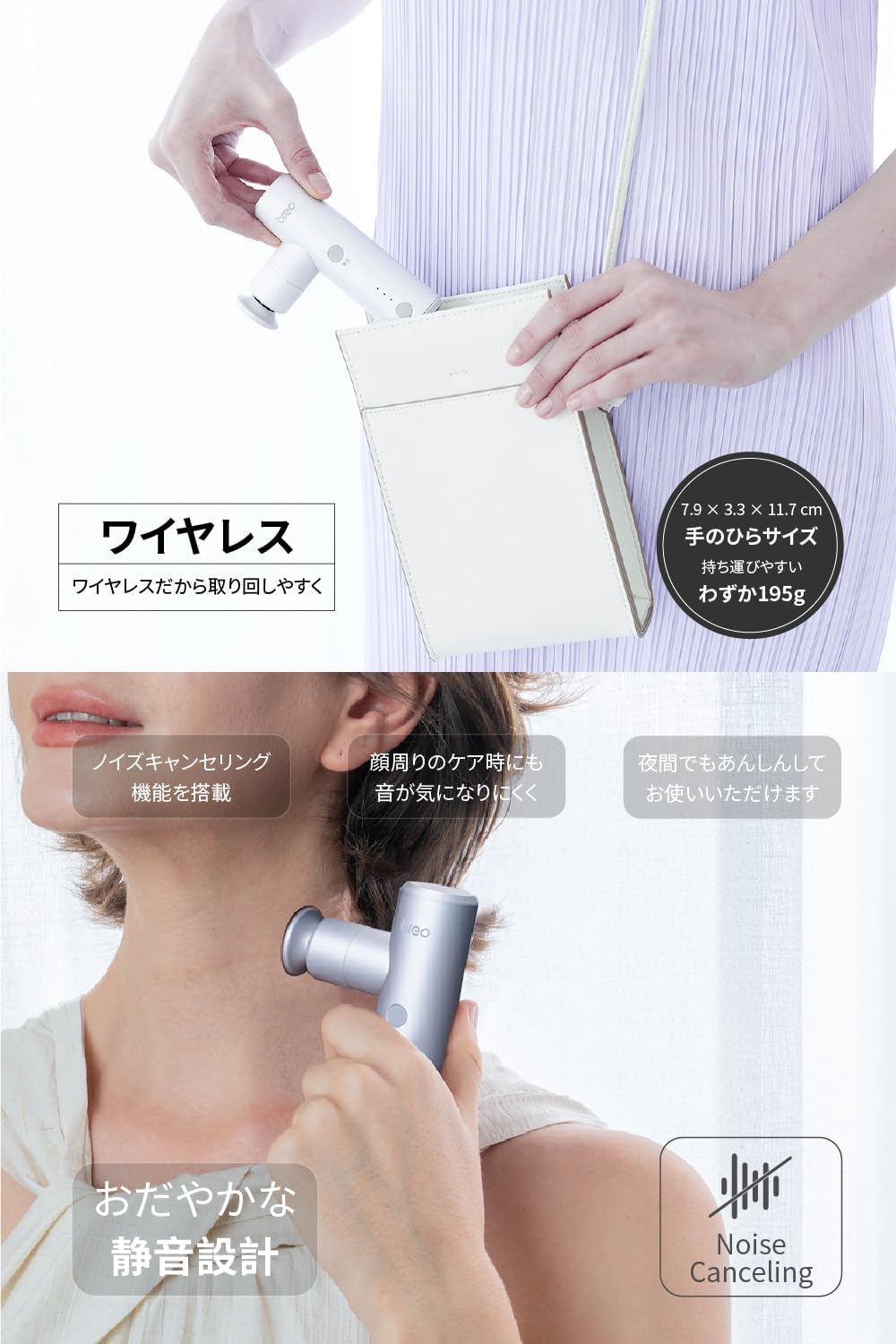
Figure 5: Storing the portable massager.
8. Отстраняване на проблеми
| проблем | Възможна причина | Решение |
|---|---|---|
| Устройството не се включва. | Ниска батерия. | Заредете устройството напълно. |
| Устройството спира по време на употреба. | Automatic shut-off activated (10 minutes). Приложен е прекомерен натиск. | Restart the device if desired. Reduce pressure on the massage area. |
| Вибрацията е слаба. | Ниска батерия. Избран е неправилен режим. | Заредете устройството. Cycle through modes to select a stronger setting. |
| Прикачените файлове са трудни за смяна. | Not properly aligned or device is on. | Ensure device is off. Align attachment carefully and push/pull firmly. |
Ако проблемът продължава след изпробване на тези решения, моля, свържете се с отдела за обслужване на клиенти.
9. Спецификации
- модел: Sport-M310
- Размери: 7.9 см (Д) х 3.3 см (Ш) х 11.7 см (В)
- Тегло: 195 гр
- Батерия: 1100mAh литиево-полимерна батерия (включена)
- Порт за зареждане: Тип-C
- Вход за зареждане: DC5.0V/2.0A
- Време за зареждане: Приблизително 2 часа
- Ниво на шум при работа: < 50 dB
- Режими на вибрация: 4 нива
- Max Vibration Frequency: 3000 цикъла/минута
- Автоматичен таймер: 10 минути
- материал: (Not specified in data, assuming standard massager materials)
- Произход: Китай
10. Гаранция и поддръжка
This breo Facial mini massager comes with a 1-годишна гаранция от производителя from the date of purchase. The warranty covers defects in materials and workmanship under normal use.
Гаранцията не покрива:
- Damage caused by improper use, accident, abuse, or neglect.
- Повреди от неоторизирани ремонти или модификации.
- Нормално износване.
For warranty claims or technical support, please contact breo customer service. Please have your proof of purchase and model number (Sport-M310) ready when contacting support.