
1. Въведение
Thank you for choosing the CHROX G96max Android 12.0 TV Box. This manual provides essential information for setting up, operating, and maintaining your device. The G96max TV Box is designed to deliver a high-performance multimedia experience with its Android 12.0 operating system, RK3318 Quad-Core processor, 4K/6K video support, dual-band Wi-Fi, and Bluetooth 5.0 connectivity.
Please read this manual thoroughly before using the product to ensure proper operation and to maximize your viewопит.
2. Съдържание на пакета
Проверете дали всички изброени по-долу артикули са включени във вашия пакет:
- 1 x G96 MAX Android 12.0 TV Box
- 1 x Захранващ адаптер
- 1 x HDMI кабел
- 1 x IR дистанционно управление
- 1 x Ръководство за потребителя
- 1 x Wireless Mini Keyboard (may vary by package)

Image: The CHROX G96max Android 12.0 TV Box with its included accessories, such as the remote control, power adapter, and cables.
3. Продуктът свършиview
The CHROX G96max TV Box features a compact design with various ports for connectivity. Understanding these interfaces is crucial for proper setup and usage.
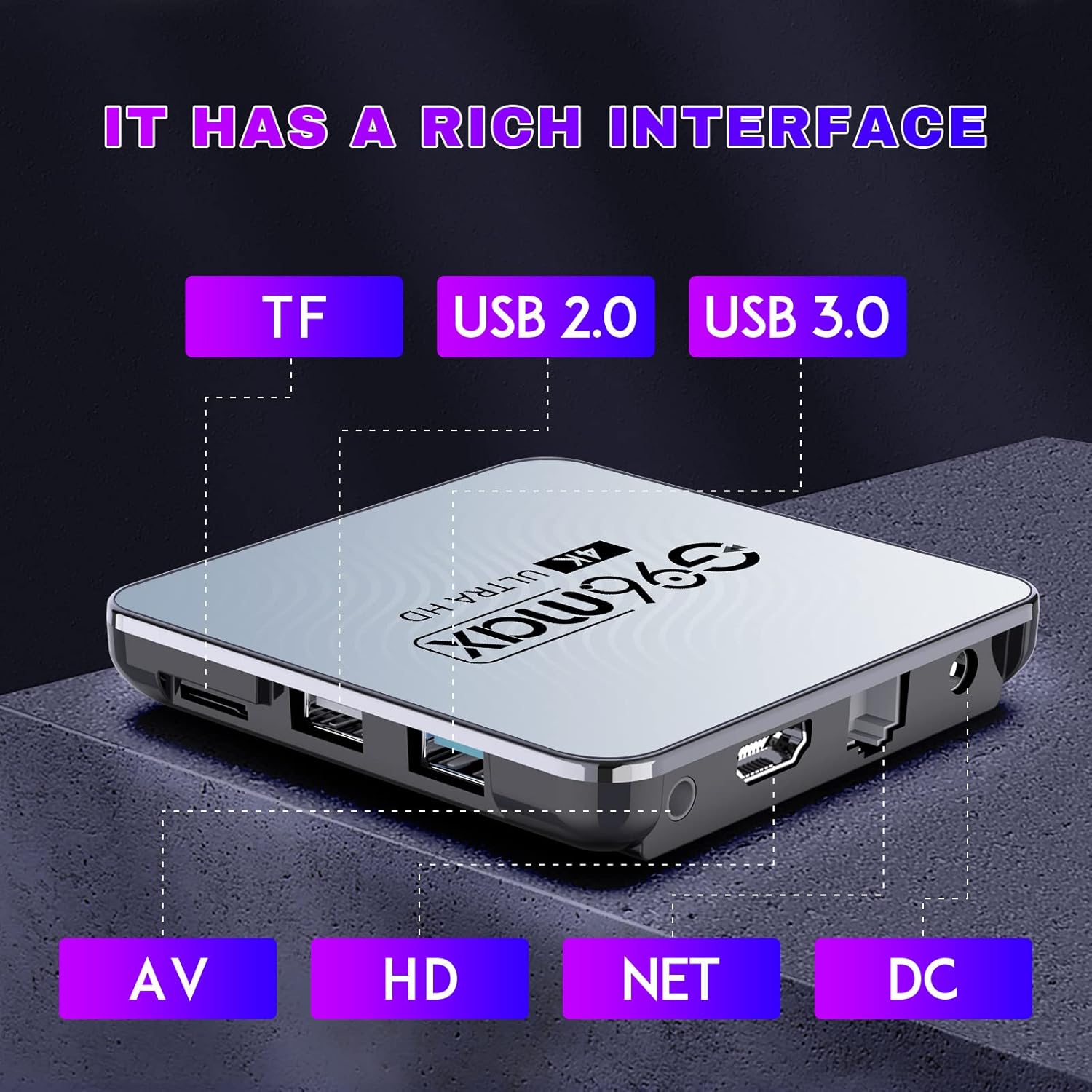
Изображение: Подробно view of the CHROX G96max TV Box, highlighting its various input/output ports including TF card slot, USB 2.0, USB 3.0, AV, HDMI, Ethernet (NET), and DC power input.
Описания на портовете:
- Слот за TF карта: For inserting a MicroSD/TF memory card to expand storage.
- USB 2.0 порт: For connecting USB devices such as flash drives, external hard drives, or a mouse.
- USB 3.0 порт: Offers faster data transfer speeds for compatible USB devices.
- AV порт: For connecting to older televisions using an AV cable (composite video and stereo audio).
- HDMI порт: For connecting to an HDTV or monitor using the provided HDMI cable for high-definition video and audio.
- NET (Ethernet) Port: За кабелна интернет връзка.
- Входяща постоянна мощност: За свързване на захранващия адаптер.

Image: The CHROX G96max TV Box displaying its wireless capabilities, including 2.4GHz and 5.8GHz Wi-Fi, built-in Bluetooth 4.0 (note: product description states BT5.0), and a USB 3.0 port.
4. Ръководство за настройка
Follow these steps to set up your CHROX G96max TV Box:
- Свързване с телевизор: Connect one end of the HDMI cable to the HDMI port on the TV Box and the other end to an available HDMI input on your television. If using an older TV, connect an AV cable to the AV port.
- Свържете захранването: Plug the power adapter into the DC power input port on the TV Box, then plug the adapter into a wall outlet. The device should power on automatically, or you may need to press the power button on the remote control.
- Изберете вход: Turn on your television and use its remote control to select the correct HDMI or AV input source that corresponds to where you connected the TV Box.
- Съветник за първоначална настройка: Upon first boot, the TV Box will guide you through an initial setup wizard. This typically includes language selection, screen adjustment, and network connection.
- Мрежова връзка:
- Wi-Fi: Select your Wi-Fi network from the list, enter the password, and connect. The device supports dual-band 2.4G/5.8G Wi-Fi.
- Ethernet: If you prefer a wired connection, connect an Ethernet cable from your router to the NET port on the TV Box.
- Google акаунт: Sign in with your Google account to access the Google Play Store and other Google services. If you don't have one, you can create one.
- Wireless Mini Keyboard: If included, connect the USB dongle for the wireless mini keyboard to an available USB port on the TV Box. The keyboard should be automatically recognized.
5. Инструкции за работа
5.1 Навигиране в интерфейса
Use the provided IR remote control or the wireless mini keyboard to navigate the Android 12.0 interface. The remote typically includes directional buttons, an 'OK' button for selection, 'Back' button, 'Home' button, and volume controls.

Image: An illustration showing the progression of Android versions, highlighting Android 12.0 as the latest upgrade for the G96max TV Box.
5.2 Инсталиране на приложения
The CHROX G96max TV Box comes with the Google Play Store pre-installed, allowing access to thousands of applications.

Image: A visual representation of the Google Play Store interface, surrounded by numerous popular application icons, indicating the wide range of apps available for download.
- From the home screen, select the Google Play Store икона.
- Търсене на your desired application using the search bar.
- Select the app and click Инсталирайте.
- Once installed, the app will appear on your home screen or in the app drawer.
5.3 Възпроизвеждане на медийни файлове
The TV Box supports Ultra HD 4K/6K video playback, HLG Mode, and HDR10+ for enhanced visual quality.

Image: A visual comparison demonstrating the clarity and detail difference between 720p, 1080p, and 4K video resolutions, emphasizing the TV Box's 4K decoding capability.
- Use pre-installed media players or download preferred ones from the Google Play Store.
- Access local media files from connected USB drives or TF cards.
- Stream content from various online services through their respective applications.
6. Поддръжка
- Почистване: Използвайте мека, суха кърпа за почистване на устройството. Избягвайте течни почистващи препарати или абразивни материали.
- Софтуерни актуализации: Периодично проверявайте за системни актуализации в настройките на устройството, за да осигурите оптимална производителност и сигурност.
- Управление на съхранението: Regularly clear cache and uninstall unused applications to free up storage space and maintain system speed.
- Мощностен цикъл: If the device becomes unresponsive, disconnect the power adapter for a few seconds and then reconnect it to perform a power cycle.
7. Отстраняване на проблеми
If you encounter issues with your CHROX G96max TV Box, refer to the following common problems and solutions:
| проблем | Решение |
|---|---|
| Няма захранване/Устройството не се включва |
|
| Няма сигнал на телевизионния екран |
|
| Проблеми с Wi-Fi връзката |
|
| Дистанционното не работи |
|
| Сривове или замръзване на приложенията |
|
8. Спецификации
Key technical specifications of the CHROX G96max Android 12.0 TV Box:

Изображение: Близък план view of the Rockchip RK3318 processor, highlighting its role as a high-performance chip within the TV Box.
- Операционна система: Android 12.0
- процесор: RK3318 Четириядрен 64-битов Cortex-A53
- GPU: Мали-450 MP2
- RAM: 4GB (според текущия модел)
- Flash Storage: 64GB (според текущия модел)
- Wi-Fi: 2.4G/5G Dual Band, IEEE 802.11 a/b/g/n/ac/ax
- Bluetooth: BT 5.0
- USB портове: 1 x Type-A USB 3.0, 1 x Type-A USB 2.0
- LAN: Ethernet 10/100M standard RJ-45
- Video Decoder Support: H.264/H.265/VP9 up to 8K@30fps, H.264/AVC BP/MP/HP profile @ level 5.1, H.265/HEVC Main/Main10 profile @ level 5.1 High-tier, VP9 P2 4KX2K @60fps, AVS2 4KX2K @60fps, MPEG-1, MPEG-2, MPEG-4
- Поддръжка на медийни формати: Avi/Ts/Vob/Mkv/Mov/ISO/wmv/asf/flv/dat/mpg/mpeg
- Поддръжка на музикални формати: MP3/WMA/AAC/WAV/OGG/DDP/HD/FLAC/APE
- Photo Format Support: JPEG / BMP / GIF / PNG / TIFF
- Резолюция: Supports 1080p FW, 4k, 720p (up to 6K decoding)
- Специални функции: Support Dual WiFi, HDR10+, HLG Mode, 3D Effect
- Съвместими устройства: телевизия
9. Гаранция и поддръжка
CHROX provides 24-hour after-sales service for this product. If you have any questions, concerns, or require technical assistance, please contact our customer support. Your satisfaction is important to us.
Please refer to your purchase documentation or the seller's information for specific contact details and warranty terms.