
1. Въведение
This manual provides detailed instructions for the setup, operation, maintenance, and troubleshooting of your Vontar X3 S905X3/4GB/32GB Android TV Box. Please read this manual thoroughly before using the device to ensure proper functionality and to maximize your user experience. Keep this manual for future reference.
2. Продуктът свършиview
The Vontar X3 S905X3/4GB/32GB is an Android TV Box designed to transform your television into a smart entertainment hub. It runs on Android 9.0 and features a powerful S905X3 processor, 4GB of RAM, and 32GB of internal storage, providing a smooth and responsive user experience for streaming, gaming, and app usage.
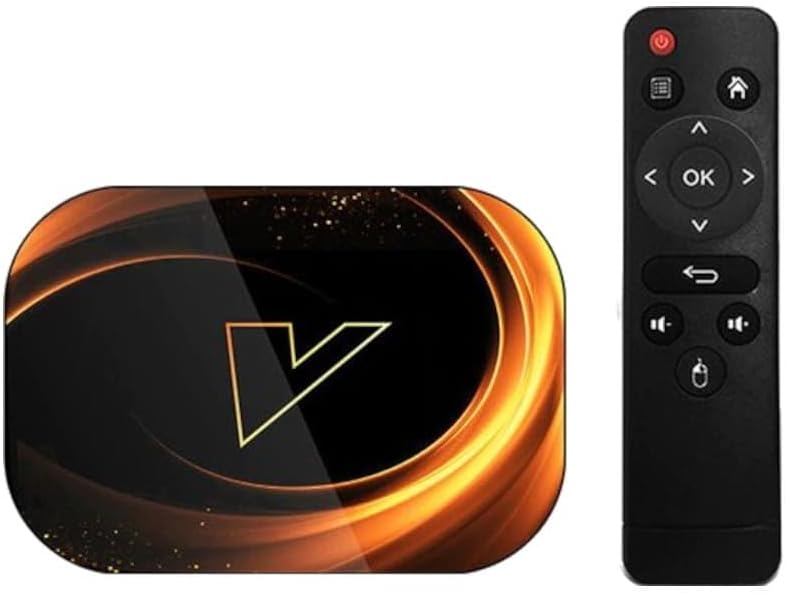
Фигура 2.1: The Vontar X3 Android TV Box shown alongside its included remote control. The TV box features a sleek, dark design with a prominent 'V' logo on top, while the remote is a standard black infrared type with navigation and media control buttons.
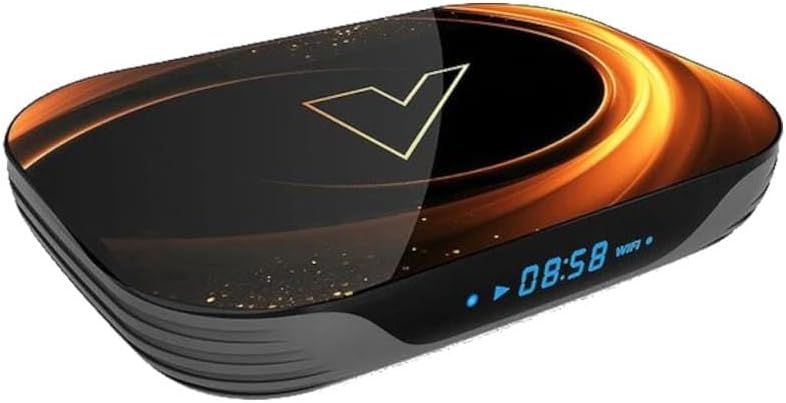
Фигура 2.2: Преден ъгъл view of the Vontar X3 Android TV Box, highlighting its digital display which shows the current time (08:58) and Wi-Fi status. The device has a dark, glossy finish with an illuminated 'V' logo and subtle golden accents.
Съдържание на пакета:
- Vontar X3 S905X3/4GB/32GB Android TV Box
- Дистанционно управление
- Захранващ адаптер
- HDMI кабел
- Ръководство за потребителя
3. Ръководство за настройка
3.1 Свързване на устройството
- Свързване с телевизор: Insert one end of the HDMI cable into the HDMI port on the Vontar X3 TV Box and the other end into an available HDMI input on your television.
- Свързване към захранване: Plug the power adapter into the DC IN port on the TV Box, then plug the adapter into a wall outlet. The device should power on automatically or can be turned on using the power button on the remote.
- Свързване към мрежа (по избор):
- Wi-Fi: Once the device is powered on, navigate to the 'Settings' menu, select 'Network & Internet', and choose your Wi-Fi network. Enter the password if prompted.
- Ethernet: For a wired connection, connect an Ethernet cable from your router to the LAN port on the TV Box. The device will automatically detect the wired connection.
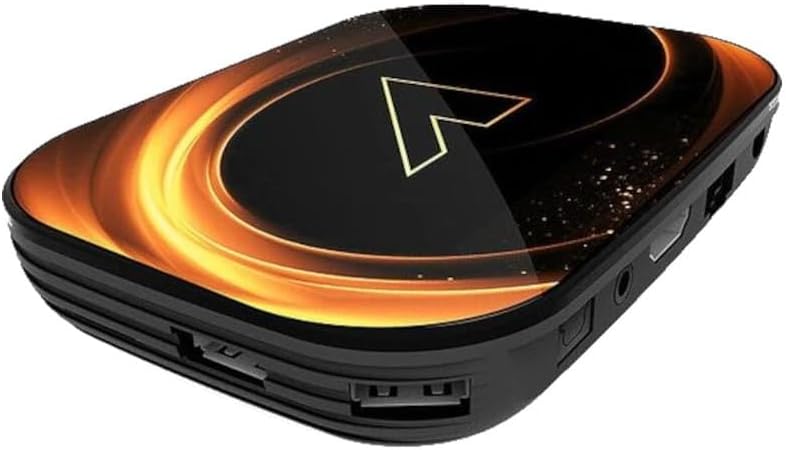
Фигура 3.1: Задна view of the Vontar X3 Android TV Box, showing various ports including HDMI, Ethernet (LAN), and DC power input. These ports are essential for connecting the device to a television and power source.

Фигура 3.2: отстрани view of the Vontar X3 Android TV Box, displaying additional connectivity options such as USB ports (one USB 3.0, one USB 2.0) and a MicroSD card slot for expandable storage.
3.2 Първоначално стартиране
After connecting all necessary cables, switch your TV's input source to the corresponding HDMI port. The Vontar X3 TV Box will display the boot-up screen. Follow any on-screen prompts for initial setup, such as language selection and Google account login.
4. Инструкции за работа
4.1 Функции за дистанционно управление
The included remote control allows you to navigate the Android TV interface and control media playback. Familiarize yourself with the main buttons:
- Бутон за захранване: Включва или изключва устройството.
- Навигационен панел (нагоре/надолу/наляво/надясно): Премества курсора или селекцията.
- Бутон OK: Потвърждава избора или отваря елемент.
- Бутон за връщане назад: Връща се към предишния екран.
- Бутон за начало: Връща към главния начален екран.
- Бутони за сила на звука: Регулира силата на звука на звука.
- Бутон за меню: Достъп до контекстно-чувствителни менюта.
4.2 Навигиране в интерфейса на Android 9.0
The Vontar X3 runs on Android 9.0, offering a user-friendly interface. Use the remote's navigation pad to browse through apps, settings, and content. The home screen typically displays frequently used apps, recommended content, and quick access to settings.
4.3 Installing and Uninstalling Applications
- Инсталиране на приложения: Access the Google Play Store from the home screen. Търсене на desired applications and select 'Install'.
- Деинсталиране на приложения: Go to 'Settings' > 'Apps'. Select the app you wish to uninstall and choose 'Uninstall'.
4.4 Възпроизвеждане на медийни файлове
The device supports various media formats. You can play media from:
- Услуги за поточно предаване: Install apps like Netflix, YouTube, Hulu, etc., from the Google Play Store.
- Локално хранилище: Connect a USB drive or MicroSD card to play media files directly. Use a file manager or media player app.
- Мрежово съхранение: Достъп до медии files from network-attached storage (NAS) or shared folders on your local network.
5. Поддръжка
5.1 Почистване на устройството
To clean the Vontar X3 TV Box, use a soft, dry cloth. Do not use liquid cleaners or abrasive materials, as they may damage the device's finish or internal components.
5.2 Софтуерни актуализации
Periodically check for software updates to ensure optimal performance and access to the latest features. Go to 'Settings' > 'Device Preferences' > 'About' > 'System update'.
5.3 Фабрично нулиране
Ако срещнете постоянни проблеми, възстановяването на фабричните настройки може да ги реши. Предупреждение: A factory reset will erase all data, settings, and installed applications. Go to 'Settings' > 'Device Preferences' > 'Reset'. Confirm your choice when prompted.
6. Отстраняване на проблеми
This section addresses common issues you might encounter with your Vontar X3 TV Box.
| проблем | Възможна причина | Решение |
|---|---|---|
| Без захранване | Power adapter not connected; Power outlet not working; Device faulty. | Уверете се, че захранващият адаптер е здраво свързан към устройството и към работещ електрически контакт. Опитайте с друг контакт. |
| Няма сигнал на телевизора | Incorrect HDMI input selected; HDMI cable loose or faulty; TV Box not powered on. | Select the correct HDMI input on your TV. Check HDMI cable connections. Ensure the TV Box is powered on. |
| Wi-Fi не се свързва | Incorrect Wi-Fi password; Router issues; Device too far from router. | Verify Wi-Fi password. Restart your router. Move the TV Box closer to the router or use an Ethernet cable. |
| Дистанционното не работи | Batteries drained; Obstruction between remote and device; Remote not paired (if Bluetooth). | Replace batteries. Ensure no obstructions. If it's a Bluetooth remote, re-pair it via settings. |
| Приложенията се сриват или замръзват | Insufficient memory; App specific issue; Software glitch. | Close background apps. Clear app cache/data (Settings > Apps). Restart the device. Perform a factory reset if issues persist. |
7. Спецификации
The following are the technical specifications for the Vontar X3 S905X3/4GB/32GB Android TV Box:
- модел: X3 S905X3/4GB/32GB
- Операционна система: Android 9.0
- Процесор: Amlogic S905X3
- RAM: 4GB
- Вътрешна памет: 32GB
- Свързване: Wi-Fi, Ethernet, HDMI, USB 3.0, USB 2.0, MicroSD Card Slot
- Размери: 13.78 x 9.45 x 6.3 инча (Размери на опаковката)
- Тегло на артикула: 1.76 паунда (800 грама)
- цвят: Colourful (Device exterior design)
- производител: Vontar
- Номер на модела на артикул: 62353
- ASIN: B0CPPPXYKP
8. Гаранция и поддръжка
For warranty information and technical support, please refer to the documentation provided with your purchase or contact Vontar customer service directly. Keep your proof of purchase for any warranty claims.