
1. Въведение
This manual provides detailed instructions for the FREEWOLF M68 60% Wireless Gaming Keyboard. Please read this manual carefully before using the product to ensure proper operation and longevity.

Figure 1: FREEWOLF M68 Wireless Gaming Keyboard (Shimmer color variant)
2. Продуктът свършиview
Ключови характеристики:
- Трирежимна свързаност: Supports wired (USB-C), 2.4GHz wireless, and Bluetooth 5.0 connections.
- Съвместимост с множество устройства: Connects to Windows, Mac, Linux, PC, Laptop, iPad, iOS, and Android devices.
- Компактно оформление от 60%: Features 67 keys, optimizing desktop space.
- PBT капачки за клавиши: Durable Polybutylene Terephthalate keycaps with clear legends.
- Дъгова LED подсветка: Offers constant and breathing modes with adjustable brightness and speed.
- Дълготрайна батерия: Built-in 2000mAH battery provides extended usage.
- Ергономичен дизайн: Double leg braces allow for three adjustable typing angles.
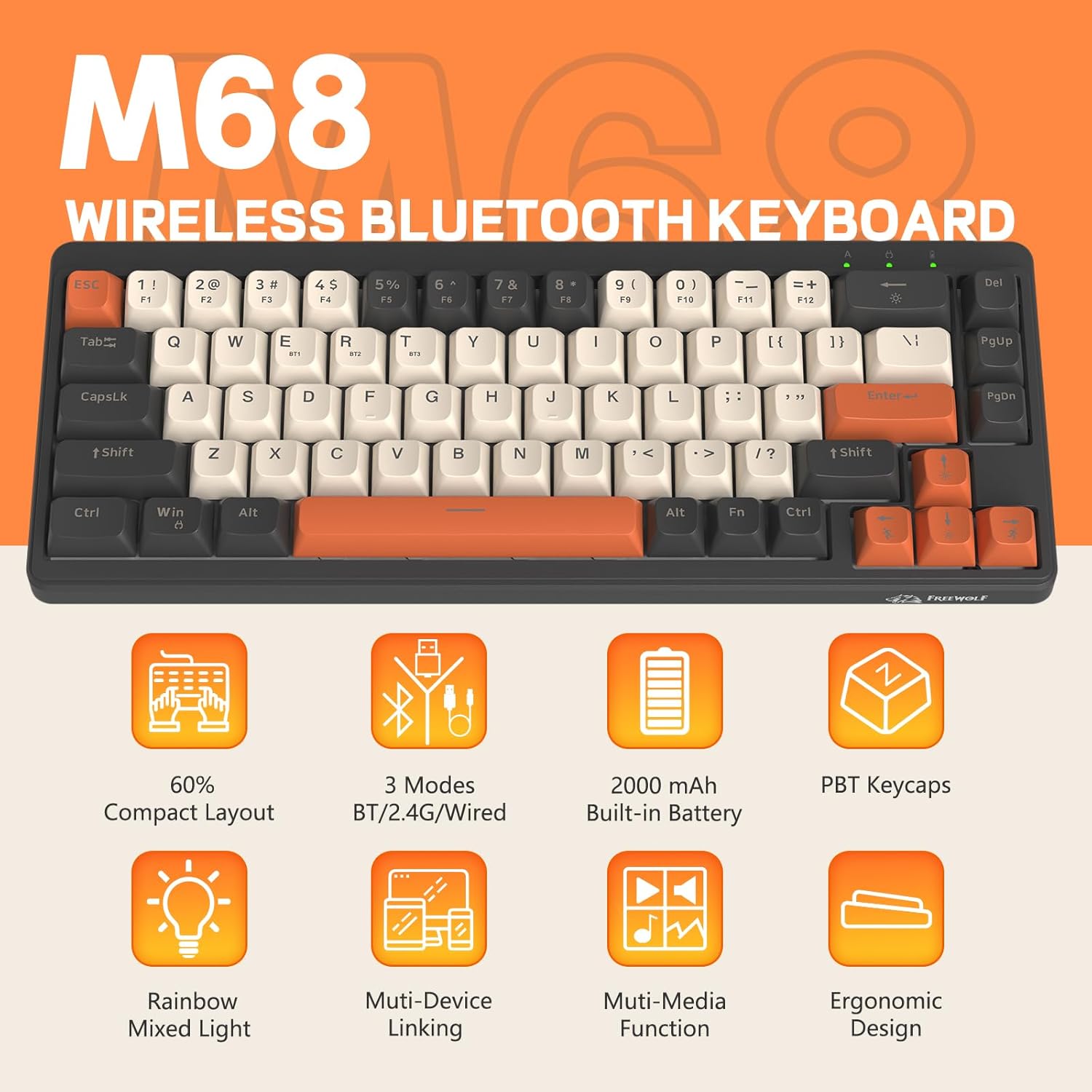
Фигура 2: Надview of FREEWOLF M68 key features.
3. Настройка и свързване
3.1. Tri-Mode Connection Overview
The M68 keyboard supports three connection methods: wired via USB-C, 2.4GHz wireless via a USB receiver, and Bluetooth 5.0. You can switch between these modes using the dedicated switch on the keyboard.

Фигура 3: Подробно view of the 3-mode connection options.
3.2. Кабелна връзка
- Намерете USB-C порта на клавиатурата.
- Свържете предоставения USB-C кабел към клавиатурата, а другия край към USB порта на компютъра.
- Уверете се, че превключвателят за режим на клавиатурата е настроен на позиция „кабелен“ (USB).
- Клавиатурата ще бъде автоматично разпозната от вашата система.
3.3. 2.4GHz безжична връзка
- Locate the 2.4GHz USB receiver (often stored in a compartment on the keyboard).
- Включете USB приемника в наличен USB порт на вашия компютър.
- Задайте превключвателя за режим на клавиатурата в положение за безжична връзка 2.4 GHz.
- Клавиатурата трябва да се свърже автоматично. Ако не, натиснете FN + R за да започнете сдвояване.
3.4. Bluetooth връзка
The M68 can connect to up to three Bluetooth devices simultaneously.
- Задайте превключвателя за режим на клавиатурата в позиция Bluetooth.
- To enter pairing mode for a specific channel (BT1, BT2, or BT3), press and hold FN + Q (за БТ1), FN + W (за BT2), или FN + E (for BT3) until the corresponding indicator light flashes rapidly.
- On your device (PC, laptop, tablet, phone), open Bluetooth settings and search for "FREEWOLF M68".
- Select the keyboard to pair. The indicator light will become solid once connected.
- За да превключвате между сдвоени Bluetooth устройства, натиснете FN + Q/W/E накратко.
4. Операция
4.1. Управление на подсветката
The M68 features customizable rainbow LED backlighting.
- FN + Backspace: Toggle backlight on/off or switch between constant and breathing modes.
- FN + лява стрелка: Намалете скоростта на подсветката.
- FN + стрелка надясно: Увеличете скоростта на подсветката.
- FN + стрелка нагоре: Увеличете яркостта на подсветката.
- FN + стрелка надолу: Намалете яркостта на подсветката.

Figure 4: Backlight adjustment key combinations.
4.2. Ергономично регулиране
The keyboard includes double leg braces on the back to adjust the typing angle for comfort.
- Flip the keyboard over to access the leg braces.
- Регулирайте дветеtage leg braces to achieve your preferred typing angle (flat, one stage, or two stages).

Figure 5: Ergonomic angle adjustments.
4.3. Управление на батерията
The keyboard has a built-in 2000mAH rechargeable battery.
- Зареждане: Connect the keyboard via the USB-C cable to a power source (computer USB port or wall adapter). The charging indicator will show status.
- Живот на батерията: Up to 60 hours with backlight on, and up to 200 hours with backlight off.
- Енергоспестяващ: The keyboard will enter sleep mode after a period of inactivity to conserve battery. Press any key to wake it up.

Figure 6: Battery capacity information.
5. Поддръжка
- Почистване: Use a soft, dry cloth to clean the keyboard surface. For keycaps, you may use a slightly damp кърпа. Избягвайте прекомерна влага.
- Премахване на капачката на клавиша: If necessary, use a keycap puller to carefully remove PBT keycaps for deeper cleaning or replacement.
- Съхранение: Съхранявайте клавиатурата на хладно и сухо място, далеч от пряка слънчева светлина и екстремни температури.
- Избягвайте течности: Do not expose the keyboard to liquids to prevent damage to internal components.
6. Отстраняване на проблеми
| проблем | Възможна причина | Решение |
|---|---|---|
| Клавиатурата не реагира (с кабел) | Разхлабена кабелна връзка, неправилен режим. | Ensure USB-C cable is securely connected. Check if the mode switch is set to wired. Try a different USB port. |
| Keyboard not responding (2.4GHz) | USB receiver not connected, incorrect mode, pairing issue. | Ensure USB receiver is plugged in. Set mode switch to 2.4GHz. Re-pair by pressing FN + R. Try a different USB port for the receiver. |
| Клавиатурата не реагира (Bluetooth) | Not paired, incorrect mode, device Bluetooth off. | Ensure device Bluetooth is on. Set mode switch to Bluetooth. Enter pairing mode (FN + Q/W/E) and re-pair. Forget the device on your system and re-pair. |
| Подсветката не работи или е заседнала | Backlight off, low battery, software glitch. | Натиснете FN + Backspace to toggle. Charge the keyboard. Try resetting the keyboard (refer to advanced functions if available, or disconnect/reconnect). |
| Клавишите не се регистрират или се въвеждат два пъти | Прах/отломки под капачката на клавишите, проблем с превключвателя. | Carefully remove keycap and clean. If issue persists, contact support. |
7. Спецификации
| Модел | M68 |
| Марка | СВОБОДЕН ВЪЛК |
| Свързаност | Wired (USB-C), 2.4GHz Wireless, Bluetooth 5.0 |
| Оформление на клавишите | 60% (67 ключа) |
| Ключ материал | PBT (полибутилен терефталат) |
| Подсветка | Rainbow LED (RGB) |
| Капацитет на батерията | 2000mAH |
| Съвместими устройства | Laptop, PC, Tablet (Windows, Mac, Linux, iOS, Android) |
| Размери на продукта | 32.51 х 12.5 х 3.99 см |
| Тегло | 600 гр |
| Специални функции | Ergonomic (adjustable angles), Backlit |
8. Гаранция и поддръжка
For warranty information, technical support, or customer service inquiries, please refer to the contact information provided with your purchase or visit the official FREEWOLF webсайт.
Моля, запазете доказателството си за покупка за евентуални гаранционни рекламации.