
E-ACE DMMRUTXB
E-ACE 4.3-Inch Dual Lens Car DVR Rearview Ръководство за потребителя на Mirror Dash Cam
Model: DMMRUTXB
1. Продуктът свършиview
The E-ACE 4.3-inch Dual Lens Car DVR Rearview Mirror Dash Cam is designed to enhance driving safety by providing comprehensive video recording of your journeys. This device integrates a front-facing camera and supports an optional rear-facing camera, offering a wide field of view and continuous recording capabilities. Its sleek design replaces your existing rearview mirror, providing a discreet and integrated solution for vehicle surveillance.
Key features include a 4.3-inch high-definition display, dual-lens recording, night vision, loop recording, and a G-sensor for automatic incident detection.

Image: The E-ACE rearview mirror dash cam displaying both front and rear camera feeds on its integrated screen.
2. Съдържание на пакета
Моля, проверете опаковката за следните артикули:
- E-ACE Rearview Mirror Dash Cam Unit
- Зарядно за кола
- Fixed Bandages (for mounting)
- Ръководство за потребителя
- Четец на карти
- Optional: Rear View Camera + Cable (6M or 10M, depending on variant)
- Optional: Buck Line (for parking monitoring power)
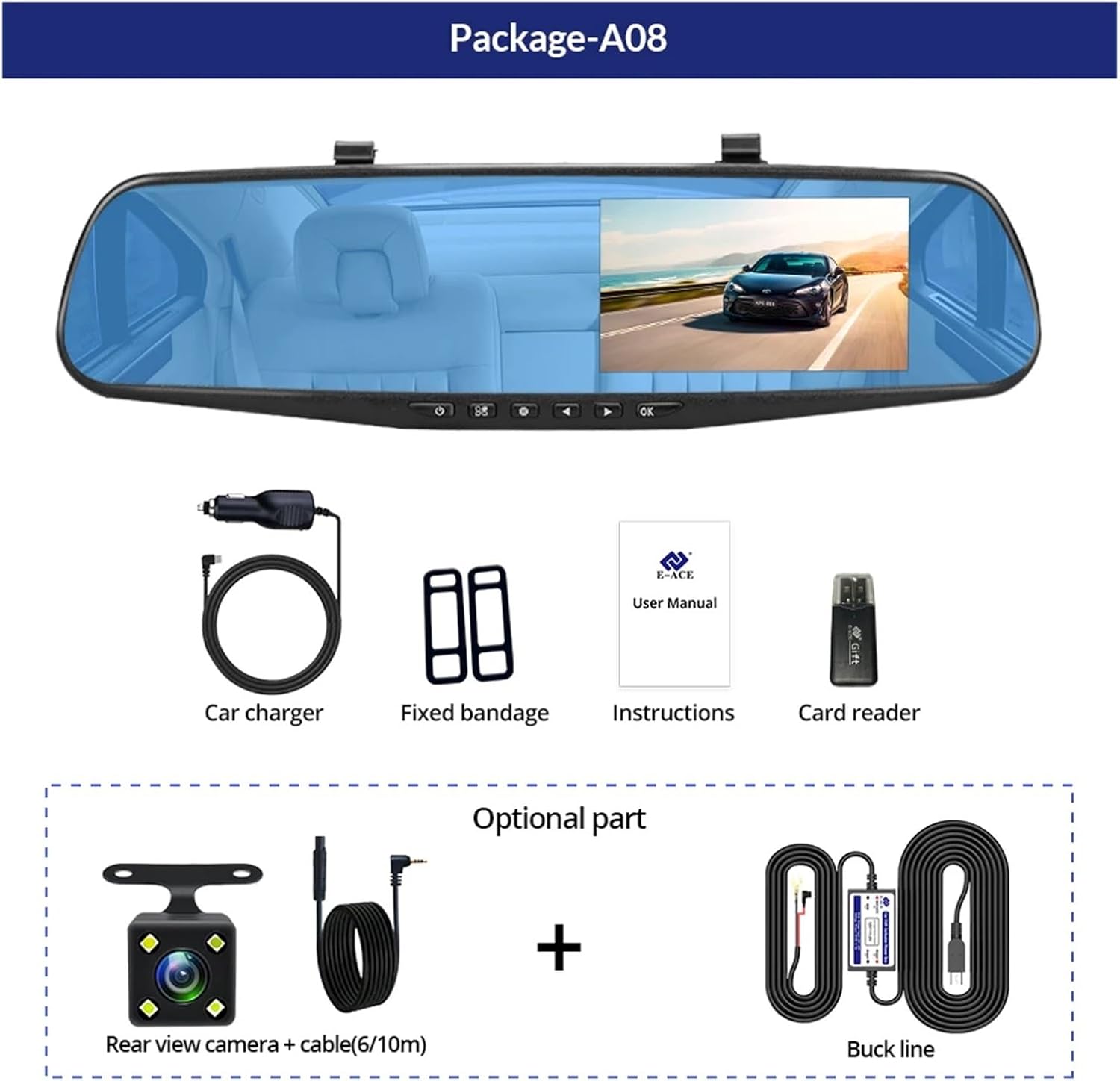
Image: A visual representation of the items included in the E-ACE dash cam package, showing the main unit and accessories.
3. Характеристики на продукта
- 4.3-инчов дисплей с висока разделителна способност: Provides clear visibility for real-time monitoring and playback.
- Дизайн с двойна леща: Captures both front and rear footage simultaneously for comprehensive coverage.
- Built-in Night Vision Technology: Ensures clear recordings in low-light conditions.
- Удобна за потребителя инсталация: Sleek rearview mirror design integrates seamlessly into your vehicle.
- Циклично записване: Автоматично презаписва най-стария footage когато картата с памет е пълна, осигурявайки непрекъснат запис.
- G-Sensor Feature: Detects sudden movements or impacts and automatically locks the current video file за да предотвратите презаписването му.
- Мониторинг на паркинг: Records video when motion or impact is detected while the vehicle is parked (requires buck line connection).
- 170-градусов широкоъгълен обектив: Осигурява широк view от пътя напред.
- Обратно изображение: Показва задната камера view with parking guidelines when reversing.
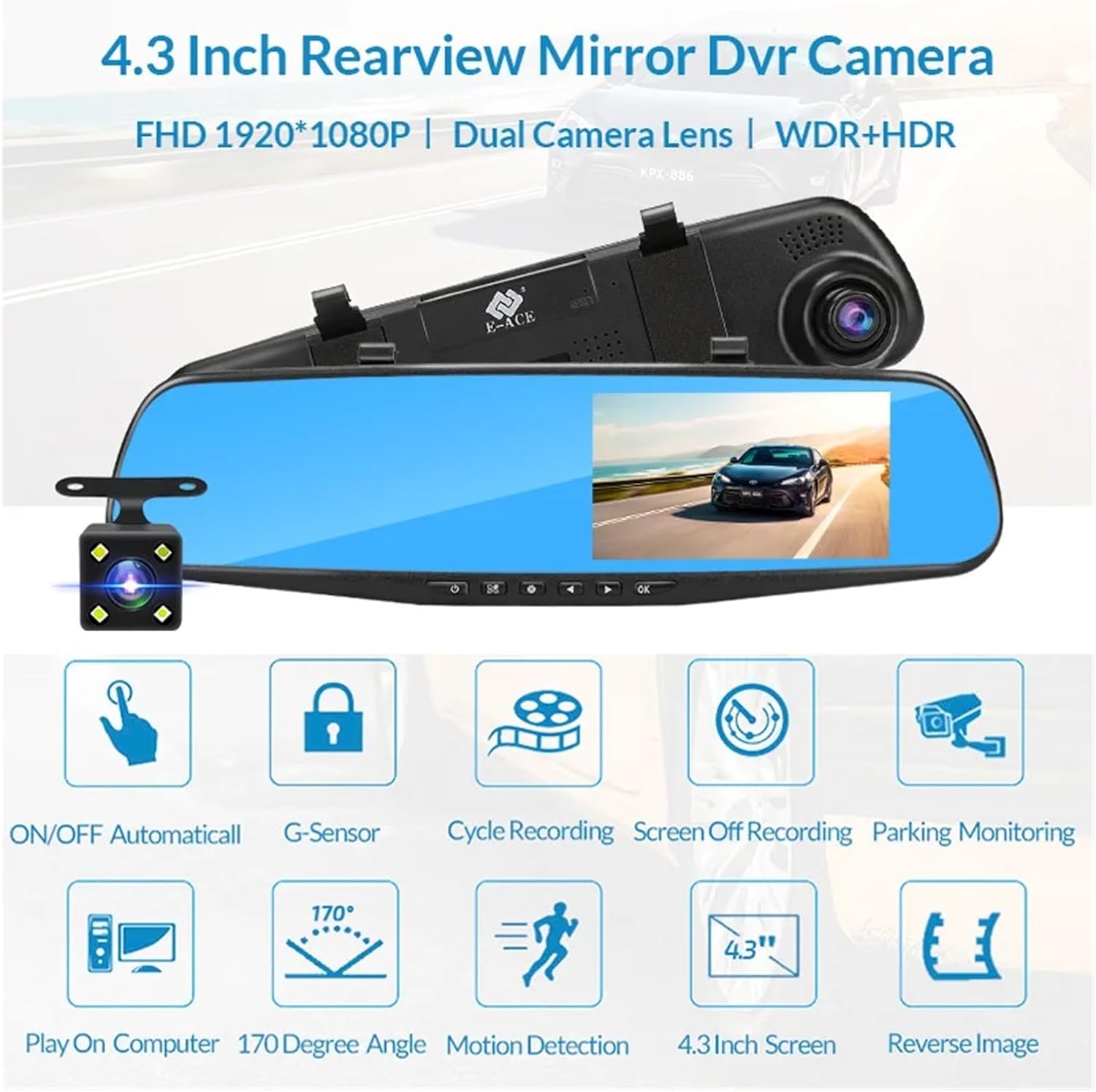
Image: An illustration highlighting the various functional features of the E-ACE dash cam.
4. Идентификация на компонента
Familiarize yourself with the various parts and controls of your E-ACE dash cam:

Image: A detailed diagram identifying the buttons, ports, and features on the E-ACE dash cam unit.
- Бутон ВКЛ./ИЗКЛ.: Включва или изключва устройството.
- Бутон за меню: Достъп до настройки и опции.
- Бутон за режим: Switches between video recording, photo, and playback modes.
- Бутон НАГОРЕ: Навигира нагоре в менютата или регулира настройките.
- Бутон надолу: Навигира надолу в менютата или регулира настройките.
- Бутон OK: Confirms selections or starts/stops recording.
- Слот за TF карта: Insert your MicroSD (TF) card here.
- AV-IN Port: Свързва задната камера.
- USB порт: За захранване и пренос на данни.
- Бутон за нулиране: Resets the device to factory settings (use a thin pin).
- Микрофон: Records audio inside the vehicle.
5. Настройка и инсталация
5.1 Поставяне на картата с памет
Before installation, insert a high-speed MicroSD (TF) card (Class 10 or higher, up to 64GB recommended) into the TF Card Slot (7) with the contacts facing the screen. Ensure the card is inserted correctly until it clicks into place.
5.2 Монтиране на видеорегистратора
- Attach the fixed bandages to the back of the dash cam unit.
- Securely strap the dash cam over your vehicle's existing rearview mirror using the fixed bandages. Ensure it is centered and stable.
5.3 Свързване на захранването
- Connect the car charger to the USB Port (9) on the dash cam.
- Включете другия край на зарядното за кола в гнездото за запалка на автомобила.
- Route the power cable neatly along the windshield trim to avoid obstructing your view.
5.4 Инсталиране на задната камера (по избор)
- Connect the rear camera cable to the AV-IN Port (8) on the dash cam.
- Route the rear camera cable from the dash cam to the rear of your vehicle. This typically involves tucking the cable under the headliner and along the side pillars.
- Mount the rear camera on the rear windshield or near the license plate using its adhesive or screws. Ensure it has a clear view на пътя отзад.
- If using the reverse image function, connect the red wire from the rear camera cable to your vehicle's reverse light power supply.
6. Инструкции за работа
6.1 Включване/изключване
- Автоматично: The dash cam will automatically power on and start recording when your vehicle's ignition is turned on (if connected to a switched power source).
- Ръчно: Press and hold the ON/OFF Button (1) to manually power the device on or off.
6.2 Основна операция
- Превключване на режими: Press the Mode Button (3) to cycle between Video Recording, Photo, and Playback modes.
- Меню за достъп: In any mode, press the Menu Button (2) to enter the settings menu. Use the UP (4) and Down (5) buttons to navigate, and OK (6) to select.
- Старт/Стоп на запис: In Video Recording mode, press the OK Button (6) to manually start or stop recording.
6.3 Режими на показване
While recording, you can typically switch between different display views by pressing the UP or Down buttons:
- Front Camera Only
- Rear Camera Only
- Picture-in-Picture (Front main, Rear sub-window)
- Picture-in-Picture (Rear main, Front sub-window)
6.4 Цикълен запис
Set the loop recording duration (e.g., 1, 3, or 5 minutes) in the settings menu. When the memory card is full, the oldest unlocked fileще бъдат презаписани от нови записи.
6.5 G-сензор
The G-sensor automatically detects collisions or sudden braking. When triggered, it locks the current video file, preventing it from being overwritten by loop recording. Adjust sensitivity in the settings.
6.6 Parking Monitoring (Optional)
If the buck line is installed, the dash cam can monitor your vehicle while parked. When motion or impact is detected, it will automatically record a short video. Enable this feature in the settings.
6.7 Настройка на дата и час
It is important to set the correct date and time in the system settings for accurate timestampна вашите записи.
7. Поддръжка
- Почистване: Използвайте мека, суха кърпа за почистване на лещата и екрана. Избягвайте абразивни почистващи препарати или разтворители.
- Карта с памет: Format the MicroSD card regularly (e.g., once a month) within the dash cam's settings to maintain optimal performance and prevent data corruption. Back up important files преди форматиране.
- температура: Avoid exposing the device to extreme temperatures, as this can affect battery life and component integrity.
- Актуализации на фърмуера: Проверете на производителя website periodically for firmware updates that may improve performance or add features.
8. Отстраняване на проблеми
| проблем | Възможна причина | Решение |
|---|---|---|
| Видеорегистраторът не се включва. | Няма захранване; дефектно зарядно устройство; хлабава връзка. | Check car charger connection and vehicle's cigarette lighter. Try a different USB cable/charger. |
| Записът спира автоматично. | Memory card full; slow memory card; G-sensor sensitivity too high. | Format the memory card. Use a Class 10 or higher MicroSD card. Lower G-sensor sensitivity in settings. |
| Видео фуtagе размазано. | Защитно фолио на обектива; замърсен обектив; неправилен фокус. | Remove any protective film. Clean the lens with a soft cloth. |
| Задната камера не показва изображение. | Разхлабена връзка; дефектен кабел/камера. | Check the AV-IN connection. Ensure the rear camera is properly installed. |
| Устройството замръзва или се срива. | Software issue; memory card error. | Press the Reset Button (10) with a thin pin. Format the memory card. |
9. Спецификации
- Име на модела: DMMRUTXB
- Дисплей: 4.3 инча
- Камера: Dual Lens (Front & Rear support)
- Видео резолюция: FHD 1920x1080P (Front)
- Характеристики: Loop Recording, G-Sensor, Night Vision, Parking Monitoring, 170-degree wide angle
- Съхранение: Supports MicroSD (TF) card, Class 10 or higher (up to 64GB)
- Свързване: USB, AV-IN (for rear camera)
- Тегло на артикула: Приблизително 1.76 унции (50 грама)
- Размери на опаковката: Приблизително 0.39 x 0.39 x 0.39 инча
- производител: DMMRUTXB
10. Гаранция и поддръжка
За информация относно гаранцията и техническа поддръжка, моля, вижте документацията, предоставена с вашата покупка, или се свържете директно с търговеца/производителя. Запазете касовата си бележка като доказателство за покупка.