
Бигме Б6
Ръководство за потребителя на цветен четец за електронни книги Bigme B6
Model: B6 | Brand: Bigme
1. Въведение
This manual provides detailed instructions for the safe and efficient operation of your Bigme B6 Color Ebook Reader. Please read this manual thoroughly before using the device and retain it for future reference.
Съдържание на пакета
- Четец за електронни книги Bigme B6
- Защитен калъф
- Ръководство на потребителя (този документ)
- Кабел за зареждане

Image 1.1: Bigme B6 Color Ebook Reader and included protective case.
2. Продуктът свършиview
Familiarize yourself with the components and features of your Bigme B6 device.
Ключови характеристики
- Дисплей: 6-inch Color E-paper display, 300 PPI resolution.
- Процесор: Octa-core CPU for responsive performance.
- Памет и съхранение: 4GB RAM and 64GB internal storage, expandable via Micro-SD card (up to 1TB).
- Операционна система: Android 14, providing access to various applications.
- Свързване: Bluetooth and Wi-Fi for wireless communication.
- аудио: Integrated Hi-Fi Speakers.
- Дизайн: Ултра тънък професионалистfile at 6.98mm.
- Комфорт за очите: Features Zero Blue Light and Flicker-Free technology, TUV Rheinland certified for reduced eye strain.

Изображение 2.1: Крайview of the Bigme B6 Ebook Reader's main features.
3. Настройка
3.1 Първоначално зареждане
Before first use, fully charge your Bigme B6. Connect the device to a power source using the provided charging cable. The charging indicator will show the charging status.
3.2 Включване/изключване
- За включване: Натиснете и задръжте бутона за захранване, докато екранът светне.
- To power off: Press and hold the power button, then select "Power Off" from the options.
- To sleep/wake: Briefly press the power button.
3.3 Мрежова връзка (Wi-Fi)
- От началния екран отидете до Настройки.
- Изберете Мрежа и интернет.
- Превключване Wi-Fi на ВКЛ.
- Изберете желаната Wi-Fi мрежа от списъка.
- Въведете паролата, ако бъдете подканени, и докоснете Свържете се.
3.4 Първоначална конфигурация на системата
Upon first power-on or after a factory reset, follow the on-screen prompts to select your language, connect to Wi-Fi, and set up your Google account (optional, for app store access).
4. Инструкции за работа
4.1 Основна навигация
- Сензорен екран: Tap to select items, swipe to scroll, pinch to zoom.
- Начален екран: Displays installed applications and widgets.
- Панел за уведомяване: Плъзнете надолу от горната част на екрана, за да получите достъп до бързи настройки и известия.
- Център за управление: Access system settings like Wi-Fi, Bluetooth, brightness, and refresh modes.
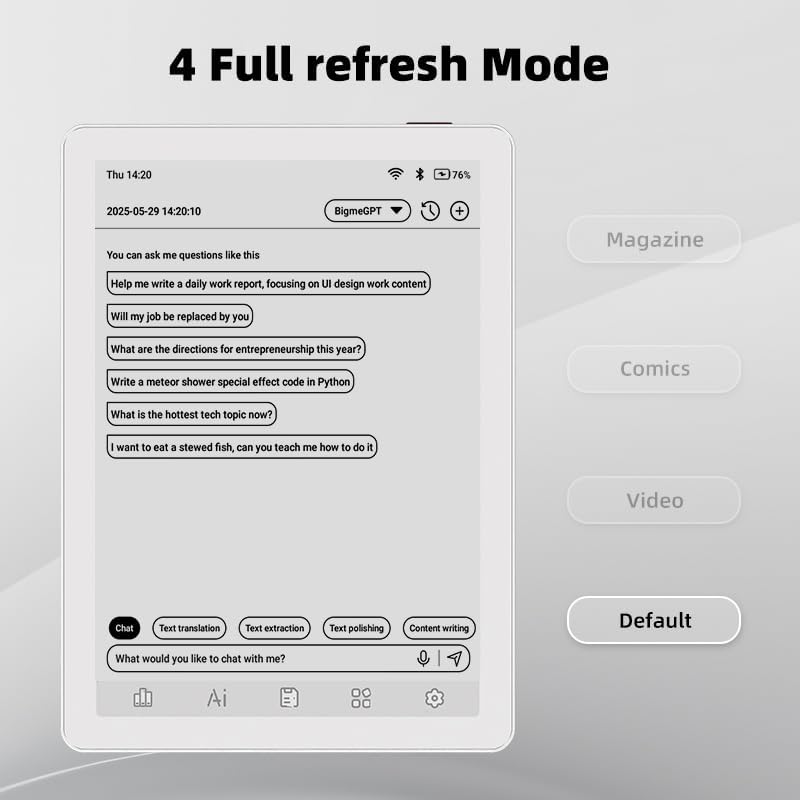
Image 4.1: The Bigme B6 home screen displaying various application icons.

Image 4.2: Accessing the Control Center for quick adjustments to device settings.
4.2 Reading eBooks
The Bigme B6 supports over 19 eBook formats, including PDF, TXT, EPUB, MOBI, and more. You can load books via USB or download them directly through reading applications.
- Open a reading application (e.g., the default reader or a downloaded app like Kindle or Libby).
- Select the book you wish to read from your library.
- Tap the left or right side of the screen to turn pages.
- Tap the center of the screen to access reading options (font size, line spacing, contrast, etc.).
- To highlight text: Press and hold on a word, then drag the selection handles to cover the desired text. Options for highlighting or notes will appear.

Image 4.3: Reading an eBook and highlighting text with color on the Bigme B6.
4.3 Управление на приложението
As an Android 14 device, you can install applications from the Google Play Store or other compatible sources.
- Инсталиране на приложения: Отворете App Store icon (Google Play Store) on your home screen, search for the desired app, and follow the installation prompts.
- Деинсталиране на приложения: Отидете на Настройки > Приложения, изберете приложението и докоснете Деинсталиране.
4.4 Audiobooks and Media Playback
The device supports audiobook playback through its built-in Hi-Fi speakers or connected Bluetooth headphones.
- Playing Audiobooks: Use a compatible audiobook application.
- Connecting Bluetooth Headphones: Отидете на Настройки > Свързани устройства > Bluetooth, enable Bluetooth, and pair with your headphones.

Image 4.4: The Bigme B6 supports audiobooks, allowing for hands-free listening.
4.5 Display Refresh Modes
The Bigme B6 offers multiple refresh modes to optimize display performance for different content types.
- Access refresh modes from the Control Center or Display Settings.
- Често срещаните режими включват:
- По подразбиране: Standard reading mode.
- списание: Optimized for images and text in magazines.
- Comics: Enhanced for comic book viewинж.
- видео: Provides a smoother refresh rate for video content (note: e-paper displays have limitations for video).

Image 4.5: Selecting from various refresh modes to suit different content types.
5. Поддръжка
5.1 Почистване на устройството
- Използвайте мека кърпа без власинки, за да избършете внимателно екрана и корпуса на устройството.
- За упорити замърсявания, леко разбъркайтеampИзплакнете кърпата с вода или препарат за почистване на екрани, специално предназначен за електроника.
- Избягвайте използването на агресивни химикали, абразивни материали или прекомерна влага.
5.2 Грижи за батерията
- Зареждайте устройството редовно, но избягвайте да го оставяте напълно разредено за продължителни периоди.
- Не излагайте устройството на екстремни температури, тъй като това може да повлияе на живота на батерията.
- Use only the provided or a certified charging cable and adapter.
5.3 Съхранение
When not in use for extended periods, store the device in a cool, dry place, away from direct sunlight and extreme temperatures. It is recommended to charge the device to about 50% before long-term storage.
6. Отстраняване на проблеми
| проблем | Възможна причина | Решение |
|---|---|---|
| Устройството не се включва. | Слаба батерия; устройството е замръзнало. | Зареждайте устройството поне 30 минути. Извършете принудително рестартиране, като задържите бутона за захранване за 10-15 секунди. |
| Screen is unresponsive or slow. | Temporary software glitch; too many apps running. | Restart the device. Close unnecessary background applications. Check for system updates. |
| Не може да се свърже с Wi-Fi. | Неправилна парола; проблем с рутера; Wi-Fi е деактивиран. | Ensure Wi-Fi is enabled and the password is correct. Restart your Wi-Fi router. Try connecting to a different network. |
| Батерията се изтощава бързо. | High screen brightness; many background apps; frequent Wi-Fi/Bluetooth use. | Reduce screen brightness. Close unused applications. Disable Wi-Fi and Bluetooth when not needed. Adjust refresh mode settings. |
| Applications crash or freeze. | App incompatibility; insufficient memory. | Update the application. Clear the app's cache (Settings > Apps > [App Name] > Storage & cache). If issues persist, uninstall and reinstall the app. |
7. Спецификации
| Име на модела | US-B6 |
| Дисплей | 6-inch Color E-paper, Electronic Ink, 300 PPI |
| Операционна система | Android 14 |
| RAM | 4GB |
| Вътрешна памет | 64GB |
| Разширяемо хранилище | Micro-SD card (up to 1TB support) |
| Свързаност | Bluetooth, WiFi |
| Батерия | 1 нестандартна батерия (включена) |
| Размери (Д x Ш x Дебелина) | 5.88" x 4.25" x 0.28" (14.94 см x 10.8 см x 0.71 см) |
| Тегло на артикула | 6.2 унции (175.77 грама) |
| Поддържани формати за електронни книги | PDF, TXT, EPUB, EPUB3, HTML, HTM, AZW3, FB2, DOC, DOCX, MOBI, OEB, CBR, RPC, RTF, DJVU, ZIP |
8. Гаранция и поддръжка
8.1 Гаранционна информация
Please refer to the warranty card included with your product for specific warranty terms and conditions. The warranty typically covers manufacturing defects for a specified period from the date of purchase.
8.2 Поддръжка на клиенти
For technical assistance, troubleshooting not covered in this manual, or warranty claims, please contact Bigme customer support. Contact details can usually be found on the Bigme official webсайта или върху опаковката на продукта.
Можете също да посетите Bigme Store on Amazon за допълнителна информация за продукта и ресурси за поддръжка.