
1. Важна забележка
Please carefully check the store name and ensure you are purchasing products sold by "LUZHAN." We have received customer feedback stating that products received did not match the description and were of poor quality. Upon investigation, we found that these customers did not purchase the products from us. To prevent such incidents from happening again in the future and to avoid unnecessary misunderstandings, please carefully verify the store name LUZHAN.

Image: Important notice to verify seller name LUZHAN for authentic products.
2. Надview
The XIAOMI POCO X8 Pro Max 5G is a high-performance smartphone designed for advanced users. It features a powerful Mediatek Dimensity 9500s processor, a vibrant 1.5K 120Hz AMOLED display, a large 8500mAh battery with 100W HyperCharge, and a 50 MP Light Fusion 600 camera system with OIS. This manual provides essential information for setting up and operating your device.
Изображение: Предна и задна част view of the POCO X8 Pro Max 5G smartphone.
Видео: Овърview of the POCO X8 Pro Series, highlighting key features and design.
3. Настройка
3.1 Какво има в кутията
- XIAOMI POCO X8 Pro Max 5G Smartphone
- Зарядно устройство
- Протектор за екран (предварително поставен или включен)
3.2 Първоначална настройка на устройството
- Включване: Press and hold the power button located on the side of the device until the XIAOMI logo appears.
- Език и регион: Следвайте инструкциите на екрана, за да изберете предпочитания от вас език и регион.
- Свържете се с Wi-Fi: Select your Wi-Fi network and enter the password to connect to the internet. This is necessary for initial setup and software updates.
- Google акаунт: Влезте с вашия Google акаунт или създайте нов. Това е от съществено значение за достъп до Google Play Store и други услуги на Google.
- Трансфер на данни: If you are upgrading from another device, you may have the option to transfer your data (apps, photos, contacts) during this stage.
- Настройка на сигурността: Set up your preferred security method, such as a PIN, pattern, password, or fingerprint. The device supports an ultrasonic fingerprint sensor.
- Пълна настройка: Follow any remaining prompts to finalize the setup process.
3.3 SIM Card and eSIM Setup
The POCO X8 Pro Max 5G supports physical SIM cards and eSIM functionality.
- Physical SIM: Use the provided SIM ejector tool to open the SIM tray. Insert your Nano-SIM card(s) into the tray, ensuring proper orientation. Close the tray securely.
- eSIM: For eSIM activation, navigate to Настройки > Мрежа и интернет > SIM карти and follow the instructions to add an eSIM profile provided by your carrier.
4. Инструкции за работа
4.1 Характеристики на дисплея
Your device features a 6.83-inch 1.5K ultra-bright AMOLED display with a 120Hz refresh rate for smooth visuals and a 24x super resolution touch for enhanced responsiveness. It also includes eye protection features and Corning Gorilla Glass 7i for durability.
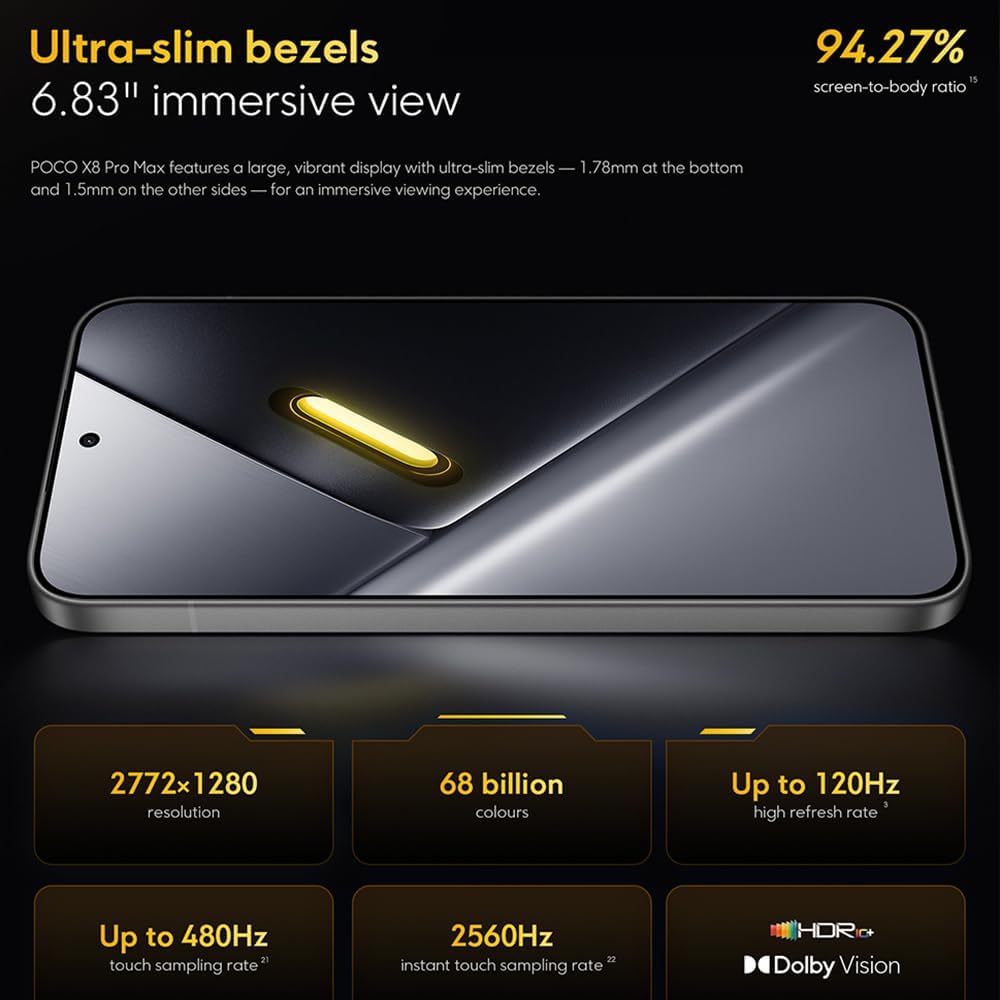
Image: The 6.83-inch 1.5K ultra-bright AMOLED display with minimal bezels.
4.2 Изпълнение
Powered by the Mediatek Dimensity 9500s chipset (3nm, 4+4 All Big Core architecture, NPU890 AI processor), the POCO X8 Pro Max 5G delivers high performance. The POCO 3D IceLoop cooling system ensures efficient heat dissipation, maintaining optimal performance during intensive tasks like gaming.

Image: Diagram illustrating the Mediatek Dimensity 9500s flagship platform.

Image: Illustration of the 5800mm² ultra-large LHP area for cooling.
4.3 система за камера
The device features a 50 MP Light Fusion 600 main camera with OIS (Optical Image Stabilization) and an 8 MP ultra-wide camera. It supports portrait mode with bokeh + HDR and dynamic video-to-still conversion.

Image: Close-up of the 50 MP main camera and 8 MP ultra-wide camera system.
4.4 Батерия и зареждане
Equipped with a massive 8500 mAh (typical) battery, the POCO X8 Pro Max 5G offers extended usage. It supports 100W HyperCharge, allowing for rapid recharging. A 16% ultra-high carbon-silicon content contributes to its high energy density.

Image: Illustration highlighting the massive 8500mAh battery capacity.

Image: Visual representation of the 100W HyperCharge technology.
4.5 аудио
The device features symmetrical dual stereo speakers (1115F) for a balanced and immersive audio experience.
Софтуер 4.6
The POCO X8 Pro Max 5G comes with Xiaomi HyperOS 3 installed, offering an optimized and user-friendly interface based on Android 16.
5. Поддръжка
5.1 Почистване на устройството
- Използвайте мека кърпа без власинки, за да избършете екрана и задния панел.
- Избягвайте използването на агресивни химикали, абразивни материали или аерозолни спрейове.
- За упорити замърсявания, леко разбъркайтеampИзплакнете кърпата с вода или препарат за почистване на екрани, предназначен за електроника.
5.2 Dust and Water Resistance
The device is certified for IP68 dust and water resistance. This means it can withstand immersion in up to 2 meters of water for 30 minutes under specific laboratory conditions. However, water and dust resistance may deteriorate over time with normal wear and tear. The warranty does not cover liquid damage. Avoid exposing the device to hot water, saltwater, or other liquids.

Image: Visual representation of the IP68 dust and water resistance.
5.3 Софтуерни актуализации
Редовно проверявайте за актуализации на софтуера и инсталирайте такива, за да сте сигурни, че устройството ви разполага с най-новите функции, корекции за сигурност и подобрения в производителността. Обикновено можете да намерите тази опция в Настройки > За телефона > Актуализация на системата.
6. Отстраняване на проблеми
6.1 Често срещани проблеми и решения
- Устройството не се включва: Уверете се, че батерията е заредена. Свържете устройството към зарядното устройство и изчакайте няколко минути, преди да опитате да го включите отново.
- Екранът не реагира: Try restarting the device by holding the power button for an extended period (e.g., 10-15 seconds) until it reboots.
- Сривове на приложенията: Изчистете кеша на проблемното приложение (Настройки > Приложения > [Име на приложението] > Памет > Изчистване на кеша) or reinstall the app. Ensure your device software is up to date.
- Слаб живот на батерията: Check background app usage, reduce screen brightness, disable unnecessary features like GPS or Bluetooth when not in use, and ensure your software is updated.
- Проблеми с мрежовата свързаност: Restart your device. Check if your SIM card is properly inserted. Toggle Airplane Mode on and off. Reset network settings (Настройки > Система > Опции за нулиране > Нулиране на Wi-Fi, мобилни устройства и Bluetooth).
6.2 Фабрично нулиране
Ако срещнете постоянни проблеми, може да се наложи фабрично нулиране. Предупреждение: Това ще изтрие всички данни на вашето устройство. Архивирайте важни данни, преди да продължите. Отидете на Настройки > Система > Опции за нулиране > Изтриване на всички данни (възстановяване на фабричните настройки) и следвайте инструкциите на екрана.
7. Спецификации
| Характеристика | Спецификация |
|---|---|
| Марка | XIAOMI |
| Име на модела | POCO X8 Pro Max 5G |
| Операционна система | Android 16 (with Xiaomi HyperOS 3) |
| Капацитет за съхранение на паметта | 512 GB |
| Размер на екрана | 6.83 инча |
| Тип дисплей | AMOLED, 1.5K, 120Hz refresh rate |
| Клетъчна технология | 5G |
| Цвят | Ноар (Черен) |
| Тип конектор | USB тип C |
| Биометрична сигурност | Fingerprint Recognition (Ultrasonic) |
| Капацитет на батерията | 8500 mAh (литиево-полимерна) |
| Зареждане | 100W хиперзареждане |
| Основна камера | 50 MP Light Fusion 600 with OIS |
| Ултраширокоъгълна камера | 8 MP |
| Процесор | Mediatek Dimensity 9500s |
| Прахо- и водоустойчивост | IP68 |
| Година на модела | 2025 |
| Страна на произход | Китай |
8. Гаранция и поддръжка
For detailed warranty information and customer support, please refer to the warranty card included with your product or visit the official XIAOMI webсайт. Запазете доказателството си за покупка за гаранционни рекламации.
Online resources and FAQs may also be available on the XIAOMI support portal.