1. Въведение
The Extech EX330 is a compact, autoranging digital multimeter designed for a wide range of electrical and electronic measurements. Its robust design and comprehensive features make it an essential tool for professionals and hobbyists alike. This manual provides detailed instructions for the safe and effective use of your EX330 multimeter.
Key features of the EX330 include:
- Вграден безконтактен AC voltage detector (NCV) for enhanced safety.
- Large 4000-count LCD display for clear readings.
- Automatic ranging for simplified operation.
- Измерва AC/DC Voltage, AC/DC Current, Resistance, Capacitance, Frequency, Duty Cycle, and Temperature.
- Diode test and Continuity check functions.
- Data Hold and Max Hold features.
- Durable rubber holster for protection.
- UL listed Cat III 600V safety rating.

2. Първи стъпки
2.1. Инсталиране на батерията
The EX330 multimeter requires two AAA batteries for operation. To install or replace batteries:
- Уверете се, че мултицетът е изключен.
- Намерете отделението за батерии на задната страна на устройството.
- Използвайте отвертка, за да отворите капака на отделението за батерията.
- Поставете две батерии тип AAA, като спазвате правилната полярност (+ и -), както е указано вътре в отделението.
- Поставете отново капака на отделението за батерията и го закрепете с винта.
2.2. Свързване на тестови проводници
The multimeter comes with a set of red and black test leads. Proper connection is crucial for accurate and safe measurements.
- Винаги свързвайте черния измервателен кабел към COM (Общ) входен жак.
- За повечето обемиtage, resistance, and continuity measurements, connect the red test lead to the V/Ω/µA/CAP/Hz/Temp входен жак.
- За измервания на ток до 400mA, свържете червения измервателен кабел към mA входен жак.
- For high current measurements up to 10A, connect the red test lead to the 10A входен жак.

3. Инструкции за работа
3.1. Включване/изключване
To turn the multimeter on, rotate the function switch from the ИЗКЛ position to any desired measurement function. To turn the multimeter off, rotate the function switch back to the ИЗКЛ позиция.
3.2. Function Selection (Rotary Dial)
The large rotary dial on the front of the multimeter allows you to select the desired measurement function. The EX330 features automatic ranging, which simplifies operation by automatically selecting the correct measurement range.
- VAC / ВDC: Measures AC or DC Voltage.
- mA / 10A: Measures AC or DC Current (milliampпреди или ampето).
- Ω: Measures Resistance.
- CAP: Measures Capacitance.
- Hz /%: Measures Frequency and Duty Cycle.
- ° F / ° C: Measures Temperature in Fahrenheit or Celsius.
- Диод / непрекъснатост: Tests diodes and checks for circuit continuity.
3.3. Безконтактен томtage (NCV) Откриване
The NCV feature allows for quick detection of AC voltage without direct contact, enhancing safety when working with electrical systems. To use the NCV function, press and hold the NCV button. The top of the meter will illuminate and an audible tone will sound if AC voltage се открива.

3.4. томtagИзмерване (AC/DC)
За измерване на обtage:
- Задайте въртящия се диск на VAC or VDC според случая.
- Свържете черния тестов проводник към COM жака и червения тестов кабел към V/Ω/µA/CAP/Hz/Temp жак.
- Свържете измервателните сонди паралелно към веригата или компонента, който ще се измерва.
- Прочетете томаtage стойност на LCD дисплея.

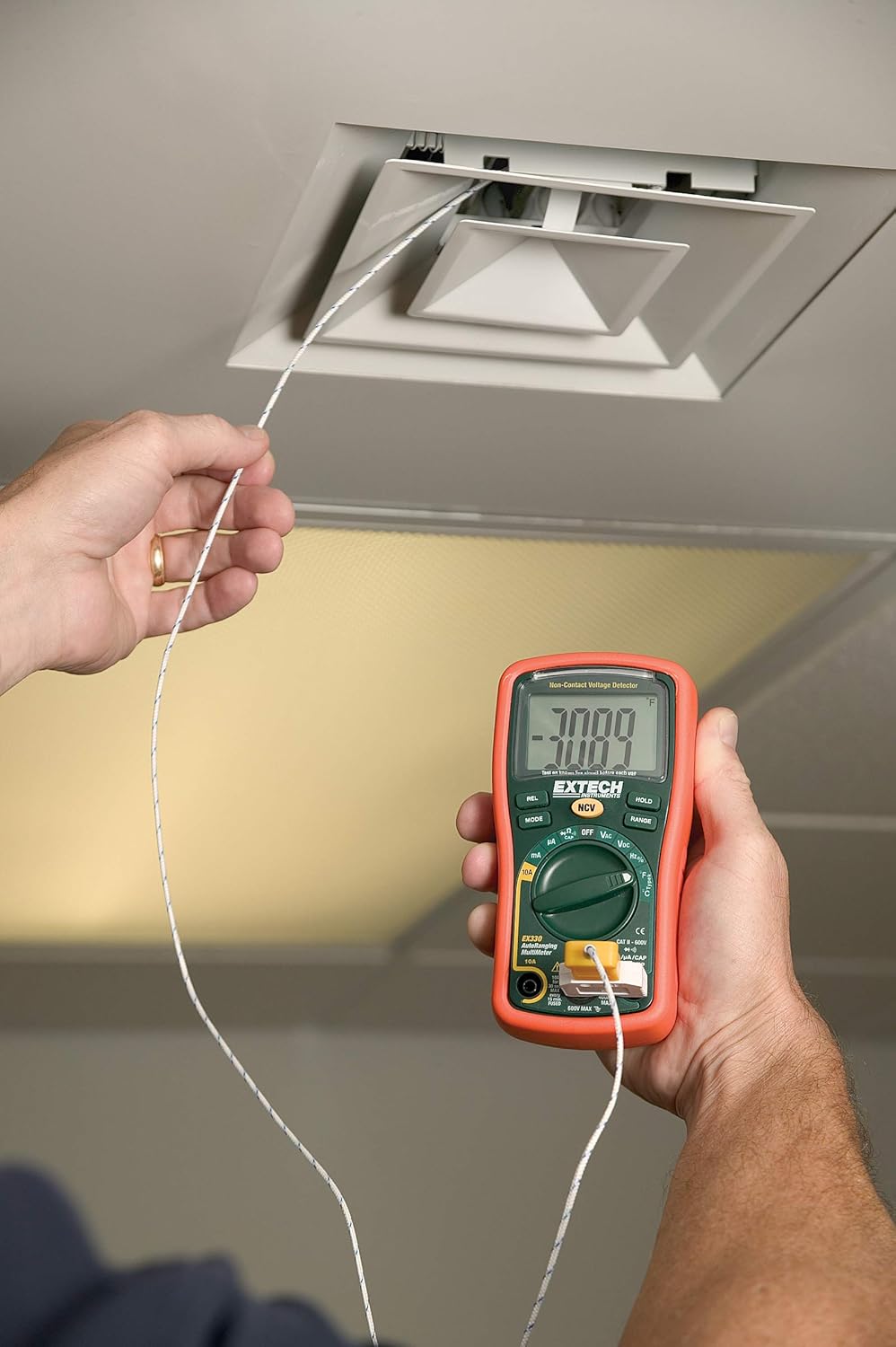
3.5. Temperature Measurement (Type K)
The EX330 includes a Type K temperature probe for accurate temperature readings.
- Задайте въртящия се диск на °F or °C.
- Plug the Type K temperature probe into the V/Ω/µA/CAP/Hz/Temp и COM input jacks, observing polarity.
- Поставете върха на температурната сонда върху или близо до обекта, чиято температура ще бъде измерена.
- Allow time for the reading to stabilize on the display.
3.6. Data Hold and Max Hold
- Натиснете ДЪРЖИ бутон, за да замразите текущото показание на дисплея. Натиснете отново, за да го освободите.
- Натиснете РЕЖИМ button repeatedly while in certain functions to cycle through sub-functions or to activate МАКС. ЗАДЪРЖАНЕ, which captures and displays the maximum measured value.
3.7. Характеристики на продуктаview
Гледайте това видео за бърз прегледview of the Extech EX330's key features and applications.
Видео 3.1: Крайview of Extech EX330 Multimeter features, including AC/DC voltage measurement, 4000-count display, built-in non-contact voltage detector, and Type K temperature measurement.
3.8. Accuracy Demonstration
This video demonstrates the accuracy and reliability of Extech multimeters, showcasing two units providing consistent readings when measuring voltage from a power supply.
Video 3.2: Demonstration of two Extech multimeters measuring voltage from a power supply, highlighting their consistent and accurate readings over time.
4. Поддръжка и грижа
4.1. Почистване
To clean the multimeter, use a soft, damp cloth. Do not use abrasives or solvents. Ensure the unit is off and disconnected from any circuits before cleaning.
4.2. Смяна на батерията
When the battery indicator appears on the display, replace the batteries as described in Section 2.1. Prompt battery replacement ensures continued accuracy and proper operation.
4.3. Смяна на предпазител
If the multimeter fails to measure current, the fuse may need replacement. Refer to the specifications for the correct fuse type and rating. Fuse replacement should only be performed by qualified personnel.
5. Отстраняване на проблеми
This section addresses common issues you might encounter with your EX330 multimeter.
| проблем | Възможна причина | Решение |
|---|---|---|
| Няма дисплей или дисплеят е слаб | Изтощени или изтощени батерии | Сменете батериите (Раздел 2.1) |
| Неправилни показания | Incorrect function selected, poor test lead connection, damaged test leads | Verify function, check connections, replace test leads if damaged |
| Няма измерване на ток | Изгорял предпазител | Сменете предпазителя (Раздел 4.3) |
| NCV не открива обемtage | Voltage too low, interference, or incorrect usage | Осигурете обtage is within detectable range, minimize interference, follow NCV instructions (Section 3.3) |
6. Технически спецификации
| Спецификация | Стойност |
|---|---|
| Дисплей | 4000 Count LCD |
| AC/DC Voltage | До 600V |
| AC / DC ток | До 10А |
| Съпротива | До 40MΩ |
| Капацитет | Up to 100µF |
| Честота | До 10MHz |
| Температура (Тип K) | -4 до 1382°F (-20 до 750°C) |
| Без контактtagд (NCV) | 100 до 600VAC |
| Източник на захранване | 2 x AAA батерии (включени) |
| Размери (Д x Ш x В) | 5.7 x 2.9 x 1.6 инча |
| Тегло | 9.9 унции (0.28 кг) |
| Оценка за безопасност | UL listed Cat III - 600V |
| Страна на произход | Китай |

7. Гаранция и поддръжка
7.1. Гаранционна информация
The Extech EX330 Autoranging Mini Multimeter is covered by a 1 години гаранция на части и труд from the date of purchase. This warranty covers defects in materials and workmanship under normal use. It does not cover damage resulting from misuse, unauthorized modifications, accidents, or neglect.
7.2. Поддръжка на клиенти
For technical assistance, troubleshooting, or warranty claims, please contact Extech customer support. Refer to the official Extech webсайта или опаковката на продукта за най-актуалната информация за контакт.


