1. Въведение
This manual provides comprehensive instructions for the safe and efficient use of your Logisys PS480D 480W ATX Power Supply. Please read this manual thoroughly before installation and operation to ensure proper functionality and to prevent damage to the unit or other components.

Figure 1: Logisys PS480D 480W ATX Power Supply, front view with cables bundled.
2. Информация за безопасност
ПРЕДУПРЕЖДЕНИЕ: Power supplies contain high voltagкомпоненти. Не отваряйте захранващия блок casinж. Вътре няма части, които потребителят може да обслужва.
- Уверете се, че захранването е изключено от контакта преди монтаж или поддръжка.
- Always ground yourself to prevent electrostatic discharge (ESD) when handling internal computer components.
- Не използвайте захранващия блок във влажна илиamp условия.
- Осигурете подходяща вентилация около захранващия блок, за да предотвратите прегряване.
- Use only the provided power cables and connectors.
3. Характеристики на продукта
The Logisys PS480D is a 480W ATX power supply designed for personal computers. Key features include:
- Висока ефективност
- Low Noise & Ripple
- Над Voltage Защита
- Защита от късо съединение
- Built-in EMI Filter
- Insulation Resistance 100MΩ min.
- Complies with FCC part 15J class B 115VAC operation and CISPR 22 230 VAC operation.
- Meets UL 1950, CSA 22.2 LEVEL 3 Requirement.
- 100% Burn-in test / Vibration test / Hi-pot test / Leakage current test.
- MTBF above 100,000 hours at 25 °C.

Figure 2: Rear panel of the power supply with fan, AC inlet, and power switch.
4. Настройка и инсталация
Follow these steps to install the Logisys PS480D power supply into your computer system.
- Приготвяне: Ensure your computer is completely powered off and unplugged from the wall outlet. Open your computer case according to its manufacturer's instructions.
- Премахнете старото захранване (ако е приложимо): Disconnect all cables from the old power supply to the motherboard, drives, and other components. Unscrew and remove the old power supply from the case.
- Инсталиране на ново захранване: Carefully place the Logisys PS480D into the power supply bay of your computer case. Secure it with screws.
- Свържете основното захранване: Connect the 20+4 pin ATX mainboard connector to your motherboard. If your motherboard uses a 20-pin connector, detach the 4-pin section. If it uses a 24-pin connector, connect both sections.
- Свържете захранването на процесора: Connect the 4-pin +12V power connector to the corresponding port on your motherboard.
- Connect Peripheral Power:
- Use the 4-pin standard drive connectors for HDDs and CD/DVD-ROM drives.
- Use the 4-pin 3.5" FDD or ZIP connectors for floppy disk drives or similar devices.
- Use the Serial ATA (SATA) connectors for SATA hard drives and SSDs.
- Управление на кабели: Прокарайте кабелите спретнато, за да осигурите правилен въздушен поток в кутията.
- Затвори случай: След като всички връзки са сигурни, затворете корпуса на компютъра.
- Свързване на AC захранване: Plug the AC power cord into the power supply's AC inlet and then into a wall outlet.
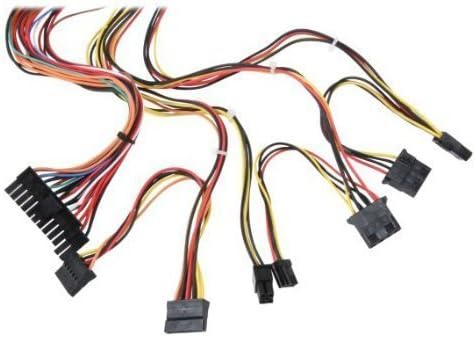
Фигура 3: Надview of power supply connectors.

Figure 4: Power supply dimensions and included AC power cord.
5. Инструкции за работа
After successful installation, you can power on your computer.
- Ensure the power switch on the rear of the power supply (Figure 2) is in the "ON" (I) position.
- Натиснете бутона за захранване на корпуса на компютъра.
- The power supply will provide stable power to your system components.
- To power off, shut down your operating system normally. For complete power disconnection, switch the power supply to the "OFF" (O) position and unplug the AC cord.
6. Поддръжка
Редовната поддръжка помага да се осигури дълготрайността и оптималната работа на вашето захранване.
- Почистване: Periodically clean dust from the power supply's fan and vents using compressed air. Ensure the power supply is unplugged before cleaning.
- Въздушен поток: Ensure that the computer case has adequate airflow and that the power supply's fan is not obstructed.
- Цялост на кабела: Periodically check all power cables for secure connections and signs of wear or damage.
7. Отстраняване на проблеми
Ако срещнете проблеми със захранването, вижте следните често срещани стъпки за отстраняване на неизправности:
- Без захранване:
- Проверете дали захранващият кабел е добре включен както в захранването, така и в контакта.
- Ensure the power switch on the rear of the power supply is in the "ON" (I) position.
- Проверете дали контактът на стената работи, като включите друго устройство.
- Check all internal power connections (20/24-pin ATX, 4-pin +12V, peripheral connectors) are firmly seated.
- Нестабилност на системата/Случайни изключвания:
- This could indicate an overloaded or failing power supply. Ensure your system's power requirements do not exceed the PS480D's 480W capacity.
- Check for proper ventilation and ensure the power supply fan is spinning. Overheating can cause instability.
- Необичаен шум:
- A loud fan noise might indicate dust buildup or a failing fan bearing. Clean the fan as described in the Maintenance section.
If problems persist after attempting these steps, contact Logisys customer support or a qualified technician.
8. Спецификации
| Характеристика | Спецификация |
|---|---|
| Марка | Logisys |
| Номер на модела | PS480D |
| Изход Ватtage | 480 вата |
| Форма фактор | ATX |
| Размери (ДxШxВ) | 6" Д x 5.5" Ш x 3.25" В (15.24 x 13.97 x 8.25 см) |
| Тегло на артикула | 2.06 паунда (0.93 кг) |
| Конектор на дънната платка | 1x 20+4 Pin ATX |
| Конектор за захранване на процесора | 1x 4 Pin +12V |
| Standard Drive Connectors | 4x 4 Pin (Molex) |
| FDD/ZIP Connectors | 1x 4 Pin 3.5" |
| Серийни ATA конектори | 1x SATA |
| Метод на охлаждане | въздух |
| Защити | Над Voltage Защита, защита от късо съединение |
| Сертификати | FCC part 15J class B, CISPR 22, UL 1950, CSA 22.2 LEVEL 3 |
9. Гаранция и поддръжка
For warranty information, technical support, or service inquiries, please refer to the official Logisys webсайта или се свържете с техния отдел за обслужване на клиенти. Запазете касовата си бележка като доказателство за покупка.

