1. Въведение
Thank you for choosing the Fonestar AS-24U Hi-Fi USB/SD/MP3 Ampспасител. Това ръководство предоставя важна информация за безопасната и ефикасна работа на вашето устройство. Моля, прочетете го внимателно преди употреба и го запазете за бъдещи справки.
2. Инструкции за безопасност
- Захранване: Осигурете amplifier is connected to a power source matching the specified voltagд (230V).
- Вентилация: Не блокирайте вентилационните отвори. Оставете достатъчно пространство около устройството за правилен въздушен поток, за да предотвратите прегряване.
- Влага: Запазете amplifier away from water, moisture, and high humidity environments. Do not expose it to dripping or splashing.
- Източници на топлина: Избягвайте поставянето на устройството в близост до източници на топлина, като радиатори, отоплителни уреди, печки или други уреди, произвеждащи топлина.
- Почистване: Disconnect the power cord before cleaning. Use a dry, soft cloth. Do not use liquid cleaners or aerosol cleaners.
- Обслужване: Не се опитвайте сами да обслужвате този продукт. Обърнете цялото обслужване към квалифициран сервизен персонал.
- Влизане на обект/течност: Никога не пъхайте предмети от какъвто и да е вид в този продукт през отворите, тъй като те могат да докоснат опасен обемtagточки или части на късо, което може да доведе до пожар или токов удар.
3. Продуктът свършиview
3.1 Преден панел
The front panel features controls for power, input selection, volume adjustment, and USB/SD media playback. It also includes a display for media information.
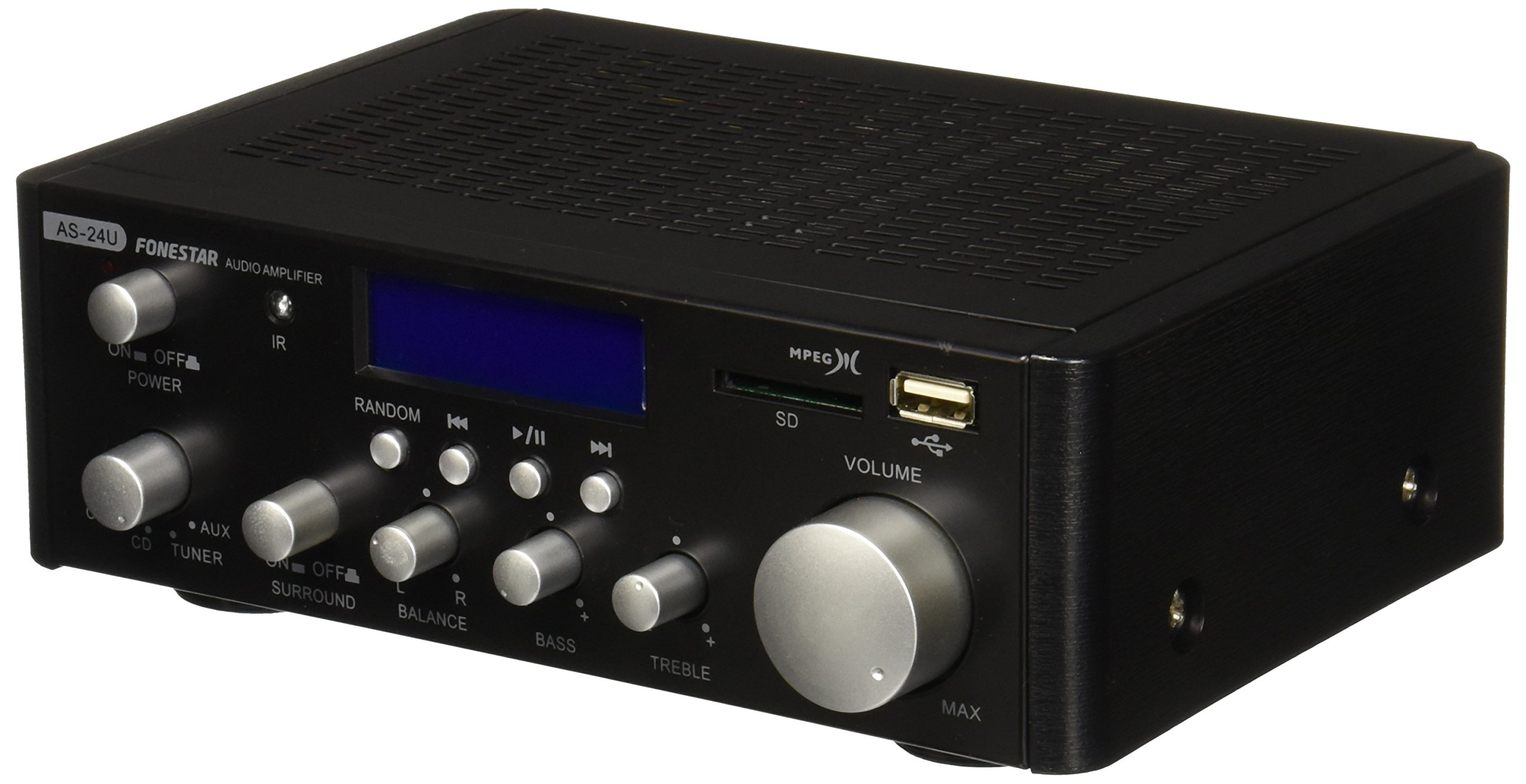
Изображение 1: Предна част view of the Fonestar AS-24U amplifier, showing the main controls and display.
3.2 Заден панел
The rear panel provides all necessary connections for audio input sources, speaker outputs, and power.

Изображение 2: Задна част view of the Fonestar AS-24U amplifier, detailing input/output ports and power connection.
- INPUT (AUX, TUNER, CD): RCA stereo inputs for connecting external audio sources.
- SPEAKER OUT (STEREO): Spring clip terminals for connecting passive speakers (4-8 Ω).
- SPEAKER OUT (SURROUND): Additional spring clip terminals for surround speakers (8 Ω).
- ЗАХРАНВАНЕ: AC power input for the main power cable.
- VOLTAGE СЕЛЕКТОР: Switch for selecting between 115V and 230V power input. Ensure this is set correctly for your region.
3.3 Дистанционно управление
Включеното дистанционно управление позволява удобно управление на amplifier's media playback functions.
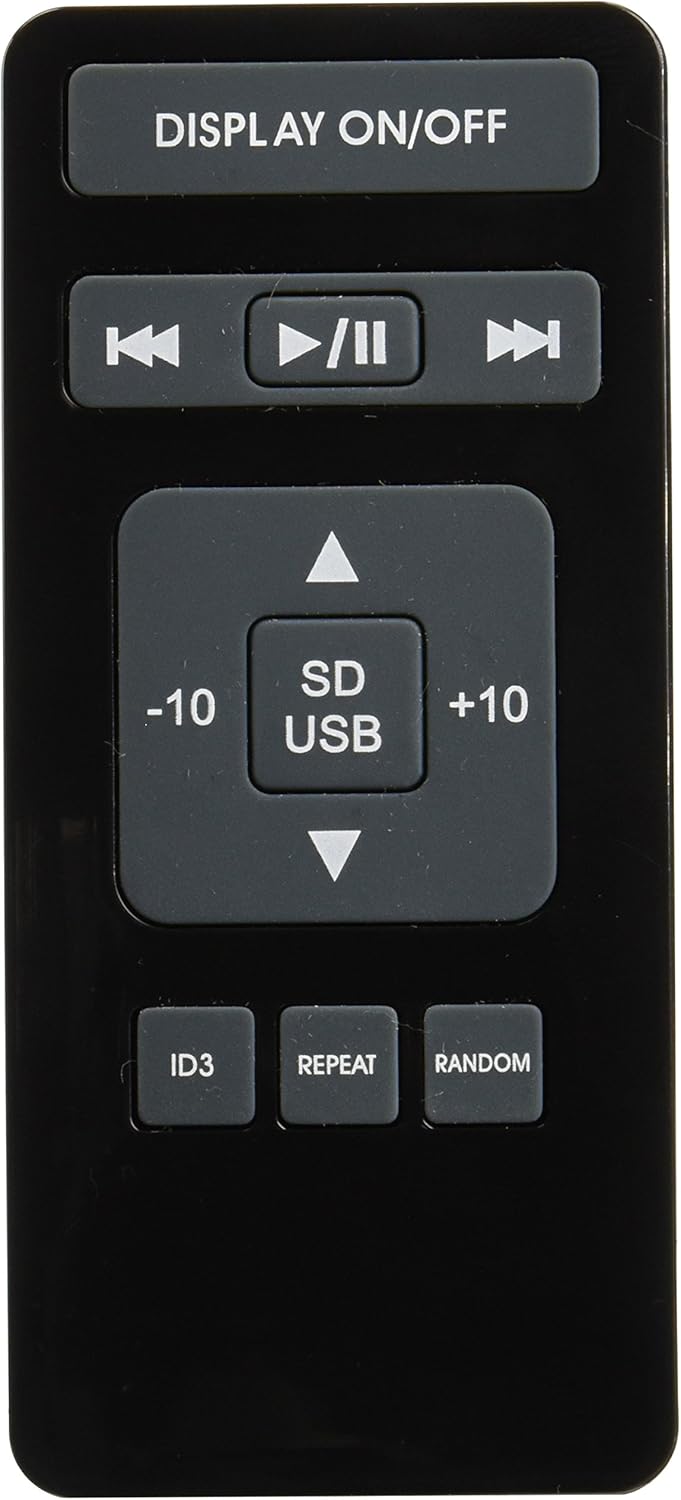
Image 3: Remote control for the Fonestar AS-24U amplifier, showing buttons for media playback and display control.
- ДИСПЛЕЙ ВКЛ. / ИЗКЛ.: Toggles the front panel display.
- PLAY/PAUSE, PREVIOUS/NEXT: Controls for media playback.
- SD/USB: Selects between SD card and USB drive as the media source.
- -10/+10: Skips tracks by 10.
- ID3: Displays ID3 tag информация за mp3 files.
- ПОВТОРЕНИЕ: Toggles repeat modes (e.g., repeat one, repeat all).
- СЛУЧАЙНИ: Toggles random playback.
4. Настройка
4.1 Свързване на високоговорители
- Осигурете ampспасителят е изключен и изваден от контакта.
- Connect your passive speakers to the SPEAKER OUT terminals on the rear panel.
- Match the positive (+) terminal on the ampзахранващия кабел към положителния (+) полюс на високоговорителя, а отрицателния (-) към отрицателния (-).
- For stereo speakers, use the 4-8 Ω terminals. For surround speakers, use the 8 Ω terminals. Ensure your speakers' impedance matches the ampспецификациите на lifier.
4.2 Свързване на аудио източници
- Connect your audio devices (e.g., CD player, tuner, auxiliary device) to the corresponding RCA INPUT jacks (CD, TUNER, AUX) on the rear panel.
- Ensure left and right channels are correctly matched (red for right, white for left).
4.3 Захранване
- Verify the VOLTAGE SELECTOR switch on the rear panel is set to the correct voltage for your region (e.g., 230V).
- Connect the power cable to the POWER IN socket on the rear panel and then to a suitable wall outlet.
5. Инструкции за работа
5.1 Включване/изключване
Press the power button on the front panel to turn the amplifier on or off. A soft start protection circuit is integrated.
5.2 Избор на входен източник
Use the input selector knob or buttons on the front panel to choose between CD, TUNER, AUX, USB, or SD inputs.
5.3 Регулиране на силата на звука
Rotate the main volume knob on the front panel to adjust the overall sound level. Start with a low volume and gradually increase it to a comfortable listening level.
5.4 Възпроизвеждане от USB/SD карта
- Поставете USB флаш устройство или SD карта, съдържаща MP3 аудио fileв съответния слот на предния панел.
- Select the USB or SD input using the input selector.
- Use the playback controls (Play/Pause, Previous/Next) on the front panel or remote control to manage your music.
- The remote control allows for additional functions like skipping 10 tracks (+10/-10), displaying ID3 tags, repeating tracks, and random playback.
6. Поддръжка
6.1 Почистване
За почистване на amplifier, first unplug it from the power outlet. Use a soft, dry cloth to wipe down the exterior surfaces. Do not use abrasive cleaners, waxes, or solvents as they may damage the finish.
6.2 Съхранение
Ако съхранявате amplifier for an extended period, ensure it is unplugged, clean, and stored in a cool, dry place away from direct sunlight and extreme temperatures.
7. Отстраняване на проблеми
- Без захранване:
- Check if the power cable is securely connected to both the ampзахранващия кабел и контакта.
- Ensure the wall outlet is functional.
- Verify the VOLTAGE SELECTOR switch is set correctly.
- Няма звук:
- Confirm that the correct input source is selected.
- Проверете всички връзки на високоговорителите за правилна полярност и сигурно закрепване.
- Уверете се, че звукът е увеличен и не е изключен.
- Тествайте с различен аудио източник.
- Изкривен звук:
- Намалете силата на звука.
- Проверете съвместимостта на импеданса на високоговорителите.
- Уверете се, че аудио кабелите не са повредени и са здраво свързани.
- Проблеми с възпроизвеждането от USB/SD карта:
- Ensure the USB drive or SD card is formatted to a compatible file система (например FAT32).
- Проверете дали аудиото files са във формат MP3.
- Опитайте с друго USB устройство или SD карта.
8. Спецификации
| Марка | FONESTAR |
| Модел | AS-24U |
| Stereo Power Output | 25 + 25 W max, 15 + 15 W RMS (4 Ω), 12 + 12 W RMS (8 Ω) |
| Surround Power Output | 10 + 10 W max, 6 + 6 W RMS (8 Ω) |
| Входове | 3 stereo (CD, Tuner, AUX), 2 x RCA 400 mV |
| Защити | Плавен старт, късо съединение, претоварване |
| Voltage | 230 волта |
| Размери (Д x Ш x В) | 5 x 5 x 10 см (приблизително 50 x 50 x 100 мм) |
| Тегло | 1.9 кг |
| Свързване на високоговорителя | С кабел |
9. Гаранция и поддръжка
This Fonestar AS-24U amplifier comes with a standard manufacturer's warranty. Please refer to the warranty card included with your purchase for specific terms and conditions. For technical support, service, or warranty claims, please contact your retailer or the official Fonestar customer service.


