1. Въведение
This manual provides instructions for the proper use and maintenance of your Casio GX-12B Value Series Desk Top/Compact Desk Type Calculator. Please read this manual thoroughly before using the calculator to ensure optimal performance and longevity.
Ключови характеристики:
- Extra Large 12-Digit Display
- Two-Way Power (Solar and Battery)
- 2 Independent Memories
- Item Counter Function
- Mark-up Percentage Функция
- Durable Plastic Keys
- Compact Desk Type Design
2. Настройка и захранване
Източник на захранване:
The Casio GX-12B calculator operates on a two-way power system, utilizing both solar power and a single LR44 button-cell battery. For optimal performance, ensure the solar panel is exposed to sufficient light. In low-light conditions, the battery automatically takes over.
Инсталиране/смяна на батерията:
- Уверете се, че калкулаторът е изключен.
- Намерете капака на отделението за батерии на гърба на калкулатора.
- Using a small screwdriver, carefully remove the screw and open the battery compartment cover.
- Remove the old LR44 battery (if replacing) and insert a new LR44 battery with the positive (+) side facing up.
- Поставете отново капака на отделението за батерията и го закрепете с винта.
- Натиснете AC (All Clear) button to reset the calculator.
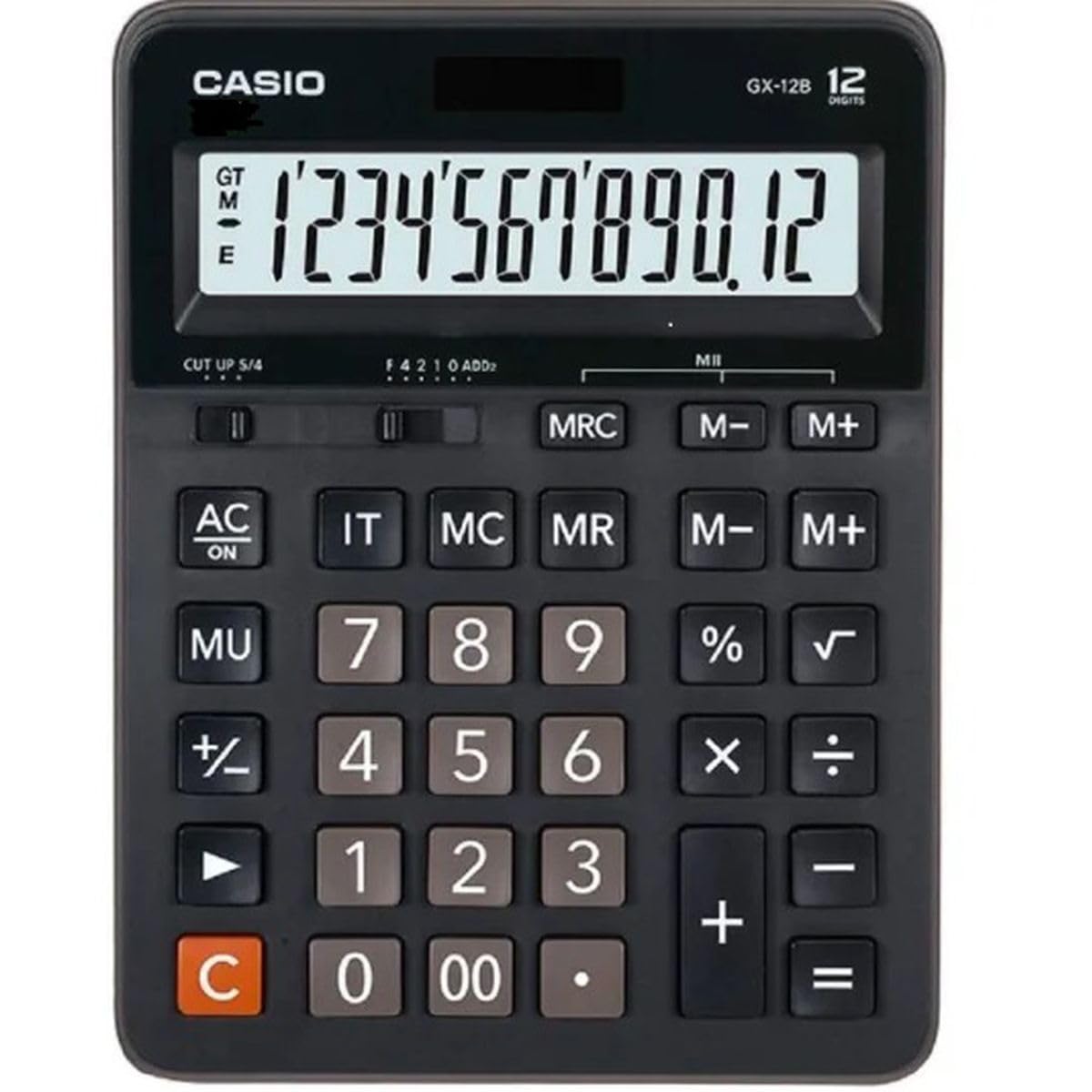
This image displays the Casio GX-12B calculator, highlighting its approximate length of 8.8 inches (22 cm) for scale. The calculator features a large display and clearly labeled keys.
3. Основни операции
Familiarize yourself with the key functions to perform calculations efficiently.
Ключови функции надview:
- AC: All Clear. Clears all values and operations, resetting the calculator.
- C: Clear Entry. Clears the last entered number.
- + / - / × / ÷Основни аритметични операции.
- =: Executes the pending calculation.
- %: Процентtage key. Used for percentage calculations (e.g., 100 + 10% = 110).
- MU: Mark-up key. Used for profit margin calculations.
- M+: Добавя показаната стойност към паметта.
- M-: Изважда показаната стойност от паметта.
- MRC: Memory Recall/Clear. Press once to recall the memory value. Press twice to clear the memory.
- IT: Item Counter. Counts the number of entries in a series of calculations.
Example Calculations:
- Допълнение: За да изчислите 123 + 456:
- Натиснете AC
- Въведете 123
- Натиснете +
- Въведете 456
- Натиснете = (Резултат: 579)
- Процентtage: To add 10% to 200:
- Натиснете AC
- Въведете 200
- Натиснете +
- Въведете 10
- Натиснете % (Резултат: 220)
- Функция на паметта: To calculate (5 × 3) + (8 × 2):
- Натиснете AC
- Въведете 5 × 3 M+ (15 is added to memory)
- Въведете 8 × 2 M+ (16 is added to memory)
- Натиснете MRC (Резултат: 31)
- Натиснете MRC отново, за да изчистите паметта.
4. Грижи и поддръжка
- Почистване: Избършете калкулатора с мека, суха кърпа. За упорити замърсявания използвайте кърпа, леко настърганаampened with water and a mild detergent, then wipe dry immediately. Avoid using strong solvents or abrasive cleaners.
- Съхранение: Съхранявайте калкулатора на хладно и сухо място, далеч от пряка слънчева светлина и екстремни температури.
- Избягвайте въздействието: Do not drop or subject the calculator to strong impacts, as this can damage internal components or the display.
- Живот на батерията: If the display becomes dim or unresponsive, replace the LR44 battery.
5. Отстраняване на проблеми
| проблем | Възможна причина | Решение |
|---|---|---|
| Дисплеят е празен или тъмен. | Insufficient light for solar panel, or low battery. | Move the calculator to a brighter area. Replace the LR44 battery if the issue persists. |
| Неправилни резултати от изчисленията. | Incorrect key input, or memory not cleared. | Натиснете AC to clear all operations and memory, then re-enter the calculation. Ensure correct order of operations. |
| Клавишите не реагират. | Low battery, or internal malfunction. | Replace the LR44 battery. If the problem continues, contact customer support. |
6. Спецификации
- модел: GX-12B
- Дисплей: 12-Digit Extra Large LCD
- Източник на захранване: Two-Way Power (Solar and 1 x LR44 Battery)
- Размери (Д x Ш): Приблизително 20.8 см x 15.9 см (8.2 инча x 6.3 инча)
- Тегло: Приблизително 0.32 kg (0.7 lbs)
- материал: Пластмаса
- Функции: Basic arithmetic, Percentage, Mark-up, Memory (M+, M-, MRC), Item Counter
7. Гаранционна информация
This Casio product is covered by a Limited Warranty. For specific terms, conditions, and duration of the warranty, please refer to the warranty card included with your purchase or visit the official Casio webсайт. Запазете доказателството си за покупка за гаранционни рекламации.
8. Поддръжка на клиенти
If you encounter any issues not covered in this manual or require further assistance, please contact Casio customer support. Contact details can typically be found on the official Casio webсайта или върху опаковката на продукта.


