Въведение
The Klipsch Reference RSB-6 Sound Bar with Wireless Subwoofer is designed to enhance your home audio experience. This system provides incredible sound with a wireless subwoofer, offering a turn-key solution to upgrade your TV's audio to a true home theater experience. Within minutes of unboxing, this 2-way sound bar and 6.5-inch wireless subwoofer deliver powerful, detailed sound.
Ключови характеристики:
- 4K Ultra-HD video pass-through
- Super easy to set up
- Featuring Klipsch Tractrix horns for detailed, impactful sound
- Integrated Dolby Audio for an incredible listening experience
- Automatically-connecting wireless subwoofer
Настройка
Setting up your Klipsch Reference RSB-6 Sound Bar is designed to be straightforward. Follow these steps to connect your sound bar and wireless subwoofer.
1. Разопаковане и поставяне:
Carefully remove all components from the packaging. Place the sound bar directly in front of your television, ensuring it does not obstruct the TV's remote sensor. Position the wireless subwoofer in a convenient location within the room, ideally near the sound bar but it can be placed elsewhere for optimal bass distribution.
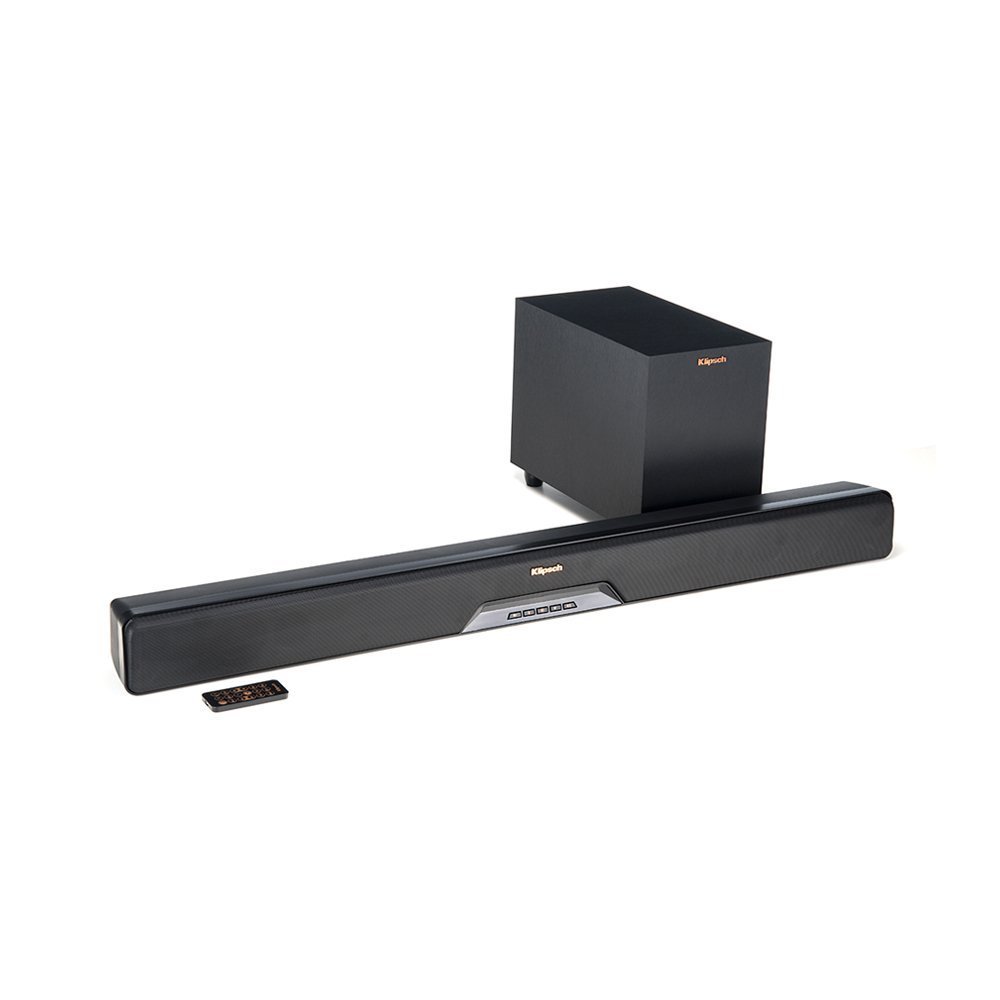
Image: The Klipsch Reference RSB-6 Sound Bar positioned in front of a television, with the wireless subwoofer nearby.
2. Connecting the Sound Bar to your TV:
The RSB-6 supports HDMI-ARC for the best audio quality and control. Connect one end of an HDMI cable (included) to the HDMI-ARC port on your TV and the other end to the HDMI-ARC port on the sound bar. Ensure your TV's HDMI-ARC feature is enabled in its settings.
Alternatively, you can use an optical cable to connect the sound bar to your TV's optical audio output. Connect the power cord to the sound bar and plug it into a wall outlet.
3. Свързване на безжичния субуфер:
The wireless subwoofer is designed to automatically connect to the sound bar upon powering on. Plug the subwoofer's power cord into a wall outlet. The subwoofer should automatically pair with the sound bar. If pairing does not occur automatically, refer to the troubleshooting section for manual pairing instructions.
Оперативен
The Klipsch RSB-6 offers various modes and controls to optimize your listening experience.
1. Дистанционно управление:
Use the included remote control to power on/off, adjust volume, select input sources (TV, Aux, Bluetooth), and switch between sound modes. The remote is compact and provides full control over the system's functions.
2. Режими на звука:
- Dialogue EQ: This feature enhances vocal frequencies, making dialogue clearer and easier to understand, especially in movies or shows with complex sound mixes.
- Съраунд режим: Activates a virtual surround sound experience, expanding the soundstage for a more immersive audio environment.
- Нощен режим: Reduces dynamic range and bass output, making it ideal for late-night viewбез да безпокоите другите.
You can often combine Surround Mode and Dialogue EQ for a customized listening experience.
3. Bluetooth връзка:
To connect a Bluetooth device, select the Bluetooth input on the sound bar. Enable Bluetooth on your device and select "Klipsch RSB-6" from the list of available devices. Once paired, you can stream audio wirelessly from your smartphone, tablet, or computer.
Поддръжка
To ensure the longevity and optimal performance of your Klipsch Reference RSB-6 Sound Bar, follow these simple maintenance guidelines:
- Почистване: Use a soft, dry cloth to wipe down the surfaces of the sound bar and subwoofer. Avoid using liquid cleaners or abrasive materials, as these can damage the finish.
- Вентилация: Уверете се, че саундбарът и субуферът имат адекватна вентилация. Не блокирайте вентилационните отвори и не поставяйте устройствата в затворени пространства, които биха могли да ограничат въздушния поток.
- Избягвайте екстремни условия: Keep the units away from direct sunlight, heat sources, and excessive moisture.
Отстраняване на неизправности
If you encounter any issues with your Klipsch Reference RSB-6 Sound Bar, try the following troubleshooting steps:
- Няма звук:
- Ensure the sound bar is powered on and the correct input source (TV, Aux, Bluetooth) is selected.
- Check all cable connections (HDMI, optical) between the sound bar and your TV.
- Verify that your TV's audio output is set to external speakers and HDMI-ARC is enabled if using an HDMI connection.
- Безжичният субуфер не се свързва:
- Уверете се, че и саундбарът, и субуферът са включени.
- If the subwoofer does not automatically pair, try manually pairing it. Consult the full user manual for specific manual pairing instructions, which typically involve pressing a pairing button on both units.
- Ensure the subwoofer is within range of the sound bar and there are no significant obstructions.
- Poor Bluetooth Connection/Range:
- Ensure your Bluetooth device is within close proximity to the sound bar (typically within 15-20 feet).
- Remove any obstacles that might interfere with the Bluetooth signal.
- Try unpairing and re-pairing your Bluetooth device.
- Voice Clarity Issues:
- Activate the Dialogue EQ mode on your remote control to boost vocal frequencies.
- Adjust the overall volume and bass levels to find a balance that suits your preference.
If these steps do not resolve the issue, please contact Klipsch customer support for further assistance.
Спецификации
| Характеристика | детайл |
|---|---|
| Име на модела | Звукова лента с безжичен субуфер |
| Тип високоговорител | Саундбар, Субуфер |
| Специална функция | Bass Boost, Subwoofer |
| Препоръчителни употреби на продукта | Домашно кино |
| Съвместими устройства | телевизия |
| Диаметър на субуфера | 6.5 инча |
| Конфигурация на канала за съраунд звук | 1.0 |
| Цвят | черен |
| Включени компоненти | Звукова лента |
| Тегло на артикула | 2950 грама (6.5 паунда) |
| Водоустойчив е | Не е водоустойчив |
| Тип гаранция | Ограничен |
| Контролен метод | Дистанционно |
| Безжична комуникационна технология | Bluetooth |
| Максимална изходна мощност на високоговорителя | 120 вата |
| Размери на продукта | 11.4 x 43.3 x 8.3 инча |
Гаранция и поддръжка
The Klipsch Reference RSB-6 Sound Bar with Wireless Subwoofer comes with a limited warranty. For detailed information regarding warranty coverage, terms, and conditions, please refer to the warranty card included in your product packaging or visit the official Klipsch webсайт.
For technical support, troubleshooting assistance, or any other inquiries, please contact Klipsch customer support. Contact information can typically be found on the Klipsch webсайта или в документацията на продукта.


