1. Въведение
The Sengled Smart Light Bulbs A19 are Zigbee-compatible LED bulbs designed for integration into smart home systems. These bulbs provide soft white (2700K) illumination, are dimmable, and offer control via voice commands or a mobile application when connected to a compatible Zigbee hub. This manual provides instructions for installation, setup, operation, and troubleshooting.

Image 1.1: Sengled Smart Light Bulbs A19 (4-Pack)
2. Информация за безопасност
- Електрическа безопасност: Always ensure power is turned off at the switch before installing or removing bulbs.
- Само за вътрешна употреба: These bulbs are designed for indoor use in dry locations. Do not expose to water or excessive humidity.
- Работна температура: Не инсталирайте в затворени осветителни тела, които ограничават въздушния поток, тъй като това може да намали живота на крушката.
- Съвместимост с димери: These bulbs are dimmable via the smart home system. Do not use with standard incandescent dimmers.
- Изхвърляне: Изхвърляйте електронните отпадъци отговорно, съгласно местните разпоредби.
3. Съдържание на пакета
Пакетът включва:
- 4 x Sengled Smart LED Light Bulbs (A19, Soft White 2700K)
4. Спецификации
| Характеристика | детайл |
|---|---|
| Номер на модела | E21-N13A |
| Тип крушка | LED |
| Размер на формата на крушка | A19 |
| Основа на крушка | E26 |
| Уотtage | 9 вата |
| Еквивалент с нажежаема жичка | 60 вата |
| Яркост | 800 лумена |
| Цветна температура | 2700 келвина (меко бяло) |
| Voltage | 120 волта (100-120V, 60Hz) |
| Контролен метод | Глас, Приложение |
| Свързаност | Zigbee Protocol (Hub Required) |
| Среден живот | 25,000 часа |
| Използване на закрито/външно | На закрито |
| Размери | 2.4"Ш x 4.5"В |
5. Инструкции за настройка
These Sengled Smart Light Bulbs require a compatible Zigbee hub for full functionality. Compatible hubs include Sengled Smart Hub, Amazon Echo devices with a built-in Zigbee hub (e.g., Echo 4th Gen, Echo Plus, Echo Show 10, Echo Studio), SmartThings Hub, Wink Hub, or Hubitat Hub.
5.1. Initial Setup Steps
- Инсталирайте крушката: Screw the Sengled Smart Light Bulb into a standard E26 light socket. Ensure the power to the fixture is turned off before installation.
- Включване: Включете захранването на осветителното тяло. Крушката трябва да светне.
- Изтеглете приложението: Download the Sengled Home App from the Apple App Store or Google Play Store. Alternatively, use the app for your chosen compatible hub (e.g., Amazon Alexa App, SmartThings App).
- Регистрация/Вход: Open the app and register for an account or log in if you already have one.
- Добавяне на устройство: Follow the in-app instructions to add a new device. This typically involves scanning a QR code on the bulb or packaging, or initiating a device search within the app.
- Свързване с хъба: The bulb will connect to your Zigbee hub. This process usually completes within one minute.
5.2. Hub-Specific Setup Options
The following images illustrate common setup configurations:

Image 5.1: Setup with Sengled Smart Hub

Image 5.2: Setup with Samsung SmartThings Hub

Image 5.3: Setup with Amazon Echo (Built-in Hub)
6. Операция
Once successfully paired with your smart hub, the Sengled Smart Light Bulbs offer various control options.
6.1. Гласов контрол
Control your lights hands-free using voice commands with compatible assistants like Amazon Alexa or Google Home Assistant.

Image 6.1: Voice control example with Alexa
6.2. Dimming and Remote Control
Adjust the brightness from 1% to 100% and control your lights from anywhere using the Sengled Home App or your smart home platform's app.

Image 6.2: Dimming functionality from 100% to 30%

Image 6.3: Remote control from any location
6.3. Scheduling and Routines
Set schedules for your lights to turn on/off or adjust brightness at specific times, such as dusk or sunrise. Create routines for automated lighting scenarios.
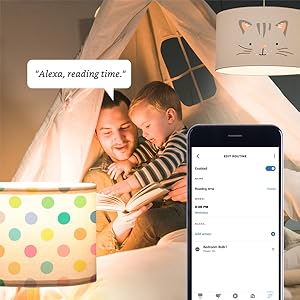
Image 6.4: Setting up a reading time routine
6.4. Групов контрол
Add multiple smart bulbs (up to 64) to your smart hub system and control them individually or as a group within the app.
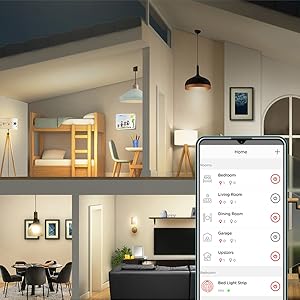
Image 6.5: Managing lights by room for group control
7. Поддръжка
- Почистване: Уверете се, че крушката е изключена и се е охладила преди почистване. Избършете с мека, суха кърпа. Не използвайте течни почистващи препарати.
- Съхранение: Ако съхранявате луковиците, дръжте ги на хладно и сухо място, далеч от пряка слънчева светлина и екстремни температури.
- Няма части, които могат да се обслужват от потребителя: Do not attempt to disassemble or repair the bulb. This will void the warranty.
8. Отстраняване на проблеми
8.1. Bulb Not Responding/Connecting
- Проверете захранването: Ensure the light fixture switch is in the ON position and the bulb is receiving power.
- Hub Connection: Verify that your Zigbee hub is powered on and connected to your network.
- близост: Ensure the bulb is within range of your Zigbee hub or another Zigbee device acting as a repeater.
- Повторно сдвояване: If the bulb loses connection, try removing it from your app and re-pairing it according to the setup instructions. Power cycling the bulb (turning it off and on 5 times) can sometimes reset it for re-pairing.
- Актуализация на приложението: Ensure your Sengled Home App or smart home platform app is updated to the latest version.
8.2. Voice Control Issues
- Assistant Link: Confirm that your Sengled account (or smart hub) is correctly linked to your voice assistant (Alexa, Google Home).
- Откриване на устройството: Ask your voice assistant to "Discover devices" to ensure all bulbs are recognized.
- Command Clarity: Speak commands clearly and ensure the device name used in the command matches the name in your app.
8.3. Unstable Connection
- Zigbee мрежа: A strong Zigbee mesh network is crucial. Adding more Zigbee devices (like smart plugs or other bulbs) can strengthen the network.
- смущения: Keep your Zigbee hub away from Wi-Fi routers, microwaves, or other devices that might cause wireless interference.
9. Гаранционна информация
Sengled Smart Light Bulbs are covered by a 3 години ограничена гаранция from the date of purchase. This warranty covers defects in materials and workmanship under normal use. For warranty claims or detailed terms, please refer to the official Sengled webсайт или се свържете с поддръжката на клиенти.
10. Поддръжка на клиенти
For further assistance, technical support, or to report issues, please visit the official Sengled support website or contact their customer service department. Contact information can typically be found on the Sengled website or within the Sengled Home App.


