1. Въведение
This manual provides detailed instructions for the installation, operation, and maintenance of your Thomson SB260IBT 2.1 Channel Soundbar. Please read this manual thoroughly before using the product and retain it for future reference.
1.1 Информация за безопасност
- Уверете се, че захранването обtage отговаря на изискванията, посочени на етикета на продукта.
- Не излагайте саундбара или субуфера на дъжд, влага или екстремни температури.
- Избягвайте поставянето на устройството в близост до източници на топлина или на пряка слънчева светлина.
- Осигурете подходяща вентилация около уреда, за да предотвратите прегряване.
- Не отваряйте casinж; поверете цялото обслужване на квалифициран персонал.
- Почиствайте уреда само с мека, суха кърпа.
2. Съдържание на пакета
Проверете дали всички елементи са налични в пакета:
- Thomson SB260IBT Soundbar
- Субуфер
- Дистанционно управление
- Захранващ кабел
- Audio Cables (e.g., Optical, AUX - may vary by region)
- Ръководство за потребителя
3. Продуктът свършиview
3.1 Саундбар и субуфер

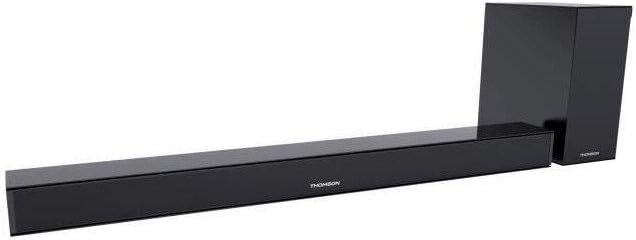
This image displays the Thomson SB260IBT soundbar unit alongside its accompanying subwoofer. The soundbar is a long, slender black unit, and the subwoofer is a compact black cube, both designed to complement modern home entertainment systems.
3.2 Контролен панел и портове
This image shows a close-up of the soundbar's side panel, revealing various control buttons and input/output ports. These include buttons for power, mode selection, volume control, and ports such as USB, SD card slot, and auxiliary input.
3.2.1 Преден панел
- LED индикатор: Показва текущия режим или състояние.
- IR приемник: За сигнали от дистанционно управление.
3.2.2 Заден панел
- Входяща мощност: Connects to the AC power cable.
- ОПТИЧЕН вход: За цифрова аудио връзка от телевизор или друго устройство.
- AUX вход: For analog audio connection using a 3.5mm cable.
3.2.3 Страничен панел
- USB порт: За възпроизвеждане на аудио files от USB устройство.
- Слот за SD карта: За възпроизвеждане на аудио files от SD карта.
- Бутони за управление: Power, Mode, Volume Up/Down.
3.2.4 Дистанционно управление
The remote control provides full functionality for power, input selection, volume adjustment, and playback controls.
4. Настройка
4.1 Поставяне
Place the soundbar on a stable, flat surface directly in front of your television. Position the subwoofer on the floor near the soundbar for optimal bass response. Ensure adequate ventilation around both units.
4.2 Свързване към захранване
- Свържете захранващия кабел към входа за захранване на саундбара.
- Включете другия край на захранващия кабел в контакта на стената.
- Connect the subwoofer to its power source (if separate).
4.3 Аудио връзки
4.3.1 Оптична връзка
For high-quality digital audio, connect an optical cable from your TV's optical output to the soundbar's OPTICAL input. Select 'Optical' mode on the soundbar.
4.3.2 AUX връзка
Use a 3.5mm audio cable to connect your device's audio output (e.g., smartphone, MP3 player) to the soundbar's AUX input. Select 'AUX' mode on the soundbar.
4.3.3 Bluetooth връзка
For wireless audio, select 'Bluetooth' mode on the soundbar. Refer to section 5.4 for detailed pairing instructions.
5. Инструкции за работа
5.1 Включване/изключване
Натиснете Мощност бутон на саундбара или дистанционното управление, за да включите или изключите устройството.
5.2 Избор на вход
Натиснете Режим button on the soundbar or remote control to cycle through available input sources: Bluetooth, Optical, AUX, USB, SD Card. The LED indicator will show the selected mode.
5.3 Контрол на звука
Използвайте Сила на звука + и Сила на звука - бутоните на саундбара или дистанционното управление, за да регулирате нивото на основната сила на звука.
5.4 Bluetooth сдвояване
- Включете звуковата лента и натиснете Режим button to select Bluetooth mode. The LED indicator will flash, indicating it is in pairing mode.
- На вашето устройство с Bluetooth (напр. смартфон, таблет) активирайте Bluetooth и потърсете налични устройства.
- Select "SB260IBT" from the list of found devices to pair.
- Once successfully paired, the soundbar's LED indicator will stop flashing and remain solid. You can now play audio from your device through the soundbar.
5.5 Възпроизвеждане от USB/SD карта
Insert a USB drive or SD card (containing compatible audio files) into the corresponding port on the soundbar's side panel. The soundbar will automatically switch to USB/SD mode and begin playback. Use the remote control for playback functions such as Play/Pause, Next Track, and Previous Track.
6. Поддръжка
6.1 Почистване
Disconnect the soundbar from the power supply before cleaning. Use a soft, dry cloth to gently wipe the surfaces. Do not use liquid cleaners, abrasive materials, or chemical solvents, as these may damage the finish.
6.2 Съхранение
If storing the unit for an extended period, disconnect it from power and store it in a cool, dry place, away from direct sunlight and extreme temperatures. It is recommended to keep the original packaging for storage.
7. Отстраняване на проблеми
| проблем | Решение |
|---|---|
| Без захранване | Check if the power cable is securely connected to the soundbar and the wall outlet. Ensure the wall outlet is functional. |
| Няма звук | Ensure the correct input source (e.g., Optical, AUX, Bluetooth) is selected. Check all audio cable connections. Increase the volume on both the soundbar and the connected device. |
| Bluetooth Disconnection or Failure to Pair | Ensure the device is within the Bluetooth operating range (approximately 10 meters). Turn off and on Bluetooth on your device, then try re-pairing. Ensure no other devices are actively connected to the soundbar. |
| Дистанционното управление не работи | Check the battery in the remote control and replace if necessary. Ensure there are no obstacles between the remote control and the soundbar's IR receiver. |
8. Спецификации
- Име на модела: SB260IBT
- марка: Томсън
- Конфигурация на канала: 2.1 Канал
- Максимална изходна мощност: 200 вата
- Технология за свързване: Bluetooth, кабелен/безжичен
- Тип вход: Multiple (Optical, AUX, USB, SD Card)
- Източник на захранване: Електрически с кабел
- Метод на контрол: Via App, Remote Control, On-unit Buttons
- Специални функции: Bluetooth
- Препоръчителни употреби: For Computers, Gaming Consoles, Music Players, Smartphones or Tablets, Televisions
- Размери на продукта: 100 x 15 x 7 cm (Soundbar)
- Тегло на продукта: Approximately 3 kg (Soundbar and Subwoofer combined)
- Брой единици: 2 (саундбар и субуфер)
- Водоустойчив: не
- Тип монтаж: Плот за маса
9. Гаранция и поддръжка
9.1 Гаранционна информация
This product comes with a limited warranty. Please refer to the warranty card included in your package for specific terms and conditions, including the warranty period and coverage details. Retain your proof of purchase for warranty claims.
9.2 Поддръжка на клиенти
For technical assistance, troubleshooting, or service inquiries, please contact Thomson customer support. Contact details can typically be found on the manufacturer's official website or in your product documentation. Please have your model number (SB260IBT) and purchase information ready when contacting support.


