Въведение
This manual provides detailed instructions for the setup, operation, maintenance, and troubleshooting of your Jaycar Composite AV to HDMI Converter (Model AC-1722). Please read this manual thoroughly before using the device to ensure proper functionality and to prevent damage.
Ключови характеристики
- Converts Composite Video and Stereo Audio (RCA) to HDMI output.
- Supports HDMI 1080p or 720p output resolutions.
- Compatible with NTSC and PAL video systems.
- Plug and play operation.
Съдържание на пакета
Моля, проверете дали всички артикули са налични във вашия пакет:
- Jaycar Composite AV to HDMI Converter (AC-1722)
- Захранващ адаптер (5V DC)
- Ръководство на потребителя (този документ)
Продуктът е свършилview
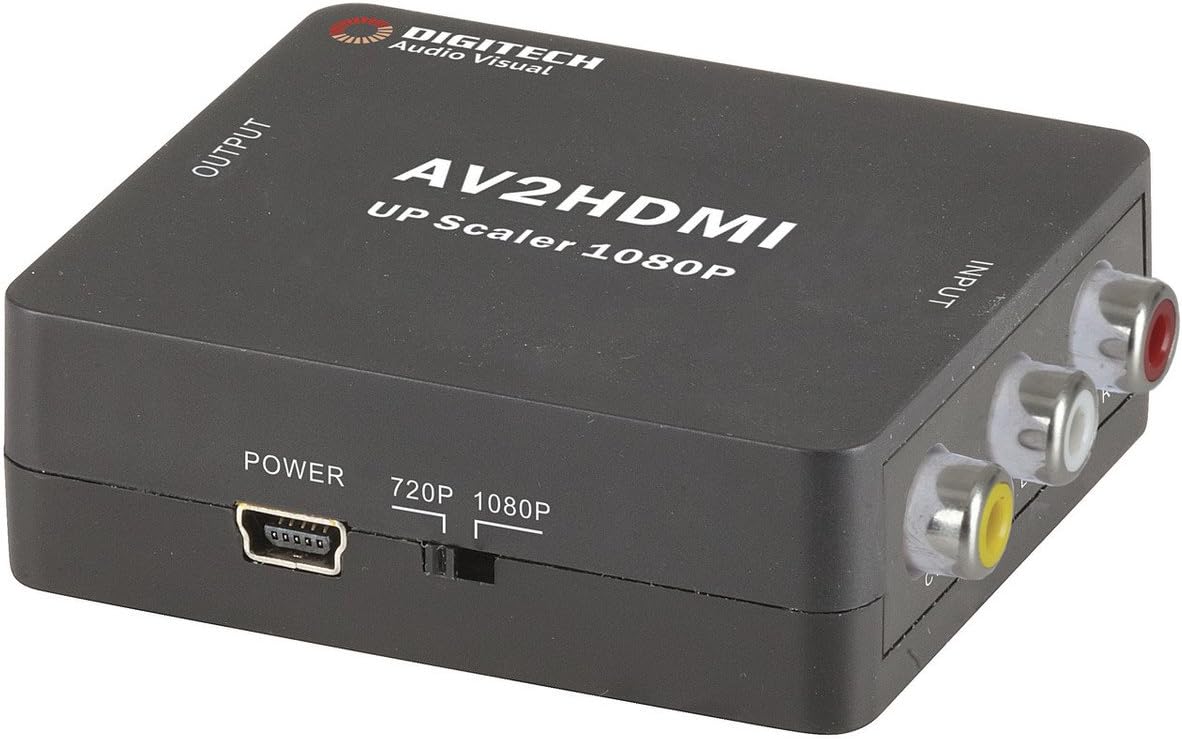
Изображение 1: Отпред view of the Jaycar Composite AV to HDMI Converter. This image displays the top and front of the converter, showing the "AV2HDMI UP Scaler 1080P" label, "OUTPUT" and "INPUT" indicators, the power input, and the 720p/1080p resolution switch. The Composite AV input ports (yellow, white, red) are visible on the right side.

Изображение 2: отстрани view of the converter showing the HDMI output port. This port is labeled "HDMI" and is where the HDMI cable connects to your display device.

Изображение 3: отстрани view of the converter showing the Composite AV input ports. These ports are labeled "CVBS" (yellow for video), "L" (white for left audio), and "R" (red for right audio).

Изображение 4: отстрани view of the converter showing the power input port and the 720p/1080p resolution switch. The power port is a mini-USB type, and the switch allows selection between 720p and 1080p output resolutions.
Инструкции за настройка
- Свързване на изходно устройство: Connect your Composite AV source device (e.g., DVD player, VCR, game console) to the converter's input ports. Match the yellow RCA cable to the "CVBS" port, the white RCA cable to the "L" (Left Audio) port, and the red RCA cable to the "R" (Right Audio) port.
- Connect Display Device: Connect an HDMI cable from the converter's "HDMI" output port to an available HDMI input on your display device (e.g., TV, monitor, projector).
- Select Output Resolution: Use the 720p/1080p switch on the converter to select your desired output resolution. For most modern displays, 1080p is recommended. If you experience issues, try 720p.
- Свържете захранването: Connect the provided 5V DC power adapter to the converter's "POWER" input port, then plug the adapter into a wall outlet. The converter will power on automatically.
- Изберете вход на дисплея: Turn on your display device and select the corresponding HDMI input channel to view the converted signal.
Инструкция за работа
The Jaycar Composite AV to HDMI Converter is designed for plug-and-play operation. Once all connections are made and power is supplied, the converter will automatically scale the analog AV signal to the selected HDMI output resolution (720p or 1080p).
- Ensure your source device is powered on and outputting a Composite AV signal.
- Verify your display device is set to the correct HDMI input.
- If no image appears, check all cable connections and the power supply.
- Experiment with the 720p/1080p switch if the image is distorted or not displayed correctly.
Поддръжка
The converter requires minimal maintenance. Follow these guidelines to ensure longevity:
- Keep the device in a dry, well-ventilated area, away from direct sunlight, high temperatures, and humidity.
- Избягвайте изпускане или подлагане на устройството на силни удари.
- Почиствайте външната част с мека, суха кърпа. Не използвайте течни почистващи препарати или разтворители.
- Ensure all cables are securely connected but do not force them.
Отстраняване на неизправности
| проблем | Възможна причина | Решение |
|---|---|---|
| Няма видео или аудио изход. |
|
|
| Distorted or flickering image. |
|
|
| Няма звук, но има видео. |
|
|
Спецификации
| Тип вход | Composite Video and Audio (3 RCA) |
| Тип изход | HDMI тип-A |
| Поддържани резолюции | 1080p (1920 x 1080), 720p |
| Видео системи | NTSC, PAL |
| Изискване за мощност | 5V DC (Power adapter included) |
| Размери на продукта (Д x Ш x В) | 54 мм x 60 мм x 20 мм (приблизително 2.13" x 2.36" x 0.79") |
| Тегло на продукта | 80g |
Гаранционна информация
This Jaycar product comes with a 1-годишна гаранция от датата на покупка. Тази гаранция покрива дефекти в материалите и изработката при нормална употреба. Тя не покрива щети, причинени от неправилна употреба, злополука, неоторизирана модификация или неправилен монтаж.
For warranty claims, please retain your proof of purchase and contact Jaycar customer support.
Поддръжка на клиенти
If you require further assistance or have questions not covered in this manual, please contact Jaycar customer support through their official webсайта или търговеца на дребно, откъдето сте закупили продукта.
For the latest support information, please visit the official Jaycar webсайт: www.jaycar.com.au


