Въведение
The Hyperkin Armor3 NuWave Controller is designed to provide accurate and fluid motion control for your Nintendo Wii U and Wii consoles. Featuring built-in Nu+ technology, this controller enhances your gaming experience by offering a wider range of motion in compatible titles. This manual provides essential information on setting up, operating, maintaining, and troubleshooting your NuWave Controller.
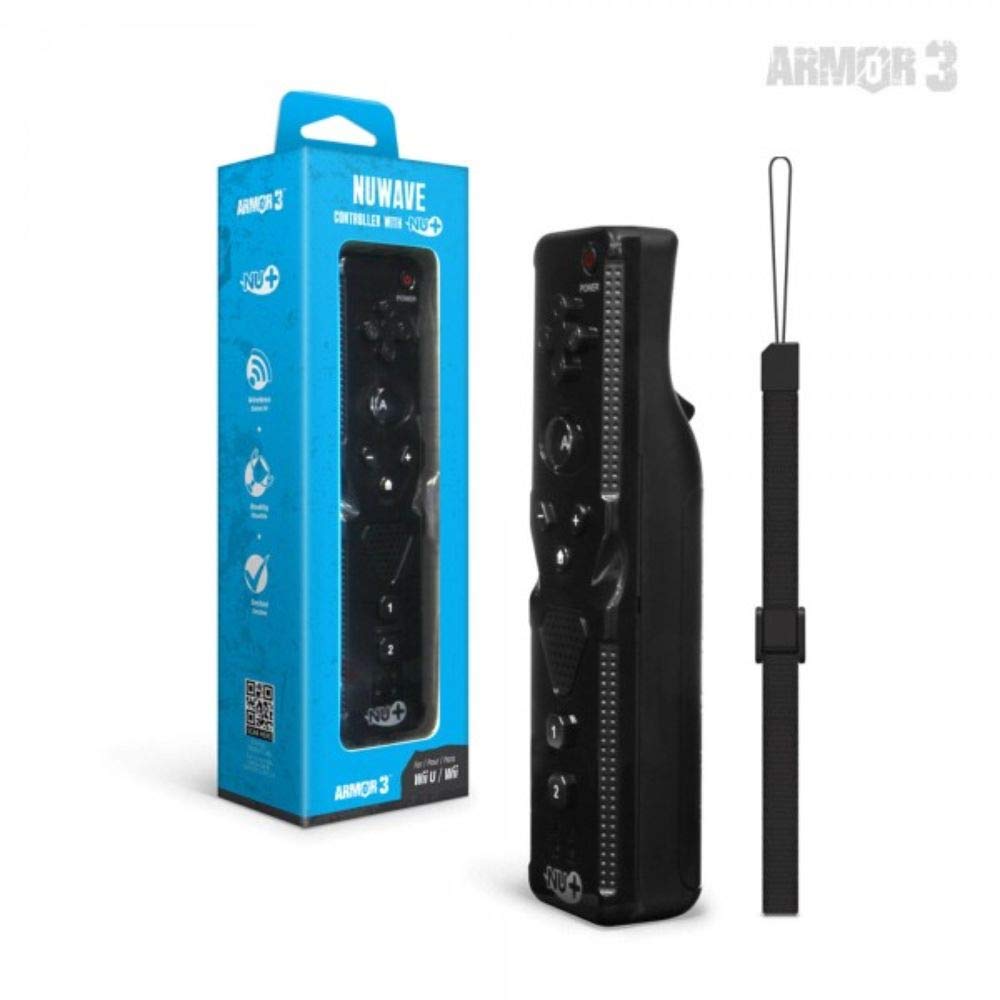
Фигура 1: Hyperkin Armor3 NuWave Controller and its packaging. The controller is black with a wrist strap, and the packaging highlights its Nu+ technology and compatibility with Wii U and Wii.
Продуктът е свършилview
The Armor3 NuWave Controller is a motion-sensing controller compatible with both Wii U and Wii systems. It integrates advanced Nu+ technology for enhanced motion detection and precision in supported games.
Ключови характеристики:
- Съвместимост: Fully compatible with Nintendo Wii U and Nintendo Wii consoles.
- Nu+ Technology: Built-in technology for a wider range of motion and improved accuracy in compatible titles.
- Ергономичен дизайн: Designed for comfortable grip and extended gameplay sessions.
- Източник на захранване: Изисква 2 батерии тип AA (не са включени в комплекта).
Настройка
1. Инсталиране на батерията
- Намерете отделението за батерии на гърба на контролера.
- Плъзнете капака на батерията надолу, за да го отворите.
- Поставете две (2) батерии тип AA, като осигурите правилната полярност (+/-), както е указано вътре в отделението.
- Поставете обратно капака на батерията, като го плъзнете нагоре, докато щракне на мястото си.
2. Свързване с вашата конзола
To connect the NuWave Controller to your Wii U or Wii console, follow these steps:
- Ensure your console is powered on.
- On your Wii U or Wii console, press the SYNC button (usually located near the SD card slot or battery compartment).
- On the NuWave Controller, open the battery cover and locate the small red SYNC button inside the battery compartment.
- Press and release the SYNC button on the controller.
- The player indicator lights on the bottom of the controller will flash. Once a single light remains lit, the controller is successfully connected.
- If connection fails, repeat steps 2-5. Ensure the controller is within range of the console.
Инструкция за работа
Основни контроли:
- Насочващ пад (D-Pad): Used for menu navigation and character movement.
- Бутон: Primary action button, often used for selection or interaction.
- B Button (Trigger): Located on the underside, typically used for grabbing or firing.
- 1 & 2 Buttons: Auxiliary action buttons, functions vary by game.
- Бутон за начало: Returns to the console's Home Menu.
- Plus (+) & Minus (-) Buttons: Often used for zooming, adjusting settings, or specific in-game actions.
- Бутон за захранване: Turns the controller on/off.
Motion Sensing with Nu+ Technology:
The built-in Nu+ technology provides enhanced motion tracking. For games that support it, you will experience more precise and responsive movements. Hold the controller firmly and ensure clear line of sight to the sensor bar for optimal performance.
- Калибриране: Some games may require initial calibration. Follow on-screen prompts.
- Каишка за китката: Always use the included wrist strap to prevent accidental drops during active gameplay.
Поддръжка
Почистване:
- Избършете контролера с мека, суха кърпа.
- За упорити замърсявания, леко дampНамокрете кърпата с вода. Не използвайте агресивни химикали или абразивни почистващи препарати.
- Ensure no liquid enters the controller's openings.
Съхранение:
- Съхранявайте контролера на хладно и сухо място, далеч от пряка слънчева светлина и екстремни температури.
- Ако съхранявате за продължителен период от време, извадете батериите, за да предотвратите протичане.
Грижа за батерията:
- Always use new, high-quality AA batteries.
- Не смесвайте стари и нови батерии или различни видове батерии.
- Изхвърляйте използваните батерии отговорно в съответствие с местните разпоредби.
Отстраняване на неизправности
| проблем | Възможна причина | Решение |
|---|---|---|
| Контролерът не се включва. | Изтощени или неправилно поставени батерии. | Сменете батериите с нови батерии тип AA, като внимавате за правилната полярност. |
| Controller does not sync with console. | Incorrect syncing procedure; out of range; console interference. | Ensure console is on. Repeat syncing steps (press SYNC on console, then on controller). Move closer to console. Check for other wireless device interference. |
| Buttons are unresponsive or delayed. | Low battery; connection issue; physical obstruction. | Replace batteries. Re-sync the controller. Ensure buttons are not stuck. |
| Motion control is inaccurate. | Sensor bar obstruction; improper calibration; environmental factors. | Ensure clear line of sight to the sensor bar. Re-calibrate in-game if prompted. Avoid strong light sources directly facing the sensor bar. |
Спецификации
- модел: M07399-bk
- марка: Хиперкин
- Съвместимост: Nintendo Wii U, Nintendo Wii
- Източник на захранване: 2 x AA батерии (не са включени)
- Размери: 2.8 x 1.8 x 8 инча (приблизително)
- Тегло: 3.88 унции (приблизително, без батерии)
- технология: Built-in Nu+ motion technology
- цвят: черен
Гаранция и поддръжка
For specific warranty information and terms, please refer to the documentation included with your purchase or visit the official Hyperkin website. Hyperkin provides customer support for their products.
Онлайн помощ: Visit the official Hyperkin webсайт за ЧЗВ, ръководства за отстраняване на проблеми и информация за контакт. www.hyperkin.com
Контакт: Refer to the Hyperkin website for the most current customer service contact methods (phone, email, etc.).