1. Въведение
The RAINPOINT Bluetooth Sprinkler Timer is designed to automate your garden and lawn watering with precision and ease. Featuring Bluetooth 5.0 connectivity, it allows you to control and program irrigation schedules directly from your smartphone. It supports both irrigation and misting modes, includes a water flow meter, and offers a rain delay function to conserve water.
Ключови характеристики:
- Bluetooth 5.0 Control: Manage and program your timer from your smartphone within a Bluetooth signal range of up to 165 ft (60m).
- Множество режими на приложение: Choose between 'Irrigation mode' for regular watering and 'Mist mode' for fine misting.
- Water Flow Sensor: Built-in sensor monitors and analyzes water consumption to prevent overwatering.
- Функция за забавяне на дъжда: Skip watering for 24, 48, or 72 hours based on weather forecasts to conserve water.
- Soil Moisture Sensor Compatibility: Delay watering schedules based on data from optional soil moisture sensors.
2. Продуктът свършиview и компоненти
Familiarize yourself with the main parts of your RAINPOINT Bluetooth Sprinkler Timer.

Figure 1: RAINPOINT Bluetooth Sprinkler Timer components, showing the inlet, outlet, and control panel.

Figure 2: Internal valve system of the RAINPOINT Sprinkler Timer, highlighting the auto-shutoff valve, anti-clogging self-cleaning valve, and impurity filter.
3. Спецификации
| Характеристика | Спецификация |
|---|---|
| Размер на входа | 1" with 3/4" adaptor |
| Изходна резба | 3/4" |
| Работно водно налягане | 0.5 бара до 8 бара (7.25-116 PSI) |
| Working Water Flow | 5 L/min до 35 L/min |
| Водоустойчив рейтинг | IP54 |
| Температура на поливане | 0℃ до 50℃ (32℉ до 122℉) |
| Източник на захранване | DC 1.5V x 4 AA batteries |
| Irrigation Mode Frequency | Maximum 3 times per day |
| Irrigation Mode Duration | 1 минута до 11 часа 59 минути |
| Mist Period | 1 минута до 11 часа 59 минути |
| Mist Working Time | 5 секунди до 59 секунди |
| Mist Interval | Максимум 15 минути |
| Живот на батерията | Над 1 година |
| Материал | Пластмаса |
| Тегло на артикула | 10.2 унции |
4. Настройка
4.1 Инсталиране на батерията
- Remove the battery compartment cover from the back of the timer.
- Поставете 4 нови батерии тип AA, като внимавате за правилната полярност (+/-).
- Поставете сигурно капака на отделението за батерията.

Figure 3: Proper installation of 4 AA batteries into the timer's battery compartment.
4.2 Connecting to Hose and Faucet
- Screw the timer's inlet onto your outdoor faucet. Ensure a tight fit to prevent leaks.
- Connect your garden hose to the timer's outlet.
4.3 Инсталиране на приложение и Bluetooth сдвояване
- Download the "RainPoint" app from your smartphone's app store (iOS or Android).
- Отворете приложението и активирайте Bluetooth на вашия смартфон.
- In the app, select to add a new device. Follow the on-screen instructions to press and hold the button on the timer until the LED indicator blinks rapidly, then confirm in the app to pair.
Video 1: This video demonstrates the initial setup of the Bluetooth water timer, including battery installation and pairing with the mobile application.
Video 2: This video provides a comprehensive guide on how to use the TTV103BRF Bluetooth water timer, covering app navigation and basic functions.
4.4 Connecting Soil Sensor (Optional)
If you have a RAINPOINT soil moisture sensor, you can connect it to your timer for smart irrigation based on soil humidity.
- Ensure the soil sensor has batteries installed and is powered on.
- In the RainPoint app, navigate to the 'Sensor' tab.
- Follow the app's instructions to connect the soil sensor. The app will display soil humidity and temperature data once connected.
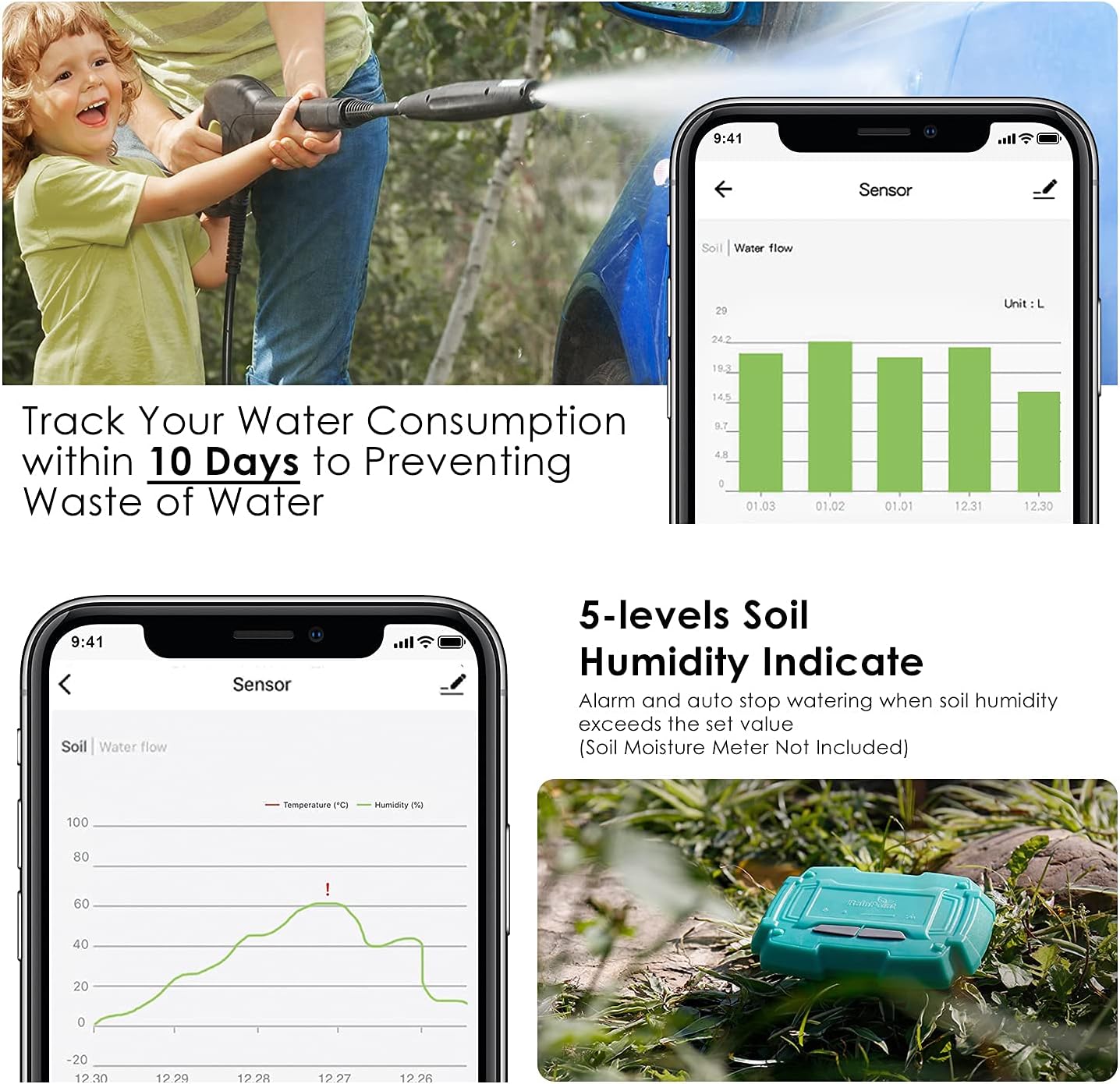
Figure 4: The RainPoint app interface showing soil humidity and temperature data from a connected soil sensor.
5. Инструкции за работа
5.1 Ръчно поливане
To initiate watering immediately for a set duration:
- Open the RainPoint app and navigate to the 'Manual' tab.
- Drag the slider to set the desired watering duration (e.g., 5 minutes, 30 minutes).
- Press the 'Play' icon to start manual watering. Press the 'Pause' icon to stop.

Figure 5: Manual watering settings within the RainPoint app, allowing users to set a specific duration for immediate watering.
5.2 Setting Irrigation Plans (Irrigation Mode & Mist Mode)
You can set up to three different irrigation plans (Plan A, B, C) per day.
- Navigate to the 'Plan' tab in the RainPoint app.
- Select a plan (e.g., Plan A) to configure.
- Choose between 'Irrigation Mode' or 'Mist Mode'.
- For Irrigation Mode: Set the start time, watering duration (1 min to 11h 59m), and select the days of the week for the plan to repeat.
- For Mist Mode: Set the start time, mist period (1 min to 11h 59m), mist working time (5s to 59s), interval (max 15 min), and select the days of the week for the plan to repeat.
- Save your plan settings.

Figure 6: The RainPoint app interface showing multiple irrigation plans with customizable start times, durations, and repeat schedules.
5.3 Функция за забавяне при дъжд
За да спрете временно графика си за поливане поради дъжд:
- In the 'Plan' tab, locate the 'Rain Delay' section.
- Select the desired delay duration (e.g., 24H, 48H, 72H).
- The timer will automatically resume its schedule after the selected delay period.

Figure 7: The RainPoint app displaying options to skip watering for 12, 24, or 72 hours due to rain.
5.4 Мониторинг на водния поток
The built-in water flow sensor allows you to track your water consumption.
- Navigate to the 'Parameter' or 'Sensor' tab in the RainPoint app.
- View the water flow data, which can be tracked for up to 10 days, to monitor usage and prevent waste.

Figure 8: The RainPoint app interface showing water consumption data over 10 days.
6. Поддръжка
6.1 Смяна на батерията
Replace batteries when the low power indicator appears in the app or on the device. Follow the battery installation steps in Section 4.1.
6.2 Почистване на филтъра
Periodically check and clean the built-in filter at the timer's inlet to prevent debris from affecting water flow.
- Disconnect the timer from the faucet.
- Remove the filter screen from the inlet.
- Изплакнете филтъра под течаща вода, за да отстраните натрупаните отпадъци.
- Поставете отново чистия филтър и прикрепете таймера към крана.
6.3 Зазимяване
To prevent damage from freezing temperatures:
- Disconnect the timer from the faucet and hose before the first freeze.
- Извадете батериите.
- Store the timer indoors in a dry, frost-free location.
6.4 Устойчивост
The RAINPOINT Sprinkler Timer is constructed with durable materials, making it waterproof, ultraviolet-proof, and corrosion-proof to ensure reliable operation in various outdoor conditions.
Figure 9: The timer is designed to be waterproof, UV-proof, and corrosion-proof for long-lasting performance.
7. Отстраняване на проблеми
7.1 Проблеми с връзката
- Не може да се сдвои с приложение: Ensure Bluetooth is enabled on your smartphone and the timer's LED is blinking rapidly. Check that the timer is within the 165 ft (60m) Bluetooth range.
- Приложението не отговаря: Check battery levels in the timer. Close and reopen the app, or restart your smartphone.
7.2 Няма воден поток
- No water from faucet: Ensure your outdoor faucet is fully open.
- Таймерът не се активира: Check battery levels. Verify that an irrigation plan is active or manual watering is initiated.
- Low water pressure: Ensure adequate water pressure from your source.
- Clogged filter: Refer to Section 6.2 for instructions on cleaning the filter.
7.3 Incorrect Schedule Execution
- Schedule not running: Verify that the irrigation plan is enabled in the app and the correct days of the week are selected. Check the timer's battery status.
- Watering at wrong times: Double-check the start times and durations configured in your irrigation plans within the app.
- Rain delay active: Ensure the rain delay function is not currently active, preventing scheduled watering.
8. Гаранционна информация
This product comes with a manufacturer's warranty. Please refer to the product packaging or the official RAINPOINT webсайт за специфични гаранционни условия, включително срок на покритие и процедури за предявяване на рекламации.
9. Поддръжка
For further assistance, technical support, or inquiries about your RAINPOINT Bluetooth Sprinkler Timer, please contact RAINPOINT customer support through the following channels:
- Онлайн: Посетете официалния RAINPOINT webсайт за често задавани въпроси и ресурси за поддръжка.
- Магазин на Amazon: You can also find support and product information on the Магазин RAINPOINT в Amazon.


