1. Въведение
This manual provides detailed instructions for the installation, operation, and maintenance of your JVC KD-TD71BT CD Receiver. The KD-TD71BT is a versatile car audio system featuring CD playback, AM/FM tuner, built-in Bluetooth for hands-free calling and audio streaming, front USB and AUX inputs, and integrated Amazon Alexa functionality. It also includes advanced audio processing technologies like a 13-band equalizer, K2 Technology, Time Alignment, Space Enhancement, and Sound Lift for an optimized listening experience. Please read this manual thoroughly before using the product to ensure correct operation and to prevent damage.
2. Информация за безопасност
- Безопасност при шофиране: Винаги работете с уреда безопасно. Не извършвайте никакви операции, които биха ви разсейвали от шофирането.
- Контрол на звука: Поддържайте силата на звука на ниво, при което все още можете да чувате външни звуци, като например превозни средства на спешна помощ.
- Захранване: Това устройство е предназначено за електрически системи с напрежение 12V DC с отрицателен полюс на заземяване.
- Инсталация: Ensure proper installation to prevent fire, electric shock, or other injuries. Consult a qualified technician if unsure.
- Избягвайте влагата: Не излагайте устройството на дъжд или влага, за да предотвратите пожар или токов удар.
- Вентилация: Осигурете адекватна вентилация около устройството, за да предотвратите прегряване.
3. Съдържание на пакета
Проверете дали всички елементи са налични в пакета:
- JVC KD-TD71BT CD Receiver Unit
- Wired Microphone (for Bluetooth hands-free calling)
- Кабелна сбруя
- Монтажен хардуер
- Ръководство за употреба (този документ)
4. Настройка и инсталация
Proper installation is crucial for optimal performance and safety. If you are unsure about any part of the installation process, it is recommended to consult a professional car audio installer.
4.1. Преди инсталиране
- Disconnect the negative terminal of the car battery to prevent short circuits.
- Ensure you have all necessary tools and mounting accessories.
- Review your vehicle's wiring diagram.
4.2. Окабеляване
Connect the wiring harness provided with the unit to your vehicle's wiring. Pay close attention to the color codes and functions of each wire.
- Жълто: Постоянно 12V (батерия)
- червено: Превключващо 12V (запалване/аксесоари)
- Черно: Земя
- Синьо/бяло: Дистанционно включване (за ampзахранваща/захранваща антена)
- Проводници за високоговорители: Свържете се към съответните високоговорители на превозното средство (напр. бяло/бяло-черно за преден ляв, сиво/сиво-черно за преден десен, зелено/зелено-черно за заден ляв, лилаво/лилаво-черно за заден десен).
- Вход за микрофон: Connect the supplied wired microphone to the dedicated input jack for Bluetooth hands-free calling.

изображение: Задна view of the JVC KD-TD71BT CD Receiver. This image displays the various connection ports, including the main wiring harness connector on the left, RCA pre-outs for external amplifiers, and the antenna input on the right. The heat sink is also visible in the center.
4.3. Монтиране на модула
Secure the unit into the dashboard opening using the provided mounting sleeve and brackets. Ensure the unit is firmly seated and does not obstruct any vehicle controls.
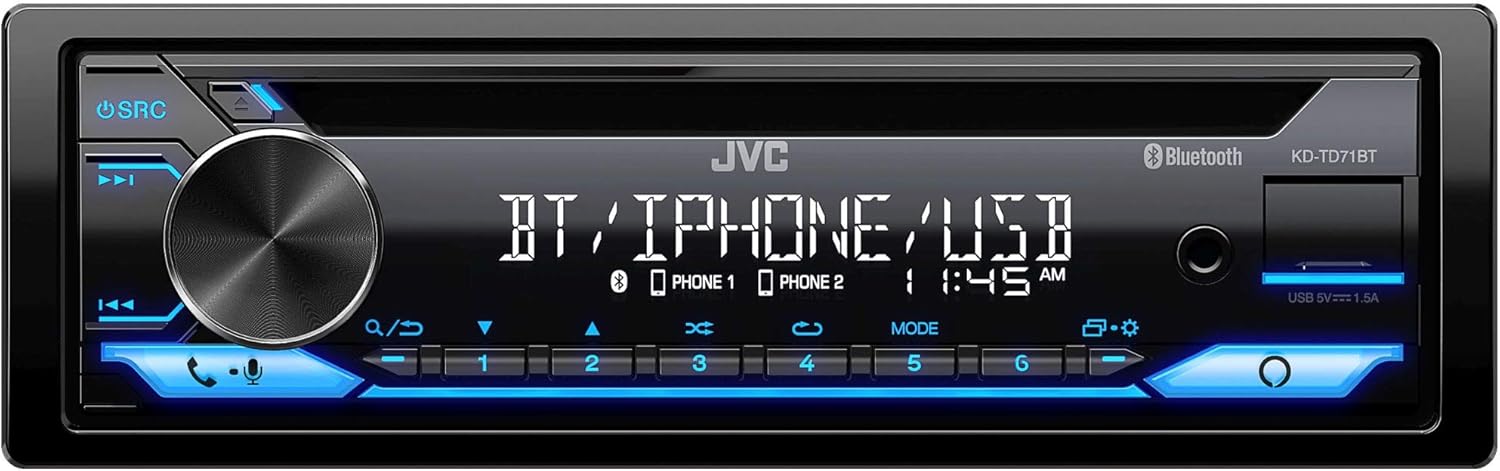
изображение: Отпред view of the JVC KD-TD71BT CD Receiver. This image shows the main display, the large rotary volume knob, source button, track controls, and the CD slot. The front USB and AUX inputs are also visible on the right side of the faceplate.
5. Инструкции за работа
5.1. Основна операция
- Включване/изключване: Натиснете SRC бутон, за да включите устройството. Натиснете и задръжте SRC бутон, за да го изключите.
- Контрол на звука: Завъртете голямото въртящо се копче, за да регулирате нивото на звука.
- Избор на източник: Натиснете SRC Натиснете бутона многократно, за да превключвате между наличните източници (CD, тунер, Bluetooth аудио, USB, AUX).
- Меню/Настройки: Натиснете МЕНЮ button (often integrated with the volume knob press) to access system settings.
5.2. Bluetooth функции
The KD-TD71BT features Bluetooth for hands-free calling and wireless audio streaming.
- Сдвояване на устройство:
- Включете Bluetooth на вашето мобилно устройство.
- Select "KD-TD71BT" from the list of available devices.
- Confirm the pairing on both devices if prompted. The unit supports Bluetooth Automatic Pairing.
- Обаждане със свободни ръце:
- Отговор/Край на повикване: Натиснете ОБАДЕТЕ СЕ button (often a dedicated button or part of the volume knob function).
- Набиране: Използвайте контролите на устройството или телефона си, за да наберете.
- Аудио стрийминг: Select Bluetooth Audio as the source. Play music from your paired device. The unit supports Streaming DJ, allowing up to 5 Bluetooth devices to be connected simultaneously for music streaming.
- 2-Phones Full-Time Connection: The unit can maintain a full-time connection with two Bluetooth-enabled phones simultaneously, allowing for seamless switching between devices for calls or music.
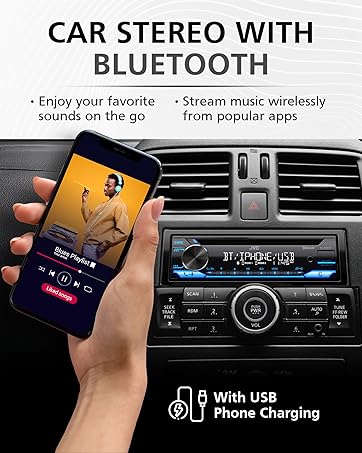
изображение: A hand holding a smartphone displaying a music playlist, positioned next to a car stereo. The car stereo's display shows "BT / IPHONE / USB", indicating its Bluetooth and USB capabilities. This illustrates the unit's ability to connect with smartphones for audio playback.
5.3. USB and AUX Inputs
- USB възпроизвеждане: Connect a USB storage device to the front USB port. The unit supports MP3, WMA, WAV, AAC, and FLAC audio file playback. Use the track controls to navigate. The USB port also provides 1.5A charging for compatible devices.
- AUX вход: Connect an external audio player to the front 3.5mm AUX input using a stereo mini-jack cable. Select AUX as the source.
5.4. Възпроизвеждане на CD
- Поставете CD в слота за дискове. Устройството автоматично ще превключи на CD източник и ще започне възпроизвеждане.
- Използвайте ПОРЪЧКА НАГОРЕ/НАДОЛУ бутони за пропускане на песни.
- Натиснете ПАУЗА/ВЪЗПРОИЗВЕЖДАНЕ бутон за пауза или възобновяване на възпроизвеждането.
5.5. AM/FM Tuner
- Select Tuner as the source.
- Използвайте ТЪРСИ buttons to find radio stations.
- Натиснете и задръжте ТЪРСИ за автоматично търсене на станции.
- Store favorite stations using the preset buttons (1-6).
5.6. Интеграция с Amazon Alexa
The KD-TD71BT features built-in Amazon Alexa.
- Активиране: Connect your smartphone via Bluetooth and ensure the JVC Remote App is installed and configured with your Amazon Alexa account.
- Гласови команди: Press the dedicated Alexa button (or activate via the JVC Remote App) and speak your commands, such as "Alexa, play music," "Alexa, get directions," or "Alexa, check the weather."
6. Аудио настройки
Customize your listening experience using the advanced audio settings. Access these settings through the unit's menu.
- 13-лентов графичен еквалайзер: Adjust specific frequency bands to tailor the sound to your preference. Eleven preset EQ settings are also available.
- Подравняване на времето: Adjust the delay of individual speaker outputs to ensure sound from all speakers reaches the listener at the same time, creating a more focused soundstage.
- Space Enhancement: Digitally expands the sound field to create a larger, more immersive listening environment.
- Звуков лифт: Virtually adjusts the height of the sound image, making it appear as if the sound is coming from the dashboard rather than the floor.
- K2 Технология: JVC's proprietary technology that reproduces the original master sound by expanding the bit rate and frequency range.
7. Поддръжка
- Почистване на уреда: Use a soft, dry cloth to wipe the faceplate. For stubborn dirt, dampen кърпата с вода. Никога не използвайте абразивни почистващи препарати или разтворители.
- Грижа за CD плейъра: Use only standard, round CDs. Avoid using irregularly shaped discs or discs with labels that may peel off. Keep the disc tray clean.
- Смяна на предпазител: Ако устройството не се включи, проверете предпазителя, разположен на задната му страна. Сменете го с предпазител от същия тип. amperage рейтинг.
8. Отстраняване на проблеми
If you encounter issues with your KD-TD71BT, refer to the following common problems and solutions.
| проблем | Възможна причина | Решение |
|---|---|---|
| Без захранване | Изгорял предпазител; неправилно окабеляване; проблем с акумулатора на автомобила. | Check and replace fuse; verify wiring connections; check car battery. |
| Без звук | Твърде ниска сила на звука; активирано заглушаване; проблем с окабеляването на високоговорителите; избран неправилен източник. | Увеличете силата на звука; деактивирайте безшумния звук; проверете връзките на високоговорителите; изберете правилния източник. |
| Bluetooth не се свързва | Bluetooth off on phone/unit; device not paired; interference. | Ensure Bluetooth is on; re-pair device; move closer to unit; restart phone/unit. |
| CD прескача или не се възпроизвежда | Dirty or scratched disc; unit vibration; foreign object in slot. | Clean disc; ensure stable mounting; check for obstructions. |
| Слабо радио приемане | Антената не е свързана; повредена антена; зона със слаб сигнал. | Check antenna connection; replace antenna if damaged; try a different location. |
9. Спецификации
Key technical specifications for the JVC KD-TD71BT CD Receiver:
- Номер на модела: KD-TD71BT (also referred to as KD-T710BT in some documentation)
- Захранване: 12V DC (отрицателно заземяване)
- Свързване: Bluetooth, Front USB, Front AUX (3.5mm Jack)
- USB зареждане: 1.5A
- Режим на аудио изход: Стерео
- Конфигурация на канала за съраунд звук: 2
- Equalizer: 13-Band Graphic EQ with 11 Presets
- Поддържани аудио формати (USB/CD): MP3, WMA, WAV, AAC, FLAC
- Специални функции: Amazon Alexa Compatible, K2 Technology, Time Alignment, Space Enhancement, Sound Lift, Streaming DJ, 2-Phones Full-Time Connection, Steering Wheel Remote Ready
- Размери на продукта: Приблизително 10 x 9 x 4 инча (25.4 x 22.86 x 10.16 cm)
- Тегло на артикула: 3.19 паунда (1.45 кг)
- производител: JVC
10. Гаранционна информация
JVC products are manufactured to high-quality standards. For specific warranty terms and conditions, please refer to the warranty card included with your product or visit the official JVC website. Warranty coverage typically includes defects in materials and workmanship for a specified period from the date of purchase. Keep your proof of purchase for warranty claims.
11. Поддръжка на клиенти
If you require further assistance or have questions not covered in this manual, please contact JVC customer support.
- Официален JVC Webсайт: www.jvc.com (for product information, FAQs, and support contact details)
- Онлайн ресурси: Check the support section of the JVC website for updated manuals, firmware, and troubleshooting guides.