1. Продуктът свършиview
The Philips SRP5016/10 is a modern and elegant 6-in-1 universal remote control designed to simplify your home entertainment experience. It allows you to control up to six different devices, such as televisions, DTVs, DVRs, home theater systems, soundbars, and streaming devices. This remote features a learning function, enabling it to receive and store infrared codes from your original remote controls, providing comprehensive control over various brands and models.
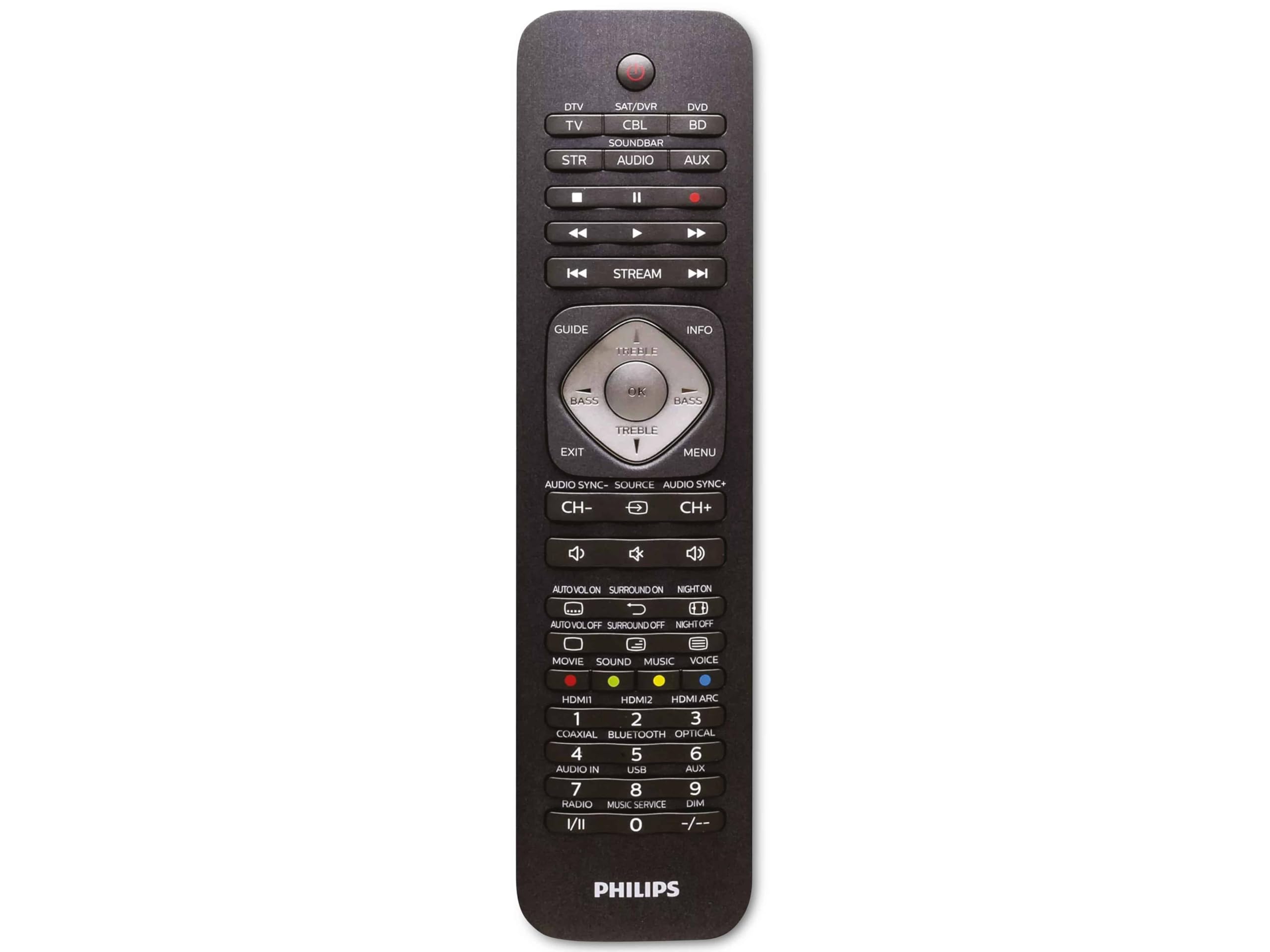
Image 1.1: Philips SRP5016/10 6-in-1 Universal Remote Control. This image displays the front view of the black universal remote control, highlighting its ergonomic design and button layout.
2. Настройка
2.1. Инсталиране на батерията
- Отворете капака на отделението за батерии, разположено на гърба на дистанционното управление.
- Поставете две батерии тип AAA, като внимавате за правилната полярност (+ и -), както е указано вътре в отделението.
- Затворете здраво капака на отделението за батерията.
Забележка: Батериите не са включени и трябва да се закупят отделно.
2.2. Programming Devices
The Philips SRP5016/10 can be programmed using either direct code entry or the learning function.
2.2.1. Direct Code Entry (Recommended for common brands)
- Включете устройството, което искате да управлявате (например телевизор, DVD плейър).
- Press and hold the desired device button on the universal remote (e.g., TV, DVD) for approximately 3 seconds until the device button lights up.
- Enter the 4-digit code for your device's brand (refer to the code list provided with your remote, if available, or search online for Philips universal remote codes).
- If the device turns off or responds, the code is correct. Press the device button again to save the code. If not, try the next code for your brand.
2.2.2. Learning Function (For devices not in the code list or advanced functions)
- Place the universal remote and your original remote control head-to-head, approximately 1-3 cm apart.
- Press and hold the desired device button on the universal remote (e.g., TV) for approximately 3 seconds until the device button lights up.
- Натиснете и задръжте НАУЧЕТЕ button on the universal remote until the device button starts blinking.
- On your original remote, press the button you wish to teach (e.g., МОЩНОСТ). The device button on the universal remote will blink rapidly and then stay solid, indicating successful learning.
- Repeat step 4 for all other buttons you wish to learn.
- Натиснете НАУЧЕТЕ button again to exit learning mode.
3. Инструкции за работа
3.1. Selecting a Device
To control a specific device, press the corresponding device button (e.g., TV, DVD, SAT, AUX, ЗВУКОВА ЛЕНТА, ПОТОК) once. The selected device button will light up briefly to confirm your selection. You can then use the remote's buttons to control that device.
3.2. Основни функции
- МОЩНОСТ: Включва или изключва избраното устройство.
- ОБЕМ +/-: Adjusts the volume of the selected audio device.
- КАНАЛ +/-: Changes channels on the selected TV or DTV device.
- МЪК: Заглушава звука.
- БРОЙ БУТОНИ (0-9): За директно въвеждане на канал или други числови входове.
- NAVIGATION (Arrow buttons, OK): За навигация и избор в менюто.
4. Поддръжка
4.1. Смяна на батерията
When the remote control's range decreases or buttons become unresponsive, it is time to replace the batteries. Follow the battery installation steps in Section 2.1. Always replace both AAA batteries simultaneously with new ones.
4.2. Почистване
За почистване на дистанционното управление използвайте мека, суха кърпа. За упорити замърсявания, леко намачкайтеampen the cloth with water or a mild cleaning solution. Avoid using abrasive cleaners, solvents, or alcohol, as these can damage the remote's surface or internal components.
5. Отстраняване на проблеми
- Дистанционното не работи:
- Проверете дали батериите са поставени правилно и не са изтощени. Сменете ги, ако е необходимо.
- Уверете се, че няма препятствия между дистанционното и устройството.
- Verify that the correct device button (e.g., TV, DVD) is selected.
- Устройството не отговаря на команди:
- The device code may be incorrect. Try reprogramming the device using a different code from the code list or use the learning function.
- Ensure the remote's infrared emitter is pointed directly at the device's infrared receiver.
- Learning function not working:
- Ensure the original remote's batteries are fresh and it is functioning correctly.
- Make sure the remotes are positioned correctly (head-to-head, 1-3 cm apart) during the learning process.
- Try learning the button again. Some original remotes have weaker IR signals that require multiple attempts.
6. Спецификации
| Характеристика | Спецификация |
|---|---|
| Марка | Philips |
| Име на модела | 6-в-1 |
| Номер на модела | SRP5016/10 |
| Съвместими устройства | Home Theater, DVD/Blu-ray Player, SoundBar, Television, Streaming Device |
| Специална функция | Универсална, функция за обучение |
| Технология за свързване | Инфрачервена връзка |
| Maximum Number of Supported Devices | 6 |
| Тип контролер | Бутон за управление |
| Брой бутони | Not specified (typical universal remote layout) |
| Максимален обхват | 10 метра |
| Източник на захранване | 2 x AAA батерии (не са включени) |
| Тип материал | Пластмаса |
| Размери на продукта | 21.4 х 5.3 х 2.2 см |
| Тегло на продукта | 130 гр |
7. Гаранция и поддръжка
For warranty information, please refer to the documentation provided at the time of purchase or contact your retailer. Philips offers customer support for their products. If you encounter issues that cannot be resolved using this manual, please visit the official Philips support webсайт или се свържете с тяхното обслужване на клиенти за съдействие.
Моля, запазете доказателството си за покупка за гаранционни искове.


