1. Въведение
This manual provides essential information for the safe and effective use of your Sony MHC-V43D High Power Party Speaker. Please read these instructions thoroughly before operating the unit and retain them for future reference.

Фигура 1: Отпред view of the Sony MHC-V43D Party Speaker.
Ключови характеристики:
- Jet Bass Booster: Enhances bass for powerful sound.
- Party Light & Speaker Light: Illuminates your space with dynamic lighting effects.
- Karaoke & Guitar Input: Connect microphones and guitars for interactive entertainment.
- Управление с жестове: Manage music playback and effects with simple hand movements.
- NFC and Bluetooth Connectivity: Безпроблемно безжично стрийминг на аудио.
- Music Center App Compatibility: Control speaker functions from your smartphone.
- Fiestable App Integration: Access DJ Control, Illumination, Karaoke, and Motion Control features.
- Built-in CD/DVD Player: Enjoy your favorite discs.
- USB and HDMI Connectivity: Versatile media playback options.
2. Настройка
2.1 Какво има в кутията
- AC Cord (1U)
- FM Antenna (1U)
- Batteries (2U)
- Remote Control (1U)
- Setup Guide (1U)
2.2 Първоначално настаняване
Place the speaker on a stable, flat surface. Ensure adequate ventilation around the unit to prevent overheating. Avoid placing it near heat sources or in direct sunlight.
2.3 Захранване
- Connect the supplied AC power cord to the AC IN port on the rear of the speaker.
- Plug the other end of the AC power cord into a wall outlet (240 Volts).
2.4 Свързване на FM антена
Connect the supplied FM antenna to the FM ANTENNA terminal on the rear of the speaker for improved radio reception.
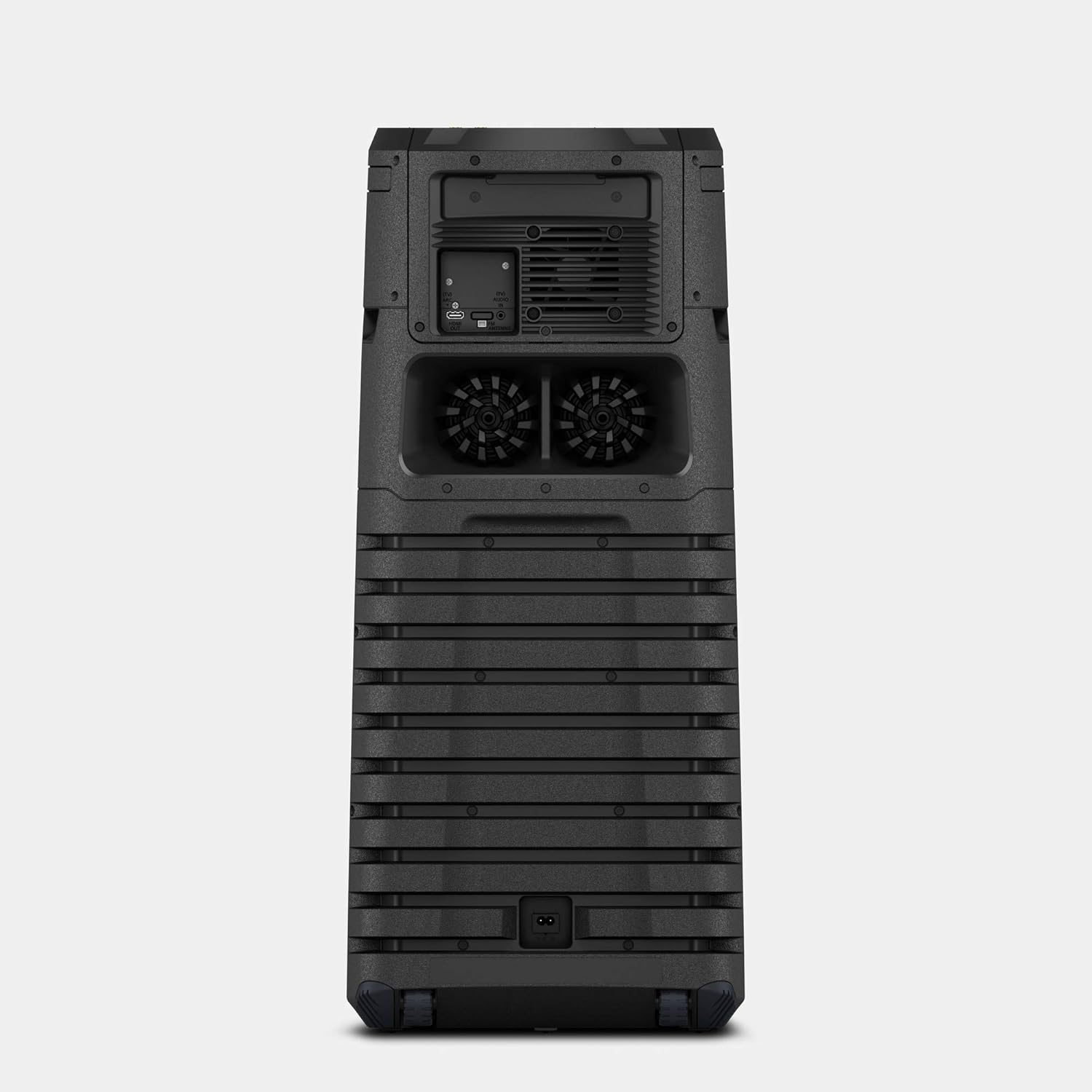
Figure 2: Rear panel connections including AC IN and FM Antenna port.
3. Инструкции за работа
3.1 Основни контроли
The main controls are located on the top panel of the speaker. These include power, volume, playback controls, and function selection buttons.

Figure 3: Top panel controls for power, volume, and function selection.
3.2 Bluetooth и NFC свързаност
За да се свържете безжично:
- Bluetooth сдвояване: Press the Bluetooth button on the speaker or remote control. On your device, search for "MHC-V43D" and select to pair.
- NFC (комуникация в близко поле): Touch your NFC-enabled smartphone to the N-Mark on the speaker for instant pairing.
3.3 Karaoke and Guitar Input
The speaker features two microphone/guitar inputs for karaoke and live performances.
- Connect your microphone or guitar to the MIC/GUITAR jacks on the top panel.
- Adjust the MIC/GUITAR LEVEL and VOCAL FADER controls as needed.
3.4 Управление с жестове
Control various functions by waving your hand over the gesture control panel on the top of the speaker.
- Увеличаване/намаляване на звука: Twist your hand right/left.
- Пропуснете песента: Shake your hand left/right.
- Пауза/Възпроизвеждане: Move your hand up/down.

Figure 4: Demonstrating gesture control for music playback.
3.5 Music Center and Fiestable App
Enhance your experience by downloading the Sony Music Center and Fiestable apps on your smartphone.
- Music Center: Manage music playback, sound settings, and speaker grouping.
- Весело: Access party features like DJ Control, Illumination, Karaoke, and Motion Control.
3.6 Media Playback (CD/DVD, USB, HDMI)
- CD/DVD: Insert a disc into the disc tray. Select the 'Disc' function.
- USB: Connect a USB device to the USB port. Select the 'USB' function.
- HDMI: Connect to a TV or other device using an HDMI cable. Select the 'HDMI' function.
4. Поддръжка
4.1 Почистване
- Избършете външната част на високоговорителя с мека, суха кърпа.
- Не използвайте абразивни гъби, абразивни прахове или разтворители като алкохол или бензен.
4.2 Съхранение
Когато не се използва за продължителни периоди, съхранявайте високоговорителя на хладно и сухо място, далеч от пряка слънчева светлина и екстремни температури.
5. Отстраняване на проблеми
5.1 Без захранване
- Ensure the AC power cord is securely connected to both the speaker and the wall outlet.
- Проверете дали контактът работи правилно, като включите друго устройство.
5.2 Няма звук
- Verify the volume level on both the speaker and the connected device.
- Ensure the correct input source (Bluetooth, USB, CD/DVD, HDMI) is selected.
- Check all cable connections for wired inputs.
5.3 Проблеми със сдвояването чрез Bluetooth
- Уверете се, че високоговорителят е в режим на Bluetooth сдвояване.
- Ensure your device's Bluetooth is enabled and within range (approx. 10 meters).
- Delete the speaker from your device's Bluetooth list and attempt to re-pair.
6. Спецификации
| Характеристика | детайл |
|---|---|
| Име на модела | MHC-V43D |
| Тип монтаж | Подова стойка |
| Материал | Пластмаса |
| Тип високоговорител | Bookshelf/Outdoor |
| Специална функция | NFC активиран |
| Препоръчителни употреби | За смартфони или таблети |
| Съвместими устройства | Смартфон, Таблет |
| Диаметър на субуфера | 12 инча |
| Конфигурация на канала за съраунд звук | 2.1 |
| Цвят | черен |
| Размери на продукта | 32.9Д x 35Ш x 79.5В сантиметра |
| Тегло на артикула | 14 кг 500 гр |
| Водоустойчив е | ВЯРНО |
| Максимален обхват (Bluetooth) | 10 metres / 30 Feet |
| Контролен метод | Докосване |
| Безжична комуникационна технология | Bluetooth |
| Източник на захранване | Електрически с кабел |
| Уотtage | 400 вата |
| Честотна характеристика | 20000 Hz |
7. Гаранция и поддръжка
7.1 Гаранционна информация
This product comes with a Limited Warranty. Please refer to the warranty card included in your package for specific terms and conditions.
7.2 Поддръжка на клиенти
For any queries, technical assistance, or service requests, please contact Sony India Private Limited customer care:
- Номер за обслужване на клиенти: 080 6500 6500
- Имейл: sonyindia.care@ap.sony.com
Адрес на вносителя: Sony India Private Limited, A-18, Mohan Co-operative Industrial Estate, Mathura Road, NEW DELHI 110044, INDIA.


