1. Въведение
This manual provides comprehensive instructions for the installation, operation, and maintenance of the SINOTIMER TM919B 30A Programmable Electronic Timer Switch. This device is designed to automatically control the ON/OFF switching of various electrical appliances based on user-defined daily or weekly programs. Please read this manual carefully before installation and use to ensure proper function and safety.
2. Информация за безопасност
ПРЕДУПРЕЖДЕНИЕ: Риск от токов удар. Монтажът трябва да се извършва само от квалифициран електротехник или обучен персонал.
- Always disconnect power at the circuit breaker before installing or servicing the timer switch.
- Уверете се, че всички кабелни връзки са сигурни и отговарят на местните електрически норми.
- Не превишавайте максималното натоварване от 30A.
- This device is intended for indoor use only. Avoid exposure to moisture or extreme temperatures.
- Не се опитвайте сами да разглобявате или ремонтирате устройството. Свържете се с квалифициран сервизен персонал.
3. Продуктът свършиview
The SINOTIMER TM919B is a digital timer switch featuring a large LCD display, multiple programming options, and a manual override function. It is designed for DIN rail mounting.
3.1. Компоненти и контроли
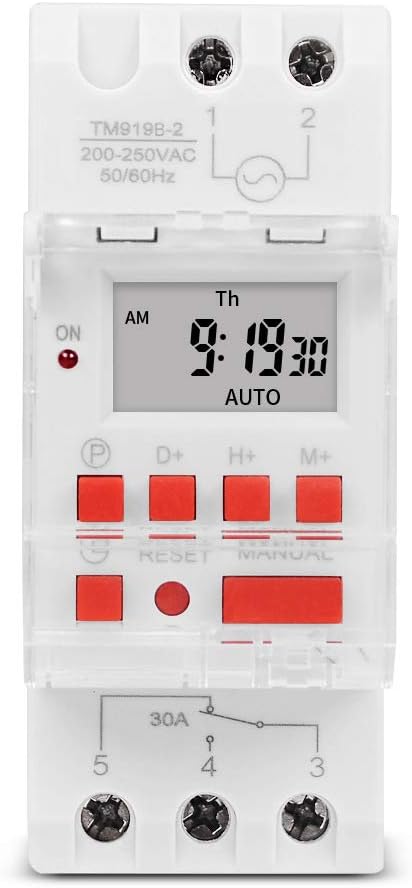
Фигура 1: Отпред view of the TM919B timer switch, showing the LCD display, control buttons, and terminal connections.

Фигура 2: Под ъгъл view of the TM919B with the transparent protective cover open, revealing the programming buttons (P, D+, H+, M+, RESET, MANUAL).
- LCD дисплей: Показва текущото време, ден и състояние на програмата.
- P (Program) Button: Enters/exits program setting mode.
- D+ (Day) Button: Adjusts day of the week in setting modes.
- H+ (Hour) Button: Adjusts hour in setting modes.
- M+ (Minute) Button: Adjusts minute in setting modes.
- Бутон за рестартиране: Изчиства всички настройки и нулира таймера до фабричните настройки.
- Бутон РЪЧНО: Превключва между режими ВКЛ., АВТОМАТИЧЕН и ИЗКЛ.
- Терминални връзки: For power input and load output.
4. Спецификации
| Характеристика | Спецификация |
|---|---|
| Модел | TM919B |
| Voltage | 220V (AC200-250V) |
| Честота | 50/60Hz |
| Максимално натоварване | 30A (резистивно натоварване) |
| Програми | 16 ON/OFF programs per day/week |
| Минимален интервал | 1 минута |
| Резервна батерия | Built-in rechargeable battery (for memory retention) |
| Монтаж | 35 мм DIN шина |
| Размери | Вижте Фигура 3 |

Фигура 3: Detailed dimensions of the TM919B timer switch, showing height, width, and depth measurements.
5. Настройка и инсталация
Follow these steps for safe and correct installation of your timer switch.
5.1. Монтаж
- Уверете се, че захранването е изключено от главния прекъсвач.
- Mount the TM919B onto a standard 35mm DIN rail. The device features a clip mechanism on the back for secure attachment.
- Press the orange clip at the bottom of the unit to release it from the DIN rail if removal is necessary.

Фигура 4: отстрани view of the TM919B, highlighting the orange DIN rail mounting clip.

Фигура 5: Назад view of the TM919B, illustrating the DIN rail mounting mechanism.
5.2. Схема на свързване
Refer to the diagram below for correct wiring connections. Ensure all connections are tight and insulated.

Фигура 6: отстрани view of the TM919B showing the wiring diagram printed on the casing. Terminals 1 and 2 are for power input (L and N). Terminals 3, 4, and 5 are for load output (Common, Normally Open, Normally Closed).
- Терминали 1 и 2: Power Input (L - Live, N - Neutral). Connect your 220V AC supply here.
- Терминал 3: Common (COM) for the output relay.
- Терминал 4: Normally Open (NO) output. The load will be powered when the timer is ON.
- Терминал 5: Normally Closed (NC) output. The load will be powered when the timer is OFF.
For typical applications where the load is switched ON by the timer, connect the load between Terminal 3 (COM) and Terminal 4 (NO).
6. Инструкции за работа
6.1. Първоначална настройка и нулиране
- After connecting power, the display may be blank or show random characters. Press the НУЛИРАНЕ button with a pointed object (e.g., a pen tip) to clear all memory and reset the timer. The display will show "0:00" and "MO".
- Allow the internal battery to charge for at least 30 minutes before programming for optimal performance and memory retention during power outagес.
6.2. Настройка на текущото време и ден
- Натиснете и задръжте D+ button to set the current day of the week (MO, TU, WE, TH, FR, SA, SU).
- Натиснете и задръжте H+ button to set the current hour (0-23).
- Натиснете и задръжте M+ button to set the current minute (0-59).
- Release the buttons when the correct time and day are displayed. The timer will automatically save the settings.
6.3. Програмиране на цикли на включване/изключване
The TM919B supports up to 16 ON/OFF programs. Each program consists of an ON time and an OFF time.
- Натиснете P button once. The display will show "1 ON". This is for the first ON program.
- Използвайте D+ to select the day(s) for this program. Options include:
- MO TU WE TH FR SA SU (Every day)
- MO (Monday only)
- TU (Tuesday only)
- ...
- MO TU WE TH FR (Weekdays)
- SA SU (Weekends)
- MO TU WE (Mon-Wed)
- TH FR SA (Thu-Sat)
- MO WE FR (Mon, Wed, Fri)
- TU TH SA (Tue, Thu, Sat)
- MO TU WE TH FR SA (Mon-Sat)
- Използвайте H+ и M+ to set the desired ON hour and minute.
- Натиснете P button again. The display will show "1 OFF". This is for the first OFF program.
- Използвайте D+, H+, и M+ to set the desired OFF day, hour, and minute. Ensure the OFF time is after the ON time for the same program.
- Repeat steps 1-5 for additional ON/OFF programs (up to 16). If you don't need all 16 programs, simply press P to cycle through unused programs until you return to the current time display.
- To exit programming mode and save settings, press the clock button (usually labeled with a clock icon, or simply wait for 30 seconds without input).
6.4. Ръчно заместване
Натиснете РЪКОВОДСТВО бутон за превключване между режимите на работа:
- НА: The timer output is continuously ON, ignoring all programs.
- АВТОМАТИЧЕН: The timer operates according to the programmed ON/OFF cycles. This is the standard operating mode.
- ИЗКЛЮЧЕНО: The timer output is continuously OFF, ignoring all programs.
Уверете се, че таймерът е настроен на АВТОМАТИЧНО for programmed operation.
7. Поддръжка
- The TM919B is designed for maintenance-free operation.
- Почиствайте външната част с мека, суха кърпа. Не използвайте абразивни почистващи препарати или разтворители.
- Ensure the internal battery is charged by keeping the unit powered for at least 24 hours initially, and periodically thereafter, to maintain time and program memory during power outagес.
8. Отстраняване на проблеми
| проблем | Възможна причина | Решение |
|---|---|---|
| Дисплеят е празен. | No power supply; internal battery discharged. | Check power connections. Allow unit to charge for 30 minutes. |
| Таймерът не превключва товара. | Incorrect wiring; timer in MANUAL ON/OFF mode; incorrect program settings. | Verify wiring (refer to Figure 6). Ensure timer is in AUTO mode. Check program times and days. |
| Programs are lost after power outage. | Вътрешната батерия не е напълно заредена или е дефектна. | Ensure unit is powered for at least 24 hours to fully charge the battery. If problem persists, contact support. |
| Бутоните не реагират. | Unit frozen; temporary glitch. | Натиснете НУЛИРАНЕ бутон. |
9. Гаранция и поддръжка
SINOTIMER products are manufactured to high-quality standards. For warranty information or technical support, please refer to the documentation provided with your purchase or visit the official SINOTIMER webсайт. Запазете касовата си бележка като доказателство за покупка.
For further assistance, you may contact SINOTIMER customer service through their official channels.


