Въведение
This manual provides comprehensive instructions for the operation and maintenance of your SF Quartz Analog Digital Watch, model NR77027PP05. Please read this manual thoroughly to ensure proper use and to maximize the lifespan of your timepiece. This watch features both analog and digital displays, offering versatile timekeeping functions.

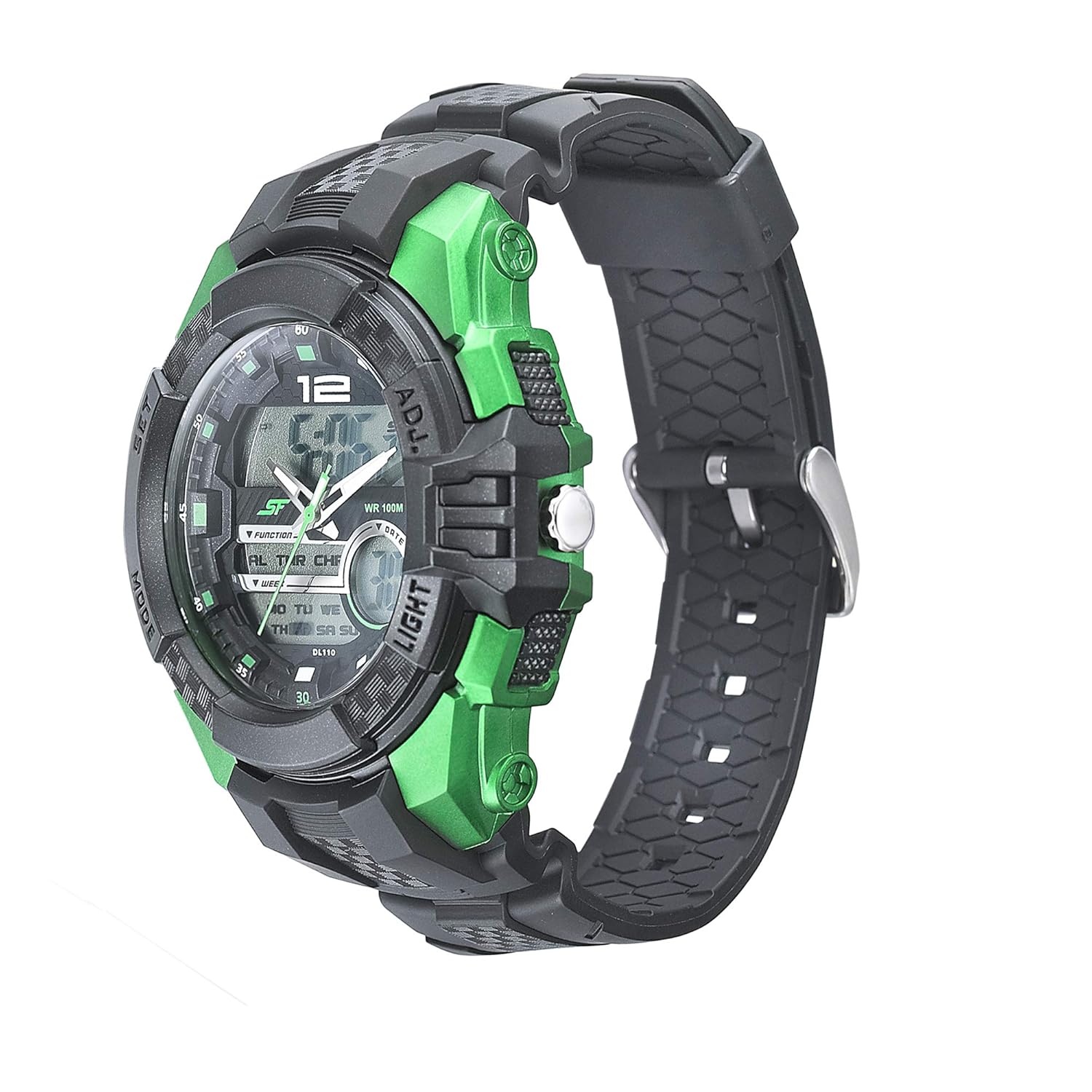
Изображение: Отпред view of the SF Quartz Analog Digital Watch NR77027PP05, showcasing its black dial, green accents, and both analog hands and digital display. The watch features multiple buttons on its sides for various functions.
Първоначална настройка
Настройка на аналогово време
- Pull the crown (located on the right side of the watch) out to the first position.
- Завъртете короната, за да настроите часовата и минутната стрелка към правилното време.
- Push the crown back into its normal position to start the analog movement.
Настройка на цифров час и дата
The digital display typically has buttons labeled 'MODE', 'SET', 'ADJ', and 'LIGHT'. Refer to the image below for button identification.
Изображение: Отстрани view of the SF Quartz Analog Digital Watch NR77027PP05, highlighting the 'SET' and 'ADJ' buttons on the right side, and 'MODE' and 'LIGHT' buttons on the left side.
- Натиснете РЕЖИМ натискайте бутона многократно, докато стигнете до режим на настройка на времето (обикновено се обозначава с мигащи цифри).
- Натиснете НАБОР or ПРИЛ , за да изберете цифрата, която искате да промените (напр. часове, минути, година, месец, ден).
- Използвайте СВЕТЛИНА button (or another designated button) to increase the value of the flashing digit.
- Repeat steps 2 and 3 until all desired settings (time, date, day of week) are correct.
- Натиснете РЕЖИМ бутон, за да излезете от режима на настройка.
Инструкция за работа
Режими на цифров дисплей
Натиснете РЕЖИМ бутон, за да превключвате между следните функции:
- Дисплей за време: Shows current digital time (hours, minutes, seconds) and day of the week.
- Алармен режим: Позволява настройване и активиране на аларма.
- Режим хронометър: За измерване на изминало време.
- Режим на таймер: For countdown timing.
- Режим на двойно време: Показва втора часова зона.
Използване на подсветката
Натиснете СВЕТЛИНА button (typically on the upper left or lower left side) to illuminate the digital display for a few seconds in low-light conditions.

Изображение: Друга страна view of the SF Quartz Analog Digital Watch NR77027PP05, emphasizing the 'LIGHT' button on the left side, used for illuminating the digital display.
Грижа и поддръжка
- Почистване: Избърсвайте часовника редовно с мека, суха кърпа. За упорити замърсявания е необходима лекаamp Може да се използва кърпа, след което да се подсуши незабавно. Избягвайте агресивни химикали или абразивни материали.
- Водоустойчивост: This watch is rated for 100 meters (10 ATM) water resistance. This means it is suitable for swimming and snorkeling, but not for scuba diving. Do not operate buttons or the crown while the watch is wet or submerged.
- температура: Избягвайте излагането на часовника на екстремни температури (горещи или студени) или резки температурни промени, тъй като това може да повлияе на неговата точност и уплътнения.
- Въздействие: Пазете часовника от силни удари или падания.
- Смяна на батерията: When the digital display dims or the analog movement stops, the battery may need replacement. It is recommended to have battery replacement performed by a qualified watch technician to ensure water resistance is maintained.

Изображение: Гръб view of the SF Quartz Analog Digital Watch NR77027PP05, showing the stainless steel back case with "WR 100M" (Water Resistant 100 Meters) engraving, confirming its water resistance capabilities.
Отстраняване на неизправности
| проблем | Възможна причина | Решение |
|---|---|---|
| Аналоговите стрелки не се движат. | Батерията е изтощена или коронката е извадена. | Push crown in. If still not moving, replace battery. |
| Цифровият дисплей е празен или тъмен. | Батерията е изтощена. | Сменете батерията. |
| Времето е неточно. | Неправилна настройка или излагане на силни магнитни полета. | Reset time. Keep watch away from strong magnets. |
| Вода вътре в часовника. | Crown or buttons operated underwater, or seals compromised. | Immediately take to a service center. Do not attempt to dry it yourself. |
Спецификации
- модел: NR77027PP05
- Движение: Quartz (Analog & Digital)
- Диаметър на кутията: 53 милиметра
- Материал на лентата: Полиуретан
- Цвят на лентата: черен
- Тегло на артикула: 180 грама
- Водоустойчивост: 100 метра (10 банкомата)
- Батерия: 1 литиево-полимерна батерия (включена)
- производител: Титан Къмпани ООД
- Страна на произход: Индия
Гаранционна информация
This SF watch comes with a 1 години гаранция covering manufacturing defects. The warranty period begins from the date of purchase. Please retain your purchase receipt as proof of purchase for any warranty claims.
Гаранцията не покрива:
- Щети в резултат на неправилно боравене, липса на грижи, злополуки или нормално износване.
- Повреда, причинена от неоторизиран ремонт или модификация.
- Смяна на батерията.
- Damage to the strap or crystal.
For warranty service, please contact an authorized SF service center.
поддръжка
For further assistance, questions, or service inquiries regarding your SF watch, please refer to the official SF website or contact their customer support. Contact details can typically be found on the manufacturer's webсайта или на гаранционната карта, включена в продукта.
Manufacturer: Titan Company Ltd
Address: 3 Sipcot Industrial Complex, Hosur - 635126, India
Telephone: +91-(0)4344-664199