1. Въведение
This user manual provides essential information for the safe and effective operation of your ITECH IT6952A Programmable DC Power Supply. Please read this manual thoroughly before using the device to ensure proper functionality and to prevent damage or injury. The IT6952A is a high-performance, programmable DC power supply designed for laboratory and industrial applications, offering precise control over voltage и токов изход.
2. Информация за безопасност
Always observe the following safety precautions to prevent electric shock, injury, or damage to the instrument:
- Ensure the power supply is connected to a grounded AC outlet.
- Не работете с устройството на мокро или damp условия.
- Не отваряйте casing; вътре няма части, които потребителят може да обслужва сам. За всяко обслужване се обърнете към квалифициран персонал.
- Уверете се, че входният обtage matches the power supply's rating before connecting to the mains.
- Avoid short-circuiting the output terminals, especially at high power settings.
- Осигурете подходяща вентилация около уреда, за да предотвратите прегряване.
3. Продуктът свършиview
The ITECH IT6952A features a clear VFD display and intuitive controls for easy operation.
3.1 Разположение на предния панел

Figure 3.1: Front Panel of IT6952A
The front panel includes the VFD display for voltage and current readings, a rotary knob for precise adjustments, number keys (0-9) and ESC for direct input, function keys (V-SET, I-SET, Save, Recall, Meter, Trigger, Enter, On/Off) for various operations, navigation keys (UP/DOWN/LEFT/RIGHT) for cursor movement, and output terminals for connecting loads. The 'Shift' and 'Local' keys provide additional control options, and the main power switch is integrated.
3.2 Оформление на задния панел
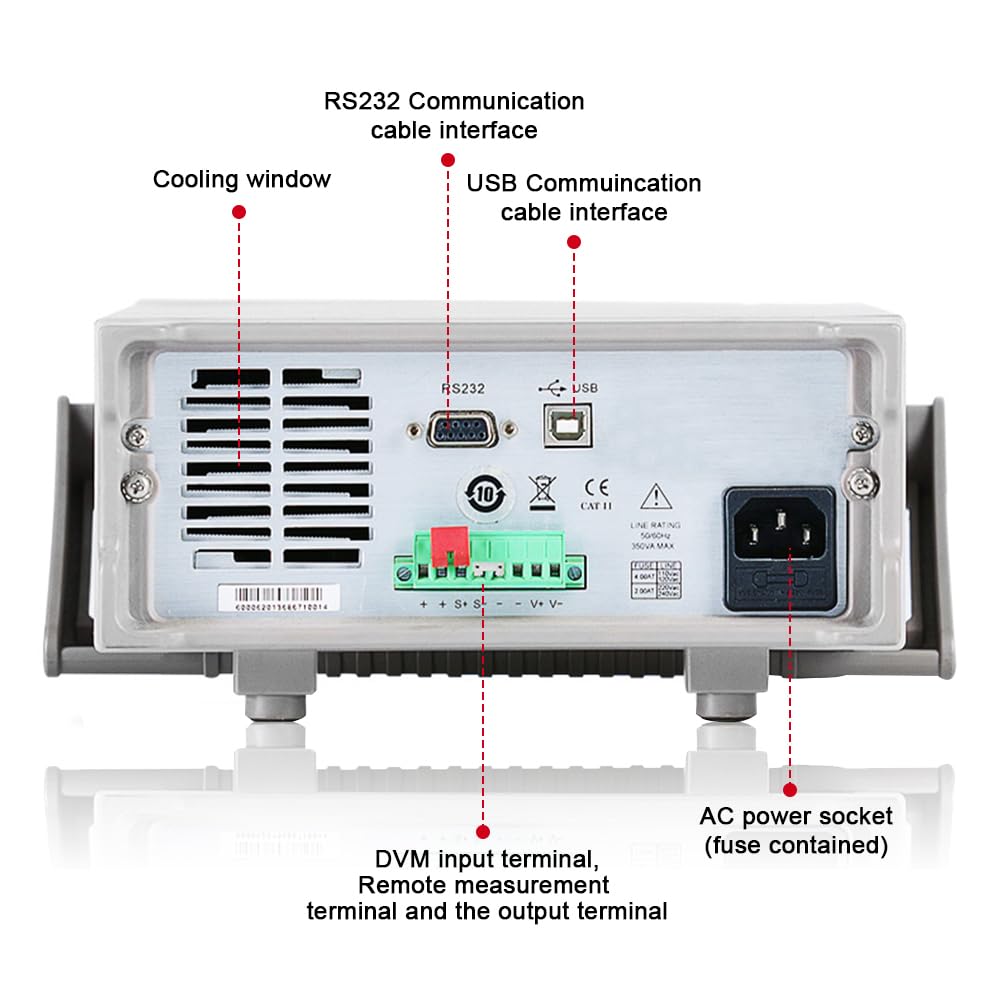
Figure 3.2: Rear Panel of IT6952A
The rear panel features the AC power socket (with integrated fuse), cooling windows for heat dissipation, an RS232 communication cable interface, a USB communication cable interface, and DVM input terminals along with remote measurement terminals and additional output terminals for specific applications.
4. Настройка
Следвайте тези стъпки за първоначална настройка:
- Разопаковане: Внимателно извадете захранващия блок от опаковката му. Проверете за евентуални повреди по време на транспортиране.
- Разположение: Place the unit on a stable, level surface with adequate ventilation around all sides. Do not block the cooling vents on the sides and rear.
- Захранване: Connect the provided AC power cord to the AC power socket on the rear panel of the IT6952A. Plug the other end into a grounded electrical outlet.
- Включване: Press the main power switch on the front panel to turn on the unit. The VFD display should illuminate.
- Изходна връзка: Connect your load to the output terminals on the front panel using appropriate test leads. Ensure correct polarity (positive to positive, negative to negative).
5. Инструкции за работа
This section covers basic operation of the IT6952A.
5.1 Настройка Voltagд и ток
- Set Voltage: Натиснете V-SET Бутон. Звукътtage display will become active. Use the rotary knob to adjust the voltage, or use the number keys for direct input followed by Въведете.
- Задаване на ток: Натиснете I-SET button. The current display will become active. Use the rotary knob to adjust the current limit, or use the number keys for direct input followed by Въведете.
- Активиране на изхода: След задаване на желаната сила на звукаtage and current, press the Вкл./Изкл button to enable the output. The output indicator will illuminate.
- Деактивиране на изхода: To disable the output, press the Вкл./Изкл бутон отново.
5.2 Using Memory Functions (Save/Recall)
The IT6952A allows you to save and recall frequently used voltage и текущи настройки.
- Запазване на настройката: Задайте желаната сила на звукаtage and current. Press the Запазване button. Use the navigation keys or number keys to select a memory location (e.g., 0-9) and press Въведете to store the settings.
- Recall Setting: Натиснете Припомнете си button. Use the navigation keys or number keys to select the desired memory location and press Въведете to load the stored settings.
6. Поддръжка
Proper maintenance ensures the longevity and reliability of your power supply.
- Почистване: Disconnect the power supply from the mains before cleaning. Use a soft, dry cloth to wipe the exterior. For stubborn dirt, a slightly damp cloth with mild detergent can be used, ensuring no liquid enters the unit.
- Вентилация: Regularly check that the cooling vents are free from dust and obstructions. Use compressed air to clear dust if necessary.
- Съхранение: When not in use for extended periods, store the power supply in a cool, dry, and dust-free environment.
7. Отстраняване на проблеми
If you encounter issues with your IT6952A, refer to the following common problems and solutions:
| проблем | Възможна причина | Решение |
|---|---|---|
| Няма захранване при включване | Power cord not connected; Blown fuse; No power from outlet | Check power cord connection; Replace fuse (refer to specifications for type); Test outlet with another device |
| Няма изходно обtage/ток | Output disabled; Overload protection activated; Incorrect settings | Натиснете Вкл./Изкл to enable output; Reduce load or increase current limit; Verify voltage/текущи настройки |
| Display shows 'Error' | Internal fault; Over-temperature | Turn off unit, wait 5 minutes, restart; Ensure proper ventilation, allow unit to cool down. If error persists, contact support. |
| Неточни показания | Poor connection; Calibration needed | Check all connections; Contact ITECH support for calibration information. |
8. Спецификации
Key technical specifications for the ITECH IT6952A Programmable DC Power Supply:
| Спецификация | Стойност |
|---|---|
| Марка | ITECH |
| Модел | IT6952A |
| Изход Voltage | 60 волта |
| Ampераж | 25 Amps |
| Изход Ватtage | 600 вата |
| Форма фактор | Настолен |
| Тип конектор | USB |
| Материал | Метал |
| Цвят | Червено, черно |
9. Гаранция и поддръжка
ITECH products are designed for reliability and performance. For warranty information, technical support, or service inquiries, please refer to the warranty card included with your product or visit the official ITECH webсайт. Запазете касовата си бележка като доказателство за покупка при гаранционни рекламации.
For further assistance, you may contact ITECH customer service through their official channels. Always provide your product model (IT6952A) and serial number when seeking support.


