Въведение
Thank you for choosing the Opal Selfie Stick OP-Sel-BT-01. This manual provides essential information for the safe and effective use of your device. Please read it thoroughly before operation and retain it for future reference.
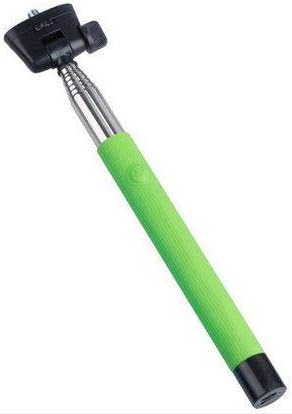
Фигура 1: The Opal Selfie Stick OP-Sel-BT-01 in green, showing its extendable arm, phone holder, and comfortable grip.
Характеристики на продукта
- цвят: Зелено
- Основен материал: Стомана
- Максимален капацитет на натоварване: 500 гр
- Свързване: Безжична (Bluetooth)
- Съвместими системи: Android 3.0 и по-нова версия, iOS 4.0 и по-нова версия
Настройка
- Unfold the Selfie Stick: Gently pull the phone holder section upwards to extend the stick.
- Adjust Phone Holder: Отворете телефона клamp and securely place your smartphone within it. Ensure the phone is centered and stable. The clamp is designed to hold various phone sizes.
- Включване: Locate the power button (if applicable, usually on the handle) and press it to turn on the selfie stick. An indicator light may illuminate.
Инструкция за работа
Свързване чрез Bluetooth
- Ensure the selfie stick is powered on and in pairing mode (indicator light may flash rapidly).
- На вашия смартфон отидете на Настройки > Bluetooth.
- Включете Bluetooth и потърсете налични устройства.
- Select "Opal OP-Sel-BT-01" or a similar name from the list of devices.
- Once paired, the indicator light on the selfie stick may turn solid or turn off, indicating a successful connection.
Правене на снимки/видео
- Отворете приложението за камера на вашия смартфон.
- Удължете селфи стика до желаната от вас дължина.
- Position your phone for the desired shot.
- Press the shutter button on the selfie stick handle to capture a photo or start/stop video recording.
Поддръжка
- Почистване: Избършете селфи стика с мека, суха кърпа. Не използвайте абразивни почистващи препарати или разтворители.
- Съхранение: Store the device in a cool, dry place away from direct sunlight and extreme temperatures. Retract the stick fully before storage.
- Грижа за батерията: If the selfie stick has a rechargeable battery, ensure it is charged periodically even when not in use to maintain battery health.
Отстраняване на неизправности
| проблем | Възможна причина | Решение |
|---|---|---|
| Не може да се сдвои с телефон | Selfie stick not in pairing mode; Bluetooth off on phone; battery low. | Ensure stick is on and in pairing mode. Turn phone's Bluetooth off/on. Charge the selfie stick. |
| Shutter button not working | Not paired; camera app settings. | Verify successful Bluetooth pairing. Check camera app settings for volume button shutter control. |
| Phone not stable in clamp | Phone not centered; clamp not fully secured. | Re-position phone to be centered. Ensure clamp is firmly gripping the phone. |
Спецификации
- модел: OP-Sel-BT-01
- марка: Опал
- цвят: Зелено
- Основен материал: Стомана
- Максимален капацитет на натоварване: 500 гр
- Свързване: Безжична (Bluetooth)
- Поддържани операционни системи: Android 3.0 или по-нова версия, iOS 4.0+
- ASIN: B091DBB122
- Първа налична дата: 30 март 2021 г
Гаранция и поддръжка
For information regarding warranty coverage or technical support, please refer to the documentation included with your purchase or visit the official Opal webсайт. Конкретните гаранционни условия може да варират в зависимост от региона и търговеца на дребно.
Информация за безопасност
- Не излагайте устройството на екстремни температури, влага или пряка слънчева светлина за продължителни периоди.
- Да се пази от деца.
- Не се опитвайте да разглобявате или модифицирате устройството. Това може да анулира гаранцията и да причини повреда.
- Ensure your phone is securely fastened in the clamp before extending the stick.


