Въведение
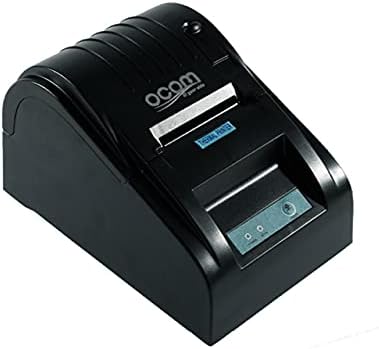
This image shows the OCOM OCPP-585A-U-B Thermal Receipt Printer from a slightly elevated front-right angle. The printer is black with a sleek, compact design. The paper output slot is visible at the top, and the control panel with 'POWER' and 'MODE' indicators is located on the front.
This manual provides detailed instructions for the OCOM OCPP-585A-U-B Thermal Receipt Printer. Please read this manual carefully before using the printer to ensure proper operation and longevity.
Ръководство за настройка
1. Разопаковане
Carefully remove the printer and all accessories from the packaging. Verify that all components are present: printer unit, power adapter, USB cable, and a roll of thermal paper.
2. Зареждане на термохартия
- Open the paper cover by pushing the cover open button (usually located on the side or front).
- Insert the thermal paper roll into the paper compartment, ensuring the printing side of the paper faces the print head. The paper should feed smoothly from the bottom of the roll.
- Pull out a small length of paper beyond the paper exit slot.
- Затворете плътно капака за хартия, докато щракне на мястото си.
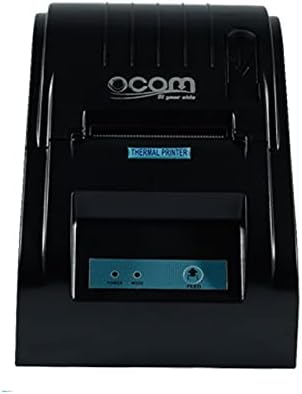
This image displays the OCOM OCPP-585A-U-B Thermal Receipt Printer from a direct top-down perspective. The paper compartment is visible, showing a thermal paper roll correctly inserted. The 'THERMAL PRINTER' label and the control panel with 'POWER' and 'MODE' indicators are clearly visible.
3. Свързване на принтера
- Свържете захранващия адаптер към входния порт за захранване на принтера и след това го включете в електрически контакт.
- Connect the USB cable to the printer's USB port and the other end to your computer or POS system.
- Press the power button to turn on the printer. The power indicator light should illuminate.
Инструкция за работа
Основен печат
Once connected and powered on, the printer is ready to receive print commands from your connected device. Ensure the correct printer driver is installed on your computer/POS system.
- Отворете документа или приложението, от което искате да печатате.
- Select 'Print' from the file меню.
- Choose 'OCOM OCPP-585A-U-B' as your printer.
- Adjust print settings if necessary (e.g., paper size, print quality).
- Кликнете върху „Печат“.
Self-Test Print
To perform a self-test print, ensure the printer is off. Hold down the 'FEED' button (if available, or a combination of buttons as per specific model) while turning on the printer. Release the button once printing begins. This will print a configuration page, confirming basic printer functionality.
Поддръжка
Почистване на печатащата глава
Regular cleaning of the print head ensures optimal print quality and extends printer life.
- Изключете принтера и извадете захранващия кабел.
- Отворете капака на хартията.
- Използвайте леко памучен тампон dampened with isopropyl alcohol to gently wipe the thermal print head (the dark strip inside the printer).
- Оставете печатащата глава да изсъхне напълно, преди да затворите капака и да включите принтера.
Cleaning the Paper Path
Отстранете праха или отломките от хартията от пътя на хартията с мека четка или сгъстен въздух.
Отстраняване на неизправности
| проблем | Възможна причина | Решение |
|---|---|---|
| Принтерът не се включва | Разхлабен захранващ кабел; дефектен контакт | Check power connections; Try a different outlet |
| Няма изход за печат | Paper loaded incorrectly; Out of paper; Driver not installed/selected | Reload paper correctly; Replace paper roll; Install/select correct printer driver |
| Faint or blank print | Thermal paper loaded upside down; Print head dirty; Paper quality issue | Flip paper roll; Clean print head; Try new thermal paper |
| Printer offline | USB cable disconnected; Printer driver issue | Reconnect USB cable; Reinstall printer driver |
Спецификации
| Характеристика | детайл |
|---|---|
| Първа налична дата | 2021 юни 20 г |
| производител | OCOM |
| ASIN | B097LSGP62 |
| Номер на модела на артикул | OCPP-585-U-B |
| Име на марката | OCOM |
| Технология за свързване | USB |
| Технология на принтера | Термичен |
| Цвят | черен |
| Име на модела | OCPP 585 U B |
| Печатни медии | Етикети |
| Тип скенер | разписка |
Гаранция и поддръжка
This OCOM printer typically comes with a standard manufacturer's warranty. Please refer to the warranty card included with your product for specific terms and conditions, or visit the official OCOM webсайт за подробна информация за гаранцията.
For technical support, driver downloads, or further assistance, please visit the OCOM official support website or contact their customer service. Keep your model number (OCPP-585A-U-B) and purchase details ready when seeking support.


