Въведение
This user manual provides comprehensive instructions for the HW16 Smart Watch. It covers setup, operation, maintenance, and troubleshooting to help you maximize your device's potential. The HW16 Smart Watch features a 1.72-inch full screen, Bluetooth call functionality, music system, heart rate sensor, fitness tracking, and password lock screen, compatible with both iOS and Android devices.
Настройка
1. Зареждане на устройството
Before first use, fully charge your HW16 Smart Watch. Connect the magnetic charging cable to the charging points on the back of the watch and plug the USB end into a compatible power adapter (not included) or a computer USB port. The watch display will indicate charging status.
2. Включване / изключване на захранването
To power on, press and hold the side button until the screen illuminates. To power off, press and hold the side button, then select the power off option on the screen.
3. Сдвояване със смартфона
The HW16 Smart Watch connects via Bluetooth. Download the recommended companion application (e.g., Wearfit Pro APP as mentioned in specifications) from your smartphone's app store. Ensure Bluetooth is enabled on your phone. Open the app, follow the on-screen instructions to search for and pair with your HW16 device. Confirm the pairing request on both your phone and the watch.
Инструкция за работа
Навигация
The HW16 features a full touch screen. Swipe left/right, up/down to navigate through menus and features. Press the side button to return to the home screen or access the app list.
Функционалност за Bluetooth обаждане
Once paired with your phone, the watch supports HD-Dial calls. You can swipe to answer incoming calls, dial numbers directly from the watch, and synchronize your mobile phone call history and address book. This feature allows for hands-free communication.

Image: The HW16 Smart Watch showing its HD-Dial Call feature, including options to answer, dial, and access contacts. This image illustrates the watch's capability for direct phone calls.
Музикална система
Control music playback on your connected smartphone directly from your watch. Play, pause, skip tracks, and adjust volume without needing to take out your phone.
Проследяване на фитнес
The watch tracks various fitness metrics including steps, distance, and calories burned. Utilize the multi-sport mode for specific activity tracking.
Сензор за сърдечен ритъм
Monitor your heart rate in real-time. Access the heart rate application on the watch to view your current heart rate and historical data.

Изображение: Задната част view of the HW16 Smart Watch, highlighting the optical heart rate sensor. This sensor uses light to detect blood flow and measure heart rate.
Заключване на екрана с парола
Enhance your privacy and security by setting a password lock for your watch. This prevents unauthorized access to your data.

Image: The HW16 Smart Watch screen showing a numerical keypad for entering a password. This feature provides enhanced security for the device.
Функции за наблюдение на здравето
The HW16 Smart Watch offers comprehensive health data detection, including:
- Сърдечен ритъм: Непрекъснато наблюдение на сърдечната честота.
- Кислород в кръвта: Measurement of blood oxygen saturation levels.
- Кръвно налягане: Estimation of blood pressure (for reference only, not medical device).
- Наблюдение на съня: Проследява моделите на съня, включително дълбок сън, лек сън и време за бодърстване.
- Стрес тест: Дава представа за нивата на стрес.
- Дихателна тренировка: Водени дихателни упражнения за релаксация.
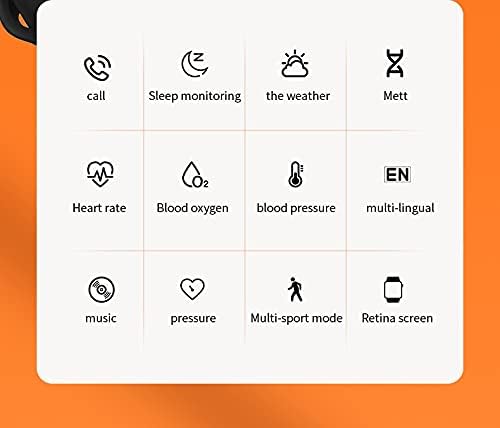
Image: A grid of icons illustrating the various functions of the HW16 Smart Watch, including call, sleep monitoring, weather, Mett, heart rate, blood oxygen, blood pressure, multi-lingual support, music, pressure, multi-sport mode, and Retina screen.
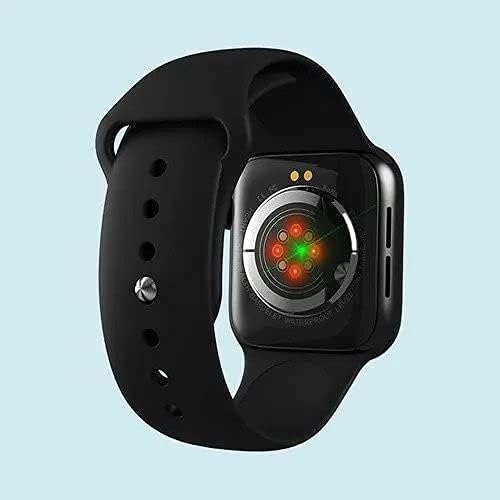
Image: This image showcases the health data detection capabilities of the HW16 Smart Watch, including a MET graph and a custom component display for personalized shortcuts.
Спецификации
| Характеристика | детайл |
|---|---|
| Име на модела | HW16 |
| Размер на дисплея | 1.72 инча |
| Резолюция | 320*385 |
| Технология за свързване | Bluetooth 5.2 |
| Материал на тялото | Zinc alloy + IML injection process |
| Материал на каишката | Течен силикон |
| Капацитет на батерията | 250mAh |
| Съвместима ОС | iOS 10.0 и по-нова версия / Android 5.0 и по-нова версия |
| Размери | 43.4мм*38мм*11мм |
| Размер на маншета | 260мм*20мм*2.5мм |
| Специални функции | Camera (remote control), Heart Rate Sensor, Fitness Tracker, Password Lock Screen, Music System |
| Водоустойчив | Yes (implied by "Waterproof" keyword, but no specific IP rating provided) |
| Поддържани езици | Chinese, English, Arabic, French, German, Spanish, Portuguese, Russian, Thai, Polish, Italian, Japanese, Traditional, Czech, Turkish, Greek, Latin, Romanian, Vietnamese, Danish... |

Image: The HW16 Smart Watch, black casing with a blue strap, displayed on a watch stand. The screen shows time, steps, and various app icons.

Image: The HW16 Smart Watch worn on a wrist, displaying its main menu with various circular app icons for different functions.
Поддръжка
- Почистване: Избърсвайте часовника и каишката редовно с мека,amp плат. Избягвайте използването на агресивни химикали или абразивни материали.
- Водоустойчивост: While the watch is waterproof (as per keywords), avoid prolonged submersion or exposure to hot water/steam. Dry the watch thoroughly if it gets wet.
- Зареждане: Use only the provided charging cable. Do not force the charger into the port.
- Съхранение: Съхранявайте часовника на хладно и сухо място, когато не го използвате.
Отстраняване на неизправности
Часовникът не се включва
Уверете се, че часовникът е напълно зареден. Свържете го към зарядното устройство за поне 30 минути, преди да опитате да го включите отново.
Не може да се сдвои с телефон
- Уверете се, че Bluetooth е активиран на телефона и часовника ви.
- Уверете се, че часовникът е в обхвата на Bluetooth връзката на вашия телефон.
- Рестартирайте както телефона, така и часовника.
- Clear previous Bluetooth connections on your phone and try pairing again.
- Ensure the companion app is installed and running.
Неточни здравни данни
Ensure the watch is worn snugly on your wrist, not too loose or too tight. Clean the sensor on the back of the watch regularly. Note that health data is for reference only and not intended for medical diagnosis.
Екранът не реагира
Try restarting the watch. If the issue persists, ensure the screen is clean and dry. If the problem continues, contact customer support.
Гаранция и поддръжка
For warranty information and customer support, please refer to the documentation included with your purchase or visit the official SmartWatch brand webсайт. Запазете доказателството си за покупка за гаранционни рекламации.


