1. Въведение
The Sinotimer TM630S-2 is a versatile 7-day weekly programmable digital timer switch designed for automatic control of various electrical equipment. It features a built-in battery for memory retention during power failures, high accuracy, and strong anti-jamming capabilities. This manual provides detailed instructions for the setup, operation, and maintenance of your TM630S-2 timer switch.
This device is ideal for controlling streetlights, neon signs, water heaters, air conditioners, electric cookers, agricultural facilities, and broadcasting equipment, offering precise scheduling with up to 16 ON/OFF settings per day or week.

Фигура 1: Ъглова view of the Sinotimer TM630S-2 Digital Timer Switch, showing the LCD display and control buttons.
2. Продуктът свършиview
The TM630S-2 features an LCD display for time and program settings, along with several buttons for configuration. It is designed for DIN-rail mounting, making it suitable for integration into electrical panels.

Фигура 2: Отпред view of the Sinotimer TM630S-2, highlighting its 220V compatibility and button layout.
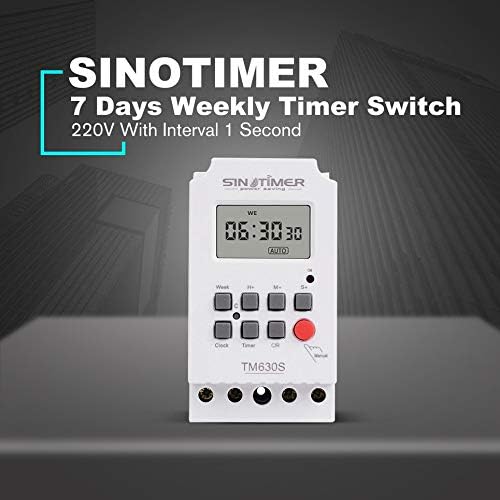
Figure 3: The Sinotimer TM630S-2, marketed as a 7-day weekly timer switch with 1-second interval capability.

Figure 4: The TM630S-2 showcasing its key features, including automatic switching, low consumption, high-accuracy CMOS chip, and compliance with IEC 60367 and CE standards.
3. Инсталиране и настройка
3.1 Монтаж
The TM630S-2 is designed for DIN-rail mounting. Ensure the mounting location is secure, dry, and within the specified operating temperature range.

Figure 5: Technical drawing illustrating the dimensions and DIN-rail mounting mechanism of the TM630S-2.
3.2 Окабеляване
ПРЕДУПРЕЖДЕНИЕ: All wiring should be performed by a qualified electrician and in accordance with local electrical codes. Ensure power is disconnected before wiring to prevent electric shock.
The TM630S-2 supports 220V AC power supply. Connect the input power and the load according to the wiring diagram provided on the device and below.
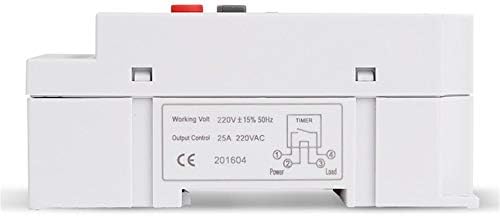
Фигура 6: Отдолу view of the TM630S-2, displaying the wiring diagram for input power and household appliances, along with product specifications.
- Connect the Live (L) and Neutral (N) wires of the 220V AC power supply to the input terminals.
- Connect the Live (L) and Neutral (N) wires of the appliance (load) to be controlled to the output terminals.
- Уверете се, че всички връзки са сигурни и правилно изолирани.
4. Инструкции за работа
4.1 Функции на бутоните
- Часовник: Използва се за задаване на текущото време и ден.
- седмица: Selects the day of the week during time or program setting.
- H+: Adjusts hours (for time or program setting).
- М+: Adjusts minutes (for time or program setting).
- S+: Adjusts seconds (for time or program setting).
- Таймер: Влиза в режим на програмиране.
- C/R (Cancel/Recall): Clears current program settings or recalls them.
- Ръчно: Manually switches the output ON/OFF or sets to AUTO mode.
4.2 Настройка на текущото време и ден
- Натиснете и задръжте Часовник бутон.
- Докато държите Часовник, натиснете седмица за да зададете текущия ден от седмицата.
- Докато държите Часовник, натиснете H+ за да зададете текущия час.
- Докато държите Часовник, натиснете M+ за да зададете текущата минута.
- Докато държите Часовник, натиснете S+ to set the current second.
- Освободете Часовник , за да запазите настройките.
4.3 Програмиране на цикли на включване/изключване
The TM630S-2 supports up to 16 ON/OFF programs. Each program can be set for specific days of the week or for all days.
- Натиснете Таймер button once to enter the first ON program setting (display shows "1 ON").
- Натиснете седмица to select the desired day(s) for this program (e.g., Mon-Sun, Mon-Fri, Sat-Sun, etc.).
- Натиснете H+ и M+ to set the desired ON time.
- Натиснете Таймер button again to enter the first OFF program setting (display shows "1 OFF").
- Натиснете седмица to select the desired day(s) for this OFF program (usually matches the ON program).
- Натиснете H+ и M+ to set the desired OFF time.
- Repeat steps 1-6 for additional ON/OFF programs (up to 16 pairs).
- След като настроите всички желани програми, натиснете Часовник button to exit program mode and return to the current time display.
To clear a specific program, navigate to that program using the Таймер и след това натиснете C/R бутон.
4.4 Ръчно управление
Натиснете Наръчник button to cycle through the output modes:
- НА: Output is continuously ON.
- ИЗКЛЮЧЕНО: Output is continuously OFF.
- АВТОМАТИЧЕН: The timer operates according to the programmed ON/OFF settings. Ensure the timer is in AUTO mode for scheduled operations.
5. Поддръжка
The Sinotimer TM630S-2 is designed for low maintenance. The built-in battery ensures memory retention for up to 60 days during power outages, eliminating the need for frequent time resetting.
- Почистване: Използвайте мека, суха кърпа за почистване на външната част на устройството. Не използвайте абразивни почистващи препарати или разтворители.
- Батерия: The internal battery is rechargeable and designed for long-term use. If the display becomes dim or settings are lost frequently during power outages, the battery may be nearing the end of its life. Battery replacement should only be performed by qualified personnel.
- Инспекция: Периодично проверявайте кабелните връзки, за да се уверите, че са здрави.
6. Отстраняване на проблеми
- Устройството не се включва:
- Check the main power supply to the device.
- Verify that the wiring connections are correct and secure as per the wiring diagram.
- Programs not executing:
- Уверете се, че таймерът е настроен на АВТОМАТИЧНО режим, използващ Наръчник бутон.
- Double-check the ON/OFF program settings for correct times and days.
- Verify that the current time and day are set correctly on the timer.
- Time drift/inaccuracy:
- The device has an auto time error correction of +/- 30 seconds weekly. Significant deviations may indicate an issue.
- Ensure the device is operating within its specified temperature range (-20℃ to +50℃).
- Display is blank or dim during power outage:
- The internal battery may be depleted or nearing end-of-life. The battery provides backup for up to 60 days. Allow the device to be powered for several hours to recharge the internal battery.
7. Спецификации
| Характеристика | Спецификация |
|---|---|
| Марка | Sinotimer |
| Модел | TM630S-2 |
| Цвят | Бяло |
| Температурен диапазон | -20℃ до +50℃ |
| Захранване | 220VAC (also available in 12VDC option) |
| Консумирана мощност | 4.5 VA (макс.) |
| Дисплей | LCD |
| Switching Contact | 1 превключвател |
| Програми | 16 ON/OFF settings (daily or weekly) |
| Хистерезис | 2 sec/day (at 25℃) |
| Минимален интервал | 1 секунди |
| Капацитет | 30A 250V AC |
| Затъмнена памет | 60 days (via built-in rechargeable 3V battery) |
| Обхват на таймера | 1 секунда до 168 часа |
| Average Error | 1s/24h (at 25℃) |
| Размери (прибл.) | 95 mm (H) x 98 mm (W) x 40 mm (D) |

Фигура 7: Прamples of typical applications for the TM630S-2 timer switch, including industrial settings, home automation, and agricultural use.
8. Гаранция и поддръжка
Specific warranty information for the Sinotimer TM630S-2 is not provided within this manual. Please refer to the product packaging, the seller's website (Kiminors), or your purchase receipt for details regarding warranty coverage and terms.
For technical support or further assistance, please contact the vendor or manufacturer through the contact information provided at the point of purchase.


