1. Въведение
This instruction manual provides essential information for the safe and efficient use of your Samsung HW-A58C 5.1ch Soundbar system. This system is designed to enhance your home audio experience with optimized sound for various content, clear dialogue, and dynamic surround sound. Please read this manual thoroughly before operating the product and retain it for future reference.
- Оптимизиран звук: Enjoy sound tailored for sports, games, movies, and more.
- Ясен диалог: A dedicated center channel speaker ensures voices are projected clearly.
- Wireless Surround Sound: Wireless rear speakers provide an immersive audio experience.
- Усилване на басите: Instantly enhance bass with a dedicated button.
2. Информация за безопасност
Please observe the following safety precautions to prevent electric shock, fire, or damage to the product.
- Риск от токов удар: Do not remove the cover or back of the product. There are no user-serviceable parts inside. Refer all servicing to qualified service personnel.
- FCC Compliance (U.S.A.): This device complies with Part 15 of the FCC Rules. Operation is subject to two conditions: (1) this device may not cause harmful interference, and (2) this device must accept any interference received.
- FCC Внимание: Any changes or modifications not expressly approved by the party responsible for compliance could void the user's authority to operate this equipment.
- Екраниран кабел: Use only shielded cables and connectors to connect the unit to other equipment to ensure compliance with FCC requirements.
- Излагане на радиация: This product complies with FCC radiation exposure limits. It should be installed and operated with a minimum distance of 20cm between the radiator and your body.
3. Съдържание на пакета
Проверете дали всички компоненти са налични в опаковката:
- Samsung Soundbar (HW-A58C)
- Безжичен субуфер
- Wireless Rear Speakers (2 units)
- Wireless Receiver for Rear Speakers
- Remote Control with 2 AA Batteries
- Power Cables (3 for Soundbar, Subwoofer, and Wireless Receiver)
- HDMI кабел
- Wall Mount Kit (Brackets)
- Ръководство за бързо инсталиране
Video: Unboxing the Samsung HW-A58C 5.1ch Soundbar system, showing all included components and their initial appearance.

Изображение: Отпред view of the Samsung HW-A58C Soundbar, showcasing елегантния му дизайн.

Изображение: Отпред view of the wireless subwoofer, designed to provide deep bass.
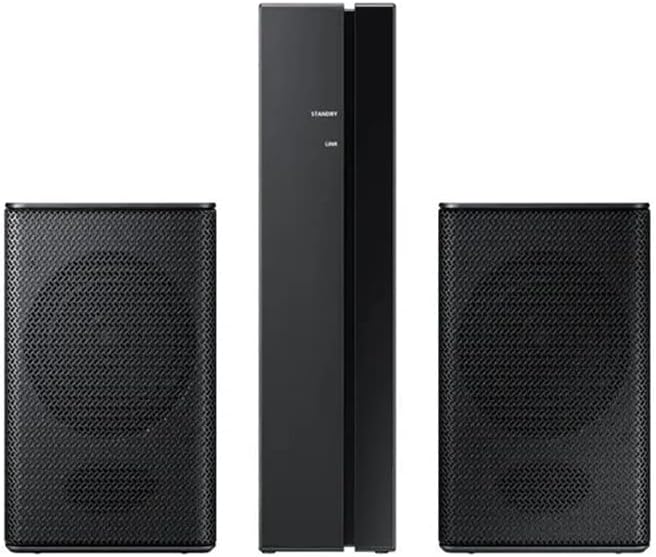
Image: The two wireless rear speakers and their receiver unit, which connect wirelessly to the soundbar.
4. Настройка
4.1. поставяне
- Саундбар: Place the soundbar centrally below your TV. Ensure it is on a stable surface or securely wall-mounted using the provided kit.
- Subwoofer: Position the wireless subwoofer in a corner of the room or near the soundbar for optimal bass distribution.
- Задни високоговорители: Place the wireless rear speakers behind your listening position, ideally equidistant from the center. Connect them to the wireless receiver.
4.2. Връзки
Свържете саундбара към телевизора си, като използвате един от следните методи:
- HDMI ARC (препоръчително):
- Свържете единия край на HDMI кабела към HDMI КЪМ ТВ (ARC) порт на звуковата лента.
- Свържете другия край към HDMI ARC порт на вашия телевизор.
- Ensure your TV's Anynet+ (HDMI-CEC) function is enabled.
- Оптичен кабел:
- Connect an optical cable (not included) from the soundbar's ЦИФРОВ АУДИО ВХОД port to your TV's optical output port.
- Bluetooth:
- Refer to the "Operating" section for detailed Bluetooth pairing instructions.
Connect the power cables to the soundbar, subwoofer, and wireless receiver, then plug them into power outlets.
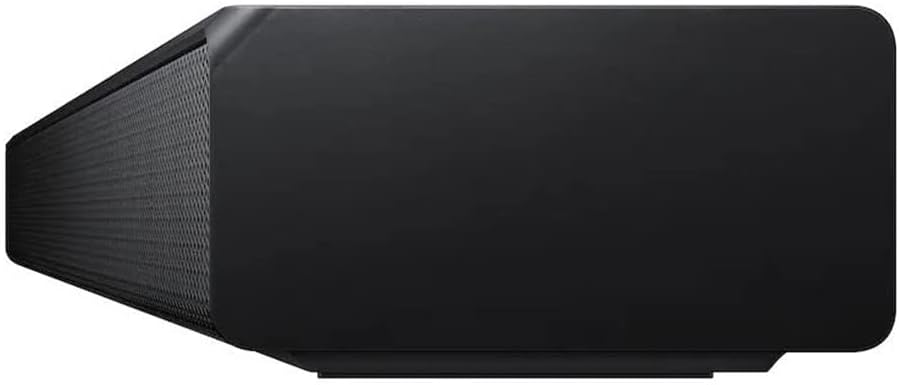
Изображение: Задна част view of the soundbar, showing the HDMI ARC, HDMI IN, USB, and power ports.
4.3. Сдвояване на безжични високоговорители
The subwoofer and wireless rear speakers should automatically connect to the soundbar when powered on. If they do not connect, follow these steps:
- Ensure the soundbar and wireless receiver are powered on.
- On the back of the wireless receiver, press and hold the ИД ИД button for at least 5 seconds. The LINK LED indicator will blink blue.
- With the soundbar powered off, press and hold the Up button on the soundbar's remote control for 5 seconds.
- The soundbar display will show "ID SET" and then "LINK" when connected. The LINK LED on the wireless receiver will turn solid blue.
5. Инструкции за работа
5.1. Basic Controls (Using Remote Control)
- мощност: Натиснете Мощност button to turn the soundbar On/Off.
- Обем: Използвайте Увеличаване/намаляване на звука buttons to adjust the master volume.
- източник: Натиснете Източник button to cycle through input modes (HDMI, D.IN, BT, USB).
- Без звук: Натиснете Без звук бутон, за да заглушите временно звука.
5.2. Звукови режими и ефекти
- Адаптивен звук Lite: Automatically optimizes sound based on content (movies, sports, news).
- Усилване на басите: Натиснете Усилване на басите button on the remote for enhanced low-frequency sound.
- Режим на игра: Provides perfectly synced directional audio and crosstalk cancellation for gaming.
- Разширяване на съраунд звука: Разширява звуцитеtagза по-завладяващо изживяване.
- Стандартен: Delivers original sound without additional effects.
5.3. Bluetooth връзка
За да свържете Bluetooth устройство:
- Натиснете Източник бутон на дистанционното управление, докато на дисплея на саундбара се появи "BT".
- На вашето мобилно устройство активирайте Bluetooth и потърсете налични устройства.
- Select "[AV] Samsung Soundbar A-Series" from the list.
- Once connected, "BT PAIRING" will appear on the soundbar display.
The soundbar supports Bluetooth multi-connection, allowing two devices to be connected simultaneously.
6. Поддръжка
За да осигурите дълготрайността и оптималната производителност на вашата саундбар система:
- Почистване: Wipe the surfaces with a soft, dry cloth. Do not use liquid cleaners or abrasive materials.
- Вентилация: Осигурете добра вентилация около всички устройства, за да предотвратите прегряване. Не блокирайте вентилационните отвори.
- Захранващ кабел: Regularly check the power cords for any damage. If damaged, discontinue use and contact service personnel.
- Съхранение: Ако съхранявате устройството за продължителен период от време, изключете го от захранването и го съхранявайте на хладно и сухо място.
7. Отстраняване на проблеми
| проблем | Решение |
|---|---|
| Без захранване. | Ensure all power cords are securely connected to the units and a working power outlet. |
| Без звук. |
|
| Subwoofer or rear speakers not connecting/no sound. |
|
| Дистанционното управление не работи. |
|
| Звукът е изкривен или неясен. |
|
8. Спецификации
| Характеристика | детайл |
|---|---|
| Име на модела | HW A58C |
| Тип високоговорител | Саундбар |
| Специални функции | Усилване на басите, стерео сдвояване |
| Препоръчителни употреби | За системи за съраунд звук |
| Съвместими устройства | Smartphone, Tablet, Laptop, Television, Projector |
| Конфигурация на канала за съраунд звук | 5.1 |
| Цвят | черен |
| Включени компоненти | Soundbar, Wireless Rear Speakers |
| Тегло на артикула | 12.45 килограма (27.4 паунда) |
| Водоустойчив | НЕВЯРНО (Не е водоустойчиво) |
| Брой артикули | 1 |
| Контролен метод | Докосване |
| Безжична комуникационна технология | Bluetooth |
| Източник на захранване | AC |
| Тип аудио драйвер | Динамичен драйвер |
| Bluetooth обхват | 10 метра |
| Технология за свързване на субуфера | Безжичен |
| Специфични употреби | Системи за домашно забавление |
| стил | Sleek, Modern, Home Theater, Cinematic |
| Използване на закрито/външно | На закрито |
| производител | Samsung |
| Размери на Soundbar (Ш x В x Д) | 38.6" x 2.3" x 4.1" |
| Размери на субуфера (Ш x В x Д) | 7.1" x 13.5" x 10.7" |
| Размери на задния високоговорител (Ш x В x Д) | 3" x 5" x 3" |
| Максимална изходна мощност на високоговорителя | 380 вата |
| Технология за свързване | Bluetooth |
| Режим на аудио изход | Съраунд |
| Тип монтаж | Стойка за стена |
9. Гаранция и поддръжка
Този продукт се предлага като артикул от Amazon Renewed. Продуктите от Amazon Renewed са професионално проверени и тествани, за да работят и да изглеждат като нови. Ако не сте доволни от покупката си, обновените продукти отговарят на условията за замяна или възстановяване на сумата съгласно Подновена гаранция на Amazon.
For technical support or further assistance, please contact Samsung Customer Service or refer to the official Samsung support webсайт.
- Samsung Support Phone: 1-800-SAMSUNG (1-800-726-7864)
- Подновена гаранция от Amazon: Научете повече


