1. Въведение
This manual provides essential information for the safe and efficient operation of your Powertech MB3904 8 Step Intelligent Lead Acid and Lithium Battery Charger. Please read this manual thoroughly before use and retain it for future reference.
2. Информация за безопасност
Винаги спазвайте следните предпазни мерки:
- Уверете се, че зарядното устройство е изключено от захранването, преди да правите или прекъсвате връзките към батерията.
- Използвайте зарядното устройство само в добре проветриви помещения.
- Избягвайте зареждането на замръзнали батерии.
- Не излагайте зарядното устройство на дъжд или прекомерна влага.
- Да се пази от деца.
- This charger is designed for 6V or 12V Lead Acid or LiFePO4 batteries only. Do not use with other battery types.
3. Съдържание на пакета
Проверете дали всички елементи са налични в пакета:
- Powertech MB3904 8 Step Intelligent Battery Charger Unit
- Батерия Clamp Connectors (Red and Black)
- Ring Terminal Connectors
- AC захранващ кабел
- Ръководство на потребителя (този документ)
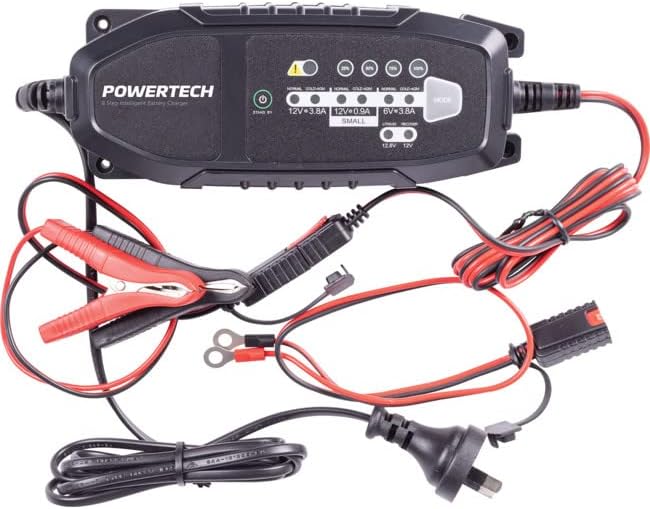
Image: The Powertech MB3904 battery charger unit shown with its various included accessories, including battery clamps, ring terminals, and the AC power cord.
4. Характеристики на продукта
The Powertech MB3904 charger offers advanced features for optimal battery maintenance:
- 8-Step Charging Process: Ensures thorough and efficient charging for various battery types.
- Multi-Voltage Съвместимост: Suitable for both 6V and 12V lead acid and LiFePO4 batteries.
- Пълна защита: Includes overload, short circuit, reverse polarity, safety timer, and wrong battery protection.
- Интуитивни LED индикатори: Clearly display charge status and selected mode.
- Бутон за избор на режим: Allows easy switching between charging modes.
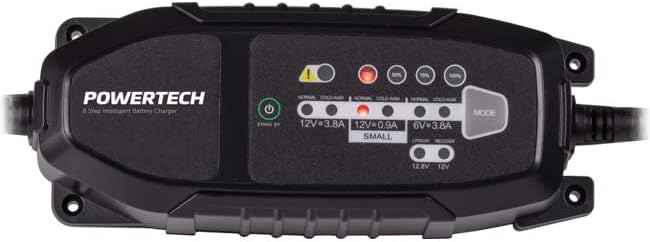
Изображение: Отгоре надолу view of the Powertech MB3904 charger, highlighting the LED indicators for charge status and the 'MODE' button for selecting charging programs.
5. Настройка
- Разположение: Поставете зарядното устройство върху стабилна, равна повърхност в добре проветриво място, далеч от пряка слънчева светлина или източници на топлина.
- Свързване на батерията: Ensure the battery terminals are clean. Connect the red (+) clamp/ring terminal to the positive (+) battery terminal and the black (-) clamp/ring terminal to the negative (-) battery terminal. Ensure a secure connection.
- Захранване: Plug the AC power cord into a suitable wall outlet. The charger will enter standby mode.
6. Инструкции за работа
6.1. Selecting Charging Mode
After connecting the battery and power, press the РЕЖИМ button to cycle through the available charging programs. The corresponding LED will illuminate to indicate the selected mode:
- 12V 3.8A (Normal): Standard charging for 12V lead acid batteries.
- 12V 3.8A (Cold/AGM): For charging 12V lead acid batteries in cold conditions or AGM batteries.
- 12V 0.9A (Small): For charging smaller 12V lead acid batteries.
- 6V 3.8A: For charging 6V lead acid batteries.
- Lithium (12.8V/12V): For charging 12V LiFePO4 batteries.
- Ремонт: A special mode for desulfation of deeply discharged lead acid batteries.
6.2. Процес на зареждане
Once a mode is selected, the charger will automatically begin the 8-step charging process. The progress LEDs (25%, 50%, 75%, 100%) will illuminate sequentially to indicate the battery's charge level. When the 100% LED is solid, the battery is fully charged.
6.3. Изключване на зарядното устройство
- Изключете захранващия кабел от стенния контакт.
- Изключете черния (-) клamp/ring terminal from the negative (-) battery terminal.
- Изключете червения (+) клamp/ring terminal from the positive (+) battery terminal.
7. Поддръжка
- Почистване: Clean the charger casinс мека, суха кърпа. Не използвайте абразивни почистващи препарати или разтворители.
- Съхранение: Съхранявайте зарядното устройство на хладно и сухо място, когато не го използвате.
- Проверка на кабела: Periodically inspect the power cord and battery cables for any signs of damage. Do not use the charger if cables are damaged.
8. Отстраняване на проблеми
| проблем | Възможна причина | Решение |
|---|---|---|
| Зарядното устройство не се включва. | Няма захранване от контакта; хлабава връзка. | Проверете контакта; уверете се, че захранващият кабел е добре включен. |
| Светодиодът за грешка свети. | Reverse polarity; short circuit; wrong battery type. | Check battery connections for correct polarity; inspect cables for shorts; ensure battery type matches selected mode. |
| Батерията не се зарежда. | Battery deeply discharged/damaged; incorrect mode selected. | Try "Repair" mode for lead acid batteries; test battery with a multimeter; ensure correct charging mode is selected. |
9. Спецификации
- модел: MB3904
- Входен обемtage: 220-240V AC, 50/60Hz
- Изход Voltage: 6V / 12V DC
- Ток на зареждане: 0.9A / 3.8A
- Видове батерии: Lead Acid (WET, MF, CA, EFB, GEL, AGM), LiFePO4
- Защита: Overload, Short Circuit, Reverse Polarity, Safety Timer, Wrong Battery
- Размери: Приблизително 20.4 x 7.4 x 4.8 см
- Тегло: Приблизително 534гр
- Съответствие: CE
10. Гаранция и поддръжка
This Powertech product is covered by a standard manufacturer's warranty. For specific warranty terms and conditions, please refer to the warranty card included with your purchase or contact your retailer.
For technical support or service inquiries, please contact Jaycar Electronics customer service or visit their official webсайт. Запазете доказателството си за покупка за гаранционни рекламации.
Джейкар Електроникс Webсайт: www.jaycar.com.au


