Въведение
This manual provides detailed instructions for the safe and effective use of your MEIKEE 15W RGBW Landscape Lights Controller. Please read this manual thoroughly before installation and operation, and retain it for future reference.
Информация за безопасност
- Ensure the power supply to the landscape lights is disconnected before installing or replacing the controller.
- This controller is designed for use with MEIKEE 15W RGBW landscape lights. Compatibility with other brands or wattages is not guaranteed.
- Do not expose the controller to extreme temperatures, direct sunlight for prolonged periods, or moisture.
- Пазете батериите далеч от деца. При поглъщане потърсете незабавно медицинска помощ.
- Изхвърлете използваните батерии в съответствие с местните разпоредби.
Настройка
1. Инсталиране на батерията
The MEIKEE RF Remote Control requires two (2) AAA batteries (not included) for operation.
- Намерете отделението за батерии на гърба на дистанционното управление.
- Плъзнете капака на отделението за батерии.
- Поставете две батерии тип AAA, като осигурите правилната полярност (+ и -), както е указано във вътрешността на отделението.
- Затворете здраво капака на отделението за батерията.

Image: MEIKEE RF Remote Control showing the back panel for battery installation.
2. Connecting to Landscape Lights
This RF remote control is designed to wirelessly control compatible MEIKEE 15W RGBW landscape lights. Ensure your landscape lights are properly installed and powered on. The remote operates via radio frequency, allowing control without direct line-of-sight, up to a maximum sensing distance of 12 meters (39.3 feet).
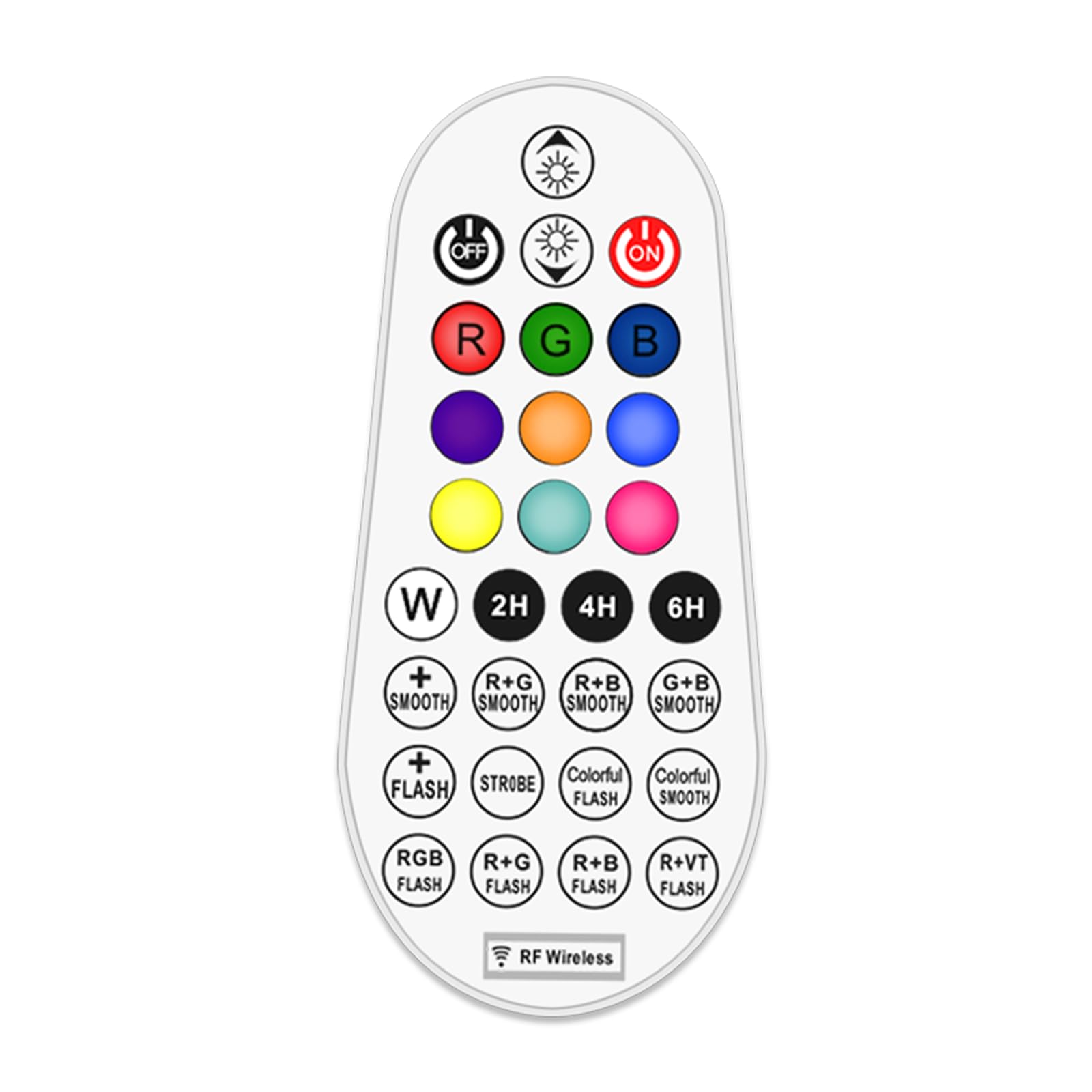
Image: Illustration of the remote control's effective range and application with landscape lights, showing a 360-degree signal.
Инструкция за работа
The 29-key remote control allows for comprehensive management of your MEIKEE RGBW landscape lights. Familiarize yourself with the button layout and functions below.

Image: Detailed diagram of the remote control buttons and their corresponding functions.
Функции на дистанционното управление:
- Включване/изключване на захранването: Натиснете ON button to turn lights on, and ИЗКЛ button to turn lights off.
- Регулиране на яркостта/скоростта: Използвайте Яркост + и Яркост - buttons to adjust light intensity. In dynamic modes, these buttons control the speed of the effect.
- Избор на цвят:
- RGBW бутони: Натиснете R for Red, G for Green, B for Blue, and W for White.
- Предварително зададени цветове: Select from 10 single colors including Cyan, Purple, Indigo, Orange, Yellow, and Magenta using the dedicated color buttons.
- Динамични режими:
- Monochrome SMOOTH: Smooth transition for a single selected color.
- Monochrome FLASH: Flashing effect for a single selected color.
- 10 Automatic Color Changing Modes: Select from various pre-programmed color changing sequences with adjustable speed. These include R+G SMOOTH, R+B SMOOTH, G+B SMOOTH, STROBE, COLORFUL FLASH, COLORFUL SMOOTH, RGB FLASH, R+G FLASH, R+B FLASH, R+VT FLASH.
- Функция за време: Set the lights to automatically turn off after a specified duration. Press 2H for 2 hours, 4H for 4 hours, or 6H за 6 часа.
- Функция на паметта: The controller remembers your last light setting (color, brightness, mode) when turned off and will resume that setting when turned back on.

Image: Visual representation of the 10 single color modes and 10 automatic color changing modes available.

Изображение: Прamples of 10 single color outputs and various brightness levels for the landscape spotlights.

Image: Visual explanation of the memory function (retains last setting) and timing function (auto-off after 2/4/6 hours).
Поддръжка
Смяна на батерията
When the remote control's range decreases or buttons become unresponsive, it is likely time to replace the batteries. Follow the battery installation steps outlined in the "Setup" section.
- Винаги сменяйте и двете батерии AAA едновременно.
- Use new, high-quality AAA alkaline batteries for optimal performance.
- Не смесвайте стари и нови батерии или различни видове батерии.
Почистване
Избършете дистанционното управление с мека, суха кърпа. Не използвайте абразивни почистващи препарати и не потапяйте дистанционното управление във вода.
Отстраняване на неизправности
| проблем | Възможна причина | Решение |
|---|---|---|
| Дистанционното управление не реагира. |
|
|
| Lights not changing color or mode. |
|
|
| Timing function not working. |
|
|
Спецификации
- марка: МЕЙКИ
- модел: RF дистанционно управление
- Метод на контрол: Remote Control (RF Wireless)
- Специална функция: 29-key RGBW color changing
- Източник на захранване: Battery Powered (2 x AAA batteries, not included)
- цвят: RGB (червено, зелено, синьо)
- Размери на артикула (Д x Ш x В): 2.36 x 0.91 x 2.84 инча
- Тегло на артикула: 0.704 унции (0.02 килограма)
- Max Sensing Distance: 12 метра (39.3 фута)
- Функции: 10 single colors, 10 color changing modes, adjustable brightness, adjustable speed, timing function (2H/4H/6H), memory function.
- Дата на първа наличност: 6 януари 2023 г
- производител: МЕЙКИ
Гаранция и поддръжка
For warranty information or technical support, please contact MEIKEE customer service through the retailer where the product was purchased or visit the official MEIKEE website. Please have your product model number (RF Remote Control) and purchase date available when contacting support.


