1. Въведение
This manual provides essential information for the installation, operation, and maintenance of the Cisco Catalyst 9800-L Copper Uplink Wireless LAN Controller (Model C9800-L-C-K9). Please read this manual thoroughly before using the device to ensure proper functionality and safety.
2. Важна информация за безопасност
Спазвайте следните предпазни мерки, за да предотвратите наранявания и повреда на устройството:
- Уверете се, че устройството е инсталирано в добре проветриво помещение, за да предотвратите прегряване.
- Използвайте само захранването, посочено за това устройство.
- Не излагайте устройството на влага или екстремни температури.
- Изключете захранването, преди да извършвате каквато и да е поддръжка или почистване.
- Отнесете всички услуги към квалифициран сервизен персонал.
3. Съдържание на пакета
Проверете дали всички елементи са налични в пакета:
- Cisco Catalyst 9800-L Wireless LAN Controller
- CD (containing documentation or software)
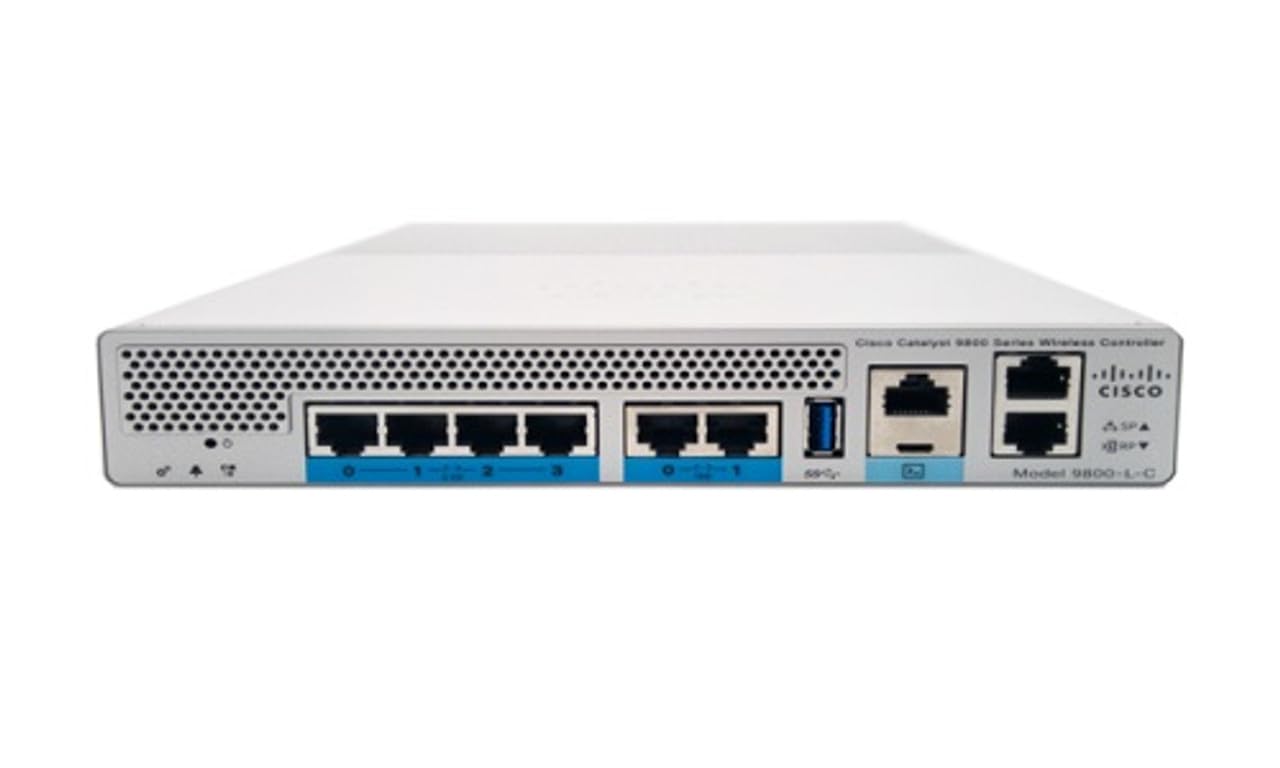
Фигура 1: Отпред view of the Cisco Catalyst 9800-L Wireless LAN Controller. This image shows the compact design and port layout of the device.
4. Продуктът свършиview
The Cisco Catalyst 9800-L is a compact, fixed-configuration wireless LAN controller designed for small to medium-sized deployments. It provides centralized control for Cisco Aironet access points, offering robust wireless network management capabilities.
Ключови характеристики:
- Managed, Layer 2.5 (Wireless Controller) functionality
- Copper uplink interfaces
- RJ45 interface type
- 11 ports for connectivity
- Designed for desktop environments
5. Настройка
5.1 Разопаковане и проверка
- Carefully remove the controller from its packaging.
- Проверете устройството за признаци на физически повреди. Ако откриете повреди, незабавно се свържете с вашия доставчик.
5.2 Физическа инсталация
- Place the controller on a stable, flat surface, such as a desktop.
- Ensure adequate clearance around the device for proper airflow and ventilation.
5.3 Захранване
- Connect the power cord to the power input on the rear of the controller.
- Plug the other end of the power cord into a grounded electrical outlet (220 Volts).
5.4 Мрежова връзка
- Connect Ethernet cables from your network infrastructure to the RJ45 uplink ports on the controller.
- Connect access points to the appropriate downlink ports as required by your network design.
5.5 Достъп до първоначална конфигурация
- Refer to the included CD or Cisco's official documentation for detailed instructions on initial console access and software configuration.
- Typically, this involves connecting a console cable to the device and using a terminal emulator.
6. Работа с контролера
6.1 Основна операция
Once powered on and initially configured, the controller will begin managing connected access points. Monitor the status indicators on the device for operational status.
6.2 Access Point Management
The Cisco Catalyst 9800-L automatically discovers and provisions Cisco Aironet access points. Use the controller's management interface (CLI or GUI) to configure wireless networks, security policies, and guest access.
6.3 Конфигурация на мрежата
Detailed network configuration, including VLANs, QoS, and routing, is performed through the controller's operating system. Consult Cisco's official documentation for advanced configuration guides.
7. Указания за поддръжка
- Актуализации на фърмуера: Regularly check for and apply the latest firmware updates from Cisco to ensure optimal performance and security.
- Почистване: Поддържайте устройството чисто и без прах. Използвайте мека, суха кърпа за почистване. Не използвайте течни или аерозолни почистващи препарати.
- Условия на околната среда: Ensure the operating environment remains within specified temperature and humidity ranges to prevent hardware failure.
- Конфигурация на резервното копие: Periodically back up your controller's configuration to prevent data loss.
8. Отстраняване на проблеми
Този раздел разглежда често срещани проблеми, с които може да се сблъскате:
| проблем | Възможна причина | Решение |
|---|---|---|
| Контролерът не се включва | Power cable disconnected; Power outlet failure | Check power cable connections; Test power outlet with another device. |
| Access points not connecting | Incorrect network configuration; APs not discovered | Verify network settings on the controller; Ensure APs are on the same network segment or reachable via IP. |
| Slow wireless performance | Interference; Overloaded channels; Outdated firmware | Perform a site survey to identify interference; Optimize channel selection; Update controller and AP firmware. |
9. Технически спецификации
| Спецификация | детайл |
|---|---|
| Марка | Cisco |
| Номер на модела | C9800-L-C-K9 |
| Брой портове | 11 |
| Интерфейс | RJ45 |
| Тип превключвател | Managed, Layer 2.5 (Wireless Controller) |
| Платформа | Зета |
| Case Material Type | Мед |
| Voltage | 220 волта |
| Съвместими устройства | Работен плот |
| Цвят | Синьо |
| Тегло на артикула | 3.09 килограма |
| UPC | 657768416101 |
| ASIN | B0C3FQPCY4 |
10. Гаранционна информация
This Cisco Catalyst 9800-L Wireless LAN Controller (Renewed) comes with a 90 дни ограничена гаранция. For specific terms and conditions, please refer to the warranty documentation provided with your purchase or contact your reseller.
11. Поддръжка на клиенти
For technical assistance, troubleshooting, or further inquiries regarding your Cisco Catalyst 9800-L Wireless LAN Controller, please visit the official Cisco support website or contact your authorized Cisco reseller. Ensure you have your model number (C9800-L-C-K9) and serial number available when seeking support.


