Въведение
This manual provides essential instructions for the installation, operation, and maintenance of your Fermax Sup Milo Digital Intercom System. Please read this manual thoroughly before installation and use to ensure proper function and safety. Keep this manual for future reference.
The Fermax Sup Milo Digital Intercom System is designed to provide clear communication and enhanced security for residential and commercial premises. It integrates advanced technology with a robust design to offer reliable access control and communication solutions.
Информация за безопасност
Always follow basic safety precautions to reduce the risk of fire, electric shock, and injury to persons. This product should only be installed and serviced by qualified personnel.
- Изключете захранването преди монтаж или обслужване.
- Не излагайте устройството на дъжд или влага.
- Уверете се, че всички кабелни връзки са сигурни и отговарят на местните електрически норми.
- Не се опитвайте сами да ремонтирате устройството. За всички видове сервизно обслужване се обърнете към квалифициран сервизен персонал.
Съдържание на пакета
Преди да започнете монтажа, проверете дали всички компоненти са налични. Пакетът обикновено включва:
- Fermax Sup Milo Digital Intercom Unit (Aluminum Plate)
- Монтажен хардуер
- Connection cables (may vary by kit)
- Ръководство на потребителя (този документ)
Note: Specific components may vary based on the purchased kit.
Настройка и инсталиране
This section outlines the general steps for installing the Fermax Sup Milo Digital Intercom System. Professional installation is recommended.
1. Подготовка на площадката
- Choose a suitable mounting location, typically near an entrance, at an accessible height.
- Уверете се, че повърхността е равна и стабилна.
- Verify access to necessary power and communication wiring.
2. Монтиране на модула
- Carefully remove the front panel of the intercom unit to access mounting holes.
- Position the unit and mark the drilling points on the wall.
- Пробийте дупки и поставете подходящи стенни анкери, ако е необходимо.
- Secure the intercom unit to the wall using the provided mounting screws.
3. Окабеляване
Refer to the wiring diagram specific to your system configuration. General connections include:
- Захранване: Connect to a stable 100V power source. Ensure correct polarity.
- Communication Bus: Connect the digital bus lines to the indoor units and central control unit.
- Освобождаване на вратата: Connect the door release mechanism (e.g., electric strike) to the designated terminals.
- Допълнителни входове/изходи: Connect any additional devices such as external cameras or sensors as required.
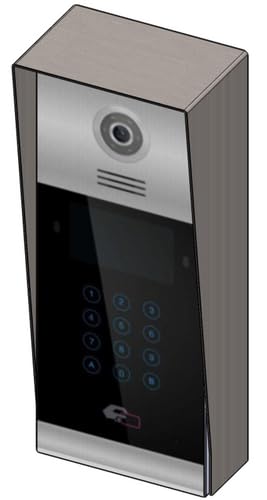 Изображение 1: Предна част view of the Fermax Sup Milo Digital Intercom System, showing the aluminum plate and digital keypad. This image illustrates the exterior design of the main unit.
4. Първоначално включване и конфигуриране
- Once all wiring is complete and secure, restore power to the system.
- The unit will perform a self-test. Observe any indicator lights or sounds.
- Follow the system's programming guide (usually provided separately or accessible via a master unit) to configure apartment numbers, access codes, and other settings.
Инструкция за работа
Making a Call from the Outdoor Panel
- To call an apartment: Enter the apartment number using the digital keypad.
- Press the "Call" button (often represented by a bell icon or similar).
- The indoor unit will ring. Once answered, communication can begin.
Receiving a Call and Opening the Door (Indoor Unit)
- When the indoor unit rings, press the "Answer" button to establish communication with the visitor.
- To open the door, press the "Door Release" button on your indoor unit.
- The door will unlock for a short period.
Using Access Codes
If configured, authorized users can enter a pre-programmed access code on the outdoor digital keypad to unlock the door without needing to call an indoor unit.
- Enter your personal access code using the digital keypad.
- Press the "Enter" or "Door Release" button.
- Вратата ще се отключи.
Поддръжка
Regular maintenance ensures the longevity and optimal performance of your Fermax intercom system.
Почистване
- Почистете външността на модула с мека, damp плат.
- Не използвайте абразивни почистващи препарати, разтворители или химически спрейове, тъй като те могат да повредят покритието и електронните компоненти.
- Ensure no liquid enters the unit's openings.
Инспекции
- Periodically check for any visible damage to the unit or wiring.
- Уверете се, че всички монтажни винтове са стегнати.
- Test the communication and door release functions regularly.
Софтуерни актуализации
If applicable, consult your installer or Fermax support for information on firmware updates that may improve performance or add new features.
Отстраняване на неизправности
Този раздел разглежда често срещани проблеми, с които може да се сблъскате. За по-сложни проблеми се свържете с техническата поддръжка.
| проблем | Възможна причина | Решение |
|---|---|---|
| No communication with indoor unit. |
|
|
| Отключването на вратата не работи. |
|
|
| Клавиатурата не реагира. |
|
|
Спецификации
Technical specifications for the Fermax Sup Milo Digital Intercom System (Model: 8424299951713).
- модел: Fermax Sup Milo Digital Intercom System
- Номер на част: 8424299951713
- производител: Фермакс
- Размери (Опаковка): Приблизително 0.1 x 0.1 x 0.1 см
- Weight (Unit): 108 грама
- материал: Metal, Plastic, Polycarbonate (Aluminum Plate)
- Източник на захранване: External Power Supply (100V)
- Voltage: 100V
- Уотtage: 100W
- Необходими батерии: не
- цвят: Multicolored (referring to internal components or subtle design elements, main plate is aluminum)
Гаранционна информация
Fermax products are manufactured to high-quality standards. For specific warranty terms and conditions, please refer to the warranty card included with your product or visit the official Fermax webсайт. Запазете доказателството си за покупка за гаранционни рекламации.
Typically, warranty covers manufacturing defects for a specified period from the date of purchase. Damage due to improper installation, misuse, or unauthorized repairs is generally not covered.
Поддръжка на клиенти
If you require technical assistance, have questions about your product, or need to report a problem, please contact your local Fermax distributor or visit the official Fermax webсайт за ресурси за поддръжка.
Webсайт: www.fermax.com
Моля, дръжте номера на модела (8424299951713) и данните за покупката под ръка, когато се свързвате с поддръжката.


