Въведение
The M-VAVE SMK-25 MINI is a compact and portable 25-key USB MIDI keyboard controller designed for music production on Mac and PC. It features velocity-sensitive keys, assignable controls, pitch and modulation functions, and versatile connectivity options including USB and Bluetooth. This manual provides detailed instructions for setting up, operating, maintaining, and troubleshooting your device.

Image: The M-VAVE SMK-25 MINI MIDI Keyboard Controller, showcasing its compact design and 25 velocity-sensitive keys.
Настройка
1. Включване
The SMK-25 MINI features a built-in rechargeable battery. To power on the device, press and hold the power button located on the side or top panel until the indicator light illuminates.
2. USB връзка
For a wired connection to your computer (Mac or PC), use the provided USB-C cable. Connect one end to the USB-C port on the SMK-25 MINI and the other end to an available USB port on your computer. The device is plug-and-play, requiring no additional drivers for basic functionality.

Image: Illustration of the plug-and-play USB connection process for the MIDI keyboard controller to a computer.
3. Bluetooth връзка
За да се свържете безжично чрез Bluetooth:
- Ensure the SMK-25 MINI is powered on.
- Натиснете BT button on the controller to activate Bluetooth pairing mode. The Bluetooth indicator light will flash.
- On your computer or mobile device, navigate to Bluetooth settings and select "SMK-25 MINI" from the list of available devices.
- След като се установи връзка, индикаторът за Bluetooth ще започне да свети постоянно.
4. Software Setup (DAW Compatibility)
The SMK-25 MINI is compatible with various Digital Audio Workstations (DAWs) such as Ableton Live, GarageBand, Logic Pro, Studio One, Cubase, Pro Tools, and Reason Studios. After connecting the controller, open your preferred DAW and ensure the SMK-25 MINI is recognized as a MIDI input device in the software's preferences or settings.

Image: The M-VAVE SMK-25 MINI shown with various DAW logos, indicating broad software compatibility.
Инструкция за работа
1. Основни контроли
- Чувствителни към скоростта клавиши: The 25 keys respond to how hard you press them, allowing for dynamic expression in your playing.
- Бутони за качване на тона: Използвайте НАГОРЕТЕ СЕ и НАМАЛЕТЕ buttons to momentarily raise or lower the pitch of notes.
- Modulation Button: The MOD button can be assigned to control various parameters within your DAW or instrument, such as vibrato or filter cutoff.
- Sustain Button: Натиснете SUS button to sustain notes, similar to a piano sustain pedal. An external sustain pedal can also be connected via the 3.5mm port.
- Октавна смяна: Използвайте OC+ и OC- buttons to shift the keyboard's octave range up or down.
- Customization Knob: The rotary knob typically controls volume or can be assigned to other MIDI CC parameters for real-time control.

Изображение: Отблизо view of the M-VAVE SMK-25 MINI's control panel, highlighting the pitch, mod, sustain, arpeggiator, and octave shift buttons.
2. Разширени функции
- Арпеджиатор: Натиснете ARP button to activate the arpeggiator. You can then use the keys and other controls to adjust arpeggio patterns, tempo, gate length, and octave range. Refer to your DAW's manual for specific arpeggiator synchronization settings.
- Smart Chord & Scale Modes: The SC/CH button enables Smart Chord and Smart Scale modes. These modes assist in playing harmonically correct notes and chords within a selected scale, simplifying music creation.
Поддръжка
To ensure the longevity and optimal performance of your M-VAVE SMK-25 MINI, follow these maintenance guidelines:
- Почистване: Use a soft, dry cloth to clean the surface of the controller. Avoid abrasive cleaners, solvents, or waxes.
- Съхранение: Съхранявайте устройството на хладно и сухо място, далеч от пряка слънчева светлина, екстремни температури и висока влажност.
- Обработка: Handle the controller with care. Avoid dropping it or subjecting it to strong impacts.
- Грижа за батерията: За оптимален живот на батерията, избягвайте честото ѝ пълно разреждане. Зареждайте устройството редовно, особено ако ще се съхранява за продължителен период от време.
Отстраняване на неизправности
| проблем | Възможна причина | Решение |
|---|---|---|
| Устройството не се включва. | Проблем с ниска батерия или захранване. | Charge the device using the USB-C cable. Ensure the power button is pressed correctly. |
| Няма звук или MIDI вход в DAW. | Incorrect connection or software settings. | Verify USB or Bluetooth connection. Check your DAW's MIDI input settings to ensure the SMK-25 MINI is selected and enabled. |
| Bluetooth връзката е неуспешна. | Pairing mode not active or interference. | Осигурете BT button is pressed and flashing. Move closer to the host device. Try restarting both devices. |
| Keys are unresponsive or inconsistent. | Software issue or physical obstruction. | Restart your DAW and the controller. Ensure no debris is lodged under the keys. |
Спецификации
| Характеристика | детайл |
|---|---|
| Модел | SMK-25 MINI |
| Брой ключове | 25, Чувствителен към скоростта |
| Свързаност | USB-C, Bluetooth |
| MIDI портове | 3.5mm MIDI Out (TRS Type A compatible) |
| Вход за сустейн педал | 3.5mm (shared with MIDI Out) |
| Контроли | Pitch Up/Down, Mod, Sustain, Arpeggiator, Smart Chord/Scale, Octave Up/Down, Customization Knob |
| Батерия | Built-in, 780 mAh Lithium |
| Време за зареждане | Приблизително 5 часа |
| Работно време | Приблизително 30 часа |
| Време на готовност | Приблизително 40 часа |
| Съвместими устройства | PC, Mac, таблет, смартфон |
| Размери | 15.12 x 5.63 x 2.64 инча (прибл.) |
| Тегло | 1.2 паунда (приблизително) |
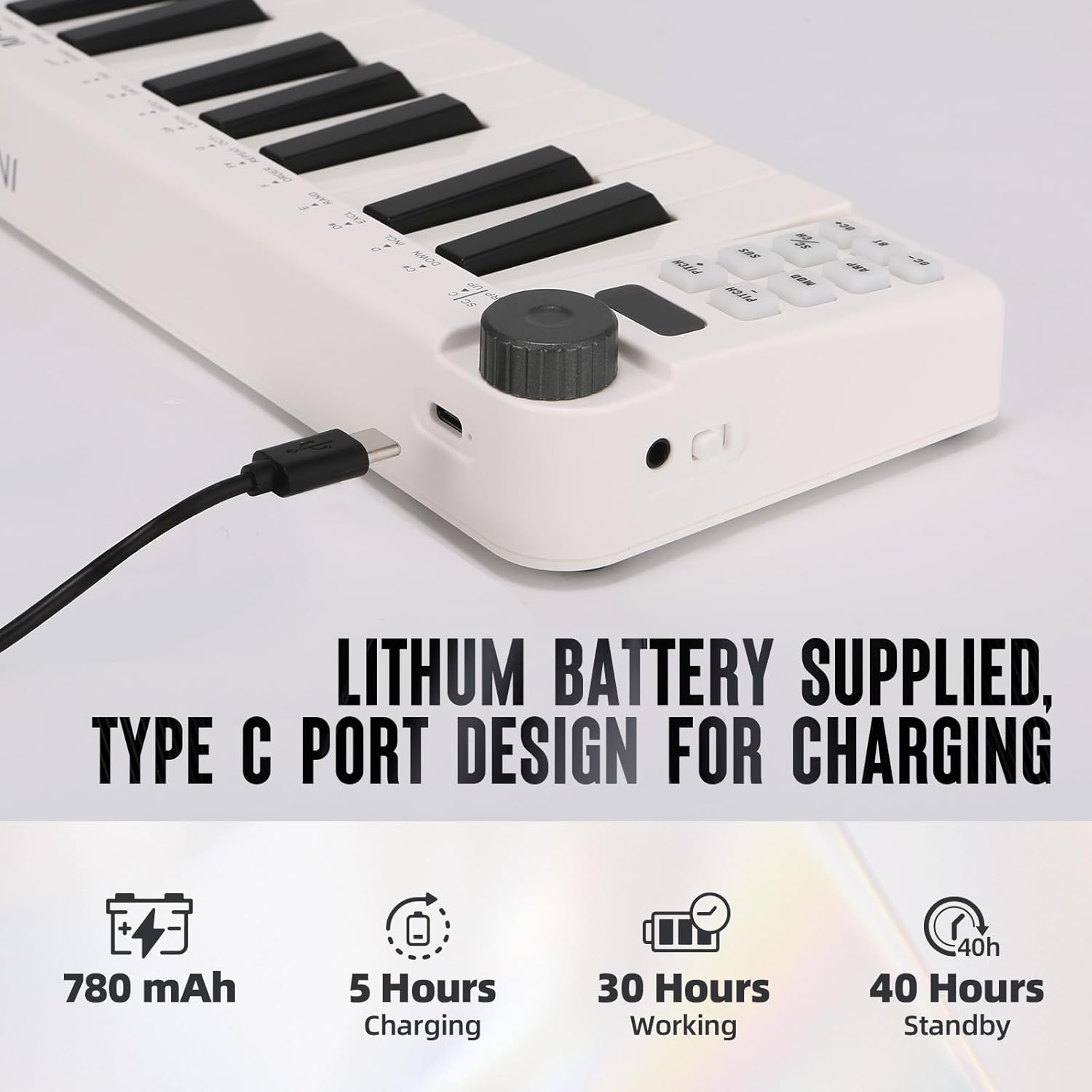
Image: Visual representation of the M-VAVE SMK-25 MINI's battery capacity, charging time, working time, and standby time.
Гаранция и поддръжка
M-VAVE products are designed for reliability and performance. For warranty information, technical support, or service inquiries, please refer to the official M-VAVE webсайта или се свържете директно с тяхната поддръжка на клиенти. Запазете касовата си бележка като доказателство за покупка при гаранционни рекламации.
M-VAVE aims to provide high-quality audio equipment and instruments. For assistance, their professional sales support team can address questions within 24 hours.
Посетете M-VAVE Store on Amazon за повече информация.


