1. Въведение
This manual provides detailed instructions for the installation, operation, and maintenance of your RetroSound RetroRadio LABC-M1-226-08-80F1. This unit is designed for 1967-68 Ford Mustang vehicles and features an AM/FM RDS tuner, Bluetooth connectivity, and auxiliary input.
2. Информация за безопасност
- Винаги изключвайте акумулатора на автомобила преди монтаж, за да предотвратите късо съединение.
- Ensure all wiring connections are secure and properly insulated to avoid damage to the unit or vehicle.
- Не работете с устройството по начин, който ви разсейва от шофирането.
- Refer to a professional installer if you are unsure about any part of the installation process.
3. Съдържание на пакета
Проверете дали всички артикули са налични във вашия пакет:
- RetroSound RetroRadio LABC-M1-226-08-80F1 Head Unit
- Wiring Harness (Power/Speakers)
- InfiniMount Brackets
- Knob Shafts
- Външен микрофон
- Инсталационен хардуер

Figure 3.1: Included Knob Shafts

Figure 3.2: External Microphone
4. Настройка и инсталация
4.1. Размери
Before installation, ensure the unit fits your vehicle's dashboard opening. Refer to the diagram below for precise measurements.

Фигура 4.1: Размери на модула
4.2. Mounting with InfiniMount Brackets
The patented InfiniMount brackets allow for flexible mounting of the unit's shafts at various angles to accommodate different dashboard configurations.

Figure 4.2: InfiniMount Brackets and Flexible Shaft Mounting
- Attach the InfiniMount brackets to the sides of the head unit using the provided screws.
- Insert the knob shafts into the desired positions on the brackets.
- Adjust the angle of the shafts as needed to align with your vehicle's dashboard openings.
- Secure the unit into the dashboard opening.
4.3. Окабеляване
Carefully connect all necessary wires as shown in the diagram below. Ensure all connections are secure.
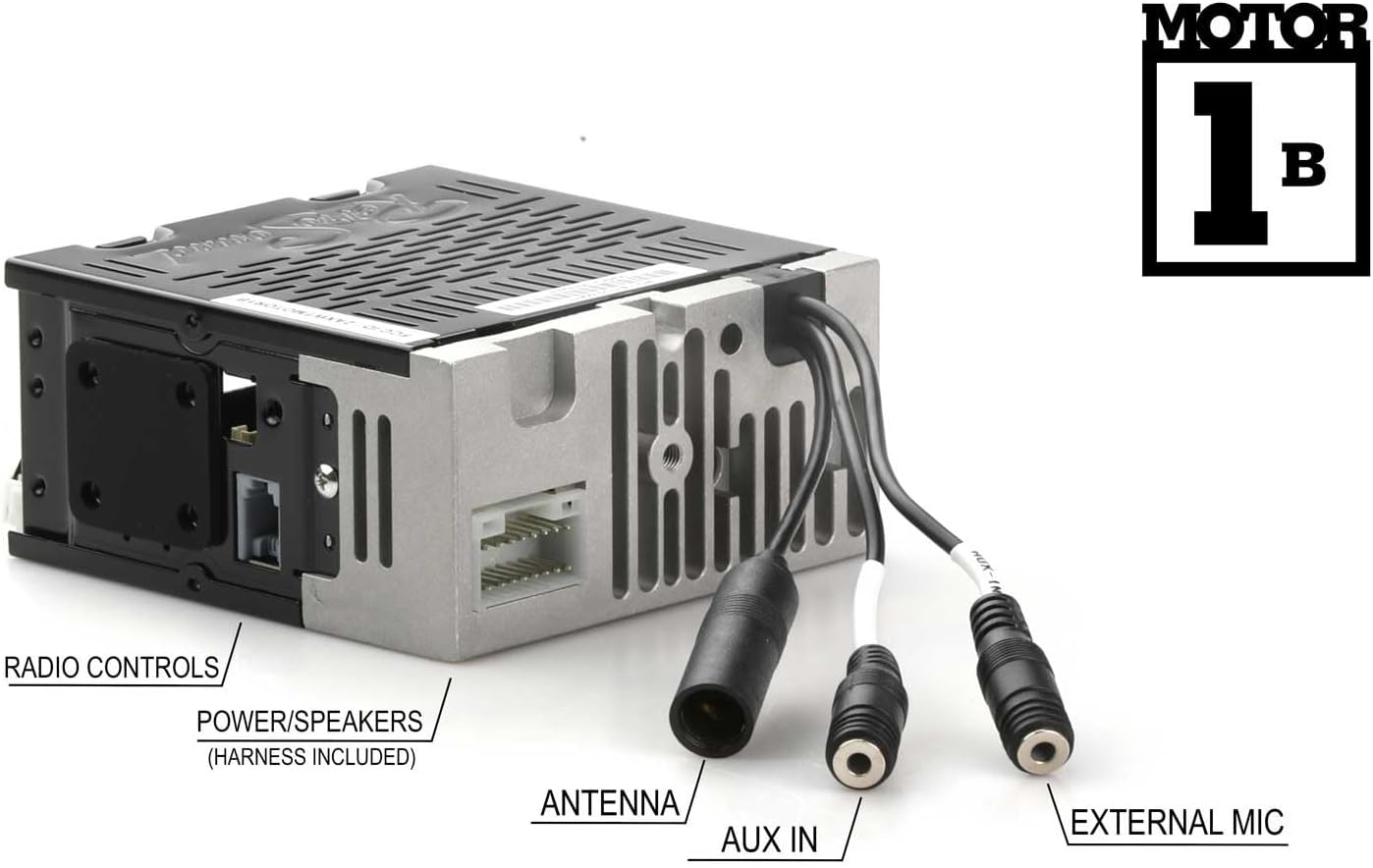
Фигура 4.3: Връзки на задния панел
- Power/Speakers: Connect the included wiring harness to the corresponding port on the unit and then to your vehicle's power and speaker wiring. Refer to your vehicle's wiring diagram for correct connections.
- Антена: Connect your vehicle's AM/FM antenna to the antenna input.
- AUX вход: Connect external audio devices using a 3.5mm audio cable to this input.
- External Mic: Plug in the provided external microphone for hands-free calling. Position the microphone in a location that allows for clear voice pickup.
- Радио контроли: Connect to compatible vehicle radio controls if available.
5. Инструкции за работа
5.1. Включване/изключване
Натиснете бутона за захранване (обикновено е интегриран с копчето за сила на звука), за да включите или изключите устройството.
5.2. AM/FM Tuner
- Избор на лента: Press the BAND button to switch between AM and FM bands.
- настройка: Use the tuning knobs or seek buttons to find radio stations.
- Предварителни настройки: The unit supports 30 presets. To save a station, tune to the desired station, then press and hold a preset button until you hear a confirmation beep. To recall a preset, press the corresponding preset button.
- RDS (система за радио данни): When available, RDS will display station information such as station name, song title, or artist.
- Tuner Frequencies: The tuner frequencies can be selected for USA, Europe, Australia, Japan, or Russia. Refer to the settings menu to adjust this if needed.
5.3. Bluetooth Connectivity (Version 5.0)
Устройството разполага с вграден Bluetooth за разговори със свободни ръце и стрийминг на аудио.
- Сдвояване:
- Уверете се, че Bluetooth е активиран на вашето мобилно устройство.
- On the RetroRadio, navigate to the Bluetooth menu (refer to the display for menu options).
- Select "Pair Device" or similar option. The unit will become discoverable.
- On your mobile device, search for available Bluetooth devices and select "RetroRadio" (or similar name).
- Потвърдете кода за сдвояване, ако бъдете подканени.
- Обаждане със свободни ръце: Once paired, you can make and receive calls through the unit using the external microphone. Use the unit's controls to answer, end, or reject calls.
- Аудио стрийминг: Play audio from your paired mobile device directly through the RetroRadio. Use the unit's controls to play, pause, skip tracks, and adjust volume.
5.4. Допълнителен вход
Connect any portable audio device (e.g., MP3 player, smartphone) to the rear-mounted auxiliary input using a 3.5mm audio cable. Select the AUX input source on the RetroRadio to listen to audio from the connected device.
6. Поддръжка
- Почистване: Use a soft, dry cloth to clean the unit's display and controls. Do not use abrasive cleaners or solvents.
- Актуализации на фърмуера: Check the RetroSound webпериодично проверявайте сайта за налични актуализации на фърмуера, за да осигурите оптимална производителност.
7. Отстраняване на проблеми
| проблем | Възможна причина | Решение |
|---|---|---|
| Без захранване | Loose power connection, blown fuse, vehicle battery disconnected. | Check power wiring, inspect vehicle fuses, ensure battery is connected. |
| Без звук | Кабелите на високоговорителите са прекъснати, силата на звука е твърде ниска, избран е неправилен източник. | Verify speaker connections, increase volume, select correct audio source (AM/FM, Bluetooth, AUX). |
| Bluetooth не се сдвоява | Bluetooth не е активиран на устройството, устройството не е в режим на сдвояване, устройството е твърде далеч. | Ensure Bluetooth is on, put unit in pairing mode, bring device closer, try re-pairing. |
| Слабо радио приемане | Antenna not connected, damaged antenna, weak signal area. | Check antenna connection, inspect antenna for damage, try tuning to a stronger station. |
8. Спецификации
- модел: LABC-M1-226-08-80F1
- марка: Ретрозвук
- Ampлифтинг: Built-in 275-watt (peak power) Mosfet amplifier, 18 watts RMS x 4 channels
- Bluetooth: Version 5.0 (with external microphone for hands-free calls)
- Тунер: AM/FM RDS tuner with 30 presets
- Tuner Frequencies: Selectable (USA/EUR/AUS/JAP/RUS)
- входове: Rear-mounted Auxiliary input (3.5mm), Bluetooth
- Енергонезависима памет: да
- Размери на единицата (В x Ш x Д): Approximately 2" x 4.34" x 4" (51mm x 110mm x 100mm) - Refer to Figure 4.1 for exact measurements.
- Тегло на артикула: 3.3 паунда
9. Гаранционна информация
This RetroSound product is covered by a 1-годишна гаранция from the date of purchase. This warranty covers defects in materials and workmanship under normal use. Please retain your proof of purchase for warranty claims. For full warranty terms and conditions, please refer to the official RetroSound webсайт или се свържете с поддръжката на клиенти.
10. Поддръжка на клиенти
If you encounter any issues not covered in this manual or require further assistance, please contact RetroSound customer support. Contact information can typically be found on the official RetroSound webсайт.
Webсайт: www.retrosound.com


