1. Въведение
This manual provides comprehensive instructions for the safe and efficient operation of your TIDRADIO TD-M11 FRS Two-Way Radio. Please read this manual thoroughly before using the device to ensure proper functionality and to prevent damage. The TD-M11 is a robust, waterproof FRS radio designed for reliable communication in various environments.
2. Съдържание на пакета
Проверете дали всички артикули са налични във вашия пакет:
- 2 x TIDRADIO TD-M11 Walkie Talkies
- 2 x 1000mAh Li-ion батерии
- 2 x USB Charging Cables & Adapters
- 2 x щипки за колан
- 1 x Ръководство за потребителя
3. Продуктът свършиview
The TIDRADIO TD-M11 is a compact and durable FRS two-way radio. It features an integrated LED display, a rotary knob for power and volume, and side buttons for channel selection and Push-to-Talk (PTT).
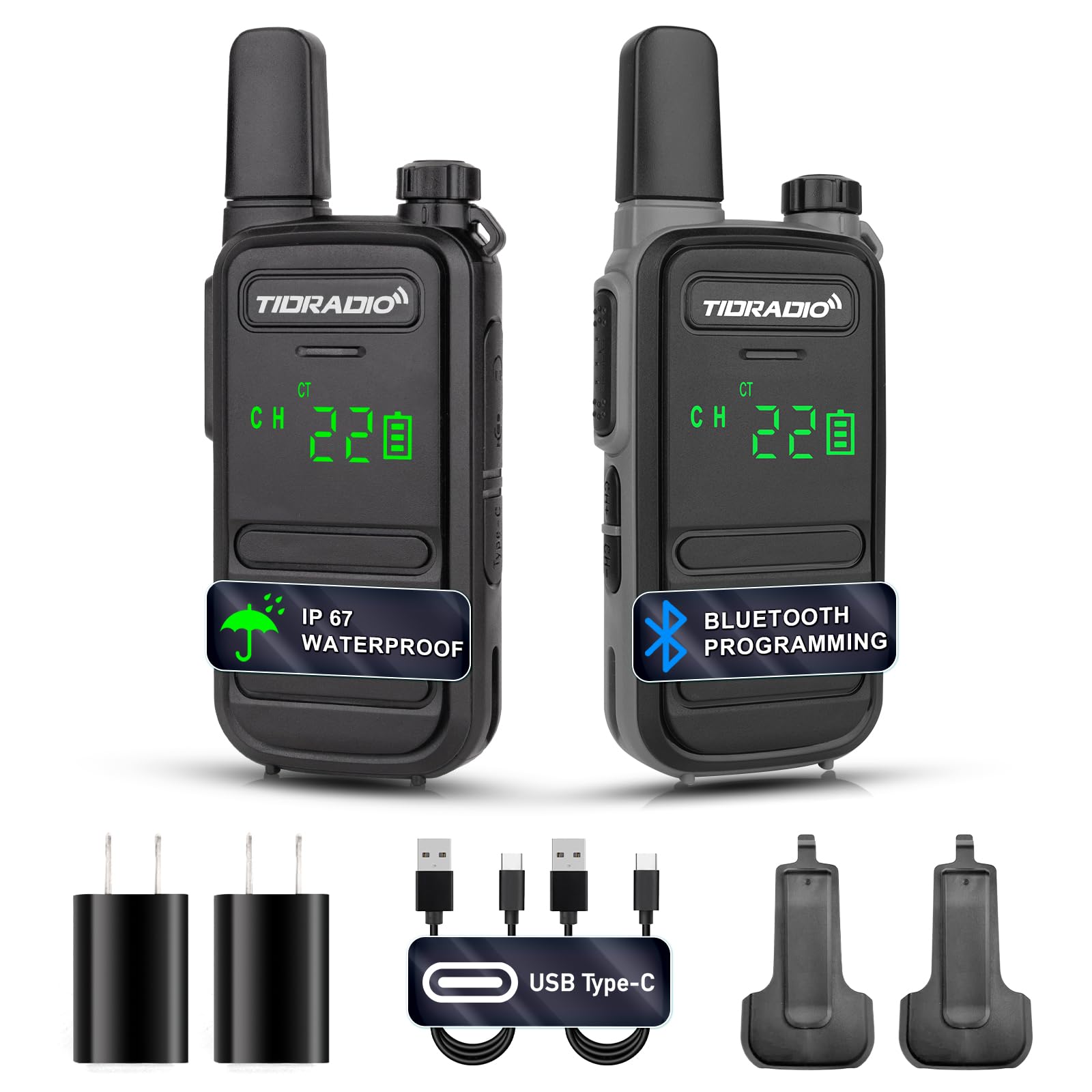
Фигура 3.1: Отпред view of the TIDRADIO TD-M11 Walkie Talkie.

Figure 3.2: Dimensions and weight of the TD-M11 radio. The radio weighs approximately 0.2 lbs, with a thickness of 0.7 inches and a height of 5.3 inches.
4. Настройка
4.1 Инсталиране на батерията
- Уверете се, че радиото е изключено.
- Намерете капака на отделението за батерии на гърба на радиото.
- Slide the cover downwards or unlatch it to remove.
- Поставете литиево-йонната батерия с капацитет 1000 mAh, като се уверите, че контактите са правилно подравнени.
- Поставете обратно капака на отделението за батерии и го закрепете.
4.2 Зареждане на батерията
The TD-M11 features a Type-C charging port for convenience. Use the provided USB charging cable and adapter.
- Connect the Type-C end of the charging cable to the radio's charging port.
- Connect the USB-A end to the provided power adapter or a compatible USB power source (e.g., power bank, PC, vehicle charger).
- LED индикаторът на радиото ще показва състоянието на зареждане.
- Charging efficiently and quickly extends the battery life.

Figure 4.1: The TD-M11 supports Type-C charging via adapter, power bank, PC, or vehicle charger.
5. Инструкции за работа
5.1 Включване/изключване и регулиране на силата на звука
За да включите радиото, завъртете горното копче по посока на часовниковата стрелка. Продължете да въртите, за да увеличите силата на звука. Завъртете обратно на часовниковата стрелка, за да намалите силата на звука и да изключите радиото.
5.2 Избор на канал
Use the CH+ and CH- buttons located on the side of the radio to cycle through the available 22 FRS channels.
5.3 Предаване и получаване
За да предавате, натиснете и задръжте бутона „Натисни и говори“ (PTT) отстрани на радиостанцията и говорете ясно в микрофона. Освободете бутона PTT, за да приемате.
5.4 Функция VOX (Гласово управлявана централа)
The built-in VOX function allows for hands-free operation. When activated, the radio will transmit automatically when it detects your voice. This feature can be configured via the Odmaster APP.

Figure 5.1: Illustration of the VOX function, enabling voice-activated transmission.
5.5 Bluetooth Programming with Odmaster APP
The TD-M11 can be programmed wirelessly using the Odmaster APP on your mobile phone. This allows for reading and writing frequencies, and searching for nearby repeaters.
- Включете радиото.
- Long press the CH+ button to activate Bluetooth. The LED indicator will show a red light.
- Download the Odmaster APP from Google Play Store or Apple App Store.
- Open the APP and connect to the radio via Bluetooth.
- Select the TD-M11 model within the APP.
- Read the current radio settings.
- Modify parameters as needed (e.g., RX/TX frequencies, power levels, VOX settings).
- Write the new settings to the radio.
Video 5.1: This video demonstrates the process of connecting your mobile phone to the TIDRADIO TD-M11 and programming it using the Odmaster application. It shows how to activate Bluetooth on the radio, pair it with the app, select the radio model, read current settings, and write new configurations.

Figure 5.2: Step-by-step guide for connecting the TD-M11 to the Odmaster APP via Bluetooth for programming. Note: Bluetooth is for programming only and cannot be connected to other accessories.
5.6 Прогноза за времето на NOAA
The LED display can clearly show NOAA weather forecasts, providing essential weather information.
5.7 Busy Channel Lockout (BCLO)
BCLO automatically or manually prevents transmission on busy communication channels to avoid interference and maintain clear communication.
6. Характеристики
- 2W Output Power & 22 FRS Channels: Provides reliable long-range communication.
- IP67 Waterproof Performance: Designed to withstand various weather conditions, suitable for outdoor activities like hiking and hunting.
- Bluetooth Connection for Programming: Connects to the Odmaster APP for mobile programming of frequencies and settings.
- Built-in VOX: Позволява комуникация със свободни ръце.
- LED дисплей: Hidden LED lighting clearly displays working status and NOAA weather forecasts, offering better dustproof effect.
- Зарядно устройство тип C: Convenient USB charging for the 1000 mAh Li-ion battery.
- Лек и преносим: Compact design for easy carrying and one-handed control.
- Блокиране на зает канал (BCLO): Предотвратява предаването по заети канали.
- Удароустойчив и прахоустойчив: Повишена издръжливост за тежки условия.

Figure 6.1: The TD-M11 is designed to be shockproof and drop-proof for increased durability.

Figure 6.2: The TD-M11 features IP67 waterproofing. Note: The TD-M11 cannot be used underwater. If it falls into water, shake or wipe the water off the walkie-talkie first before using it again.

Figure 6.3: The TD-M11's LED display shows channel, volume, and battery status, designed for clarity in various conditions.
7. Спецификации
| Характеристика | Спецификация |
|---|---|
| Номер на модела | TD-M11 |
| Тегло на артикула | 3.2 унции |
| Размери на продукта | 0.7 x 2.1 x 5.3 инча |
| Батерии | Необходими са 2 литиево -полимерни батерии (включени) |
| Брой канали | 22 |
| Специална функция | IP67 Водоустойчив |
| Честотен диапазон | UHF 400-480MHz |
| Максимален обхват на разговор | 5 километра |
| Voltage | 3.7 волта |
| Ниво на водоустойчивост | Водоустойчив |
8. Поддръжка
8.1 Почистване
Избършете радиото с мека, damp cloth. Do not use harsh chemicals or abrasive cleaners. Ensure the Type-C port cover is securely closed to maintain water resistance.
8.2 Грижи за батерията
To prolong battery life, avoid fully discharging the battery frequently. Store the radio and batteries in a cool, dry place when not in use for extended periods. If the radio will not be used for a long time, charge the battery to about 50% before storage.
8.3 Водоустойчивост
While the TD-M11 is IP67 waterproof, it is not designed for submersion. If the radio gets wet, wipe it dry immediately. Ensure all port covers are sealed to maintain water resistance.
9. Отстраняване на проблеми
9.1 Radio Does Not Power On
- Проверете дали батерията е правилно поставена и заредена.
- Ensure the power/volume knob is rotated sufficiently clockwise.
9.2 Не може да се предава или приема
- Verify that the radio is on the same channel as the other party.
- Проверете дали нивото на батерията е достатъчно.
- Ensure you are within range. Obstacles like buildings and terrain can reduce range.
- If Busy Channel Lockout (BCLO) is active, you may not be able to transmit on an occupied channel.
9.3 Лошо качество на звука
- Регулирайте силата на звука.
- Уверете се, че микрофонът и високоговорителят не са блокирани.
- Приближете се до другото радио или до място с по-малко препятствия.
9.4 Bluetooth Programming Issues
- Ensure Bluetooth is activated on the radio (long press CH+).
- Make sure the Odmaster APP is updated to the latest version.
- Рестартирайте както радиото, така и мобилното си устройство.
10. Гаранция и поддръжка
10.1 Гаранционна информация
The TIDRADIO TD-M11 comes with a 60-day hassle-free replacement warranty. Please retain your proof of purchase for warranty claims.
10.2 Поддръжка на клиенти
For further assistance, technical support, or warranty inquiries, please contact TIDRADIO customer service through the retailer's platform or the official TIDRADIO webсайт.


