Въведение
This manual provides essential instructions for setting up, operating, and maintaining your AOLON Tetra R4 Smart Watch. Please read it carefully to ensure proper use and to maximize the device's features.
Първи стъпки
1. Разопаковане
Your AOLON Tetra R4 Smart Watch package includes the following items:
- AOLON Tetra R4 Smart Watch
- Кабел за зареждане
- Ръководство за потребителя
- Гледайте група

Image: Product Size And Packaging List
2. Зареждане на устройството
Before first use, fully charge your smart watch. The device features a 350 mAh battery, providing up to 7 days of typical use and up to 30 days of standby time. A full charge takes approximately 2.5 hours.
- Свържете магнитния кабел за зареждане към точките за зареждане на гърба на часовника.
- Включете USB края на кабела в стандартен USB захранващ адаптер (не е включен) или USB порт на компютър.
- Дисплеят на часовника ще показва състоянието на зареждане.
Video: This video demonstrates the unboxing and initial setup of the Tetra R4 Smart Watch, including charging and basic UI navigation.
3. Инсталиране и сдвояване на приложение
To unlock the full potential of your smart watch, download and install the GloryFitPro приложение на вашия смартфон.
- Scan the QR code in the included user manual or search for "GloryFitPro" in your smartphone's app store (App Store for iOS, Google Play for Android).
- Активирайте Bluetooth на вашия смартфон.
- Open the GloryFitPro app and follow the on-screen instructions to add your device.
- Select "Aolon Tetra R4" from the list of available devices to connect.

Image: Connect the Smart Watch Via APP GloryFitPro "Aolon Tetra R4"
Работа с вашия смарт часовник
1. Основна навигация
The AOLON Tetra R4 features a 1.43-inch AMOLED full touch screen, a rotating crown, and two physical buttons for intuitive control.
- Сензорен екран: Плъзнете наляво, надясно, нагоре или надолу, за да се придвижвате през менютата и функциите. Докоснете, за да изберете.
- Въртяща се корона: Rotate to scroll through lists or adjust settings. Press to confirm or return to the watch face.
- Физически бутони: Use for quick access to specific functions or to power on/off the device.
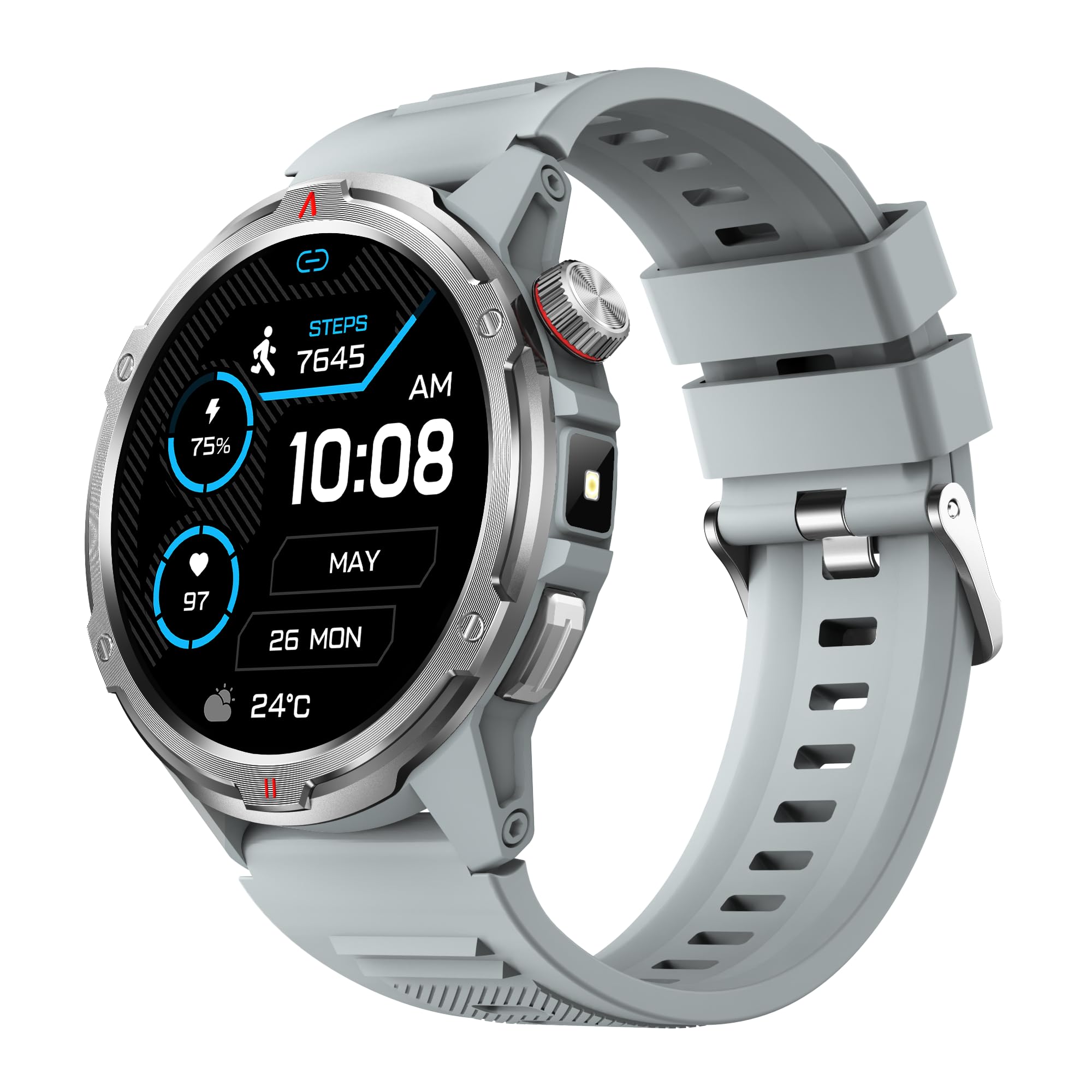
Изображение: Основен продукт view showing the 1.43" AMOLED HD Full Touch Screen and physical buttons.
2. Комуникационни характеристики
Stay connected directly from your wrist with Bluetooth calling and smart notifications.
- Bluetooth разговори: With the latest Bluetooth 5.2 chip, a high-quality speaker, and microphone, you can make and receive calls directly from your watch. You can also add up to 100 contacts and view регистрационни файлове за обаждания.
- Интелигентни известия: Receive message alerts, alarms, and other daily essentials from your paired smartphone. (Note: Message reply is not supported).

Image: BT Call & Message Sync Watch
Video: This video highlights the stylish design and various features of the smartwatch, including communication capabilities.
3. Мониторинг на здравето
The AOLON Tetra R4 utilizes Cywee Professional Algorithms for accurate health tracking, providing insights into your well-being.
- Мониторинг на сърдечната честота: Real-time heart rate monitoring throughout the day, whether at rest or during high-intensity exercise.
- Монитор на кислород в кръвта (SpO2): Measure your blood oxygen level anytime to regulate your body.
- Мониторинг на нивото на стрес: Built-in PPG, SAR, AFE sensors and advanced algorithms monitor stress levels and provide alerts.
- Монитор на съня: Combined with advanced algorithm analysis, it tracks deep sleep, light sleep, awake time, and REM sleep to help you understand and improve your sleep quality.
- Проследяване на менструалния цикъл: Provides intelligent management and thoughtful reminders for women's health.
- One-Tap Measurement: Check your heart rate, blood oxygen, and stress level simultaneously with a single tap.

Image: Heart Rate Monitoring
Video: This video demonstrates the heart rate and SpO2 monitoring features of the smartwatch.
4. Спортни режими и проследяване на активността
Track your fitness journey with over 100 sports modes and comprehensive activity tracking.
- 100+ спортни режима: Supports a wide range of activities, from running and cycling to swimming and mountaineering.
- Проследяване на активността: Records steps, calories burned, and distance covered.
- AGPS Function: Built-in AGPS provides accurate positioning and trajectory tracking for outdoor activities.

Image: 100+ More Sport Modes
Video: This video showcases the smart health features and the variety of over 100 sports modes available on the watch.
5. Outdoor Tools
Designed for outdoor enthusiasts, the Tetra R4 includes practical tools for navigation and convenience.
- Компас: Вграден компас за навигация.
- Фенерче: A convenient flashlight function for low-light situations.
- AGPS, Altimeter, Barometer: Auxiliary functions to assist with outdoor exploration.

Image: Built-in AGPS Movement
Video: This video demonstrates the IP68 waterproof rating and suitability for daily activities, including outdoor use.
6. Персонализиране
Персонализирайте часовника си, за да отговаря на вашия стил и предпочитания.
- Лица за гледане: Choose from over 150 pre-designed dials in the app, or customize your watch face with your own photos.

Image: Choose from a variety of watch faces
7. Други практически функции
The Tetra R4 offers a range of additional features to enhance your daily life.
- Актуализации на времето
- Будилник
- Хронометър и таймер
- Музикален контрол
- Remote Shutter for camera control
- Функция „Намери мобилен телефон“
- Калкулатор
- Световен часовник
- Спешно обаждане
- Гласов асистент

Image: Multiple Practical Functions
Video: This video demonstrates various multi-functional aspects of the Aolon Tetra R4 Smart Watch.
Поддръжка
1. Оценка за водоустойчивост
The AOLON Tetra R4 Smart Watch has an Водоустойчив рейтинг IP68. This means it is resistant to dust and can withstand immersion in water up to 1.5 meters for up to 30 minutes. It is suitable for daily use, including hand washing, rain, and shallow swimming. However, it is not recommended for hot showers, saunas, or diving, as steam and high water pressure can compromise the seals.

Image: IP68 Level Waterproof
2. Почистване и грижа
За да поддържате производителността и външния вид на часовника си:
- Избърсвайте часовника и каишката редовно с мека,amp плат.
- Избягвайте използването на агресивни химикали или абразивни почистващи препарати.
- Уверете се, че контактите за зареждане са чисти и сухи преди зареждане.
3. Оптимизация на живота на батерията
За да удължите живота на батерията:
- Adjust screen brightness to a lower level.
- Disable the Always-On Display (AOD) feature if not needed.
- Ограничете обновяването на приложенията и известията във фонов режим.
- Turn off continuous heart rate monitoring if not required for extended periods.
Отстраняване на неизправности
If you encounter issues with your AOLON Tetra R4 Smart Watch, try the following solutions:
- Часовникът не се включва/не се зарежда: Ensure the charging cable is securely connected to both the watch and a power source. Try a different USB port or power adapter.
- Проблеми със свързаността (Bluetooth): Make sure Bluetooth is enabled on your smartphone and the watch is within range. Restart both the watch and your phone, then attempt to re-pair via the GloryFitPro app.
- Time synchronization incorrect: Ensure the watch is properly connected to the GloryFitPro app, as time is usually synced automatically from your phone. Reinstalling the app might resolve persistent issues.
- Inaccurate step count or health data: Ensure the watch is worn snugly on your wrist. Calibrate the device through the app if available.
- Екранът не реагира: Restart the watch by pressing and holding the power button. If unresponsive, allow the battery to fully drain and then recharge.
Спецификации
| Характеристика | Спецификация |
|---|---|
| Номер на модела | Tetra R4 |
| Дисплей | 1.43-инчов AMOLED, резолюция 466x466 |
| Капацитет на батерията | 350 XNUMX mAh |
| Типична употреба Живот на батерията | До 7 дни |
| Време на готовност | До 30 дни |
| Време за зареждане | Прибл. 2.5 часа |
| Водоустойчив рейтинг | IP68 |
| Свързаност | Bluetooth 5.2 |
| Съвместимост на операционната система | Android 4.4 или по-нова версия, iOS 9.0+ |
| Здравен мониторинг | Heart Rate, SpO2, Stress, Sleep, Menstrual Cycle |
| Спортни режими | 100+ |
| Външни характеристики | Compass, Flashlight, AGPS, Altimeter, Barometer |
| Тегло | 52 грама |
Гаранция и поддръжка
AOLON provides a Гаранция 12 месеца for the Tetra R4 Smart Watch. For any questions or issues, please contact AOLON Customer Support through Amazon. Our support team aims to provide a responsive resolution within 24 hours.


