1. Продуктът свършиview
The Macap MI40 Touch Instant Burr Coffee Grinder is a high-performance appliance designed for precise and consistent coffee grinding. Featuring 65mm flat burrs, a responsive 3.5-inch touchscreen, and multiple operating modes, it is suitable for various brewing methods from espresso to cold brew. Its robust construction ensures quiet operation and stability.
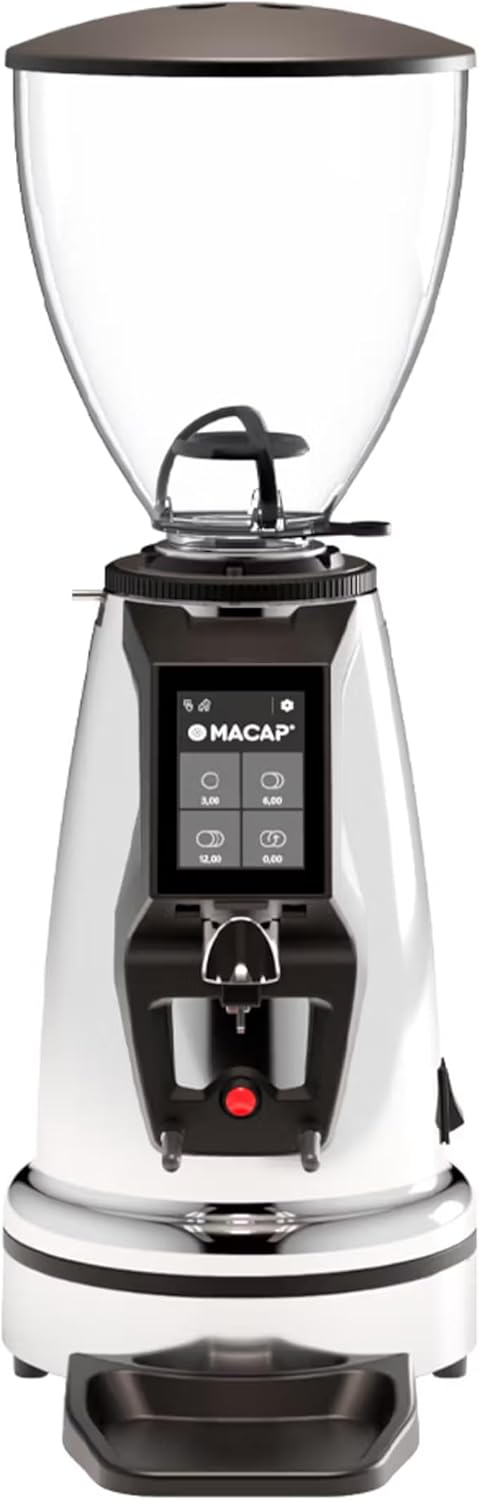
Отпред view of the Macap MI40 Touch Instant Burr Coffee Grinder, showcasing its sleek chrome finish and integrated touchscreen display.
2. Информация за безопасност
Please read all safety instructions carefully before operating the grinder to prevent injury or damage.
- Always unplug the grinder from the power outlet before cleaning, maintenance, or if it will be left unattended.
- Не потапяйте мелничката, захранващия кабел или щепсела във вода или друга течност.
- Keep hands and utensils out of the bean hopper and grind chute during operation.
- Ensure the bean hopper lid is securely in place before grinding.
- Този уред е предназначен само за смилане на цели печени кафени зърна. Не смилайте други вещества.
- Не използвайте мелничката с повреден кабел или щепсел, или ако уредът не работи правилно или е повреден по някакъв начин.
- Пазете уреда от деца.
3. Компоненти
Familiarize yourself with the main components of your MI40 Touch coffee grinder:
Бункер за зърна: Transparent container for holding whole coffee beans. Capacity: 1.2 Kilograms.

3.5'' Touchscreen Display: Intuitive interface for controlling grind settings, dose programming, and operating modes.

Grind Adjustment Collar: Stepless micrometric adjustment for precise control over grind particle size.

Portafilter Fork & Drip Tray: Adjustable fork to hold your portafilter for hands-free grinding, with a removable drip tray for easy cleaning.
4. Настройка
Follow these steps to set up your Macap MI40 Touch grinder:
- Разопаковане: Carefully remove the grinder and all accessories from the packaging. Retain the packaging for future transport or storage.
- Разположение: Поставете мелничката върху стабилна, равна и суха повърхност. Осигурете адекватна вентилация около устройството.
- Монтаж на бункера: Place the bean hopper onto the grinder body, aligning the tabs. Rotate the hopper clockwise until it locks securely into place.
- Инсталиране на тавата за отцеждане: Slide the removable drip tray into its designated slot at the base of the grinder.
- Захранване: Включете захранващия кабел в заземен електрически контакт.
- Първоначално почистване: Преди първа употреба, избършете външната част сamp cloth. Ensure the burrs and grind chute are free of any packing debris.

отстрани view of the Macap MI40 Touch grinder, illustrating its compact design and the placement of the bean hopper and drip tray.
5. Инструкции за работа
5.1. Регулиране на смилането
The MI40 Touch features stepless micrometric grind adjustment, allowing for precise control over particle size. To adjust the grind:
- Ensure the grinder is off or not actively grinding.
- Rotate the grind adjustment collar located below the bean hopper.
- Завъртете по часовниковата стрелка for a finer grind (e.g., for espresso).
- Завъртете обратно на часовниковата стрелка for a coarser grind (e.g., for drip, French press, or cold brew).
- Make small adjustments and test the grind to achieve the desired consistency for your brewing method.
Близък план view of the grind adjustment collar, showing the numerical markings for reference.
5.2. Интерфейс със сензорен екран
The 3.5-inch touchscreen allows for intuitive control and customization of your grinding experience. It features four programmable dose buttons and various settings.
The 3.5-inch touchscreen display showing the main interface with programmable dose buttons.
For a detailed demonstration of the touchscreen interface and its functionalities, please refer to the official video below:
This video demonstrates the various features and customization options of the 3.5-inch touchscreen interface on the Macap MI Series coffee grinders, including dose programming, color customization, and different operating modes.
5.3. Режими на работа
The MI40 Touch offers three primary operating modes:
- Стандартен режим: Allows you to select a pre-programmed dose by pressing the corresponding button on the touchscreen. The grinder will dispense the set amount of coffee.
- Режим на натискане и смилане: Grinding starts when the portafilter activates the button on the fork and stops when the portafilter is removed. This mode is ideal for manual control.
- Barista Hands-Free Mode: Similar to Push and Grind, but designed for continuous grinding as long as the portafilter is in place, allowing baristas to multitask.
6. Поддръжка и почистване
Regular cleaning and maintenance will ensure optimal performance and longevity of your grinder.
6.1. Ежедневно почистване
- Grind Chute: Use a brush or vacuum to clear any residual coffee grounds from the grind chute after each use.
- Капкова тава: Remove and empty the drip tray regularly. Wipe it clean with a damp кърпа и подсушете добре.
- Екстериор: Избършете външната част на мелничката с мека,amp плат. Не използвайте абразивни почистващи препарати или разтворители.

The removable drip tray and portafilter fork area, designed for easy cleaning.
6.2. Deep Cleaning (Weekly/Bi-Weekly)
- Изключете мелницата от контакта.
- Премахване на бункера за зърна: Empty any remaining beans. Rotate the hopper counter-clockwise to unlock and remove it.
- Чисти бури: Use a stiff brush or a specialized grinder brush to remove accumulated coffee oils and grounds from the burrs. You may need to remove the upper burr for thorough cleaning (refer to specific instructions in the full manual for burr removal).
- Clean Grind Chamber: Use a vacuum cleaner with a narrow attachment to remove grounds from the grind chamber.
- Сглобете отново: Reinstall the burrs (if removed) and the bean hopper securely.
7. Отстраняване на проблеми
If you encounter issues with your MI40 Touch grinder, refer to the table below for common problems and solutions.
| проблем | Възможна причина | Решение |
|---|---|---|
| Мелницата не се включва. | Не е включен в контакта; захранването е изключено; предпазителят е задействан. | Check power connection; ensure power switch is on; reset circuit breaker. |
| Не се приготвя кафе. | Hopper empty; grind chute clogged; burrs jammed. | Fill hopper; clean grind chute; clear any foreign objects from burrs (unplug first). |
| Непоследователно смилане. | Burrs dirty or worn; grind setting too coarse/fine. | Clean burrs thoroughly; adjust grind setting incrementally. Consider burr replacement if worn. |
| Grinder is excessively noisy. | Чужд предмет в борфите; хлабави компоненти. | Unplug and inspect burrs for foreign objects; check for loose parts. If noise persists, contact support. |
| Сензорният екран не реагира. | Временен софтуерен проблем; проблем със захранването. | Unplug the grinder for 30 seconds, then plug back in. If issue persists, contact support. |
8. Спецификации
Key technical specifications for the Macap MI40 Touch Instant Burr Coffee Grinder:
| Характеристика | Спецификация |
|---|---|
| Модел | MI40 Touch |
| Тип на бормашината | Плоски фрези |
| Диаметър на бормашината | 65 мм |
| Мощност на двигателя | 480W |
| Капацитет на бункера | 1.2 килограма |
| Регулиране на смилането | Безстепенно микрометрично |
| Дисплей | 3.5'' Touchscreen |
| Размери на продукта (Д x Ш x В) | 12" x 7.63" x 22" |
| Тегло на артикула | 19.58 паунда |
| Страна на произход | Италия |
9. Гаранция и поддръжка
Macap products are manufactured to high standards and undergo rigorous quality control. For warranty information, technical support, or service inquiries, please refer to the warranty card included with your product or visit the official Macap website. Please have your model number (MI40 Touch) and purchase date available when contacting support.


