1. Въведение
Welcome to the user manual for your new Nubia Flip 5G smartphone. This guide provides essential information to help you set up, operate, and maintain your device. The Nubia Flip 5G combines a compact, foldable design with advanced features, including a dual AMOLED display, a versatile external screen, and AI-powered functionalities.
Key features of your Nubia Flip 5G include:
- Dual AMOLED Displays: Enjoy a fluid 120 Hz refresh rate on both the 6.9-inch internal display and the 3-inch external display.
- Fully Functional External Display: Access 100% of your applications directly from the external screen without unfolding the phone.
- Усъвършенствана система от камери: Capture high-quality photos with the 50 MP main camera, supported by AI features and 4K stabilized video recording. Utilize the external screen for high-resolution selfies.
- Подобрения, задвижвани от изкуствен интелект: Benefit from features like AI Magic Photos for editing and live translation for voice calls.
- Дълготрайна батерия: Equipped with a 4325 mAh battery and 33W fast charging, allowing 50% charge in under 20 minutes.
2. Настройка
2.1. Разопаковане и първоначална проверка
Внимателно извадете всички елементи от опаковката. Уверете се, че са налични следните компоненти:
- Nubia Flip 5G Smartphone
- USB кабел
- Калъф за телефон
- Защитно фолио
Inspect the device for any visible damage. If any components are missing or damaged, contact customer support.
2.2. Поставяне на SIM картата
- Изключете устройството.
- Намерете тавата за SIM карта отстрани на телефона.
- Use the SIM ejector tool (not included, typically found with your SIM card) to open the tray.
- Place your Nano-SIM card(s) into the tray with the gold contacts facing down. This device supports Dual SIM.
- Внимателно поставете обратно тавата в телефона.
2.3. Включване и първоначална конфигурация
- Press and hold the Power button until the Nubia logo appears.
- Следвайте инструкциите на екрана, за да изберете езика си, да се свържете с Wi-Fi мрежа и да настроите акаунта си в Google.
- Ще бъдете преведени през настройването на функции за сигурност, като например отключване с пръстов отпечатък и разпознаване на лице.
3. Работа с устройството
3.1. Understanding the Dual Display

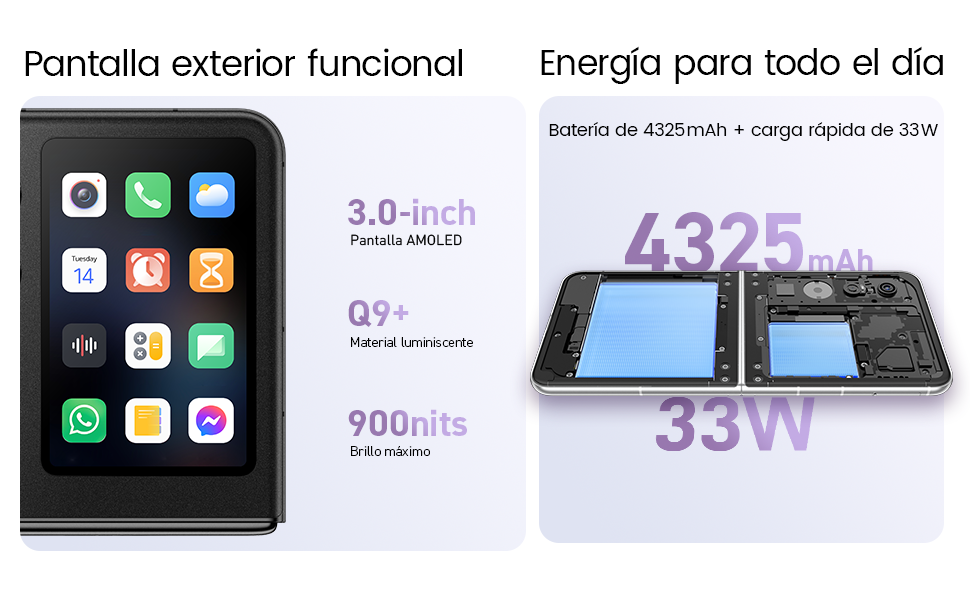
Your Nubia Flip 5G features two displays: a large 6.9-inch internal foldable AMOLED screen and a compact 3-inch external AMOLED screen. Both screens offer a smooth 120 Hz refresh rate for an enhanced visual experience.
- Вътрешен дисплей: Ideal for immersive content consumption, gaming, and detailed tasks.
- Външен дисплей: Provides quick access to notifications, widgets, music controls, and even full applications without needing to unfold the phone. Swipe left or right to navigate through different functions.
3.2. Функционалност на камерата

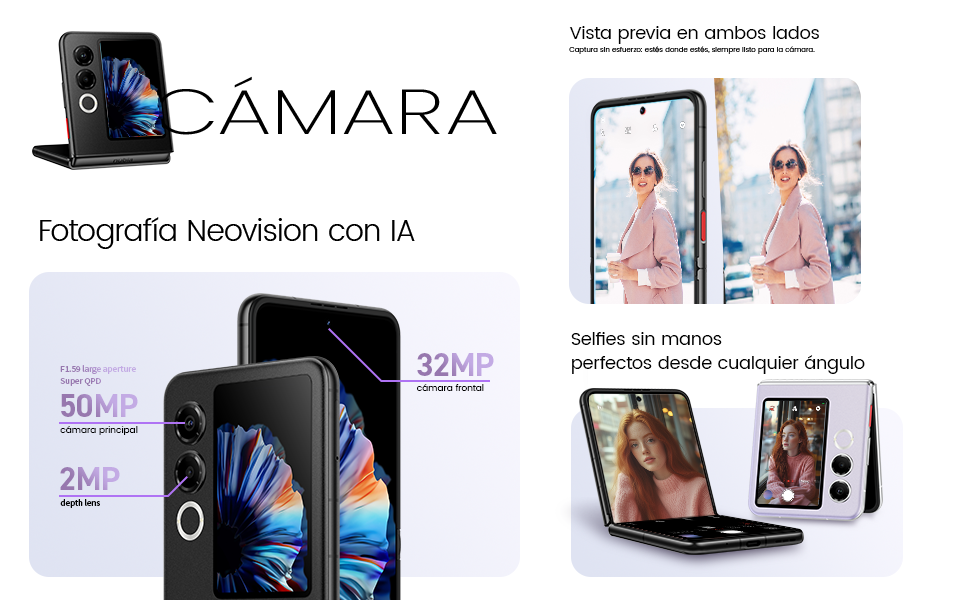
The Nubia Flip 5G is equipped with a powerful 50 MP main camera and a secondary portrait camera, enhanced with AI for superior image quality. The 32 MP front camera ensures clear video calls and selfies.
- High-Resolution Selfies: Use the external screen as a viewfinder to take selfies with the high-quality rear cameras.
- Hands-Free Photography: Partially fold the phone and place it on a flat surface to capture photos and videos without needing a tripod.
- 4K Stabilized Video: Record smooth, high-definition videos with advanced stabilization.
3.3. Функции на изкуствения интелект
The device integrates several AI functions to enhance user experience:
- AI Magic Photos: Utilize AI for intelligent photo editing and enhancement.
- Live Call Translation: Experience real-time translation during voice calls, breaking down language barriers.
3.4. Видеото е прекъснатоview
Официално видео представяне на продуктаasing the Nubia Flip 5G's design, versatile external display, hands-free selfie capabilities, and long-lasting battery.
4. Батерия и зареждане

The Nubia Flip 5G is equipped with a 4325 mAh battery, designed to provide extended usage. It supports 33W fast charging, allowing you to quickly replenish the battery. A 50% charge can be achieved in less than 20 minutes.
- Use the provided USB cable and a compatible 33W charger for optimal fast charging.
- Avoid using non-certified chargers or cables to prevent damage to the device.
5. Поддръжка
Proper care ensures the longevity and optimal performance of your Nubia Flip 5G.
- Грижа за екрана: The foldable screen is delicate. Avoid pressing hard on the screen, especially near the crease. Keep sharp objects away from the display.
- Почистване: Използвайте мека кърпа без власинки, за да почистите екрана и корпуса. Избягвайте агресивни химикали или абразивни материали.
- Водоустойчивост: While the device may have some level of splash resistance, it is not fully waterproof. Avoid submerging the phone in water or exposing it to excessive moisture.
- температура: Използвайте устройството в препоръчителните температурни диапазони. Прекомерната топлина или студ могат да повлияят на живота и производителността на батерията.
- Софтуерни актуализации: Regularly update your device's software to ensure you have the latest features, security patches, and performance improvements.
6. Отстраняване на проблеми
If you encounter issues with your Nubia Flip 5G, try the following common troubleshooting steps:
- Устройството не се включва: Уверете се, че батерията е заредена. Свържете зарядното устройство и изчакайте няколко минути, преди да опитате да включите отново.
- Екранът не реагира: Restart the device by pressing and holding the Power button. If unresponsive, perform a forced restart (refer to device-specific instructions if standard restart fails).
- Сривове на приложенията: Изчистете кеша на проблемното приложение или го инсталирайте отново. Уверете се, че софтуерът на устройството ви е актуален.
- Лош живот на батерията: Adjust screen brightness, disable unnecessary background apps, and turn off features like GPS or Bluetooth when not in use.
- Проблеми със свързаността (Wi-Fi/Bluetooth): Toggle Wi-Fi or Bluetooth off and on. Restart your router or the connected device.
- Прегряване: Close demanding applications, reduce screen brightness, and avoid direct sunlight. If overheating persists, contact support.
For more complex issues, refer to the official Nubia support webсайт или се свържете с тяхното обслужване на клиенти.
7. Спецификации
Below are the detailed technical specifications for the Nubia Flip 5G (Model: 123447101014):
| Характеристика | Спецификация |
|---|---|
| Операционна система | Android 14 |
| Тегло на артикула | 193 гр |
| Размери на опаковката | 21.1 х 9 х 3.2 см; 193 грама |
| Батерии | Необходими са батерии 1 C. (включени) |
| Номер на модела | 123447101014 |
| Технологии за свързване | Bluetooth, NFC, USB, Wi-Fi |
| GPS | вярно |
| Специални функции | Stereo speakers, Mobile Hotspot capability, Dual SIM, Built-in GPS |
| Други функции на дисплея | Безжичен |
| Вход за човешки интерфейс | Сензорен екран |
| Резолюция на скенера | 2790 x 1188 |
| Други функции на камерата | Преден заден |
| Аудио жак | неизвестен |
| Форма фактор | Сгъваем екран |
| Цвят | черен |
| Номинална мощност на батерията | 4325 XNUMX mAh |
| Време за разговори по телефона | 24 часа |
| Размер на RAM | 8 GB |
| Модел на процесора | Mediatek Dimensity 9000 |
| Скорост на процесора | 2 GHz |
| Капацитет на паметта | 8 GB |
| Размер на екрана | 6.9 инча |
| Честота на опресняване | 120 Hz |
| Име на модела | ZTE Nubia Flip |
8. Гаранция и поддръжка
Your Nubia Flip 5G smartphone comes with a standard manufacturer's warranty. Please refer to the warranty card included in your product packaging for specific terms and conditions, including coverage duration and claim procedures.
For technical support, service, or additional information, please visit the official Nubia website or contact their authorized customer service channels. Keep your purchase receipt and device serial number handy when seeking support.


