Въведение
The EROK Digital Metronome & Tuner (Model EK-AMT-600) is a versatile 3-in-1 device combining a digital metronome, chromatic tuner, and tone generator. This compact, rechargeable unit features a clear, full-color display and supports various instruments including guitar, bass, violin, ukulele, viola, cello, and wind instruments. It offers voice counting for metronome beats and comes with a contact clip-on microphone for accurate tuning.
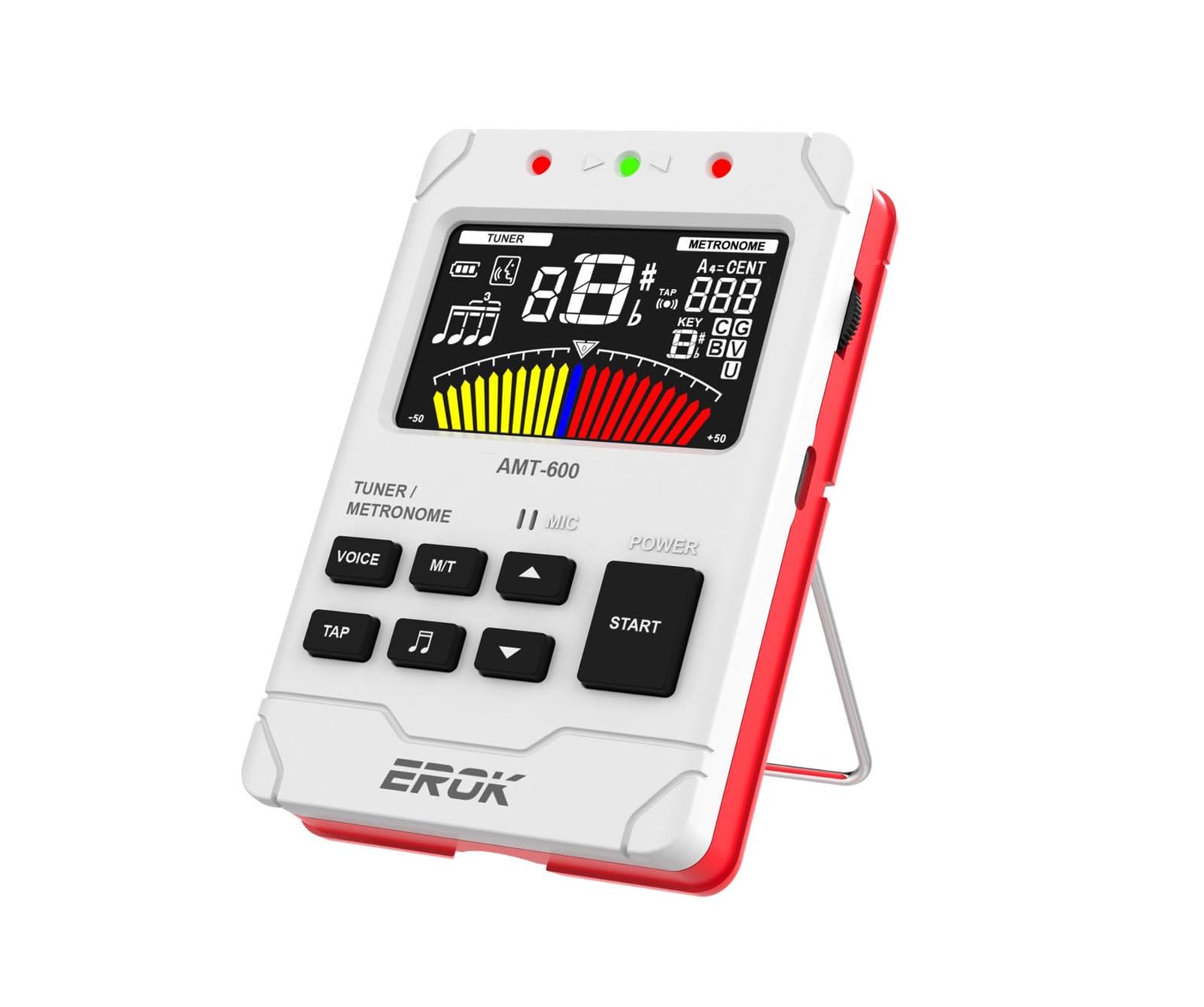
Image: The EROK Digital Metronome and Tuner (Model EK-AMT-600) in white, showcasing its display and compact design.
Какво има в кутията
- 1x EROK Digital Metronome & Tuner (Model EK-AMT-600)
- 1x ръководство за потребителя
- 1x USB Type-C кабел за зареждане
- 1x Pickup Clip
Характеристики на продукта
- Функционалност 3 в 1: Combines a metronome, tuner, and tone generator in one portable device.
- Акумулаторна батерия: Built-in 600mAh Lithium Polymer battery provides over 5 hours of continuous use after a 2-hour charge.
- Ясен дисплей: Large, full-color LCD screen for easy readability.
- Versatile Metronome: Wide tempo range (30-260 BPM), 10 beat subdivisions (0-9), 8 rhythm patterns, voice beat counting, and tap tempo function.
- Multi-Function Chromatic Tuner: Supports various instruments (Guitar, Bass, Violin, Ukulele, Chromatic, Wind Instruments) with a detection range of A0-C8 and pitch calibration (410-450Hz).
- Multiple Tuning Input Methods: Built-in microphone, included pickup clip, or 1/4-inch input jack (cable not included).
- Тон генератор: Produces precise reference tones for tuning by ear.
- Удобен за потребителя дизайн: Features adjustable volume, built-in speaker, headphone output, and a foldable stand.

Image: Key features of the EROK Digital Metronome and Tuner, including its chromatic tuner, tap tempo metronome, tone generator, and intuitive user interface.
Контроли и функции надview

Image: Labeled diagram of the EROK Digital Metronome and Tuner, showing the location and function of each button, jack, and indicator.
- LED индикатор: Displays status (e.g., charging, tuning accuracy).
- Жак за слушалки (3.5 мм): За частна практика със слушалки.
- Metronome/Tuner Switch (M/T): Long press to toggle between metronome and tuner modes.
- Voice Beat Button (VOICE): Activates or deactivates voice counting in metronome mode.
- Rhythm Button (Music Note Icon): Cycles through different rhythm patterns in metronome mode.
- Бутон TAP: Allows manual setting of tempo by tapping.
- Колело за сила на звука: Регулира изходния звук.
- USB Type-C Jack: За зареждане на устройството.
- Микрофон: Built-in microphone for tuning and sound detection.
- On/Off/Play Button (START): Long press to power on/off; short press to start/stop metronome.
- Tempo/Beat Select Buttons (Up/Down Arrows): Adjust tempo, beat, or tuning parameters.
- Pickup Jack (6.35mm): Input for external pickup clip or instrument cable.
Настройка
Зареждане на устройството
The EK-AMT-600 features a built-in rechargeable Lithium Polymer battery. To charge:
- Connect the provided USB Type-C cable to the USB Type-C Jack on the side of the device.
- Свържете другия край на кабела към стандартен USB захранващ адаптер (не е включен) или USB порт на компютър.
- The LED indicator will show charging status. A full charge typically takes approximately 2 hours and provides over 5 hours of continuous use.

Image: The EROK Digital Metronome and Tuner highlighting its long-lasting rechargeable battery, Type-C charging port, and estimated usage time.
Включване/изключване
За да включите устройството, дълго натискане на СТАРТ button. To power off, дълго натискане на СТАРТ бутон отново.
Operating the Metronome
The metronome function helps musicians maintain a steady tempo. Ensure the device is powered on.
- Switch to Metronome Mode: If not already in metronome mode, long press the M / T button to switch from tuner to metronome.
- Старт/Стоп метроном: Натиснете кратко СТАРТ button to begin the metronome beat. Short press again to stop.
- Adjust Tempo (BPM): Използвайте Стрелка нагоре / надолу buttons to increase or decrease the tempo (beats per minute) from 30 to 260 BPM.
- Темпо на докосване: Натиснете ТАП button repeatedly at your desired tempo. The device will calculate and set the BPM.
- Change Beat Subdivisions: Използвайте Стрелка нагоре / надолу buttons to change the beat subdivision (0-9).
- Change Rhythm Pattern: Натиснете Икона за музикална нота button to cycle through 8 different rhythm patterns.
- Enable Voice Counting: Натиснете ГЛАС button to activate or deactivate human voice counting for the beats.
- Регулиране на звука: Използвайте Обемно колело отстрани на устройството.
- Използване на слушалки: Включете 3.5 мм слушалки в Жак за слушалки за частна практика.
Video: Demonstrates powering on the device, enabling voice counting, changing beat patterns, and manually setting tempo in metronome mode.

Изображение: Подробно view of the metronome display, indicating voice beat, battery status, beat count, rhythm pattern, tempo, and metronome meters.
Operating the Tuner
The tuner function allows for accurate instrument tuning. Ensure the device is powered on.
- Switch to Tuner Mode: Натиснете дълго M / T button to switch from metronome to tuner mode.
- Select Tuning Input Method:
- Вграден микрофон: For acoustic instruments, simply play a note near the device's microphone.
- Клип за пикап: Connect the included pickup clip to the Pickup Jack (6.35mm) and attach the clip to your instrument's headstock or soundboard. This is ideal for noisy environments.
- 1/4-Inch Input Jack: Connect an instrument cable (not included) from your instrument to the Pickup Jack (6.35mm).
- Select Tuning Mode: Използвайте Стрелка нагоре / надолу buttons to cycle through tuning modes: Chromatic (C), Guitar (G), Bass (B), Violin (V), Ukulele (U), and Wind Instruments.
- Настройте своя инструмент: Play a single note on your instrument. The display will show the note name, string number, and a tuning meter.
- If the needle is to the left, the note is flat. Tighten the string.
- If the needle is to the right, the note is sharp. Loosen the string.
- When the needle is centered and the display turns green, the note is in tune.
- Adjust Pitch Calibration (A4): In tuner mode, you can adjust the A4 reference frequency (typically 440Hz) using specific button combinations (refer to on-screen prompts or detailed manual for exact steps if not intuitive). The device supports 410-450Hz.
Video: Demonstrates switching to tuner mode, using the pickup clip for guitar tuning, and interpreting the tuning display.

Image: The EROK Digital Metronome and Tuner showing its three sound input methods for tuning: built-in microphone, pickup clip, and 6.35mm instrument cable input.

Image: The EROK Digital Metronome and Tuner connected to a guitar headstock using the included pickup clip for accurate tuning.
Тон генератор
The tone generator function allows the device to produce precise reference tones, similar to a pitch pipe. This is useful for tuning instruments by ear or for practicing pitch recognition.
- Activate Tone Generator: While in Tuner mode, press a specific button (often the ГЛАС or ритъм button, depending on the model's specific interface) to activate the tone generator. The display will typically show the note being generated.
- Select Note/Mode: Използвайте Стрелка нагоре / надолу buttons to select the desired note or tuning mode (Chromatic, Guitar, Bass, Violin, Ukulele) for the reference tone.
- Регулиране на звука: Използвайте Обемно колело to control the output level of the generated tone.
Поддръжка
- Почистване: Избършете устройството с мека, суха кърпа. Не използвайте абразивни почистващи препарати или разтворители.
- Съхранение: Съхранявайте устройството на хладно и сухо място, далеч от пряка слънчева светлина и екстремни температури.
- Грижа за батерията: За да удължите живота на батерията, избягвайте честото ѝ пълно разреждане. Зареждайте устройството редовно, дори ако не го използвате за продължителни периоди.
- Избягвайте влагата: Keep the device away from water and high humidity to prevent damage to internal components.
Отстраняване на неизправности
- Устройството не се включва: Уверете се, че батерията е заредена. Свържете устройството към източник на захранване, като използвате USB Type-C кабела, и опитайте отново след няколко минути.
- Tuner not detecting notes accurately:
- Check the input method: Ensure the built-in microphone is unobstructed, the pickup clip is securely attached, or the instrument cable is fully inserted.
- Verify the tuning mode: Make sure the correct instrument mode (e.g., Guitar, Bass) or Chromatic mode is selected.
- Minimize background noise: For microphone tuning, ensure a quiet environment. The pickup clip is recommended for noisy settings.
- Check instrument intonation: If individual strings consistently tune incorrectly despite proper technique, your instrument's intonation may need adjustment by a professional.
- Metronome sound is too low or absent: Check the volume wheel on the side of the device. Ensure headphones are not plugged in if you expect sound from the built-in speaker.
- Животът на батерията е по-кратък от очакваното: Ensure the device is fully charged (approx. 2 hours). Extreme temperatures can affect battery performance.
- Бутоните не реагират: Try powering the device off and on again. If the issue persists, ensure no debris is obstructing the buttons.
Спецификации
| Номер на модела | EK-AMT-600 |
| Размери | 4.17 x 2.91 x 0.79 инча (10.6 x 7.4 x 2.0 см) |
| Тегло на артикула | 6.4 унции (181 грама) |
| Тип батерия | 1 литиево-полимерна батерия (включена) |
| Време за зареждане | Прибл. 2 часа |
| Време за непрекъсната употреба | Over 5 hours (after full charge) |
| Диапазон на темпото на метронома | 30-260 XNUMX BPM |
| Metronome Beat Subdivisions | 0-9 |
| Tuning Detection Range | A0 (27.5 Hz) - C8 (4186 Hz) |
| Pitch Calibration (A4) | 410-450Hz |
| Режими на настройка | Chromatic, Guitar, Bass, Violin, Ukulele, Wind Instruments |

Image: Dimensions of the EROK Digital Metronome and Tuner, showing its compact size.
Гаранция и поддръжка
EROK products are designed for reliability and performance. This product is covered by a standard manufacturer's warranty against defects in materials and workmanship. For detailed warranty information, technical support, or service inquiries, please refer to the contact information provided with your purchase or visit the official EROK webсайт.
Моля, запазете доказателството си за покупка за гаранционни искове.


